1. Ifihan
This manual provides comprehensive instructions for the installation, operation, and maintenance of your Yale YSV/200/DB1 Value Electronic Safe. Please read this manual thoroughly before using the safe to ensure proper function and security.

Aworan: Iwaju view of the Yale YSV/200/DB1 Value Electronic Safe.
2. Alaye Aabo
- Má ṣe fi àwọn kọ́kọ́rọ́ ìyípadà pajawiri pamọ́ sínú àpótí ààbò. Pa wọ́n mọ́ sí ibi ààbò tí ó yàtọ̀.
- Rí i dájú pé a gbé àpótí ààbò náà sí ibi ààbò náà láìsí ìyọkúrò láṣẹ.
- Rọpo awọn batiri ni kiakia nigbati itọka batiri kekere ba han lati yago fun titiipa.
- Pa aabo naa mọ kuro ninu ọrinrin tabi awọn iwọn otutu to gaju.
3. Package Awọn akoonu
Jẹrisi pe gbogbo awọn ohun kan wa ninu package:
- Yale YSV/200/DB1 Electronic Safe Unit
- Àwọn Kọ́kọ́rọ́ Ìfàsẹ́yìn Pajawiri (2)
- 4 x AAA batiri
- Mounting Hardware (bolts/screws)
- Afowoyi Olumulo (iwe-ipamọ yii)
4. Eto
4.1 Fifi sori batiri
The safe requires 4 AAA batteries for operation. These are included in your package.
- Open the safe door using the emergency override key (see section 5.3 if needed).
- Wa yara batiri si inu ẹnu-ọna ailewu.
- Fi awọn batiri AAA meji sii, ki o rii daju pe polarity ti o tọ (+/-).
- Pa ideri iyẹwu batiri naa.

Image: Detail of the electronic keypad and manual override lock.
4.2 Iṣagbesori Safe
For enhanced security, it is recommended to securely mount the safe to a floor or wall using the provided hardware.
- Choose a suitable location for mounting. Ensure the surface is solid and can support the weight of the safe and its contents.
- Ṣe àmì sí àwọn ibi tí a ti ń lu ihò náà láti inú ihò tí a ti gbẹ́ tẹ́lẹ̀ nínú àpótí ìpamọ́ náà.
- Drill pilot holes into the chosen surface.
- Position the safe and secure it using the provided mounting bolts/screws.
- Rí i dájú pé àpótí náà so mọ́ ara rẹ̀ dáadáa, kò sì mì.
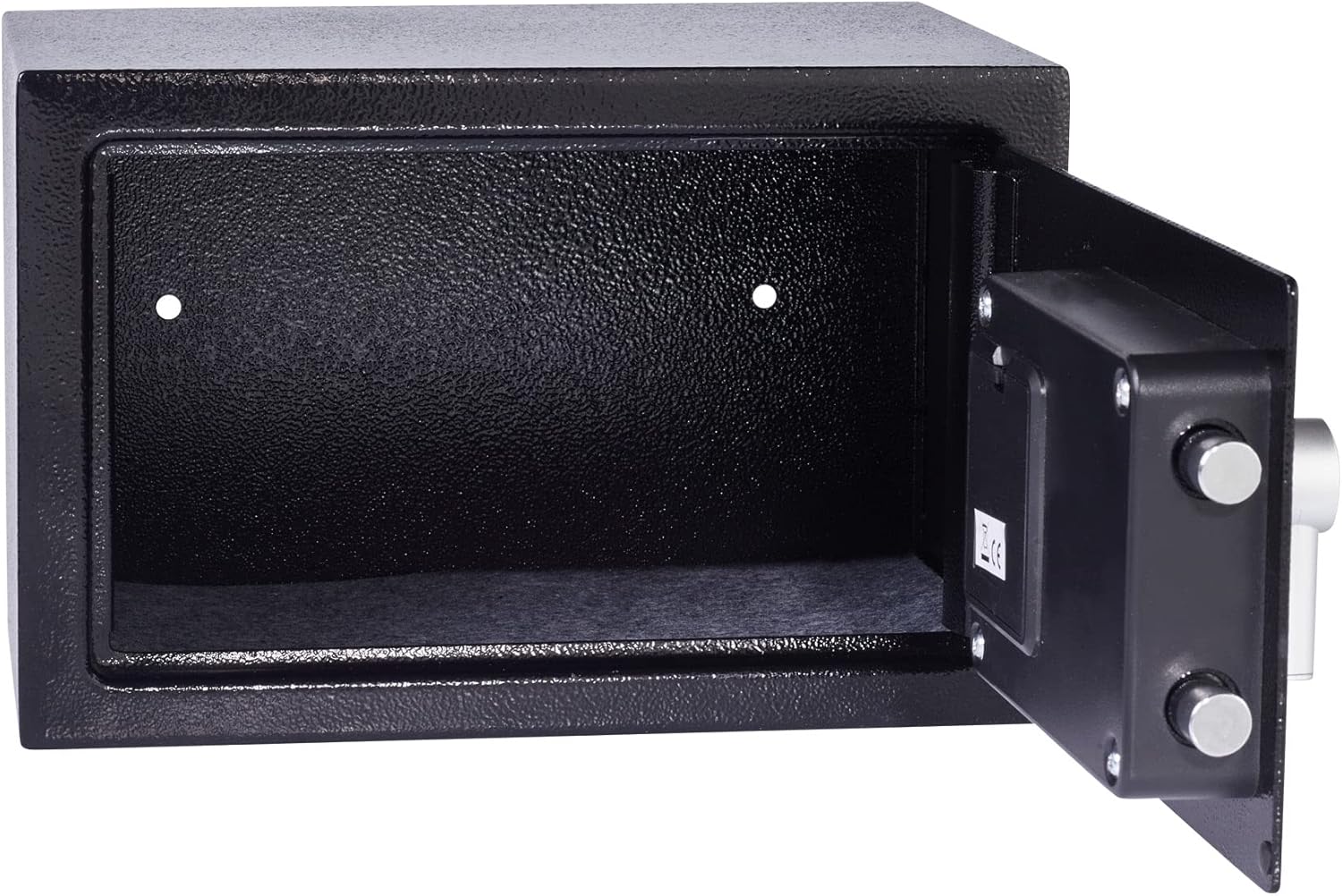
Image: Interior of the safe showing pre-drilled mounting holes.
5. Awọn ilana Iṣiṣẹ
5.1 Setting Your User Code
The safe comes with a factory default code (usually 1-2-3-4 or similar, refer to quick start guide if provided). It is crucial to change this immediately.
- With the safe door open, press the red or green reset button located on the inside of the door (often near the hinge or battery compartment). The safe will beep, and the yellow indicator light will illuminate.
- Enter your new personal code (3-8 digits) on the keypad.
- Press the 'E' or '#' button to confirm. The safe will beep again, and the yellow light will turn off, indicating the new code is set.
- Test the new code multiple times with the door open before closing it.

Image: Safe door open, revealing the interior and locking mechanism.
5.2 Ṣíṣí àpótí ààbò pẹ̀lú kóòdù rẹ
- Enter your personal code on the keypad.
- Press the 'E' or '#' button. The green indicator light will illuminate.
- Laarin iṣẹju-aaya 5, tan koko naa si ọna aago lati ṣii ilẹkun ailewu.
5.3 Using the Emergency Override Key
In case of forgotten code or battery failure, the safe can be opened using the emergency override key.
- Locate the keyhole, usually hidden behind a small cover on the keypad panel.
- Insert the emergency override key and turn it counter-clockwise.
- Nígbà tí o bá ń yí kọ́kọ́rọ́ náà, yí kókó náà padà sí apá ọ̀tún láti ṣí ìlẹ̀kùn ààbò náà.
- Once open, remove the key.
Video: Demonstrates opening the Yale safe using the electronic keypad and the emergency override key. It shows the keypad entry, turning the knob, and the use of the hidden keyhole.
6. Itọju
6.1 Batiri Rirọpo
When the batteries are low, the red indicator light will flash or remain on after entering your code. Replace all 4 AAA batteries promptly to ensure continued operation.
- Ṣii ilẹkun ailewu.
- Wa yara batiri ni inu ti ẹnu-ọna.
- Yọ awọn batiri atijọ kuro ki o si sọ wọn nù ni ifojusọna.
- Insert new 4 AAA batteries, observing correct polarity.
- Pa ideri iyẹwu batiri naa.
6.2 Ninu
Nu ita ti ailewu pẹlu asọ, damp asọ. Ma ṣe lo abrasive ose tabi olomi, bi awọn wọnyi le ba ipari tabi itanna irinše.
7. Laasigbotitusita
| Isoro | Owun to le Fa | Ojutu |
|---|---|---|
| Ailewu ko ṣii pẹlu koodu. | Incorrect code entered, low batteries, or keypad malfunction. |
|
| Bọtini foonu ko dahun. | Awọn batiri ti o ku. | Replace batteries immediately. Use emergency override key to open if necessary. |
| Ilekun ko tii dada. | Obstruction, or locking bolts are extended. | Ensure nothing is blocking the door. Turn the knob to retract bolts before closing. |
8. Awọn pato
- Awoṣe: YSV/200/DB1
- Awọn iwọn ita (H x W x D): 200 x 310 x 200 mm (isunmọ 7.87 x 12.2 x 7.87 inches)
- Àwọn Ìwọ̀n Inú (H x W x D): 197 x 307 x 150 mm (isunmọ 7.75 x 12.08 x 5.9 inches)
- Ìwúwo: Kg 4.49 (isunmọ 9.9 lbs)
- Agbara: 8 liters
- Ilana Titiipa: Electronic keypad with 22mm motorized locking bolts, 6-lever double-bitted manual override lock.
- Ohun elo: Alloy Irin
- Agbara: 4 x Awọn batiri AAA (pẹlu)
- Awọn ẹya pataki: Laser cut door, reinforced hinge, armored steel anti-drill plates.
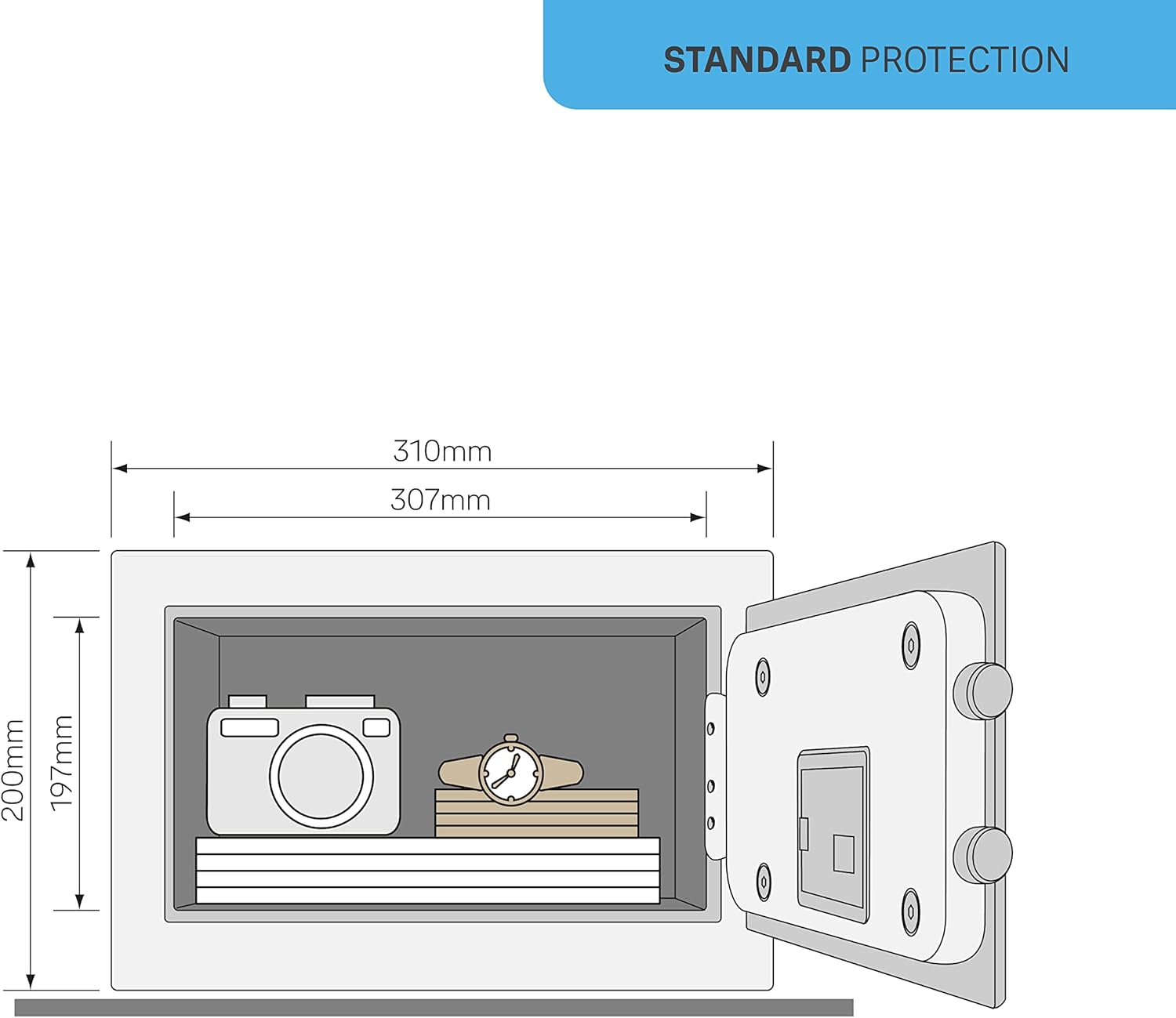
Image: Dimensional diagram of the safe, illustrating height, width, and depth.
9. Atilẹyin ọja ati Support
For warranty information or technical support, please refer to the official Yale website or contact your local Yale distributor. Keep your purchase receipt as proof of purchase.


