Ọrọ Iṣaaju
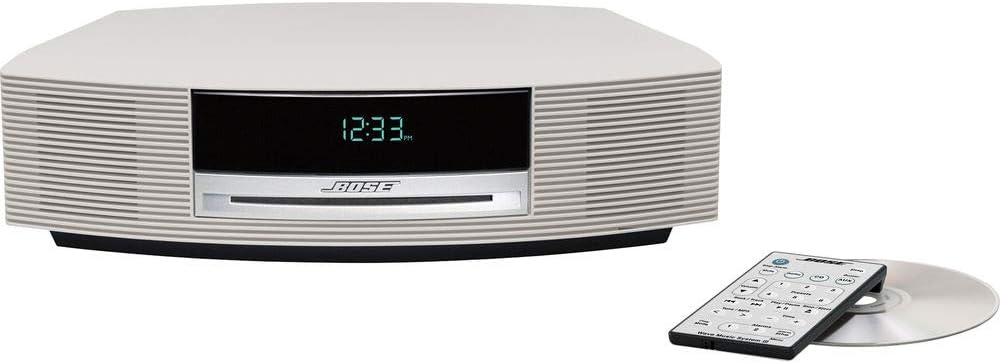
The Bose Wave Music System III is an advanced home audio system designed to deliver rich, room-filling sound from a compact unit. It features a CD player, an advanced FM/AM tuner, and options for connecting external devices like iPods, smartphones, or Bluetooth devices. This manual provides essential information for setting up, operating, and maintaining your system.
Ṣeto
1. Unpacking System
Ni ifarabalẹ yọ gbogbo awọn paati kuro ninu apoti. Rii daju pe o ni awọn nkan wọnyi:
- Wave Music System III unit
- AC agbara okun
- Isakoṣo latọna jijin
- CD ifihan
2. Asopọ agbara
Connect the AC power cord to the system's power input and then to a wall outlet. The system will automatically power on and display the time.
3. Ni ibẹrẹ Oṣo
Upon first power-up, you may need to set the clock and alarm times. Refer to the 'Operating the System' section for detailed instructions on setting these features using the remote control.

Ṣiṣẹ Eto naa
1. Awọn iṣakoso ipilẹ
The system can be controlled using the included remote control or the touch-top controls on the unit itself. The touch-top controls allow for easy on/off and snooze functions.
2. CD/MP3 CD Playback
Fi CD tàbí MP3 CD sínú ihò tó wà ní iwájú ẹ̀rọ náà. Ètò náà yóò bẹ̀rẹ̀ sí í ṣeré láìfọwọ́sí. Lo ìṣàkóso láti fo àwọn orin, dákẹ́, tàbí dá ìró orin dúró.
3. FM / AM Redio
Tẹ awọn FM/AM button on the remote to switch to radio mode. Use the tuning buttons to find your desired station. The advanced tuner displays useful information like song titles and artists where available.
4. Input oluranlọwọ
Connect external audio devices using the 3.5 mm (1/8") auxiliary input located on the back of the system. Select the AUX source using the remote control.
5. Optional Accessories (iPod, Bluetooth)
The system's versatility allows for integration with optional accessories to expand your music sources. These include docks for iPod/iPhone and Bluetooth adapters for wireless streaming from smartphones, tablets, or computers.
6. Awọn itaniji
The system features dual independent alarms. Set your preferred wake-up times and choose to wake to a CD, radio, or buzzer. The touch-top control allows for easy snooze activation.
7. Awọn fidio ọja
Video: Bose Wave Music System III Overview
Yi fidio pese kan gbogboogbo loriview ti Bose Wave Music System III, ifihanasing apẹrẹ rẹ ati awọn iṣẹ akọkọ rẹ.
Video: Your Music, Your Way
Learn how to connect various music sources and enjoy your audio content with the Bose Wave Music System III.
Video: How it Works
This video explains the underlying technology and features that contribute to the superior sound quality of the Wave Music System III.
Itoju
To ensure the longevity and optimal performance of your Bose Wave Music System III, follow these maintenance guidelines:
- Ninu: Use a soft, dry cloth to clean the exterior surfaces. Avoid using liquid cleaners or solvents.
- Itọju CD: Mú àwọn CD ní etí wọn. Tí CD bá dọ̀tí, fi aṣọ rírọ̀ tí kò ní àwọ̀ láti àárín rẹ̀ nu ún pẹ̀lẹ́pẹ̀lẹ́.
- Afẹfẹ: Ensure the system has adequate ventilation. Do not block the ventilation openings.
Laasigbotitusita
If you encounter any issues with your system, try the following basic troubleshooting steps:
- Ko si Agbara: Check that the power cord is securely connected to both the system and the wall outlet.
- Ko si Ohun: Ensure the volume is not muted or set too low. Check all audio connections for external devices.
- CD Ko ṣiṣẹ: Verify the CD is inserted correctly and is not scratched or dirty.
- Gbigba Redio ti ko dara: Adjust the position of the FM/AM antenna.
For more complex issues, please refer to the full product manual or contact Bose customer support.
Awọn pato
| Ẹya ara ẹrọ | Ẹ̀kúnrẹ́rẹ́ |
|---|---|
| Ọja Mefa | 18.75 x 12.5 x 6.5 inches |
| Iwọn Nkan | 10.96 iwon |
| ASIN | B007ZCCRBG |
| Nọmba Awoṣe Nkan | 343178-1210 |
| Awọn batiri | 1 Product Specific batteries required. (included) |
| Ọjọ Akọkọ Wa | Oṣu Karun ọjọ 1, Ọdun 2012 |
| Olupese | Bose |
| Brand | Bose |
| Asopọmọra Technology | Iranlọwọ, Bluetooth |
| Àwọ̀ | Platinum White |
| Agbọrọsọ Iru | Sitẹrio |
Atilẹyin ọja ati Support
For warranty information and customer support, please refer to the documentation included with your product or visit the official Bose webojula. Tọju iwe-ẹri rira rẹ bi ẹri rira fun awọn iṣeduro atilẹyin ọja.