Ọrọ Iṣaaju
Thank you for choosing the Rowenta Adagio Thermal Coffee Maker CT 3818. This appliance is designed to brew delicious filter coffee and keep it warm for extended periods thanks to its insulated stainless steel carafe. Please read this manual carefully before using your coffee maker for the first time and keep it for future reference. Proper use and maintenance will ensure optimal performance and longevity of your appliance.
Awọn Itọsọna Aabo pataki
- Ka gbogbo awọn ilana ṣaaju lilo.
- Maṣe fi ohun elo, okun agbara, tabi pulọọgi sinu omi tabi omi miiran.
- Rii daju voltage itọkasi lori ohun elo ibaamu awọn mains agbegbe rẹ voltage ṣaaju ki o to sopọ.
- Always unplug the coffee maker from the power outlet when not in use and before cleaning. Allow it to cool before adding or removing parts, and before cleaning the appliance.
- Do not operate any appliance with a damaged cord or plug, or after the appliance malfunctions or has been damaged in any manner. Contact Rowenta customer service for examination, repair, or adjustment.
- Ma ṣe jẹ ki okun naa duro lori eti tabili tabi counter, tabi fi ọwọ kan awọn aaye ti o gbona.
- Ma ṣe gbe alagidi kọfi sori tabi sunmọ gaasi gbigbona tabi ina ina, tabi ni adiro kikan.
- Always ensure the thermal carafe is correctly positioned on the warming plate before brewing.
- The thermal carafe is designed for use with this appliance only. It must not be used on a range top.
- Do not clean the thermal carafe with abrasive cleaners, steel wool pads, or other abrasive materials.
- Ohun elo yii jẹ fun lilo ile nikan.
- Pa ohun elo naa kuro ni arọwọto awọn ọmọde.
Ọja Pariview
Familiarize yourself with the components of your Rowenta Adagio Thermal Coffee Maker.
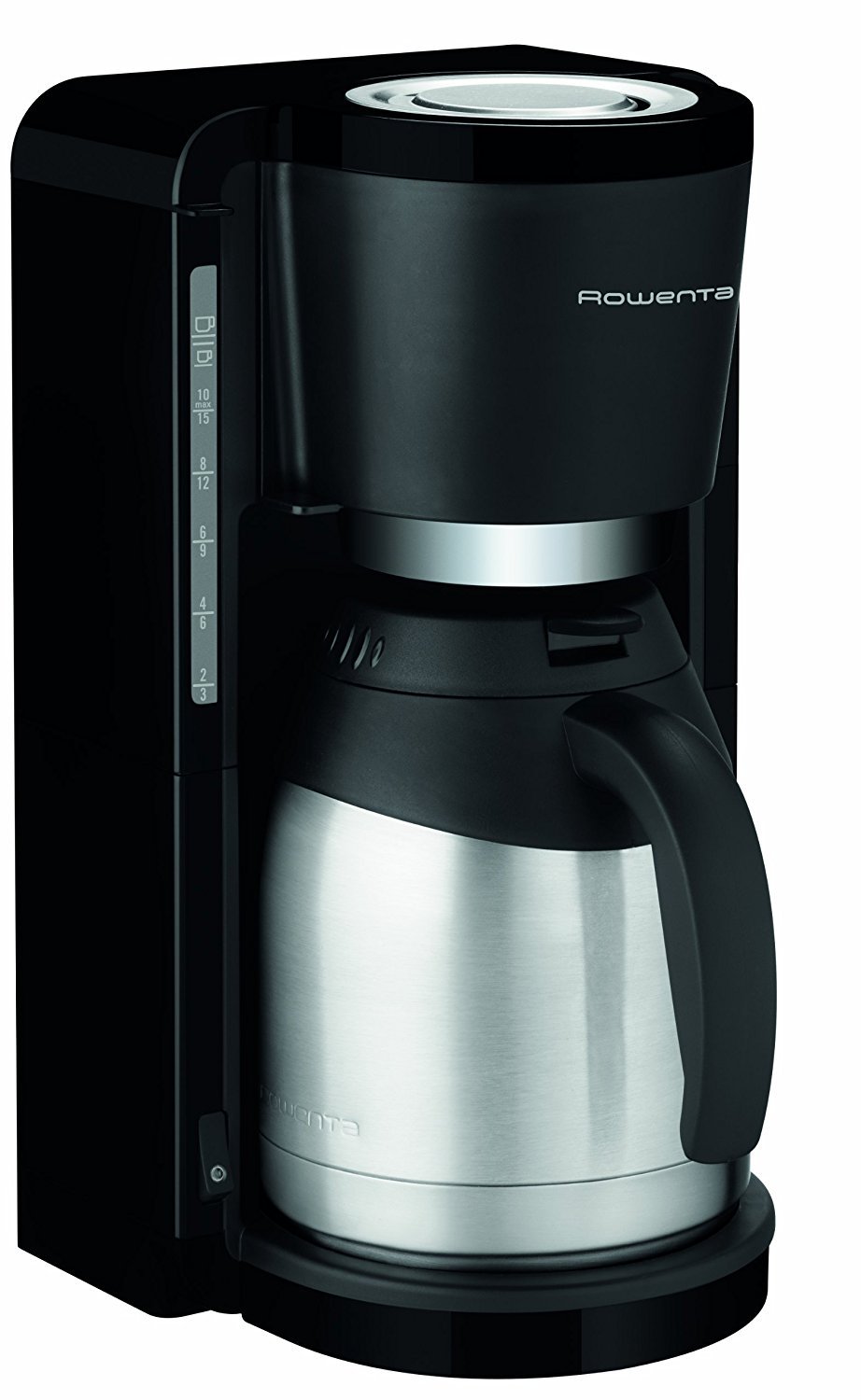

Awọn eroja:
- A. Omi ifiomipamo pẹlu Omi Ipele Atọka
- B. Filter Holder (removable)
- C. Thermal Carafe with Lid
- D. Pipọnti Head
- E. ON/OFF Switch with Indicator Light
- F. Cord Storage (underneath the unit)
Ṣeto
1. Unpacking
- Fi ìṣọ́ra yọ gbogbo ohun èlò ìdìpọ̀ àti àmì kúrò nínú ẹ̀rọ tí a fi ń ṣe kọfí.
- Rii daju pe gbogbo awọn eroja ti a ṣe akojọ si ni oke ọja naaview section are present and undamaged.
2. First Use Cleaning
Before brewing coffee for the first time, it is recommended to clean the appliance:
- Fill the water reservoir with cold water up to the MAX level.
- Place an empty filter paper (size 1x4 or similar) in the filter holder.
- Place the thermal carafe with its lid closed on the warming plate.
- Press the ON/OFF switch to start a brewing cycle without coffee.
- Once the cycle is complete, discard the water from the carafe and rinse the carafe and filter holder thoroughly.
3. Ifiweranṣẹ
Place the coffee maker on a flat, stable, heat-resistant surface, away from water sources and heat. Ensure adequate ventilation around the unit.
Awọn ilana Iṣiṣẹ
1. Àgbáye awọn Omi ifiomipamo
- Ṣii ideri ti ibi ipamọ omi.
- Fill the reservoir with fresh, cold water using the thermal carafe. The water level indicator on the side of the reservoir shows the number of cups. Do not exceed the MAX fill line.
- Close the reservoir lid securely.
2. Adding Ground Coffee
- Remove the filter holder from the coffee maker.
- Insert a paper filter (size 1x4 or similar) into the filter holder.
- Add the desired amount of ground coffee into the paper filter. A general guideline is one tablespoon of coffee per cup, but adjust to your preference.
- Place the filter holder back into its position in the coffee maker. Ensure it is seated correctly.
3. Placing the Thermal Carafe
- Ensure the lid is properly closed on the thermal carafe.
- Place the thermal carafe onto the warming plate. The drip-stop system will engage when the carafe is removed and disengage when it is placed back, preventing drips.
4. Bibẹrẹ Ilana Pipọnti
- Pulọọgi okun agbara sinu iṣan itanna to dara.
- Press the ON/OFF switch. The indicator light will illuminate, signifying that the brewing process has started.
- The coffee maker will automatically brew the coffee.
5. Lẹ́yìn tí wọ́n ti ṣe iṣẹ́ mímu
- Once the brewing cycle is complete, the coffee maker will automatically shut off. The indicator light will turn off.
- The thermal carafe is designed to keep your coffee warm for up to 4 hours.
- To serve, simply pour from the thermal carafe.
- Yọ ohun elo naa kuro lati inu ibudo agbara lẹhin lilo.
Ninu ati Itọju
Ṣiṣe mimọ nigbagbogbo ṣe idaniloju iṣẹ ṣiṣe ti o dara julọ ati fa igbesi aye oluṣe kọfi rẹ pọ si.
1. Ṣiṣe itọju ojoojumọ
- Yọọ alagidi kọfi nigbagbogbo ki o jẹ ki o tutu patapata ṣaaju ṣiṣe mimọ.
- Remove the used paper filter and discard the coffee grounds.
- Wash the filter holder and the thermal carafe (including its lid) with warm, soapy water. Rinse thoroughly and dry. These parts are generally not dishwasher safe; refer to specific care instructions for the carafe.
- Mu ese ita ti kofi alagidi pẹlu ipolowoamp asọ. Ma ṣe lo awọn afọmọ abrasive tabi awọn paadi iyẹfun.
2. Sisọ
Mineral deposits from water can build up over time, affecting performance. Descale your coffee maker regularly, depending on water hardness and frequency of use (e.g., every 2-4 months).
- Ṣe àtúnṣe omi ìtújáde gẹ́gẹ́ bí ìlànà olùpèsè (fún àpẹẹrẹ, ọtí kíkan funfun àti omi, tàbí ohun èlò ìtújáde ìtújáde ìtajà).
- Tú ojutu descaling sinu ifiomipamo omi.
- Fi àpótí ooru ti o ṣofo sori awo igbona naa.
- Start a brewing cycle. Allow half of the solution to brew through, then turn off the coffee maker and let it stand for 15-20 minutes to allow the solution to work.
- Turn the coffee maker back on to complete the brewing cycle.
- After the descaling cycle, run at least two full cycles with fresh, cold water to rinse the appliance thoroughly.
Laasigbotitusita
Ti o ba pade awọn ọran pẹlu oluṣe kọfi rẹ, tọka si awọn iṣoro ati awọn solusan ti o wọpọ wọnyi:
| Isoro | Owun to le Fa | Ojutu |
|---|---|---|
| Kofi ko ni pọnti. | Appliance not plugged in; ON/OFF switch not pressed; no water in reservoir. | Ensure plug is securely in outlet; press ON/OFF switch; fill water reservoir. |
| Kofi ko gbona to. | Appliance needs descaling; carafe lid not properly closed. | Descale the coffee maker; ensure carafe lid is tightly closed to maintain temperature. |
| Omi jo lati kuro. | Water reservoir overfilled; filter holder not correctly seated; drip-stop mechanism blocked. | Do not exceed MAX fill line; ensure filter holder is firmly in place; clean drip-stop area. |
| Coffee overflows from the filter holder. | Too much coffee grounds; filter paper not correctly placed; coffee grounds too fine; appliance needs descaling. | Reduce coffee quantity; ensure filter paper is properly seated; use medium-ground coffee; descale the appliance. |
Awọn pato
- Awoṣe: CT 3818
- Brand: Rowenta
- Agbara: 1.25 liters (10-15 agolo)
- Agbara: 870 Wattis (W) (Note: Original data indicated 870 KW, which is a likely typo. 870W is assumed based on typical coffee maker power consumption.)
- Voltage: 230 Volts
- Ohun elo: Stainless Steel (carafe), Plastic (housing)
- Àwọ̀: Dudu / fadaka
- Awọn iwọn (D x W x H): 26.5 cm x 27 cm x 38.5 cm
- Ìwúwo: 2.2 kilo
- Awọn ẹya pataki: Water level indicator, Cord storage, Drip-stop system, Automatic shut-off
Atilẹyin ọja ati Support
This Rowenta appliance is designed for durability and performance. Rowenta offers a commitment to repairability for ọdun meji 2 for spare parts availability from the date of purchase.
For any questions, concerns, or to obtain service under warranty, please contact Rowenta customer service. You can find contact information on the official Rowenta webojula tabi nipasẹ rẹ alagbata.
Jọwọ ṣe idaduro ẹri rira rẹ fun awọn iṣeduro atilẹyin ọja.


