1. Ifihan
Thank you for choosing the Severin KV 8023 S2 Superautomatic Coffee Machine. This appliance is designed to provide a premium coffee experience with ease, offering a variety of coffee specialties at the touch of a button. Featuring a high-quality ceramic grinder and intuitive controls, this machine ensures fresh, aromatic coffee every time. Please read this manual carefully before first use to ensure safe operation and optimal performance.

Aworan 1.1: Iwaju view of the Severin KV 8023 S2 Superautomatic Coffee Machine. This image shows the sleek black design of the appliance, highlighting its compact form factor suitable for any kitchen countertop.
2. Awọn Ilana Aabo pataki
Always observe the following safety precautions when using electrical appliances to prevent electric shock, fire, injury, or damage.
- Ka gbogbo awọn ilana ni pẹkipẹki ṣaaju lilo.
- Maṣe fi ohun elo, okun, tabi pulọọgi sinu omi tabi awọn olomi miiran.
- Pa ohun elo naa kuro ni arọwọto awọn ọmọde.
- Yọọ pulọọgi kuro ni ijade nigbati ko si ni lilo ati ṣaaju ṣiṣe mimọ.
- Ma ṣe ṣiṣẹ ohun elo eyikeyi pẹlu okun tabi pulọọgi ti o bajẹ, tabi lẹhin aiṣe ohun elo tabi ti bajẹ ni eyikeyi ọna.
- Lo awọn ẹya ẹrọ ti a ṣe iṣeduro olupese nikan.
- Maṣe fi ọwọ kan awọn aaye ti o gbona. Lo awọn ọwọ tabi awọn koko.
- Rii daju voltage itọkasi lori ohun elo ni ibamu si rẹ mains voltage.
- Never open the appliance housing. Repairs should only be performed by authorized service personnel.
3. Eto ati First Lo
3.1 Ṣiṣii silẹ
Carefully remove all packaging materials. Check that all parts are present and undamaged. Keep packaging for future transport or disposal.
3.2 Ni ibẹrẹ Cleaning
- Mu ese ita ẹrọ naa pẹlu ipolowoamp asọ.
- Remove the water tank, coffee bean container lid, and drip tray. Wash them with warm soapy water, rinse thoroughly, and dry.
- Tun gbogbo awọn ẹya ara jọ.
3.3 Kikun Omi Omi
Open the lid of the water tank and fill it with fresh, cold tap water up to the MAX mark. Close the lid securely.
3.4 Àgbáye Bean Eiyan
Open the lid of the coffee bean container and fill it with whole coffee beans. Do not use ground coffee in this container. Close the lid to maintain freshness.
3.5 Lilo Agbara ati Ipilẹṣẹ
- Pulọọgi okun agbara sinu iṣan ogiri ti o dara.
- Press the power button. The machine will perform an initial rinse cycle. Place a cup under the coffee spout to collect the water.
- The display will guide you through any necessary priming steps, such as filling the water circuit.
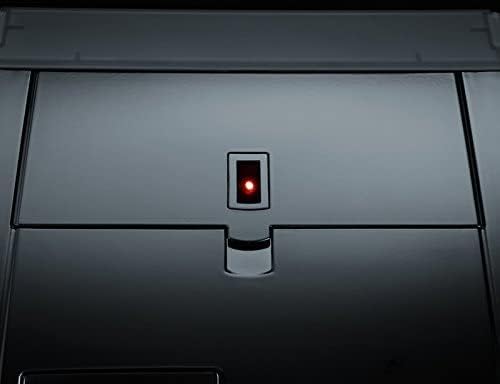
Image 3.1: Close-up of the power button with its red indicator light, located on the top surface of the coffee machine. This light indicates the machine's power status.
3.6 Adjusting Water Hardness
The machine allows for adjustable water hardness settings to optimize the water filter's performance (a filter is included). Refer to the display menu for instructions on how to measure and set your local water hardness level.
4. Awọn ilana Iṣiṣẹ
The Severin KV 8023 S2 features an intuitive E-select button and a high-contrast graphic display for easy navigation.

Image 4.1: The control panel of the Severin KV 8023 S2, showing the multi-language graphic display and the E-select rotary knob for intuitive menu navigation. Several selection buttons are also visible below the display.
4.1 Making Coffee Specialties (One-Touch)
For Cappuccino, Latte Macchiato, or Latte:
- Ensure the milk system is connected and the milk container is filled.
- Place your cup under the coffee-milk spout.
- Select your desired drink from the display using the E-select button.
- Press the corresponding button to start brewing. The machine will automatically prepare your drink without requiring you to move the cup.
4.2 Ṣiṣatunṣe Agbara Kofi ati Iwọn didun
You can customize your coffee strength (3 levels + 1 personal fit) and volume via the display menu. Use the E-select button to navigate to these settings and adjust according to your preference.
4.3 Ṣíṣe àtúnṣe Ìpele Gílọ
The ceramic grinder offers 5 adjustable grind levels. To change the grind level, turn the knob inside the bean container. Adjust only when the grinder is operating to prevent damage.
4.4 Adjusting Coffee-Milk Spout Height
The coffee-milk spout can be adjusted in height from 80 mm to 135 mm to accommodate various cup sizes. Gently slide the spout up or down to the desired position.

Image 4.2: Close-up of the adjustable coffee-milk spout on the Severin KV 8023 S2, featuring the 'SEVERIN S2+' branding. This spout can be moved vertically to fit different cup sizes.
4.5 siseto Aw
The machine offers various programming options, including individually adjustable on/off times and 5 temperature levels for your beverages. Access these settings through the main menu on the graphic display.
5. Itọju ati Cleaning
Ninu deede ati itọju jẹ pataki fun igbesi aye gigun ati iṣẹ to dara julọ ti ẹrọ kọfi rẹ.
5.1 Laifọwọyi Cleaning Program
The Severin KV 8023 S2 features automatic cleaning, rinsing, and descaling programs. The display will prompt you when these programs are due. Follow the on-screen instructions carefully.
5.2 Ninu awọn Pipọnti Unit
The patented brewing unit is removable for easy cleaning. Follow these steps:
- Pa a ati yọọ ẹrọ naa.
- Open the service door and remove the brewing unit by pressing the release buttons.
- Rinse the brewing unit thoroughly under running lukewarm water. Do not use detergents.
- Gba laaye lati gbẹ patapata ṣaaju ki o to fi sii.
5.3 Cleaning the Coffee-Milk Spout
The coffee-milk spout is dishwasher-safe and removable. Regularly detach it and clean it to prevent milk residue buildup. The machine also has a 2-stage milk system rinse program that should be run after each milk-based beverage.
5.4 Emptying Drip Tray and Coffee Grounds Container
The machine will indicate when the drip tray and coffee grounds container need to be emptied. Remove, empty, rinse with water, and dry these components before returning them to the machine.
6. Laasigbotitusita
Abala yii n ṣalaye awọn ọran ti o wọpọ ti o le ba pade. Fun awọn iṣoro ti ko ṣe akojọ si ibi, jọwọ kan si atilẹyin alabara.
| Isoro | Owun to le Fa | Ojutu |
|---|---|---|
| Ko si kofi ti a pin. | Water tank empty, beans empty, brewing unit clogged. | Fill water tank/beans. Clean brewing unit. |
| Kofi jẹ alailagbara / lagbara. | Incorrect grind level or coffee strength setting. | Adjust grind level (finer for stronger, coarser for weaker). Adjust coffee strength setting in menu. |
| Wàrà kì í yọ dáadáa. | Milk system clogged, milk too warm, incorrect milk type. | Clean milk system/spout. Use cold, fresh milk. Ensure milk type is suitable for frothing. |
| Ẹrọ ṣe afihan ifiranṣẹ aṣiṣe kan. | Specific ti abẹnu oro. | Refer to the display for the specific error code and consult the full manual or contact support. Try restarting the machine. |
7. Imọ ni pato
- Brand: Severin
- Nọmba awoṣe: Ọdun 8023
- Àwọ̀: Dudu
- Awọn iwọn ọja: 33.2 x 24.5 x 35.8 cm
- Ìwọ̀n Nkan: 9.51 kg
- Agbara Omi Omi: 1.5 liters
- Agbara: 1500 Wattis
- Voltage: 230 V
- Ohun elo: Irin ti ko njepata
- Awọn ẹya pataki: Integrated filter, Ceramic grinder, One-Touch function
- Irisi Ẹlẹda Kofi: Espresso ẹrọ
8. Atilẹyin ọja ati Support
8.1 atilẹyin ọja Alaye
Your Severin KV 8023 S2 Superautomatic Coffee Machine comes with a manufacturer's warranty. Please refer to the warranty card included in your product packaging for detailed terms and conditions, including the warranty period and coverage. Keep your proof of purchase for any warranty claims.
8.2 Onibara Support
Should you require assistance with your appliance, encounter issues not covered in this manual, or need spare parts, please contact Severin customer support. Contact details can typically be found on the official Severin webaaye tabi ninu iwe ti a pese pẹlu ọja rẹ.
For online support and further information, visit the Ile Itaja Ami Severin.


