Ọrọ Iṣaaju
This manual provides comprehensive instructions for the safe and efficient use of your Marmitek BoomBoom 560 Bluetooth Over-Ear Headphones. These headphones offer excellent digital sound quality with clear mid-tones and deep bass, along with passive noise reduction for an immersive audio experience. Please read this manual thoroughly before operating the device.

Image: Marmitek BoomBoom 560 Bluetooth Over-Ear Headphones, black, shown from a slight angle.
Package Awọn akoonu
Jọwọ ṣayẹwo pe gbogbo awọn ohun ti a ṣe akojọ si isalẹ wa ninu package rẹ:
- 1x Marmitek BoomBoom 560 Bluetooth Over-Ear Headphones
- 1x Micro USB to USB charging cable
- 1x 3.5mm Mini-jack audio cable (160 cm)
- 1x Itọsọna olumulo (iwe yii)

Image: Visual representation of the Marmitek BoomBoom 560 package contents, including the headphones, charging cable, audio cable, and user manual.
Ọja Pariview: Awọn Iṣakoso ati Awọn Ibudo
Familiarize yourself with the controls and ports on your BoomBoom 560 headphones:
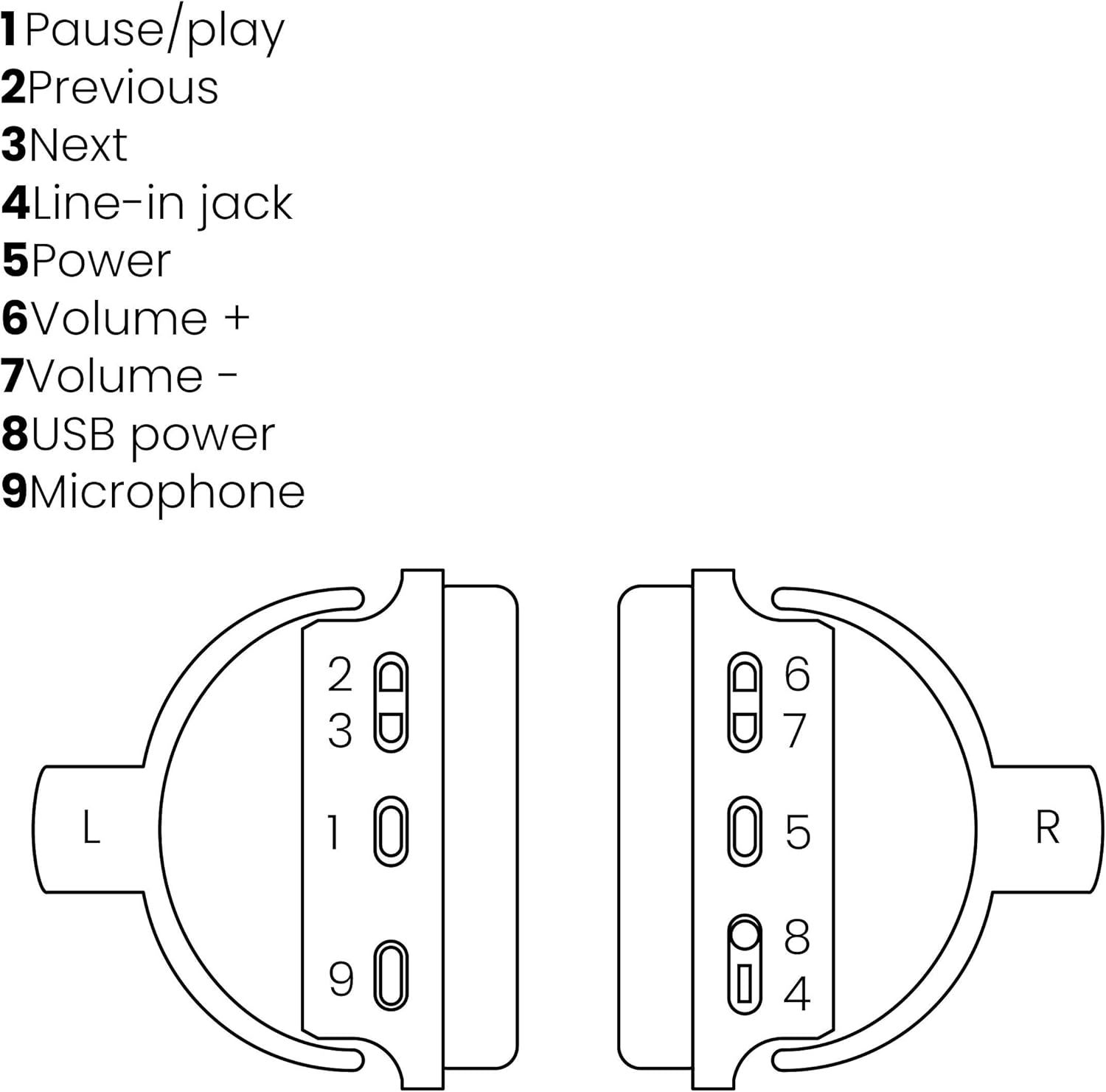
Image: A line drawing illustrating the left and right ear cup controls and ports, numbered for identification.
- Bọtini Duro/Ṣiṣere: Ṣakoso ṣiṣiṣẹsẹhin orin.
- Bọtini orin ti tẹlẹ: Ó fò sí orin tó ṣáájú.
- Bọtini Orin atẹle: Ó fò lọ sí orin tó tẹ̀lé e.
- Jack laini: For wired audio connection using the 3.5mm cable.
- Bọtini agbara: Turns the headphones on/off and initiates Bluetooth pairing.
- Iwọn didun + Bọtini: Mu iwọn didun pọ si.
- Bọ́tìnì - Ìwọ̀n: Dinku iwọn didun.
- Ibudo Agbara USB: For charging the headphones using the Micro USB cable.
- Gbohungbohun: Gbohungbohun ti a ṣe sinu fun awọn ipe laisi ọwọ.
Ṣeto
1. Ngba agbara si awọn Agbekọri
Before first use, fully charge your headphones. Connect the Micro USB end of the charging cable to the USB Power Port (8) on the headphones and the standard USB end to a USB power adapter (not included) or a computer's USB port. The LED indicator will show charging status. A full charge provides over 8 hours of playback time.
2. Sisopọ Bluetooth
To connect your headphones wirelessly to a Bluetooth-enabled device:
- Rii daju pe awọn agbekọri ti wa ni pipa.
- Tẹ mọlẹ Bọtini agbara (5) títí tí àmì LED yóò fi tàn bí àwọ̀ búlúù àti pupa, èyí tí yóò fi hàn pé ó ní ipò ìsopọ̀.
- Lórí fóònù alágbèéká rẹ, tábìlẹ́ẹ̀tì tàbí ẹ̀rọ Bluetooth mìíràn, mu Bluetooth ṣiṣẹ́ kí o sì wá àwọn ẹ̀rọ tó wà.
- Select "BoomBoom 560" from the list of found devices.
- Ni kete ti o sopọ, Atọka LED yoo tan buluu laiyara.

Image: Illustration depicting various Bluetooth-enabled devices (laptop, smartphone, tablet) wirelessly transmitting audio to the headphones.
3. Ti firanṣẹ Asopọ
If Bluetooth is not available or the battery is depleted, you can use the included 3.5mm audio cable. Connect one end of the cable to the Line-in Jack (4) on the headphones and the other end to the audio output of your device.
Awọn ilana Iṣiṣẹ
Titan / Paa
- Lati Fi agbara: Tẹ mọlẹ Bọtini agbara (5) for approximately 3 seconds until the LED indicator flashes blue.
- Lati Paarẹ: Tẹ mọlẹ Bọtini agbara (5) for approximately 3 seconds until the LED indicator turns off.
Sisisẹsẹhin Orin
- Ṣiṣẹ/Daduro: Tẹ awọn Pause/Play Button (1) lẹẹkan.
- Orin t’okan: Tẹ awọn Next Track Button (3) lẹẹkan.
- Tẹlẹ Orin: Tẹ awọn Previous Track Button (2) lẹẹkan.
Isakoso Ipe
When connected via Bluetooth, you can manage phone calls using the built-in microphone (9):
- Idahun/Ipe Ipari: Tẹ awọn Pause/Play Button (1) lẹẹkan.
- Kọ Ipe: Tẹ mọlẹ Pause/Play Button (1) fun isunmọ 2 aaya.
Iṣakoso iwọn didun
- Mu iwọn didun pọ si: Tẹ awọn Volume + Button (6).
- Din iwọn didun silẹ: Tẹ awọn Volume - Button (7).

Image: A user enjoying music or media with the Marmitek BoomBoom 560 headphones while relaxing at home.
Itoju
Láti rí i dájú pé àwọn agbekọri rẹ pẹ́ títí àti pé wọ́n ń ṣiṣẹ́ dáadáa:
- Nu agbekọri pẹlu asọ ti o gbẹ. Ma ṣe lo abrasive ose tabi epo.
- Yago fun ṣiṣafihan agbekọri si awọn iwọn otutu to gaju, ọriniinitutu, tabi oorun taara.
- Tọju awọn agbekọri naa ni itura, aye gbigbẹ nigbati ko si ni lilo.
- Ma ṣe gbiyanju lati ṣajọ tabi tun awọn agbekọri naa funrararẹ, nitori eyi yoo sọ atilẹyin ọja di ofo.
Laasigbotitusita
If you encounter issues with your BoomBoom 560 headphones, refer to the following common solutions:
- Ko si Agbara: Rii daju pe awọn agbekọri ti gba agbara ni kikun. So wọn pọ mọ orisun agbara nipa lilo okun gbigba agbara USB.
- Ko le So pọ nipasẹ Bluetooth:
- Rí i dájú pé àwọn agbekọri náà wà ní ipò ìsopọ̀ (ìmọ́lẹ̀ LED tí ń tàn bí bulu àti pupa).
- Ensure your Bluetooth device's Bluetooth function is enabled and within range (typically 10 meters).
- Try turning off and on both the headphones and your Bluetooth device.
- Delete "BoomBoom 560" from your device's Bluetooth list and attempt to pair again.
- Ko si Ohun:
- Ṣayẹwo awọn ipele iwọn didun lori mejeeji agbekọri ati ẹrọ ti o sopọ.
- Ensure the headphones are properly paired or the 3.5mm audio cable is securely connected.
- Tí o bá ń lo Bluetooth, gbìyànjú láti yọ kúrò kí o sì tún sopọ̀ mọ́ ara rẹ.
- Didara Ohun Ko dara:
- Sún mọ́ ẹ̀rọ Bluetooth rẹ láti dín ìdènà kù.
- Ensure there are no obstacles between the headphones and the device.
- Ṣayẹwo orisun ohun fun awọn ọran didara.
- Loose Earcup Bracket: If the earcup bracket feels loose, handle the headphones with care. Avoid excessive force when adjusting or folding. If the issue persists and affects functionality, contact customer support.
Awọn pato
| Orukọ awoṣe | BoomBoom 560 |
| Nọmba awoṣe | 8122 |
| Brand | Marmitek |
| Asopọmọra Technology | Wireless (Bluetooth), Wired (3.5mm jack) |
| Ibamu Bluetooth | Bẹẹni |
| Fọọmù ifosiwewe | Lori-eti |
| Ohun elo | Awọ (awọn ago etí) |
| Pataki Awọn ẹya ara ẹrọ | Idinku Ariwo |
| gbohungbohun Technology | Omni (Built-in) |
| Batiri Apejuwe | Litiumu-Ion (Li-Ion) |
| Igbesi aye batiri | Over 8 hours (approx.) |
| Eto Ifihan-si-Noise (SNR) | 82 dB |
| Ọja Mefa | 23 x 5 x 18 cm; 100g |
Atilẹyin ọja ati Support
Marmitek products are designed and manufactured to high quality standards. For information regarding warranty terms and conditions, please refer to the documentation provided with your purchase or visit the official Marmitek webojula.
For further assistance or technical support, please visit the Marmitek Store on Amazon or the official Marmitek support channels.

Image: Logo indicating "Dutch Quality" and compliance with "EU European Standards".


