Ọrọ Iṣaaju
Welcome to the Mr. Coffee BVMC-SJX36GT 12 Cup Programmable Coffeemaker instruction manual. This guide provides essential information for the safe and efficient operation, maintenance, and care of your new coffeemaker. Please read all instructions carefully before first use and retain this manual for future reference.

Aworan: Iwaju view of the Mr. Coffee BVMC-SJX36GT 12 Cup Programmable Coffeemaker, showcasing its red and black design with the digital display and control panel.
Ṣeto
Unpacking ati Ni ibẹrẹ Cleaning
- Carefully remove all packaging materials and promotional labels from your coffeemaker.
- Wash the carafe, lid, and filter basket in warm, soapy water. Rinse thoroughly and dry.
- Mu ese ita ti kofi pẹlu asọ, damp asọ.
First Brew Cycle (Cleaning Cycle)
Before brewing coffee for consumption, perform a cleaning cycle to remove any manufacturing residues.
- Fill the water reservoir with 12 cups of clean water.
- Place an empty paper filter (or the reusable filter, if included) into the filter basket.
- Fi kafe ti o ṣofo pẹlu ideri rẹ sori awo gbigbona naa.
- Press the 'Brew Now' button to start the cycle.
- Once the cycle is complete, discard the water from the carafe and the filter.
- Repeat this process once more with fresh water. Your coffeemaker is now ready for use.
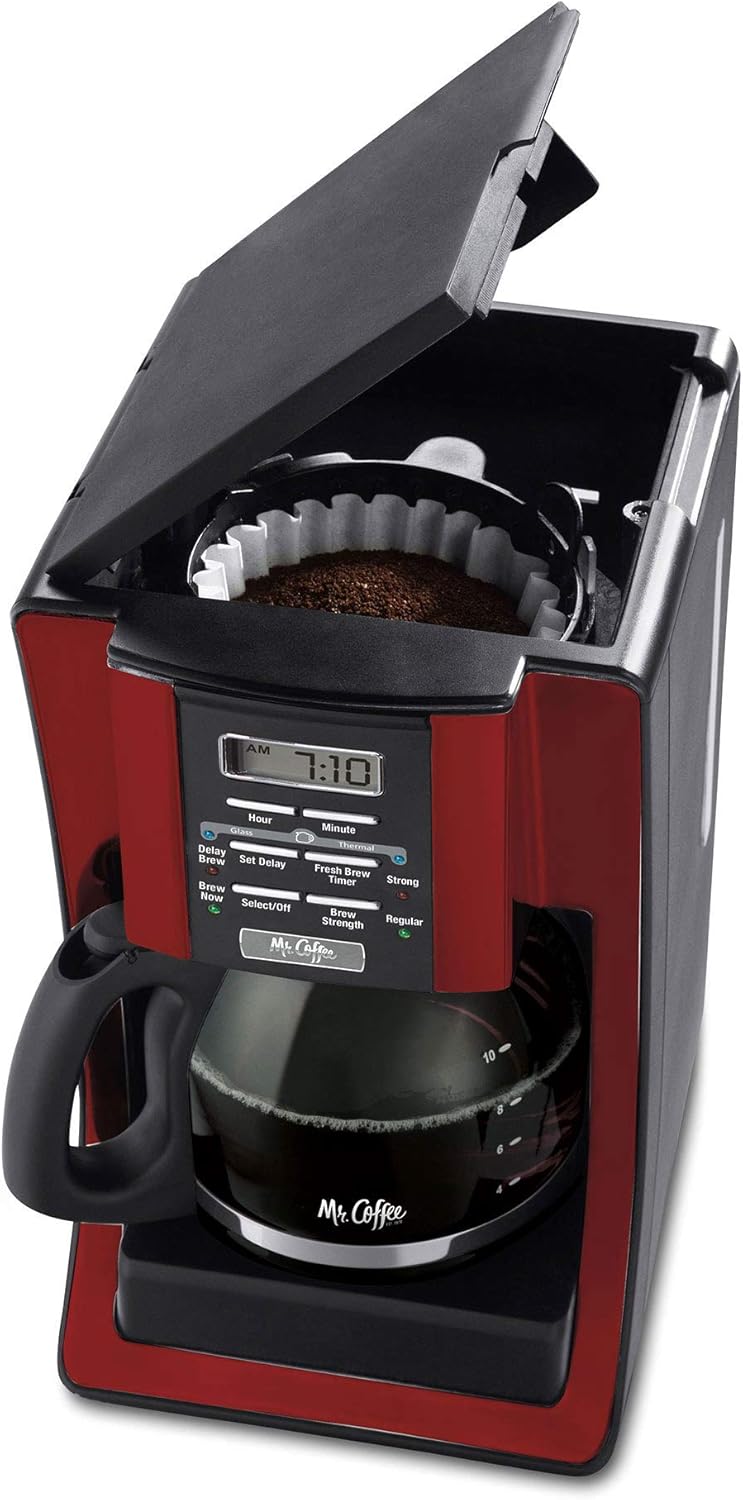
Aworan: Oke view of the coffeemaker with the lid open, showing the water reservoir and the filter basket ready for coffee grounds and water.
Awọn ilana Iṣiṣẹ
Kofi Pipọnti
- Open the top lid and fill the water reservoir with the desired amount of fresh, cold water. Refer to the water level markings on the side of the coffeemaker.
- Insert a paper filter into the filter basket or ensure the reusable filter is properly seated.
- Add the desired amount of ground coffee to the filter. A general guideline is one tablespoon of coffee per cup of water, but adjust to your taste.
- Pa ideri oke ni aabo.
- Fi kafe ti o ṣofo pẹlu ideri rẹ sori awo gbigbona naa.
- Press the 'Brew Now' button to begin brewing. The 'Brew Now' indicator light will illuminate.
Programming Delay Brew
The delay brew feature allows you to set a specific time for your coffeemaker to start brewing automatically.
- Prepare the coffeemaker with water and coffee grounds as described in the 'Brewing Coffee' section.
- Press the 'Set Delay' button. The 'Delay Brew' indicator light will flash.
- Use the 'Hour' and 'Minute' buttons to set your desired brew time.
- Press the 'Set Delay' button again to confirm the setting. The 'Delay Brew' indicator light will remain illuminated, indicating the delay brew is active.
Adjusting Brew Strength
You can choose between 'Regular' and 'Strong' brew strengths.
- Before brewing, press the 'Brew Strength' button to toggle between 'Regular' and 'Strong'. The corresponding indicator light will illuminate.
Pause 'n Serve Feature
This feature allows you to pour a cup of coffee before the entire brewing cycle is complete.
- During the brewing cycle, you can temporarily remove the carafe to pour a cup. The brewing will pause automatically.
- Return the carafe to the warming plate within 20 seconds to prevent overflow and resume brewing.

Image: The Mr. Coffee BVMC-SJX36GT coffeemaker on a kitchen counter, with a full carafe of brewed coffee and a matching red mug beside it.
Itoju
Daily Cleaning
- Yọọ kọfi nigbagbogbo ṣaaju ṣiṣe mimọ.
- Jọ́ àwọn ohun èlò kọfí tí a ti lò àti àlẹ̀mọ́ ìwé dànù.
- Wash the carafe, lid, and filter basket in warm, soapy water. These parts are top-rack dishwasher safe.
- Mu ese ita gbangba pẹlu asọ, damp asọ. Ma ṣe lo awọn afọmọ abrasive tabi awọn paadi iyẹfun.
Ilọkuro (Yiyọ ohun idogo ohun alumọni kuro)
Mineral deposits (calcium and lime) can build up in your coffeemaker over time, affecting its performance. Decalcify your coffeemaker every 80 brew cycles or monthly, depending on water hardness.
- Pour 4 cups of undiluted white household vinegar into the water reservoir.
- Place an empty paper filter in the filter basket and close the lid.
- Fi kafe ti o ṣofo pẹlu ideri rẹ sori awo gbigbona naa.
- Press the 'Brew Now' button and allow half of the vinegar solution to brew into the carafe.
- Turn off the coffeemaker and let it soak for at least 30 minutes.
- Turn the coffeemaker back on and allow the remaining vinegar solution to brew through.
- Da omi kikan naa silẹ ki o si fọ agbọn ati àlẹmọ naa.
- Fill the water reservoir with 12 cups of fresh, clean water and run two full brew cycles to flush out any remaining vinegar.
Laasigbotitusita
| Isoro | Owun to le Fa | Ojutu |
|---|---|---|
| Coffeemaker does not brew. | Not plugged in; 'Brew Now' not selected; Delay Brew active. | Ensure unit is plugged in. Press 'Brew Now'. Check if 'Delay Brew' is set. |
| Kofi jẹ alailagbara tabi lagbara ju. | Incorrect coffee-to-water ratio; Brew Strength setting. | Adjust coffee grounds amount. Select 'Strong' or 'Regular' brew strength. |
| Omi máa ń ṣàn jáde láti inú àpò àlẹ̀mọ́. | Too much coffee grounds; filter not seated correctly; carafe not on warming plate. | Reduce coffee grounds. Ensure filter is properly placed. Confirm carafe is fully on warming plate. |
| Kofi dun buburu. | Unit needs cleaning; stale coffee; poor water quality. | Perform decalcification. Use fresh coffee. Use filtered water. |
Awọn pato
- Brand: Ogbeni Kofi
- Awoṣe: BVMC-SJX36GT
- Agbara: 12 agolo
- Àwọ̀: Pupa
- Awọn iwọn ọja: 11.4"D x 18.3"W x 14.5"H
- Ẹya Pataki: Eto, Gbona
- Irisi Ẹlẹda Kofi: Drip Kofi ẹrọ
- Ipo isẹ: Ni kikun Aifọwọyi
- Iru Iṣwọle Kofi: Ilẹ
- Ìwọ̀n Nkan: 6.9 iwon
- Ọjọ Akọkọ Wa: Oṣu Kẹwa Ọjọ 13, Ọdun 2012

Aworan: Apa view of the Mr. Coffee BVMC-SJX36GT coffeemaker with its depth, width, and height dimensions clearly labeled.
Atilẹyin ọja ati Support
For detailed warranty information, please refer to the warranty card included with your product packaging or visit the official Mr. Coffee website. If you require technical assistance or have questions regarding your coffeemaker, please contact Mr. Coffee customer support.
- Atilẹyin Ayelujara: Ṣabẹwo si Ilé ìtajà kọfí Ọ̀gbẹ́ni lórí Amazon for product information and FAQs.
- Iṣẹ onibara: Refer to your product documentation for specific contact numbers and hours of operation.


