Ọrọ Iṣaaju
Thank you for choosing the Zebronics ZEB-SW2800RUCF Hero 2.1 Speaker System. This manual provides essential information for the proper setup, operation, and maintenance of your speaker system. Please read this manual thoroughly before using the product to ensure optimal performance and longevity.
Ọja Pariview
The Zebronics ZEB-SW2800RUCF Hero is a 2.1 channel multimedia speaker system designed to deliver clear and powerful audio. It features a subwoofer for deep bass and two satellite speakers for balanced sound. The system includes multiple connectivity options and an integrated FM radio.
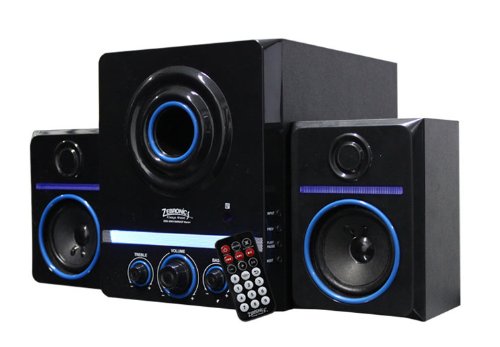
This image displays the Zebronics ZEB-SW2800RUCF Hero 2.1 speaker system. It features a central subwoofer unit with a large speaker and control knobs for treble, volume, and bass. Two satellite speakers are positioned on either side of the subwoofer. A remote control is also visible in the foreground.
Key Awọn ẹya ara ẹrọ
- 2.1 Ohun ikanni: Provides a balanced sound experience with a dedicated subwoofer and two satellite speakers.
- Ijade ti o lagbara: Total output power of 38 Watts (18W Subwoofer + 10W x 2 Satellites).
- Rédíò FM tí a ti ṣepọ̀ mọ́ra: Enjoy your favorite radio stations directly through the speaker system.
- Àtìlẹ́yìn Multimedia: Supports USB pen drives and SD/MMC memory cards for direct playback of MP3 and WMA audio files.
- Awọn iṣakoso olumulo: Features on/off switch, volume, bass, and treble controls for personalized audio.
- Isakoṣo latọna jijin: Išišẹ ti o rọrun lati ọna jijin.
- Awọn Ẹka Awakọ: 4-inch magnetically shielded subwoofer driver and 3 x 2-inch full-range magnetically shielded satellite drivers.
- Ipin ifihan agbara-si-ariwo: ≥80dB for clear audio.
- Ìdàrúdàpọ̀ Kekere: ≤0.3% at 1W output @1KHz.
Awọn ilana iṣeto
- Ṣii silẹ: Carefully remove all components from the packaging. Ensure all parts are present: one subwoofer unit, two satellite speakers, and a remote control.
- Ibi: Position the subwoofer on a stable surface, preferably on the floor for optimal bass. Place the satellite speakers on either side of your listening area, ensuring they are facing towards you for the best stereo effect.
- So Awọn Agbọrọsọ Satẹlaiti pọ: Connect the cables from the two satellite speakers to the corresponding output ports on the rear panel of the subwoofer unit. Ensure a secure connection.
- So Orísun Ohùn pọ̀ (Àṣàyàn): If connecting an external audio device (e.g., computer, smartphone, TV), use an appropriate audio cable (not included) to connect its audio output to the input port on the subwoofer.
- Asopọ agbara: Plug the power cord of the subwoofer unit into a standard electrical outlet.
- Agbara Tan: Turn on the main power switch, usually located on the rear or front panel of the subwoofer.
Awọn ilana Iṣiṣẹ
Isẹ ipilẹ
- Titan/Apapa: Use the power switch on the subwoofer or the remote control to turn the system on or off.
- Iṣakoso iwọn didun: Adjust the main volume knob on the subwoofer or use the volume buttons on the remote control.
- Iṣakoso Bass: Use the bass knob on the subwoofer to adjust the level of low-frequency sound.
- Iṣakoso Treble: Use the treble knob on the subwoofer to adjust the level of high-frequency sound.
Awọn ọna igbewọle
The speaker system supports various input sources. Use the "Mode" button on the subwoofer or remote control to switch between them.
- Ipo USB: Insert a USB pen drive into the USB port on the subwoofer. The system will automatically detect and play supported audio files (MP3, WMA).
- SD/MMC Card Mode: Insert an SD or MMC memory card into the card slot on the subwoofer. The system will automatically detect and play supported audio files (MP3, WMA).
- Ipo Redio FM: Switch to FM mode. The system will automatically scan and store available radio stations. Use the previous/next track buttons on the remote or subwoofer to navigate between stations.
- Ipo AUX: If an external device is connected via the AUX input, switch to AUX mode to play audio from that device.
Awọn iṣẹ iṣakoso latọna jijin
The remote control provides convenient access to all major functions:
- Agbara: Tan-an/pa eto naa.
- Ipo: Switch between USB, SD/MMC, FM, and AUX inputs.
- Iwọn didun +/-: Ṣatunṣe iwọn didun titunto si.
- Ṣiṣẹ/Daduro: Play or pause audio playback in USB/SD mode.
- Ti tẹlẹ/Itele: Skip tracks in USB/SD mode or change FM stations.
- Pa ẹnu mọ́: Pa ẹnu-ọna tabi mu iṣẹjade ohun silẹ.
- EQ: (If available) Cycle through equalizer presets.
Itoju
- Ninu: Use a soft, dry cloth to clean the speaker surfaces. Do not use liquid cleaners or abrasive materials, as they may damage the finish.
- Afẹfẹ: Rí i dájú pé àwọn agbọ́hùnsáfẹ́fẹ́ tó wà nínú subwoofer àti satelaiti ní afẹ́fẹ́ tó péye. Má ṣe dí àwọn afẹ́fẹ́ kankan.
- Ayika: Avoid exposing the speakers to direct sunlight, high temperatures, humidity, or dusty environments.
- Agbara Pa: Always turn off and unplug the speaker system from the power outlet when not in use for extended periods or during electrical storms.
Laasigbotitusita
| Isoro | Owun to le Fa | Ojutu |
|---|---|---|
| Ko si agbara | Kò sí okùn agbára tí a so pọ̀; Agbára tí a ti pa; Agbára tí a ti yọ jáde ní àbùkù. | Ensure power cord is securely plugged in; Turn on the power switch; Test the power outlet with another device. |
| Ko si ohun | Volume too low; Mute function active; Incorrect input mode; Audio cables not connected properly. | Increase volume; Deactivate mute; Select the correct input mode (USB, SD, FM, AUX); Check all audio cable connections. |
| Ohun ti o daru | Volume too high; Source audio quality poor; Speaker placement issues. | Reduce volume; Try a different audio source; Adjust speaker placement. |
| USB/SD kaadi ko dun | Ti ko tọ file ìṣètò; Káàdì USB/SD kò fi sí i dáadáa; Ó bàjẹ́ files. | Rii daju files are MP3 or WMA format; Reinsert USB/SD card; Try a different USB/SD card or files. |
| FM redio ko dara gbigba | Àmì tí kò lágbára; Antenna kò gùn. | Adjust the position of the speaker system; Extend the FM antenna fully; Perform an auto-scan for stations again. |
Awọn pato
| Ẹya ara ẹrọ | Ẹ̀kúnrẹ́rẹ́ |
|---|---|
| Agbọrọsọ Iru | Satẹlaiti, Subwoofer |
| Kakiri Ohun ikanni iṣeto ni | 2.1 |
| Agbara Ijade (RMS) | 38 Watts (Subwoofer: 18W, Satellites: 10W x 2) |
| Subwoofer Driver Unit | 4-inches, magnetically shielded |
| Satellite Driver Unit | 3 x 2-inches full range, magnetically shielded |
| Iwọn ifihan agbara-si-Ariwo (S/N) | ≥80dB |
| Idarudapọ | ≤0.3% at 1W output @1KHz |
| Awọn iṣakoso | On/Off switch, Volume, Bass, Treble |
| Asopọmọra Technology | USB |
| Media atilẹyin | USB pen drive, SD/MMC memory cards |
| Awọn ọna kika Audio atilẹyin | MP3, WMA |
| Pataki Awọn ẹya ara ẹrọ | Built-in FM radio, Remote controller |
| Awọn ẹrọ ibaramu | FM Radio, MP3 Player, Smartphone, Tablet, Television |
| Niyanju Lilo | For Smartphones or Tablets, For Televisions, Home Entertainment, Portable Audio |
| Olupese | Zebronics |
| Nọmba awoṣe | ZEB-SW2800RUCF Hero |
| Ọjọ Akọkọ Wa | Oṣu kọkanla ọjọ 2, ọdun 2012 |
Atilẹyin ọja ati Support
For warranty information and technical support, please refer to the warranty card included with your product or visit the official Zebronics webojula. Tọju iwe-ẹri rira rẹ fun awọn ẹtọ atilẹyin ọja.
For further assistance, you may contact Zebronics customer service through their official channels.


