1. Ifihan
This manual provides essential instructions for the safe and efficient use of your Epson L110 Colour Inkjet Printer. The Epson L110 is designed for personal and work projects, offering efficient performance with low running costs. It features a compact design and an integrated ink tank system.
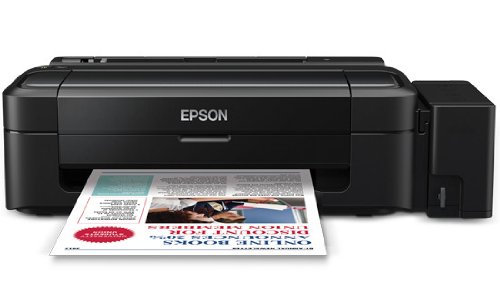
olusin 1: Iwaju view of the Epson L110 Colour Inkjet Printer.
2. Eto
2.1 Ṣiṣii silẹ
Carefully remove the printer from its packaging. Ensure all protective tapes and packing materials are removed from the printer's exterior and interior. Retain the packaging for future transport or storage.
2.2 Asopọ agbara
- So okun agbara pọ si titẹ agbara itẹwe.
- Pulọọgi opin miiran ti okun agbara sinu iṣan itanna ti o wa lori ilẹ.
- Do not power on the printer until ink tanks are filled.
2.3 Àgbáye Inki tanki
The Epson L110 features an integrated ink tank system. Use only genuine Epson ink bottles for optimal performance and to prevent damage.
- Ṣii ideri ẹyọ ojò inki ni ẹgbẹ ti itẹwe naa.
- Uncap the ink bottle for the corresponding color (Cyan, Magenta, Yellow, Black).
- Carefully pour the ink into the correct tank, aligning the bottle nozzle with the tank's filling port. The "Fast Ink Top-Up Technology" is designed for mess-free refills.
- Fill each tank to the upper line.
- Close the ink tank unit cover securely.
Figure 2: Illustration of filling the ink tanks. Ensure correct color matching.
2.4 Driver fifi sori
After filling the ink tanks, connect the printer to your computer using a USB cable. Install the printer drivers from the provided CD-ROM or download the latest drivers from the official Epson support webojula. Tẹle awọn ilana loju iboju lati pari fifi sori ẹrọ.
3. Ṣiṣẹ itẹwe
3.1 ikojọpọ Iwe
- Ṣí àtìlẹ́yìn ìwé náà kí o sì fa àtìlẹ́yìn náà jáde.
- Fan the edges of the paper stack to separate the sheets.
- Load paper into the sheet feeder with the print side facing up.
- Adjust the edge guide to the width of your paper. The maximum input sheet capacity is 50 sheets.
Figure 3: Proper paper loading into the input tray.
3.2 Ipilẹ titẹ sita
- Rii daju pe itẹwe ti wa ni titan ati ti sopọ si kọnputa rẹ.
- Ṣí ìwé tàbí àwòrán tí o fẹ́ tẹ̀ sí orí kọ̀ǹpútà rẹ.
- Yan "Tẹjade" lati inu akojọ aṣayan ohun elo (fun apẹẹrẹ, File > Titẹjade).
- In the print dialog box, select "Epson L110" as your printer.
- Ṣàtúnṣe àwọn ètò ìtẹ̀wé bí ìwọ̀n ìwé, dídára ìtẹ̀wé, àti iye àwọn àdàkọ.
- Tẹ "Tẹ́jáde" lati bẹrẹ ilana titẹjade naa.
The Epson L110 offers a print speed of up to 27 pages per minute (ppm) for black prints and 15 ppm for color prints. It produces high-resolution prints of 5760 x 1440 dpi.
4. Itọju
4.1 Atunkun Inki
Monitor ink levels regularly. When an ink tank is low, refill it promptly using genuine Epson ink bottles. A single ink bottle provides a high page yield of up to 4000 prints (black) and 6500 prints (color).
Pataki: When transporting the printer, ensure the choke valve is locked to prevent messy leaks and ink wastage.
4.2 Print Head Cleaning
If print quality declines (e.g., missing lines, faded colors), perform a print head cleaning. This can typically be done through the printer utility software on your computer. Refer to the software's help section for detailed steps.
4.3 Gbogbogbo Cleaning
Mu ese ita ti itẹwe pẹlu asọ, damp cloth. Do not use abrasive cleaners or solvents. Keep the paper path clear of dust and debris.
5. Laasigbotitusita
- Itẹwe Ko Dahun:
- Ṣàyẹ̀wò ìsopọ̀ agbára kí o sì rí i dájú pé ẹ̀rọ ìtẹ̀wé náà ti tan.
- Verify the USB cable connection between the printer and computer.
- Tun ẹrọ itẹwe ati kọmputa naa bẹrẹ.
- Rii daju pe awọn awakọ itẹwe ti fi sori ẹrọ daradara.
- Didara Titẹjade Ko dara:
- Ṣayẹwo awọn ipele inki ati ṣatunkun ti o ba jẹ dandan.
- Ṣe a si ta ori ninu.
- Ṣiṣe ayẹwo nozzle kan lati ṣe idanimọ awọn nozzles ti o dipọ.
- Rí i dájú pé o ń lo ìwé tó yẹ fún àwọn ìtẹ̀wé rẹ.
- Awọn Jams Iwe:
- Pa ẹrọ atẹwe naa kuro ki o yọọ kuro.
- Fi pẹ̀lẹ́pẹ̀lẹ́ yọ gbogbo ìwé tí ó ti dí kúrò nínú àwo ìtẹ̀wọlé, àwo ìjáde, tàbí inú ẹ̀rọ ìtẹ̀wé náà.
- Rii daju pe iwe ti wa ni ti kojọpọ daradara ati pe ko din tabi curled.
Fun iranlọwọ siwaju, tọka si atilẹyin Epson webojula tabi olubasọrọ onibara iṣẹ.
6. Awọn pato
| Ẹya ara ẹrọ | Sipesifikesonu |
|---|---|
| Orukọ awoṣe | L110 |
| Imọ-ẹrọ titẹ sita | Inkjet |
| Ijade itẹwe | Àwọ̀ |
| O pọju Awọ Print Resolution | 5760 x 1440 dpi |
| O pọju Dudu ati White Print Resolution | 5760 x 1440 dpi |
| Max Print Speed Monochrome | 27ppm |
| Iyara Titẹjade ti o pọju (Awọ) | 15ppm |
| Awọ Inki | Cyan, Black, Magenta, Yellow |
| Ikore Oju-iwe (dudu) | Titi di awọn oju-iwe 4000 |
| Ìmújáde Ojú ìwé (Àwọ̀) | Titi di awọn oju-iwe 6500 |
| Asopọmọra Technology | USB |
| O pọju Input dì Agbara | 50 |
| Awọn iwọn Media atilẹyin | A4, A5, A6, A7, A8, A9, B5, B6, B7, B8, B9, C5, C6, C7 |
| Awọn iwọn Ọja (LxWxH) | 47.2 x 22.2 x 13 cm |
| Iwọn Nkan | 2.7 kg |
| Agbara agbara | O pọju 10 Wattis |
7. Atilẹyin ọja ati Support
The Epson L110 Colour Inkjet Printer comes with an Epson Warranty, providing peace of mind. For specific warranty terms and conditions, please refer to the warranty card included with your product or visit the official Epson support webojula.
For technical support, driver downloads, FAQs, and service center locations, please visit the official Epson support website or contact Epson customer service directly.


