1. Ọja Ipariview
The SALORA CR612 is a compact digital alarm clock radio designed for bedside use. It features a large LED display, dual alarm functionality, AM/FM radio tuning, and convenient snooze and sleep timer functions. This manual provides detailed instructions for its operation.

Aworan: Angled view of the SALORA CR612 Digital Alarm Clock Radio, showing the green LED display and top control buttons.
Awọn iṣakoso ati Ifihan
Familiarize yourself with the main controls and display elements:
- Ifihan LED nla: Shows time, alarm status, and radio frequency.
- Bọtini agbara: Tan/pa a kuro.
- Bọtini lẹẹkọọkan: Ó pa itaniji náà lẹ́nu fún ìgbà díẹ̀.
- Bọ́tìnì Ṣíṣe Àkókò: Ti a lo lati ṣeto akoko lọwọlọwọ.
- Alarm 1/Alarm 2 Buttons: Used to set and activate individual alarms.
- Tuning/Volume Knobs: Adjust radio frequency and sound volume.
- Bọtini Ẹgbẹ: Awọn iyipada laarin awọn igbohunsafẹfẹ redio AM ati FM.
- Memory/Preset Buttons: Save and recall radio stations.
2. Eto
2.1 Asopọ agbara
The SALORA CR612 operates primarily on AC power with a battery backup feature to retain time and alarm settings during power outages.
- Sopọ agbara AC: Pulọọgi okun agbara AC sinu iṣan ogiri boṣewa kan.
- Fi sori ẹrọ Afẹyinti Batiri: Open the battery compartment located at the bottom or rear of the unit. Insert 2 x AAA batteries (not included) according to the polarity markings. These batteries are for backup only and will not power the display or radio functions continuously.

Aworan: Ẹyin view of the SALORA CR612, highlighting the power cable connection and the battery compartment for backup.
2.2 Eriali Oṣo
For optimal FM radio reception, extend the built-in wire antenna fully. For AM reception, the unit has a built-in ferrite bar antenna; try rotating the unit for better signal.
3. Awọn ilana Iṣiṣẹ
3.1 Ṣiṣeto Aago naa
- Tẹ mọlẹ Akoko SET bọtini. Awọn nọmba wakati yoo bẹrẹ lati filasi.
- Lo awọn TUNING/VOLUME knob (or +/- buttons if present) to adjust the hour. Pay attention to AM/PM indicators if applicable.
- Tẹ awọn Akoko SET bọtini lẹẹkansi. Awọn nọmba iṣẹju yoo filasi.
- Lo awọn TUNING/VOLUME bọtini lati ṣatunṣe awọn iṣẹju.
- Tẹ awọn Akoko SET bọtini lẹẹkan si lati jẹrisi ati jade ipo eto akoko.
3.2 Ṣíṣeto Awọn Itaniji (Itaniji Meji)
The CR612 features two independent alarms (Alarm 1 and Alarm 2).
- To Set Alarm 1: Tẹ mọlẹ OOGUN 1 Bọ́tìnì náà. Àwọn nọ́mbà wákàtí ìkìlọ̀ náà yóò máa tàn yanranyanran.
- Lo awọn TUNING/VOLUME knob to set the desired alarm hour.
- Tẹ awọn OOGUN 1 button again. The alarm minute digits will flash.
- Lo awọn TUNING/VOLUME knob to set the desired alarm minutes.
- Tẹ awọn OOGUN 1 button again to select the alarm source (Buzzer or Radio). The corresponding indicator will light up.
- Tẹ awọn OOGUN 1 button once more to confirm and activate Alarm 1. An alarm indicator (e.g., a bell icon or 'A1') will appear on the display.
- Repeat the process using the OOGUN 2 bọtini lati ṣeto Itaniji 2.
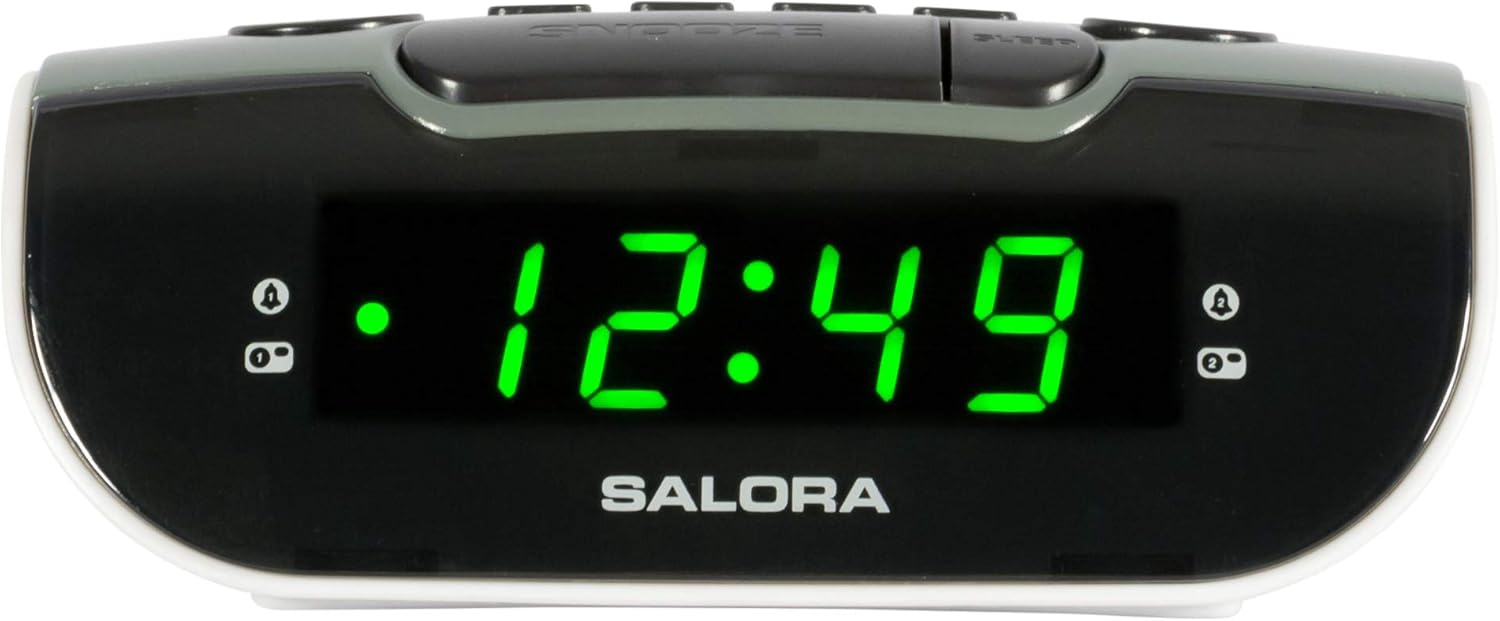
Image: Close-up of the SALORA CR612 display, showing the time '12:49' and active alarm indicators.
3.3 Iṣiṣẹ Snooze
Nigbati itaniji ba ndun, tẹ awọn ṢEGBE button to temporarily silence it. The alarm will sound again after approximately 9 minutes. To cancel the snooze and turn off the alarm completely, press the AGBARA bọtini.
3.4 Radio isẹ
- Turn On Radio: Tẹ awọn AGBARA bọtini lati tan-an kuro.
- Yan Ẹgbẹ: Tẹ awọn BAND button to switch between AM and FM frequencies.
- Ibùdó Tune: Lo awọn TUNTUN bọtini lati fi ọwọ ṣatunṣe si ibudo redio ti o fẹ.
- Ṣatunṣe Iwọn didun: Lo awọn Iwọn didun bọtini lati ṣatunṣe ipele ohun.
- Fi awọn tito tẹlẹ pamọ: Láti fi ibùdó kan pamọ́, tẹ́ ẹ sí i, lẹ́yìn náà tẹ kí o sì di í mú ÌRÁNTÍ button until the display flashes. Use the TẸTẸ buttons (or tuning knob) to select a preset number, then press ÌRÁNTÍ lẹẹkansi lati jẹrisi.
- Ṣe iranti awọn tito tẹlẹ: Ni soki tẹ awọn TẸTẸ awọn bọtini lati yipo nipasẹ awọn ibudo ti a fipamọ.
3.5 Aago orun
Aago oorun ngbanilaaye redio lati mu ṣiṣẹ fun iye akoko ti a ṣeto ṣaaju pipa laifọwọyi.
- Nigba ti redio ba ndun, tẹ awọn ORUN button repeatedly to cycle through available sleep times (e.g., 10, 30, 60, 90 minutes, or OFF).
- Redio naa yoo pa laifọwọyi lẹhin akoko ti a yan.
4. Itọju
4.1 Ninu
To clean the unit, wipe it with a soft, dry cloth. Do not use abrasive cleaners, waxes, or solvents as these can damage the finish. Ensure the unit is unplugged before cleaning.
4.2 Batiri Rirọpo
Replace the backup batteries (2 x AAA) annually or if the time and alarm settings are lost after a power interruption. Ensure correct polarity when inserting new batteries.
5. Laasigbotitusita
- Ko si Agbara/Ifihan Pipa:
- Rii daju pe okun agbara AC ti so pọ ni aabo sinu iṣan-iṣẹ iṣẹ kan.
- Ṣàyẹ̀wò bóyá a ti tẹ bọ́tìnì agbára náà.
- Itaniji Ko N dun:
- Verify that the alarm is set and activated (check for the alarm indicator on the display).
- Ensure the alarm volume is not set to minimum if using radio alarm.
- Confirm the alarm time is correctly set (AM/PM).
- Gbigba Redio ti ko dara:
- Fa eriali waya FM ni kikun.
- For AM, rotate the unit to find the best signal.
- Gbe ẹyọ kuro lati awọn ẹrọ itanna miiran ti o le fa kikọlu.
- Time/Settings Lost After Power Outage:
- Check and replace the backup batteries if necessary.
- Rii daju pe awọn batiri ti wa ni fi sii pẹlu polarity to pe.
6. Awọn pato
| Ẹya ara ẹrọ | Ẹ̀kúnrẹ́rẹ́ |
|---|---|
| Brand | SOLORA |
| Nọmba awoṣe | CR612 |
| Ọja Mefa | 11.5 x 13 x 4.8 cm |
| Iwọn | 320 giramu |
| Orisun agbara | AC Power (with 2x AAA battery backup) |
| Ifihan Iru | LED oni-nọmba |
| Awọn ẹgbẹ redio | AM/FM PLL Tuner |
| Pataki Awọn ẹya ara ẹrọ | Itaniji Meji, Dín-dín-dín, Aago Orun |
| Yara Iru | Yara yara |
| Àwọ̀ | Grey (with black and white accents) |
7. Atilẹyin ọja ati Support
7.1 atilẹyin ọja Alaye
This product is covered by a standard manufacturer's warranty. For specific details regarding warranty duration and terms, please refer to the warranty card included with your purchase or contact your retailer. If you wish to return a product within 30 days of receipt because you have changed your mind, please consult the retailer's return policy. If you have received a defective or damaged product, please consult the retailer's help page on returns and refunds.
7.2 Onibara Support
For further assistance, technical support, or inquiries not covered in this manual, please contact SALORA customer service through their official website or the retailer where the product was purchased. Please have your model number (CR612) and purchase information ready when contacting support.


