1. Ifihan
This manual provides detailed instructions for the proper use and maintenance of your TFA 38.2028.02 Digital Timer and Stopwatch. This device is designed for precise timekeeping in various applications, featuring a reversible display, touch-sensitive buttons, and magnetic mounting options. Please read this manual thoroughly before operating the device.
2. Awọn ẹya Ọja
- Reversible Display: O faye gba o rọrun viewing lati orisirisi awọn agbekale.
- Àwọn Bọ́tìnì Ìfọ́kàn-Ìfọ́kàn: For intuitive operation.
- Imọlẹ ẹhin: Ó fúnni ní ìrísí tó ṣe kedere ní àwọn ipò ìmọ́lẹ̀ tí kò tó nǹkan.
- Iṣagbesori oofa: Securely attaches to metallic surfaces.
- Wall or Tabletop Mounting: Wapọ placement awọn aṣayan.
- Ibiti Aago: Counts up to 99 minutes and 59 seconds.
- Apẹrẹ Iwapọ: Dimensions of 76 x 25 x 76 mm.
3. Package Awọn akoonu
- TFA 38.2028.02 Digital Timer and Stopwatch Unit
- Afowoyi Olumulo (iwe-ipamọ yii)
Note: 2 x 1.5V AAA batteries are required and not included in the package.
4. Eto
4.1 Fifi sori batiri
- Wa ideri iyẹwu batiri ni ẹhin ẹyọ naa.
- Rọra rọra tabi gbe ideri soke lati ṣii iyẹwu naa.
- Insert two (2) 1.5V AAA batteries, ensuring correct polarity (+/-) as indicated inside the compartment.
- Rọpo ideri iyẹwu batiri, ni idaniloju pe o tẹ ni aabo sinu aaye.
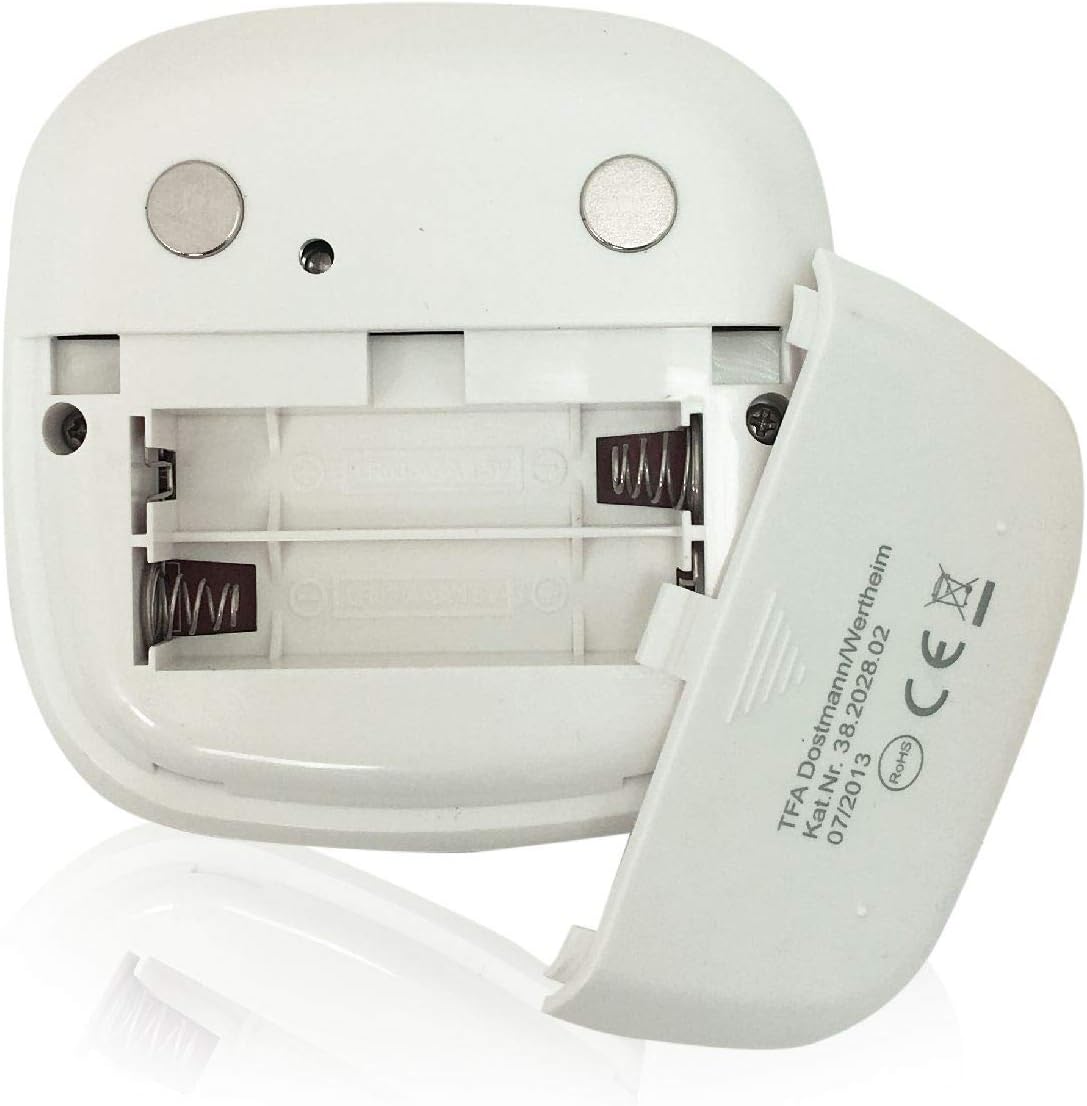
Aworan: Ẹyin view of the timer with the battery compartment open, illustrating where to insert the two AAA batteries.
4.2 Ibẹrẹ Agbara Lori
Once batteries are installed, the display will illuminate, and the device will be ready for use. The default display shows "00:00".
5. Awọn ilana Iṣiṣẹ

Aworan: Iwaju view of the TFA 38.2028.02 timer, highlighting the digital display and the three touch-sensitive buttons: 'M' for minutes, 'S' for seconds, and 'S/S' for Start/Stop.
5.1 bọtini Awọn iṣẹ
- M (Minutes): Press to increase minutes. Hold to rapidly increase minutes.
- S (Seconds): Press to increase seconds. Hold to rapidly increase seconds.
- S/S (Start/Stop): Press to start or stop the timer/stopwatch.
5.2 Setting the Timer (Countdown)
- Ensure the display shows "00:00". If not, press M ati S simultaneously to reset.
- Tẹ awọn M button to set the desired minutes (up to 99 minutes).
- Tẹ awọn S button to set the desired seconds (up to 59 seconds).
- Ni kete ti o ba ti ṣeto akoko ti o fẹ, tẹ bọtini naa S/S bọtini lati bẹrẹ kika.
- Láti dá ìkàsílẹ̀ dúró, tẹ S/S lẹẹkansi. Tẹ S/S lati bẹrẹ pada.
- When the timer reaches "00:00", an alarm will sound. Press any button to stop the alarm.
5.3 Using the Stopwatch (Count-up)
- Ensure the display shows "00:00". If not, press M ati S simultaneously to reset.
- Tẹ awọn S/S button to start the count-up. The display will begin counting from "00:00".
- Lati daduro aago iṣẹju-aaya, tẹ S/S lẹẹkansi. Tẹ S/S lati bẹrẹ pada.
- To reset the stopwatch to "00:00", pause the stopwatch, then press M ati S nigbakanna.
5.4 Backlight Išė
The display features a backlight for improved visibility. The backlight activates automatically when buttons are pressed and typically remains on for approximately 30-40 seconds before dimming to conserve battery life.
6. iṣagbesori Aw
The TFA 38.2028.02 timer offers flexible mounting solutions:
- Asomọ oofa: The back of the timer is equipped with magnets, allowing it to be securely attached to refrigerators, oven hoods, or any other metallic surface.
- Ibi Tabili: The timer's design allows it to stand upright on a flat surface, such as a kitchen counter or desk.
- Iṣagbede ogiri: The unit can also be mounted on a wall using a small hook or screw (not included) through the designated hole on the back.

Aworan: Ẹyin view of the timer, showing the integrated magnets for secure attachment to metallic surfaces and the model number.
7. Itọju
7.1 Ninu
To clean the timer, wipe it with a soft, damp cloth. Do not use abrasive cleaners or immerse the device in water. Avoid getting moisture into the battery compartment or display area.
7.2 Batiri Rirọpo
When the display becomes dim or the device stops responding, it is time to replace the batteries. Follow the battery installation steps in Section 4.1. Always use fresh 1.5V AAA batteries and dispose of old batteries responsibly.
8. Laasigbotitusita
| Isoro | Owun to le Fa | Ojutu |
|---|---|---|
| Ẹrọ naa ko ṣiṣẹ. | Awọn batiri ti ku tabi ti fi sori ẹrọ ti ko tọ. | Ṣayẹwo polarity batiri tabi ropo pẹlu awọn batiri AAA tuntun. |
| Ifihan ti wa ni baibai tabi flicker. | Agbara batiri kekere. | Rọpo awọn batiri. |
| Awọn bọtini ko dahun. | Low battery power or temporary software glitch. | Replace batteries. If problem persists, remove batteries for 1 minute and reinsert. |
| Timer alarm is too quiet. | Alarm volume is fixed and cannot be adjusted. | Ensure the timer is placed in a location where the alarm can be heard. |
9. Awọn pato
| Ẹya ara ẹrọ | Ẹ̀kúnrẹ́rẹ́ |
|---|---|
| Nọmba awoṣe | 38.2028.02 |
| Brand | TFA |
| Awọn iwọn (L x W x H) | 76 x 25 x 76 mm (approximately 2.5P x 7.6l x 7.6H cm) |
| Iwọn | 92 giramu |
| Ohun elo | Plastic with integrated magnets |
| Ibi ti ina elekitiriki ti nwa | Awọn batiri AAA 2 x 1.5V (kii ṣe pẹlu) |
| Ibiti Aago | Up to 99 minutes, 59 seconds |
| Ifihan | Digital with backlight |
| Iṣagbesori Aw | Magnetic, Tabletop, Wall-mountable |

Image: The timer held in a hand, visually demonstrating its compact size and indicating its dimensions (7.6 cm x 7.6 cm x 2.5 cm).
10. Atilẹyin ọja ati Support
TFA products are manufactured with quality and precision. For specific warranty information, please refer to the documentation provided with your purchase or visit the official TFA website. For technical support or inquiries, please contact TFA customer service through their official channels.
Jeki iwe afọwọkọ yii fun itọkasi ọjọ iwaju.


