Ọrọ Iṣaaju
O ṣeun fun riraasing the Philips AJ3116M/37 Digital Tuning Clock Radio. This manual provides essential information for setting up, operating, and maintaining your device. Please read these instructions carefully before use to ensure optimal performance and safety.
The Philips AJ3116M/37 is designed to provide reliable timekeeping, FM radio, and alarm functions. Key features include FM digital tuning with presets, a sleep timer, and a dual alarm system.
Alaye Aabo
Jọwọ ṣe akiyesi awọn iṣọra ailewu wọnyi:
- Ma ṣe fi ẹrọ naa han si ojo tabi ọrinrin.
- Ma ṣe gbe ẹrọ naa si nitosi awọn orisun ooru gẹgẹbi awọn imooru tabi awọn adiro.
- Rii daju pe fentilesonu to dara; maṣe dina awọn ṣiṣi atẹgun.
- Lo awọn asomọ/awọn ẹya ara ẹrọ ti a sọ pato nipasẹ olupese.
- Yọọ ẹrọ naa nigba iji manamana tabi nigba lilo fun igba pipẹ.
- Tọkasi gbogbo iṣẹ si awọn oṣiṣẹ iṣẹ ti o peye.
Ohun ti o wa ninu Apoti
Lẹhin ṣiṣi silẹ, jọwọ rii daju pe gbogbo awọn nkan wa ati ni ipo to dara:
- Philips AJ3116M/37 Digital Tuning Clock Radio
- Power Adapter (if included, otherwise integrated)
- Afowoyi Olumulo (iwe-ipamọ yii)
Ọja Pariview
Mọ ararẹ pẹlu awọn eroja akọkọ ti redio aago rẹ:
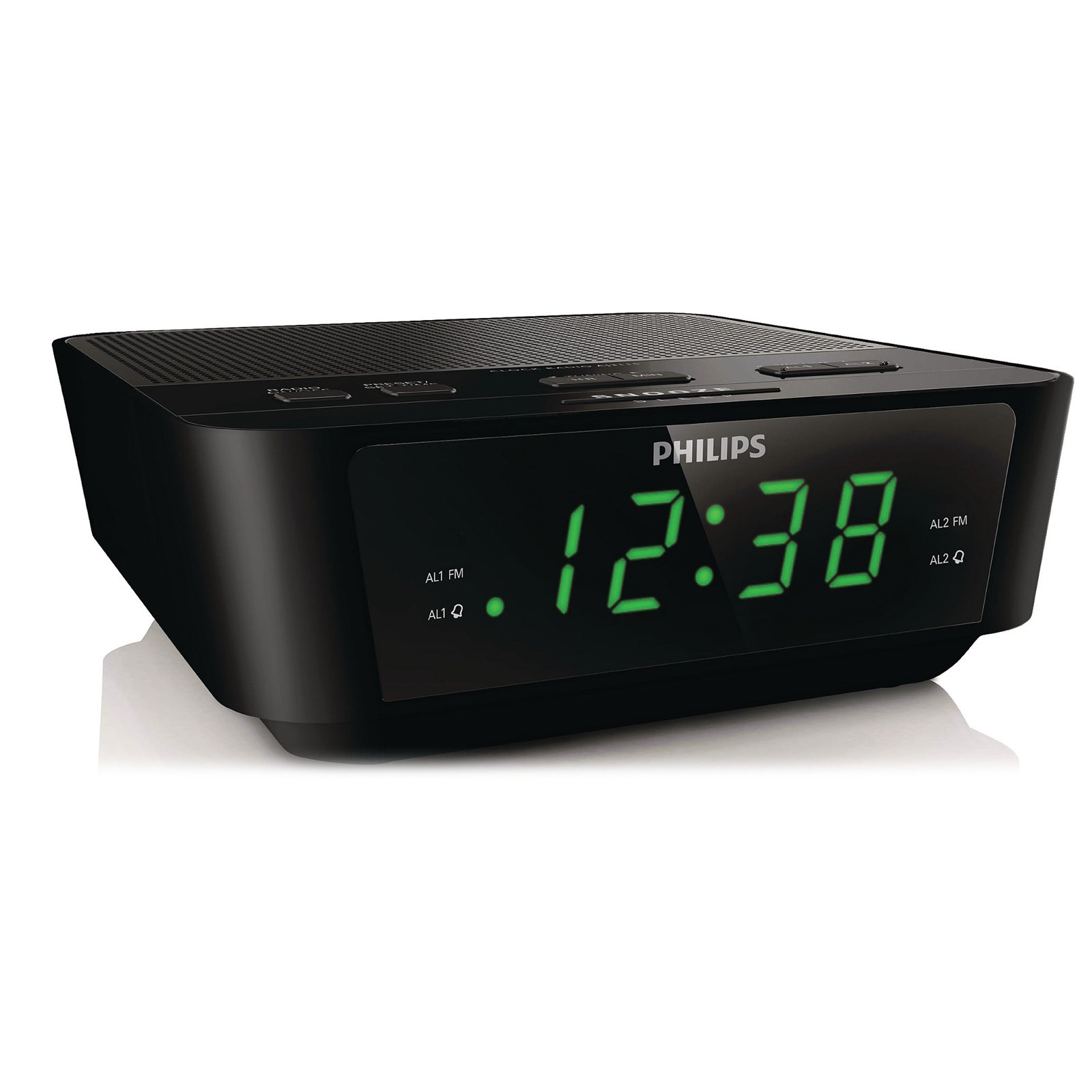
This image shows the front of the Philips AJ3116M/37 Digital Tuning Clock Radio. It features a large digital display, speaker grille, and control buttons on the top surface.
- Ifihan Digital: Shows time, alarm status, and radio frequency.
- Awọn bọtini Iṣakoso: Located on the top panel for setting time, alarms, tuning radio, and adjusting volume.
- Agbọrọsọ: Integrated for audio output.
- Eriali FM: Fun gbigba redio.
- Iṣagbewọle agbara: For connecting to AC power.
- Abala Batiri: Located on the bottom for backup batteries.
Ṣeto
-
So agbara:
Plug the AC power adapter into the DC input jack on the back of the clock radio, then plug the adapter into a wall outlet.
-
Install Backup Batteries:
Open the battery compartment cover on the bottom of the unit. Insert 2 AA batteries (not included) according to the polarity markings (+ and -). These batteries retain time and alarm settings during a power outage but do not power the unit for normal operation.
-
Ṣeto Akoko:
Tẹ mọlẹ Akoko SET button until the hour digits flash. Use the WAKATI ati ISEJU Tẹ awọn bọtini lati ṣatunṣe akoko naa. Akoko SET lẹẹkansi lati jẹrisi.
Awọn ilana Iṣiṣẹ
Redio Isẹ
-
Tan/Pa:
Tẹ awọn RADIO TAN/PA bọtini lati tan redio tabi pa.
-
Tun si Ibusọ kan:
Tẹ awọn TUNE + or TÚNṢẸ́ - buttons to manually adjust the frequency. For automatic tuning, press and hold TUNE + or TÚNṢẸ́ - for two seconds; the radio will scan for the next strong station.
-
Ṣeto awọn tito tẹlẹ:
Tune si ibudo ti o fẹ. Tẹ mọlẹ TẸTẸ bọtini titi nọmba tito tẹlẹ seju. Lo TUNE + or TÚNṢẸ́ - to select a preset number (1-10). Press TẸTẸ lẹẹkansi lati fipamọ.
-
Yan Awọn tito tẹlẹ:
Nígbà tí rédíò bá wà nílẹ̀, tẹ TẸTẸ bọtini leralera lati gigun nipasẹ awọn ibudo ti o fipamọ.
-
Ṣatunṣe Iwọn didun:
Lo awọn Idibo + or ÌWỌN - buttons to adjust the sound level.
Awọn iṣẹ itaniji
The clock radio features a dual alarm system, allowing you to set two independent alarms.
-
Set Alarm 1 or Alarm 2:
Tẹ mọlẹ OOGUN 1 or OOGUN 2 button until the alarm time flashes. Use the WAKATI ati ISEJU buttons to set the desired alarm time. Press the respective Itaniji bọtini lẹẹkansi lati jẹrisi.
-
Select Alarm Source:
After setting the alarm time, press the OOGUN 1 or OOGUN 2 button repeatedly to cycle through alarm modes: Buzzer, Redio, tabi Paa. An indicator will light up next to your selection.
-
Stop/Snooze Alarm:
Nigbati itaniji ba dun, tẹ bọtini naa ṢEGBE button for a temporary pause (typically 9 minutes). To turn off the alarm completely, press the ALARM PA bọtini.
Aago orun
Aago oorun naa fun ọ laaye lati sun oorun si redio, eyi ti yoo pa laifọwọyi lẹhin akoko ti a ti ṣeto.
-
Activate Sleep Timer:
Nígbà tí rédíò bá wà nílẹ̀, tẹ ORUN button repeatedly to select a sleep duration (e.g., 120, 90, 60, 30, 15 minutes, or OFF). The radio will play for the selected duration and then turn off.
Ifihan Imọlẹ
Ṣatunṣe imọlẹ ifihan si ayanfẹ rẹ.
- Tẹ awọn DIMMER button (if available, or a similar button) to cycle through different brightness levels for the digital display.
Itoju
-
Ninu:
Mu ese kuro pẹlu rirọ, damp Aṣọ. Má ṣe lo àwọn ohun ìfọṣọ tàbí àwọn ohun èlò ìfọṣọ. Rí i dájú pé a ti yọ ẹ̀rọ náà kúrò kí a tó sọ ọ́ di mímọ́.
-
Rirọpo Batiri:
Replace the backup batteries annually or when the battery low indicator appears (if applicable) to ensure time retention during power outages.
Laasigbotitusita
| Isoro | Owun to le Fa | Ojutu |
|---|---|---|
| Ko si agbara / Ifihan pipa | Power cord not connected properly. Power outage. | Check AC power connection. Ensure power outlet is functional. |
| Gbigba redio ti ko dara | Antenna not extended or positioned correctly. Interference from other electronics. | Fully extend the FM wire antenna. Reposition the unit for better reception. Move away from other electronic devices. |
| Itaniji ko dun | Alarm not activated or set incorrectly. Volume too low (if radio alarm). | Verify alarm time and source (Buzzer/Radio) are correctly set and activated. Increase radio volume if using radio alarm. |
| Akoko / eto ti sọnu lẹhin agbara utage | Awọn batiri afẹyinti ti ku tabi ko fi sii. | Fi awọn batiri AA tuntun mẹrin sinu apo batiri naa. |
Awọn pato
| Brand | Philips |
| Nọmba awoṣe | AJ3116M/37 |
| Ifihan Iru | Oni-nọmba |
| Àwọ̀ | Dudu |
| Pataki Awọn ẹya ara ẹrọ | Alarm, Radio, Timer |
| Ọja Mefa | 5.39"W x 6.46"H |
| Iwọn Nkan | 9.6 iwon |
| Orisun agbara | Battery & AC |
| Awọn batiri ti a beere | Awọn batiri AA 2 (fun afẹyinti) |
| Olupese | Philips onibara Electronics |
| UPC | 609585234185 |
Atilẹyin ọja ati Support
Fun alaye atilẹyin ọja ati atilẹyin alabara, jọwọ tọka si kaadi atilẹyin ọja ti o wa pẹlu ọja rẹ tabi ṣabẹwo si atilẹyin osise Philips webojula. O tun le ṣàbẹwò awọn Itaja Philips lori Amazon fun ọja alaye siwaju sii.
Jọwọ ṣe idaduro ẹri rira rẹ fun eyikeyi awọn ibeere atilẹyin ọja.


