1. Ifihan
O ṣeun fun riraasing the ONKYO FR-V7 Center Unit Amplifier. This manual provides essential information for the safe and efficient operation of your audio system. Please read it thoroughly before use and retain it for future reference. The FR-V7 integrates a CD player, MD player, and tuner into a single compact unit, designed to deliver high-quality audio when connected to external speakers.
2. Alaye Aabo
Lati rii daju iṣẹ ailewu ati yago fun ibajẹ, ṣe akiyesi awọn iṣọra wọnyi:
- Ibi ti ina elekitiriki ti nwa: So ẹrọ pọ nikan si ohun AC iṣan ti voltage pato lori ru nronu.
- Afẹfẹ: Rí i dájú pé afẹ́fẹ́ ń tàn kálẹ̀ tó. Má ṣe dí àwọn ihò afẹ́fẹ́ tàbí kí o gbé ẹ̀rọ náà sí orí àwọn ibi tí ó rọrùn tí ó lè dí afẹ́fẹ́ lọ́wọ́.
- Omi ati Ọrinrin: Ma ṣe fi ẹrọ naa han si ojo tabi ọrinrin. Ma ṣe gbe awọn nkan ti o kun fun awọn olomi, gẹgẹbi awọn vases, sori ẹyọ.
- Awọn nkan ajeji: Má ṣe fi àwọn ohun èlò irin tàbí ohun èlò tó lè jóná sínú ihò ẹ̀rọ náà.
- Ṣiṣẹ: Ma ṣe gbiyanju lati ṣe iṣẹ fun ẹyọkan funrararẹ. Tọkasi gbogbo iṣẹ si awọn oṣiṣẹ iṣẹ ti o peye.
- Ibi: Gbé ẹ̀rọ náà sí orí ilẹ̀ tí ó dúró ṣinṣin, tí ó tẹ́jú, tí ó jìnnà sí oòrùn tààrà, àwọn orísun ooru, àti eruku tàbí ìgbọ̀nsẹ̀ tí ó pọ̀ jù.
3. Ọja Ipariview
The ONKYO FR-V7 is a compact audio system designed for high-fidelity sound reproduction. It features a front-loading CD player, a MiniDisc (MD) player/recorder, and an AM/FM tuner. The unit serves as the central hub for your audio setup, requiring external speakers for sound output.
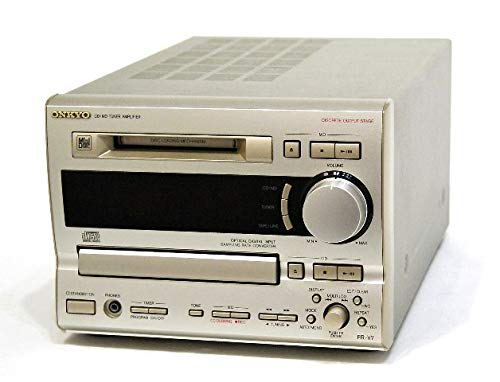
olusin 3.1: Iwaju view of the ONKYO FR-V7 Center Unit Amplifier, showing the display, control buttons, and disc trays.
3.1 Iwaju Panel idari
- Bọtini agbara: Yipada ẹyọ naa tan tabi pa.
- Ifihan: Shows current source, track information, and tuner frequency.
- Asayan Orisun: Switches between CD, MD, Tuner, LINE 1, LINE 2, and TAPE inputs.
- Iṣakoso iwọn didun: Ṣe atunṣe ipele ohun gbogbogbo.
- CD Tray/MD Slot: For inserting CDs and MiniDiscs.
- Awọn idari Sisisẹsẹhin: Play, Pause, Stop, Skip/Wa fun CD and MD.
- Awọn iṣakoso Tuner: Tuning Up/Down, Preset selection.
3.2 Ru Panel Awọn isopọ
- Awọn ebute Agbọrọsọ: Connects to passive speakers.
- LINE IN (1 & 2): Analog audio inputs for external devices (e.g., turntable pre-amp, auxiliary player).
- TAPE IN/OUT: Analog audio input and output for a tape deck or other recording device.
- OPTICAL DIGITAL OUT: Digital audio output for connecting to a digital recorder or DAC.
- FM/AM Antenna Terminals: For connecting radio antennas.
- Wiwọle Agbara AC: Ó so mọ́ agbára ìpèsè àkọ́kọ́.
4. Eto
4.1 Ṣiṣii silẹ
- Carefully remove the FR-V7 unit and all accessories from the packaging.
- Daduro awọn ohun elo iṣakojọpọ fun irinna ọjọ iwaju tabi ibi ipamọ.
- Inspect the unit for any signs of damage. If damaged, contact your dealer.
4.2 Asopọ Agbọrọsọ
The FR-V7 requires external passive speakers. Ensure your speakers are compatible with the amplifier's output specifications.
- Locate the speaker terminals on the rear panel of the FR-V7.
- Connect the positive (+) terminal of the left speaker to the left (+) terminal on the FR-V7.
- Connect the negative (-) terminal of the left speaker to the left (-) terminal on the FR-V7.
- Repeat steps 2 and 3 for the right speaker.
- Ensure all connections are secure and that no bare speaker wire strands are touching each other or the unit's chassis, which could cause a short circuit.
4.3 Audio Component Connection
So awọn orisun ohun ita pọ nipa lilo awọn okun RCA.
- LINE IN 1/2: For connecting devices like a cassette deck, phono pre-amplifier, or another auxiliary audio source. Connect the RCA output cables from your device to the corresponding LINE IN jacks on the FR-V7.
- TAPE IN/OUT: For connecting a tape recorder. Connect the TAPE OUT of your recorder to the TAPE IN of the FR-V7, and the TAPE IN of your recorder to the TAPE OUT of the FR-V7.
- OPTICAL DIGITAL OUT: If you wish to record the digital output of the CD or MD player, connect an optical cable from this port to the digital input of a compatible recording device.
4.4 Eriali Asopọ
- Eriali FM: Connect the supplied FM indoor antenna or an external FM antenna to the FM antenna terminal. For optimal reception, extend the wire fully.
- Eriali AM: Connect the supplied AM loop antenna to the AM antenna terminals. Position the loop antenna for best reception.
4.5 Asopọ agbara
- Ensure all audio and speaker connections are made correctly.
- Plug the power cord into the AC power inlet on the rear of the FR-V7.
- So opin keji okun ina naa sinu ibudo ogiri ti o yẹ.
5. Awọn ilana Iṣiṣẹ
5.1 Agbara Tan / Pa
Tẹ awọn AGBARA button on the front panel to turn the unit on or off. The display will illuminate when the unit is powered on.
5.2 Orisun Aṣayan
Tẹ awọn ORISUN button repeatedly to cycle through the available input sources: CD, MD, TUNER, LINE 1, LINE 2, TAPE. The selected source will be indicated on the display.
5.3 CD Sisisẹsẹhin
- Tẹ awọn CD source button or select CD using the ORISUN bọtini.
- Tẹ awọn ŠI / PADE bọtini lati ṣii CD atẹ.
- Place a CD with the label side up into the tray.
- Tẹ ŠI / PADE lẹẹkansi lati pa awọn atẹ.
- Tẹ awọn ERE bọtini lati bẹrẹ ṣiṣiṣẹsẹhin.
- Lo DÁYÉ, DURO, SKIP (▶▶| / |◀◀), ati SEARCH (▶▶ / ◀◀) awọn bọtini lati ṣakoso ṣiṣiṣẹsẹhin.
5.4 MD Playback and Recording
- Tẹ awọn MD source button or select MD using the ORISUN bọtini.
- Insert a MiniDisc into the MD slot with the arrow pointing inwards.
- Fun Sisisẹsẹhin: Tẹ awọn ERE button. Use playback controls similar to CD.
- Fun Gbigbasilẹ: Select the desired input source (e.g., CD, LINE 1). Insert a blank or erasable MD. Press the REC bọtini, lẹhinna tẹ ERE on the source device to begin recording. Refer to the display for recording status.
5.5 Tuner isẹ
- Tẹ awọn OWO source button or select TUNER using the ORISUN bọtini.
- Tẹ awọn BAND bọtini lati yipada laarin FM ati AM iye.
- Lo awọn Atunse soke / isalẹ awọn bọtini lati tune si ibudo pẹlu ọwọ.
- To automatically scan for stations, press and hold the Atunse soke / isalẹ awọn bọtini.
- Awọn ibudo tito tẹlẹ: To store a station, tune to it, then press ÌRÁNTÍ followed by a preset number button. To recall a preset, press the corresponding preset number button.
5.6 Iwọn didun ati Iṣakoso ohun orin
- Iwọn didun: Yiyi awọn Iwọn didun knob on the front panel to adjust the output level.
- Awọn iṣakoso ohun orin: If available, use the BASS and TREBLE knobs (or menu options) to adjust the low and high frequency response.
6. Itọju
6.1 Ninu Unit
- Nigbagbogbo ge asopọ okun agbara ṣaaju ṣiṣe mimọ.
- Lo asọ ti o tutu, ti o gbẹ lati nu awọn ita ita.
- Fun awọn abawọn alagidi, fẹẹrẹ dampen the cloth with a mild, non-abrasive cleaner. Do not use harsh chemicals or solvents.
- Yago fun sisọ awọn olomi mimọ taara sori ẹyọ naa.
6.2 Disc Care (CD/MD)
- Mu awọn disiki mu nipasẹ awọn egbegbe wọn lati yago fun awọn ika ọwọ lori ibi ere.
- Jeki awọn disiki mọ. Mu wọn nu pẹlu asọ, asọ ti ko ni lint lati aarin si ita.
- Tọju awọn disiki ni awọn ọran wọn nigbati o ko ba wa ni lilo lati daabobo wọn lati eruku ati awọn idọti.
- Do not expose discs to direct sunlight or high temperatures.
7. Laasigbotitusita
If you experience problems with your FR-V7, consult the following table before seeking professional service.
| Isoro | Owun to le Fa | Ojutu |
|---|---|---|
| Ko si agbara | A ti ge okùn agbára náà; ibi tí agbára ń jáde kò ní èrè | Ṣayẹwo asopọ okun agbara; Gbiyanju iṣan ti o yatọ |
| Ko si ohun | Incorrect source selected; Volume too low; Speakers not connected; Speaker wires shorted | Select correct source; Increase volume; Check speaker connections; Ensure no bare wires are touching |
| CD/MD does not play | Disc inserted incorrectly; Disc dirty or scratched; Disc format not supported | Reinsert disc correctly; Clean or replace disc; Ensure disc is standard audio CD/MD |
| Gbigba redio ti ko dara | Antenna not connected or poorly positioned | Connect antenna securely; Adjust antenna position for best reception |
8. Awọn pato
Awọn pato jẹ koko ọrọ si iyipada laisi akiyesi fun ilọsiwaju.
- Awoṣe: FR-V7
- Awọn iṣẹ: CD Player, MD Player/Recorder, AM/FM Tuner, Ampitanna
- Awọn ebute Input:
- LINE Input: 2 systems (RCA)
- TAPE Input: 1 system (RCA)
- Awọn ebute Ipajade:
- Speaker Output: 1 system (Stereo, binding post type)
- TAPE Output: 1 system (RCA)
- Optical Digital Output: 1 system
- Awọn iwọn (W x H x D): Isunmọ 40.7 x 16.7 x 23 cm (16.0 x 6.6 x 9.1 inches)
- Ìwúwo: Isunmọ 5.52 kg (12.17 lbs)
- Awọn ibeere Agbara: AC 100V, 50/60Hz (Japan model)
9. Atilẹyin ọja ati Support
ONKYO products are manufactured to high quality standards. For warranty information, please refer to the warranty card included with your purchase or contact your local ONKYO dealer. For technical support or service inquiries, please visit the official ONKYO webojula tabi kan si wọn onibara iṣẹ Eka.
ONKYO Official Webojula: www.onkyo.com


