1. Ifihan
Thank you for choosing the HOMCOM A2-0054 High Back Vibration Massage Office Chair. This manual provides essential information for the safe assembly, operation, and maintenance of your new office chair. Please read these instructions thoroughly before use and retain them for future reference.
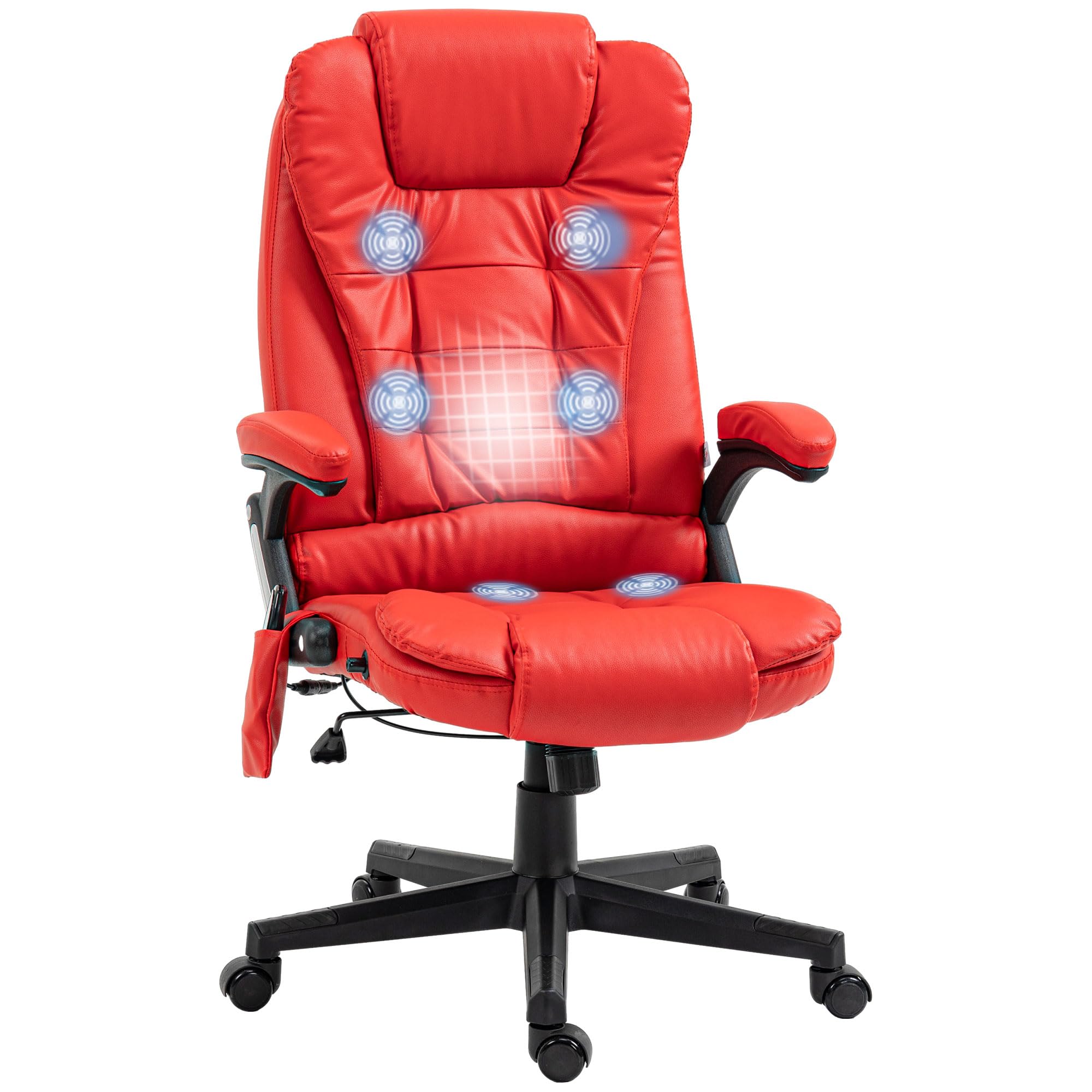
Image 1.1: HOMCOM A2-0054 High Back Vibration Massage Office Chair in Red.
2. Awọn ilana aabo
- Rii daju pe gbogbo awọn paati wa ati ti ko bajẹ ṣaaju apejọ. Ma ṣe lo ti eyikeyi awọn ẹya ba sonu tabi fọ.
- Follow assembly instructions carefully. Incorrect assembly can lead to instability and injury.
- Má ṣe dúró lórí àga. Lo ó fún ìjókòó nìkan.
- Maṣe kọja agbara iwuwo ti o pọju ti 265 lbs (120 kg).
- Pa awọn ọmọde ati awọn ohun ọsin kuro ni alaga lakoko apejọ ati iṣẹ.
- Avoid placing the chair near heat sources or in direct sunlight for prolonged periods to prevent material degradation.
- Disconnect the power adapter for the massage and heating functions when not in use or before cleaning.
- Do not attempt to repair or modify the electrical components of the massage function. Contact qualified service personnel if issues arise.
3. Package Awọn akoonu
Verify that all parts are included in the package before beginning assembly. Refer to the separate assembly instructions provided with your chair for a detailed list of components and hardware.

Image 3.1: The chair is delivered in one package.
4. Apejọ Awọn ilana
Detailed assembly instructions, including a list of all parts and step-by-step diagrams, are provided in a separate document within your product packaging. Please follow these instructions carefully to ensure proper and safe assembly of your HOMCOM office chair. Assembly typically requires basic tools and can be completed by one person.
5. Awọn ilana Iṣiṣẹ
5.1. Giga tolesese
To adjust the chair's height, locate the lever on the right side, beneath the seat. While seated, pull the lever upwards to lower the chair. To raise the chair, stand up slightly to relieve weight from the seat, then pull the lever upwards. Release the lever at the desired height to lock it in place.

Image 5.1: Height adjustment lever operation.
5.2. Isẹ Isunmọ
The chair features a 120-degree reclining function. To recline, push your back against the backrest. The chair will recline smoothly. To return to an upright position, lean forward. The chair does not have a locking recline mechanism; it relies on body weight for position.

Image 5.2: Chair reclining function.
5.3. Vibration Massage and Heating
The chair is equipped with a six-point vibration massage system and a lumbar heating function, controlled by a remote. Connect the chair's power adapter to a suitable electrical outlet. The remote control allows you to:
- Titan/Apapa: Lo bọtini agbara lori isakoṣo latọna jijin.
- Awọn ọna ifọwọra: Select from various vibration patterns (M1, M2, M3, M4, M5) or an automatic cycle (AUTO).
- Kikunra: Adjust vibration intensity (Hi/Lo).
- Awọn agbegbe ibi-afẹde: Select specific massage zones (BACK, LUMBAR, THIGH).
- Iṣẹ Ooru: Activate or deactivate the lumbar heating.
- Aago: Set the operating duration (15, 30, or 60 minutes).
Store the remote control in the convenient side pocket when not in use.

Image 5.3: Vibration massage and heating points with remote control.

Image 5.4: Remote control in side pocket.
6. Itọju
To ensure the longevity and appearance of your HOMCOM office chair, follow these maintenance guidelines:
- Ninu: Pa nu pẹlu ipolowoamp cloth. Avoid harsh chemicals or abrasive cleaners, which can damage the faux leather.
- Ayewo: Máa ṣàyẹ̀wò gbogbo àwọn ṣẹ́kẹ́ẹ̀tì àti ìkọ́kọ́ láti rí i dájú pé wọ́n lẹ̀ mọ́ra. Mú wọn le tí ó bá pọndandan.
- Awọn Casters: Jeki awọn casters laisi idoti lati rii daju yiyi dan.
- Ibi ipamọ: Store the chair in a cool, dry place away from direct sunlight when not in regular use.
7. Laasigbotitusita
Ti o ba pade awọn ọran pẹlu alaga rẹ, tọka si awọn imọran laasigbotitusita ti o wọpọ wọnyi:
- Alaga ko ṣatunṣe giga: Ensure the height adjustment lever is fully engaged. Check if the gas lift cylinder is damaged.
- Chair is unstable/wobbly: Verify that all assembly bolts are securely tightened. Ensure the chair is on a flat, even surface.
- Massage/Heat function not working: Check if the power adapter is securely plugged into both the chair and the electrical outlet. Ensure the outlet is functional. Check the remote control batteries.
- Casters ko yiyi laisiyonu: Inspect casters for hair, dust, or other debris and clean them if necessary.
Fun awọn iṣoro ti o tẹsiwaju ti a ko le yanju nipasẹ awọn igbesẹ wọnyi, jọwọ kan si atilẹyin alabara.
8. Awọn pato
| Ẹya ara ẹrọ | Ẹ̀kúnrẹ́rẹ́ |
|---|---|
| Nọmba awoṣe | A2-0054 |
| Brand | HOMCOM |
| Àwọ̀ | Pupa |
| Ohun elo | Faux Leather, Foam |
| Ìwò Mefa | 25.5" W x 28" D x 43.25" - 47.25" H |
| Awọn iwọn ijoko | 20.5" W x 19.75" D |
| Iga ijoko | 17.75" - 21.75" H |
| Pada Style | Timutimu Pada |
| Pataki Awọn ẹya ara ẹrọ | Adjustable Height, Heated, High Back, Reclining, Rolling, Vibration Massage |
| O pọju iwuwo Agbara | 265 lbs |
| Iwọn Nkan | 39 lbs |
| UPC | 700729271087 |

Image 8.1: Detailed dimensions of the office chair.
9. Atilẹyin ọja ati Support
For warranty information or technical support, please refer to the documentation included with your purchase or contact HOMCOM customer service directly. Keep your purchase receipt as proof of purchase for any warranty claims.


