1. Ifihan
1.1 Ọja Loriview
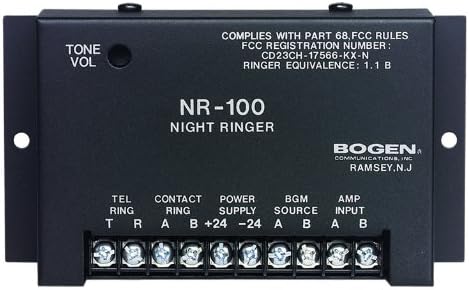
The Bogen BG-NR100 Night Ringer is an essential component for integrating telephone ringing into a paging or public address system. It is engineered to detect incoming telephone ring signals or external contact closures and generate a loud, clear electronic ringer tone. Its compact design and low current draw make it an efficient and reliable solution for various commercial and industrial applications.
1.2 Key Awọn ẹya ara ẹrọ
- Responds to 90V ring signals or external contact closures.
- Produces a clear dual-frequency electronic ringer tone.
- Easily connects to any standard paging system.
- Automatically mutes background music while ringing.
- Features a 0-level ringer volume control for adjustable output.
- Compact size for convenient installation.
- Low current draw for energy efficiency.
2. Alaye Aabo
Please read all safety instructions carefully before installing or operating the Bogen BG-NR100 Night Ringer. Failure to follow these instructions may result in electric shock, fire, or other hazards.
2.1 Gbogbogbo Aabo Awọn iṣọra
- Ma ṣe fi ẹrọ yii han si ojo tabi ọrinrin.
- Ma ṣe dina eyikeyi awọn ṣiṣi atẹgun.
- Ma ṣe fi sii nitosi awọn orisun ooru gẹgẹbi awọn imooru, awọn iforukọsilẹ ooru, awọn adiro, tabi awọn ohun elo miiran ti o nmu ooru jade.
- Lo awọn asomọ/awọn ẹya ara ẹrọ ti olupese pato.
- Tọkasi gbogbo iṣẹ si awọn oṣiṣẹ iṣẹ ti o peye.
2.2 Itanna Abo
- Rii daju pe ipese agbara voltage ibaamu awọn ibeere pàtó kan fun ẹrọ.
- Ge asopọ agbara ṣaaju ṣiṣe eyikeyi awọn asopọ tabi ṣiṣe itọju.
- Avoid touching exposed wires or terminals when the unit is powered.
- Ilẹ-ilẹ ti o yẹ jẹ pataki fun iṣẹ ailewu.
3. Eto
3.1 Ṣiṣii silẹ
Carefully remove the Night Ringer from its packaging. Inspect the unit for any signs of damage that may have occurred during shipping. If damage is found, contact your supplier immediately.
3.2 Iṣagbesori
The BG-NR100 is designed for surface mounting. Use appropriate screws (not supplied) to secure the unit to a wall or other stable surface using the mounting tabs on either side of the enclosure. Ensure the mounting location allows for adequate ventilation and access to connections.
3.3 Awọn isopọ onirin
All connections are made via the screw terminal block located on the front of the unit. Ensure power is disconnected before making any wiring connections.
| Aami ebute | Apejuwe | Išẹ |
|---|---|---|
| TEL RING (T, R) | Telephone Ring Input | Connect to the tip (T) and ring (R) lines of a standard 90V telephone ring signal source. |
| CONTACT RING (A, B) | External Contact Closure Input | Connect to a dry contact closure (e.g., from a relay or switch) to trigger the ringer. |
| POWER SUPPLY (+24, -24) | Agbara Input | Connect to a regulated 24V DC power supply. Observe polarity (+24V to +24, -24V to -24). |
| BGM SOURCE (A, B) | Iṣagbewọle Orin abẹlẹ | Connect the background music source here. The unit will mute this input during a ring event. |
| AMP INPUT (A, B) | Amplifier Input / Output to Paging System | Connect this output to the input of your paging amplifier or public address system. This carries the ringer tone and the muted BGM. |
4. Ṣiṣẹ
4.1 Ipilẹ isẹ
Once properly connected and powered, the BG-NR100 will automatically detect an incoming 90V telephone ring signal or a closure on the Contact Ring terminals. Upon detection, the unit will generate a dual-frequency electronic ringer tone and simultaneously mute any background music connected to the BGM Source input. The ringer tone will be sent to the Amp Input terminals for connection to your paging system.
4.2 Iṣakoso iwọn didun
The ringer volume can be adjusted using the TONE VOL knob located on the top left of the unit. Rotate the knob clockwise to increase the volume and counter-clockwise to decrease it. Adjust the volume to a suitable level for your environment.
5. Itọju
5.1 Ninu
To clean the unit, wipe the exterior with a soft, dry cloth. Do not use liquid cleaners or aerosol cleaners. Ensure the unit is powered off and disconnected from all sources before cleaning.
5.2 Itọju Gbogbogbo
The BG-NR100 is designed for reliable operation and requires minimal maintenance. Ensure it is installed in a location free from excessive dust, moisture, and extreme temperatures. Periodically check all wiring connections to ensure they are secure.
6. Laasigbotitusita
If you experience issues with your Bogen BG-NR100 Night Ringer, refer to the following table for common problems and solutions.
| Isoro | Owun to le Fa | Ojutu |
|---|---|---|
| No ringer tone output. | Ko si agbara si ẹrọ naa. | Check power supply connections and ensure 24V DC is present. |
| Incorrect or no input signal (TEL RING or CONTACT RING). | Verify 90V ring signal on TEL RING or proper contact closure on CONTACT RING. | |
| Volume knob set too low. | Adjust the TONE VOL knob clockwise. | |
| Ringer tone is distorted or weak. | Improper connection to paging amplifier. | Rii daju AMP INPUT is correctly connected to the amplifier input. Check amplifier eto. |
| Background music does not mute. | BGM SOURCE not connected correctly. | Verify BGM SOURCE connections. Ensure the music source is routed through the Night Ringer. |
If the problem persists after attempting these solutions, please contact Bogen technical support or a qualified service technician.
7. Awọn pato
Technical specifications for the Bogen BG-NR100 Night Ringer:
| Iwa | Iye |
|---|---|
| Olupese | ARC |
| Brand | Bogen |
| Nọmba awoṣe | BG-NR100 |
| Iwọn Nkan | 1 iwon |
| Ọja Mefa | 1 x 5 x 3 inches |
| FCC Registration Number | CD23CH-17566-KX-N |
| Ringer Idogba | 1.1 B |
| Ọjọ Akọkọ Wa | Oṣu kọkanla ọjọ 27, ọdun 2013 |
8. Atilẹyin ọja ati Support
8.1 atilẹyin ọja Alaye
For specific warranty terms and conditions, please refer to the warranty card included with your product or visit the official Bogen website. Bogen Communications, Inc. typically provides a limited warranty against defects in materials and workmanship for a specified period from the date of purchase.
8.2 Imọ Support
If you require technical assistance or have questions regarding the installation or operation of your BG-NR100 Night Ringer, please contact Bogen technical support. Contact information can usually be found on the Bogen webaaye tabi ni apoti ọja.


