1. Ifihan
This manual provides detailed instructions for the installation, operation, and maintenance of your Axis P1355 Surveillance/Network Camera. The Axis P13 series offers high-performance fixed cameras designed for both indoor and outdoor surveillance, delivering superb image quality with H.264 compression. These models support HDTV 720p/1080p video and are equipped with features like Wide Dynamic Range and Day/Night functionality for clear imaging in various lighting conditions. Specific models within the P13 series, including HDTV 720p, incorporate Axis Lightfinder technology for enhanced low-light sensitivity, while HDTV 1080p and 5-megapixel cameras feature P-iris control for optimized depth of field and lens resolution.
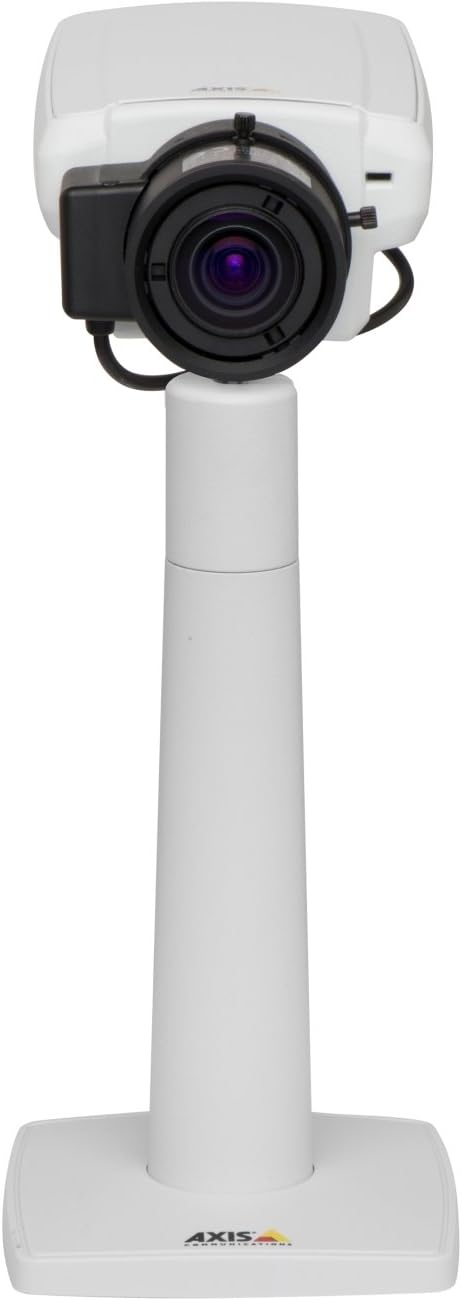
Nọmba 1: The Axis P1355 Surveillance Camera shown mounted on its stand. This image illustrates the camera's physical appearance and typical mounting configuration.
2. Alaye Aabo
Please read all safety instructions before installing or operating the camera.
- Ensure the power source matches the camera's requirements to prevent electrical hazards.
- Fifi sori yẹ ki o ṣe nipasẹ oṣiṣẹ oṣiṣẹ ni ibamu pẹlu awọn koodu itanna agbegbe.
- Ma ṣe fi kamẹra han si awọn iwọn otutu to gaju, ọriniinitutu, tabi awọn agbegbe ibajẹ.
- Avoid direct exposure of the lens to strong light sources, such as the sun, as this may damage the image sensor.
- Disconnect power before cleaning or servicing the camera.
3. Eto ati fifi sori
The Axis P1355 camera is designed for both indoor and outdoor use and supports various mounting options.
3.1 Iṣagbesori
The camera is typically designed for wall mount installation. Ensure the mounting surface is strong enough to support the camera's weight (approximately 2 pounds). Use appropriate screws and anchors for the chosen surface.
- Select a suitable location for optimal surveillance coverage.
- Securely attach the mounting bracket to the wall.
- Mount the camera onto the bracket, ensuring it is firmly in place.
- Adjust the camera's angle for the desired field of view.
3.2 Awọn isopọ
The Axis P1355 camera primarily uses wired connectivity for reliable data transmission and power.
- Asopọ agbara: Connect the provided power adapter to the camera's power input and then to a suitable electrical outlet. The camera operates on a corded electric power source.
- Isopọ nẹtiwọki: Connect an Ethernet cable from the camera's network port to your network switch or router. This provides wired connectivity for video streaming and control.
- Wireless Connectivity (Optional/Configuration): While primarily wired, the camera supports Wi-Fi for certain configurations. Refer to the Axis product documentation for specific wireless setup instructions if applicable to your model variant.
4. Awọn ilana Iṣiṣẹ
Once installed and connected, the Axis P1355 camera can be configured and operated via a network interface.
4.1 Ni ibẹrẹ Wiwọle ati iṣeto ni
- Use the Axis IP Utility or a similar network discovery tool to find the camera's IP address on your network.
- Ṣii a web ẹrọ aṣawakiri ati tẹ adiresi IP kamẹra lati wọle si rẹ web ni wiwo.
- Log in using the default credentials (refer to Axis documentation for default username/password, typically 'root' and 'pass' or similar, which should be changed immediately).
- Follow the on-screen prompts to set up basic network settings, date/time, and user accounts.
4.2 Video Monitoring and Features
- Gbe View: Access the live video feed through the web interface or compatible video management software.
- Ipinnu: The camera supports video capture resolutions up to 720p and effective video resolutions of 1080 pixels, with effective still resolution of 2 MP.
- Color and Monochrome Modes: The camera can operate in both color and monochrome (black and white) modes, automatically switching based on light conditions or configured manually.
- Iran Alẹ: Utilize the integrated night vision capabilities for surveillance in low-light or complete darkness.
- Sun-un Optical: Adjust the optical zoom for detailed views of specific areas.
- P-Iris Control: For models equipped with P-iris, this feature allows precise control over the iris position to optimize depth of field and lens resolution, enhancing image sharpness. This can be configured via the web ni wiwo.
- Ọna fidio: Video is typically captured in MP4 format.
- Isakoṣo latọna jijin: The camera supports remote control for various settings and adjustments.
5. Itọju
Regular maintenance ensures optimal performance and longevity of your Axis P1355 camera.
- Ninu: Gently clean the camera lens and housing with a soft, damp asọ. Yago fun abrasive ose tabi epo.
- Awọn imudojuiwọn famuwia: Periodically check the Axis Communications website for firmware updates. Keeping the firmware updated ensures access to the latest features, security patches, and performance improvements.
- Ayẹwo USB: Ṣayẹwo gbogbo awọn kebulu nigbagbogbo fun awọn ami ti wọ tabi ibajẹ, paapaa fun awọn fifi sori ita gbangba.
- Ṣayẹwo Ayika: Rii daju pe agbegbe iṣẹ kamẹra wa laarin iwọn otutu pato ati awọn sakani ọriniinitutu.
6. Laasigbotitusita
This section addresses common issues you might encounter with your Axis P1355 camera.
- Ko si Agbara:
- Verify the power adapter is securely connected to both the camera and a working power outlet.
- Ṣayẹwo okun agbara fun eyikeyi bibajẹ.
- Ko si Isopọ Nẹtiwọọki:
- Ensure the Ethernet cable is properly connected to the camera and the network switch/router.
- Ṣayẹwo ipo nẹtiwọki yipada / olulana.
- Confirm the camera has a valid IP address and is on the same network segment as your viewohun elo.
- Didara Aworan Ko dara:
- Nu lẹnsi kamẹra nu.
- Adjust focus and zoom settings via the web ni wiwo.
- Check lighting conditions; enable night vision or adjust exposure settings if necessary.
- Ensure P-iris control is correctly configured for optimal sharpness (if applicable).
- Ko le Wiwọle Web Ni wiwo:
- Ṣe àyẹ̀wò àdírẹ́sì IP ti kámẹ́rà náà.
- Rí i dájú pé kọ̀ǹpútà rẹ wà lórí nẹ́tíwọ́ọ̀kì kan náà pẹ̀lú kámẹ́rà náà.
- Try restarting the camera and your network equipment.
7. Awọn pato
| Ẹya ara ẹrọ | Ẹ̀kúnrẹ́rẹ́ |
|---|---|
| Brand | Awọn ibaraẹnisọrọ Axis |
| Nọmba awoṣe | AXIS P1355 |
| inu ile / ita gbangba Lilo | Ninu ile, ita gbangba |
| Asopọmọra Technology | Wired (Wi-Fi capable for certain configurations) |
| Pataki Ẹya | Alẹ Iranran |
| Orisun agbara | Itanna okun (wattis 7.1) |
| Ipinnu Yaworan fidio | 720p |
| Ipinnu fidio ti o munadoko | 1080 awọn piksẹli |
| Ipinnu Iduro ti o munadoko | 2 MP |
| Sun-un Iru | Optical Zoom (2.9x Optical) |
| Adarí Iru | Iris (P-iris control) |
| Iṣagbesori Iru | Ògiri Ògiri |
| Awọn iwọn Ọja (L x W x H) | 3.07 x 5.94 x 1.69 inches |
| Iwọn Nkan | 2 iwon |
| International Idaabobo Rating | IP54 |
| Fidio Yaworan kika | MP4 |
8. Atilẹyin ọja ati Support
For detailed warranty information and technical support, please refer to the official Axis Communications webojula tabi kan si wọn onibara iṣẹ taara.
Olupese: AXIS COMMUNICATION INC.
Webojula: www.axis.com (Jọ̀wọ́ ẹ lọ sí ọ́fíìsì òṣìṣẹ́ náà website for the most current support resources, drivers, and documentation.)


