1. Ifihan
Welcome to the user manual for your new Salora SM508 mobile phone. This guide provides essential information to help you set up, operate, maintain, and troubleshoot your device. Please read this manual carefully to ensure proper use and to maximize the performance and longevity of your phone.
2. Ọja Ipariview
The Salora SM508 is a compact and reliable basic mobile phone designed for essential communication. It features a color display, a comfortable keypad, and dual SIM support.
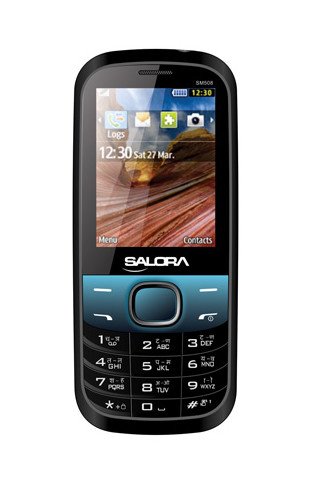
Aworan yii ṣe afihan iwaju view of the Salora SM508 mobile phone. It features a color display at the top, a central navigation button, and a standard alphanumeric keypad below. The phone has a black body with blue accents around the navigation cluster.
3. Eto
3.1 Inserting SIM Card(s)
- Turn off the phone and remove the back cover.
- Fara yọ batiri kuro.
- Locate the SIM card slots. The Salora SM508 supports dual SIM cards.
- Insert your SIM card(s) into the designated slot(s) with the gold contacts facing down. Ensure they are securely seated.
3.2 Inserting Battery
- Align the battery contacts with the contacts in the phone's battery compartment.
- Gently press the 1800 mAh Li-Ion battery into place until it clicks.
- Rọpo ideri ẹhin, ni idaniloju pe o ti somọ ni aabo.
3.3 Inserting Memory Card (Optional)
- With the back cover and battery removed, locate the memory card slot.
- Insert a microSD card (up to 8GB) into the slot with the gold contacts facing down.
- Rọpo batiri ati ideri ẹhin.
3.4 Ngba agbara si Ẹrọ
- So ṣaja naa pọ mọ ibudo gbigba agbara lori foonu rẹ.
- Pulọọgi ṣaja sinu iṣan agbara kan.
- The battery indicator on the screen will show the charging status. Charge the phone fully before first use.
3.5 Agbara akọkọ Tan / Pa
- Lati Fi agbara: Tẹ bọtini Ipe Agbara/Ipari ki o si dimu titi iboju yoo fi tan imọlẹ.
- Lati Paarẹ: Tẹ bọtini Ipe Agbara/Ipari ki o si di mu titi awọn aṣayan pipa agbara yoo fi han, lẹhinna yan 'Pa agbara'.
4. Awọn ilana Iṣiṣẹ
4.1 Ipilẹ Lilọ kiri
- Use the navigation keys (up, down, left, right) to move through menus and options.
- Press the central 'OK' or 'Select' button to confirm a selection.
- Lo bọtini 'Pada' tabi 'Paarẹ' lati pada si iboju iṣaaju tabi pa awọn kikọ rẹ.
4.2 Ṣiṣe ati gbigba awọn ipe
- Lati Ṣe Ipe: Tẹ nọmba foonu sii nipa lilo bọtini foonu ki o tẹ bọtini Ipe Alawọ ewe.
- Lati Gba Ipe kan: When the phone rings, press the Green Call button to answer.
- Lati Pari Ipe kan: Tẹ bọtini ipe Ipari Pupa.
4.3 Sending and Receiving SMS
- Lilö kiri si akojọ aṣayan 'Awọn ifiranṣẹ'.
- Yan 'Kọ Ifiranṣẹ' tabi 'SMS Tuntun'.
- Tẹ ifiranṣẹ rẹ sii nipa lilo bọtini itẹwe.
- Fi nọ́mbà olùgbà kún un tàbí kí o yan láti inú àwọn olùbáṣepọ̀.
- Tẹ 'Firanṣẹ'.
4.4 kamẹra Lilo
- Wọle si ohun elo kamẹra lati inu akojọ aṣayan akọkọ.
- The phone features a 1.3 MP primary (rear) camera.
- Ṣe fireemu ibọn rẹ nipa lilo ifihan.
- Tẹ bọtini 'OK' tabi 'Capture' lati ya fọto kan.
4.5 Multimedia ati Asopọmọra
- Jack Audio: The phone includes a 3.5 mm audio jack for connecting headphones or external speakers.
- Bluetooth: Enable Bluetooth from the settings menu to connect to compatible devices for file transfer or hands-free communication.
- GPRS: The phone supports GPRS for basic internet connectivity. Consult your network provider for data plan details.
5. Itọju
5.1 Ninu ẹrọ rẹ
- Use a soft, dry, lint-free cloth to clean the phone's screen and body.
- Yẹra fun lilo awọn kẹmika ti o lewu, awọn nkan mimu mimọ, tabi awọn ohun ọṣẹ ti o lagbara.
- Do not allow water or liquids to enter the phone.
5.2 batiri Itọju
- Yago fun ṣiṣafihan batiri si awọn iwọn otutu pupọ (gbona tabi tutu).
- Ma ṣe puncture, tuka, tabi kukuru-yipo batiri naa.
- If the battery is damaged or swollen, discontinue use immediately and replace it with an authorized Salora battery.
5.3 Ibi ipamọ
- Tọ́jú fóònù náà sí ibi gbígbẹ tí ó tutù, tí kò sí ìmọ́lẹ̀ oòrùn àti ọ̀rinrin.
- If storing for an extended period, ensure the battery is partially charged (around 50%) to preserve its lifespan.
6. Laasigbotitusita
If you encounter issues with your Salora SM508, please refer to the following common solutions:
- Foonu ko tan:
Ensure the battery is charged. Connect the charger and wait a few minutes before attempting to power on. Check if the battery is properly inserted. - Ko si ifihan nẹtiwọki:
Check if your SIM card is correctly inserted. Ensure you are in an area with network coverage. Try restarting the phone. - Kò le ṣe/gba awọn ipe:
Verify that your SIM card is active and has sufficient balance/plan. Check network signal strength. Ensure call barring or flight mode is not enabled. - Awọn iṣoro gbigba agbara:
Ensure the charger is properly connected to both the phone and the power outlet. Try using a different compatible charger. Check the charging port for any debris. - Bọtini foonu ko dahun:
Restart the phone. If the issue persists, ensure no physical damage to the keypad.
If the problem persists after trying these steps, please contact Salora customer support.
7. Awọn pato
Below are the detailed technical specifications for the Salora SM508 mobile phone:
| Ẹya ara ẹrọ | Sipesifikesonu |
|---|---|
| Brand | Salora |
| Awoṣe | SM508 |
| Eto isesise | Android 5.1, Android v5 1 OS (Note: This specification appears to be an error in the source data for a basic phone with a keypad interface. The phone operates on a proprietary feature phone OS.) |
| Iwon iboju | 6.1 Centimetres (2.4" TFT Screen) |
| Ipinnu | 320 x 240 awọn piksẹli |
| Kamẹra akọkọ | 1.3 MP (Rear) |
| Batiri | 1800 mAh, Li-Ion |
| Agbara Ibi ipamọ Iranti | Ti fẹ soke si 8GB |
| SIM Support | SIM meji |
| Awọn ọna ẹrọ Asopọmọra | Bluetooth, GPRS |
| Jack ohun | 3.5 mm |
| Ìbánisọ̀rọ̀ Ẹ̀rọ - Àkọ́kọ́ | Bọtini foonu |
| Fọọmù ifosiwewe | Pẹpẹ |
| Àwọ̀ | Dudu, Blue |
| Iwọn Nkan | 140 g |
| Package Mefa | 14 x 9.4 x 6.2 cm |
| Ọjọ Akọkọ Wa | Oṣu Kẹta Ọjọ 18, Ọdun 2014 |
8. Atilẹyin ọja ati Support
8.1 atilẹyin ọja Alaye
The Salora SM508 comes with a 1-odun olupese atilẹyin ọja fun ẹrọ lati ọjọ ti o ra. Awọn ẹya ẹrọ inu apoti, pẹlu awọn batiri, ni aabo nipasẹ a 6-osu olupese atilẹyin ọja lati ọjọ ti o ra. Atilẹyin ọja yi ni wiwa awọn abawọn iṣelọpọ ati awọn ọran ti o dide lati lilo deede.
Jọwọ ṣe idaduro iwe rira rẹ bi ẹri rira fun awọn iṣeduro atilẹyin ọja.
8.2 Onibara Support
For any technical assistance, warranty claims, or further inquiries regarding your Salora SM508 mobile phone, please contact Salora customer support directly. Refer to the packaging or the official Salora webojula fun awọn julọ lọwọlọwọ alaye olubasọrọ.


