1. Ifihan
This manual provides comprehensive instructions for the installation, operation, and maintenance of the ACTi B Series B61 Video Camera. Please read this manual thoroughly before using the product to ensure proper and safe operation.
The ACTi B61 is a 5MP Indoor Zoom Dome camera designed for surveillance applications. It features a 3x zoom lens, adaptive IR illumination, and supports H.264 video compression at 1080p/30fps. Key features include:
- 5MP Indoor Zoom Dome with Day/Night functionality
- Adaptive IR for enhanced low-light performance
- Basic Wide Dynamic Range (WDR)
- 3x Zoom Lens (3-9mm / F1.2-2.1) with DC Iris Auto Focus
- 30 frames per second at 1920 x 1080 resolution
- Idinku Ariwo oni-nọmba (DNR)
- Agbewọle ohun/jade
- Micro SD HC/Micro SDXC card slot for local storage
- Power over Ethernet (PoE) or DC12V power input
- IK09 vandal resistance rating
- Digital Input/Output (DI/DO)
2. Package Awọn akoonu
Jọwọ rii daju pe gbogbo awọn ohun kan wa ati ni ipo ti o dara nigbati ṣiṣi package naa. Ti awọn ohun kan ba nsọnu tabi bajẹ, kan si ataja rẹ lẹsẹkẹsẹ.
- ACTi B Series B61 Video Camera
- Mounting Template/Hardware (screws, anchors)
- Quick Bẹrẹ Itọsọna
- CD software (ti o ba wulo)

olusin 1: Iwaju view of the ACTi B Series B61 Video Camera. The camera is a white dome-shaped unit with a dark lens assembly visible through the clear dome cover.
3. Camera Components and Connections
Familiarize yourself with the various components and connection ports of the ACTi B61 camera.
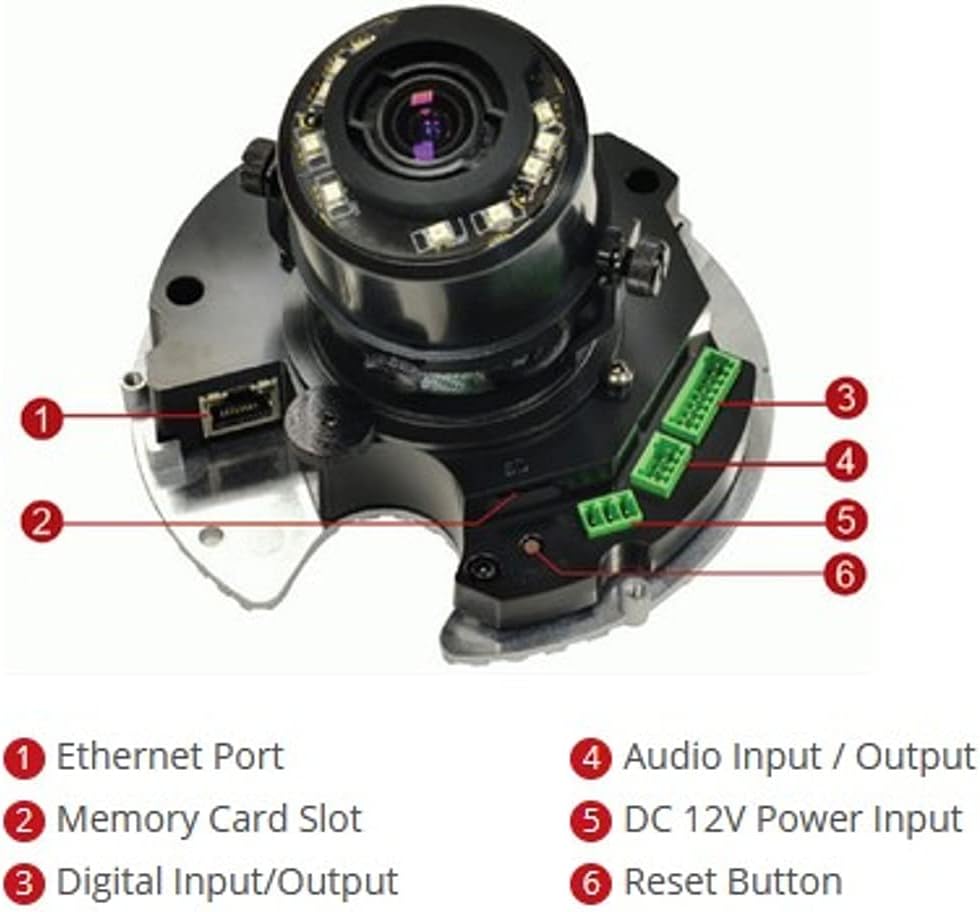
olusin 2: Ti abẹnu view of the ACTi B61 camera with key components labeled.
- 1. Ethernet Port: Fún ìsopọ̀ nẹ́tíwọ́ọ̀kì àti Power over Ethernet (PoE).
- 2. Memory Card Slot: For inserting a Micro SD HC/Micro SDXC card for local storage.
- 3. Digital Input/Output: For connecting external sensors or alarms.
- 4. Audio Input / Output: For connecting an external microphone and speaker.
- 5. DC 12V Power Input: Alternative power input if PoE is not used.
- 6. Tun bọtini: Lo lati mu pada factory aiyipada eto.
4. Eto ati fifi sori
4.1 Iṣagbesori Kamẹra
The ACTi B61 is designed for indoor ceiling mount installation. Ensure the mounting surface is strong enough to support the camera's weight (approximately 1.58 pounds).
- Choose a suitable location on the ceiling for optimal surveillance coverage.
- Use the provided mounting template to mark the drill holes on the ceiling.
- Lu awọn ihò awaoko ki o si fi awọn ìdákọró odi ti o ba jẹ dandan.
- Secure the camera's mounting base to the ceiling using the provided screws.
- Connect necessary cables (Ethernet, power, audio, DI/DO) before fully securing the camera body.
- Adjust the camera's lens angle and zoom as needed.
4.2 Agbara kamẹra
The camera can be powered via Power over Ethernet (PoE) or a 12V DC power adapter.
- Poe: Connect an Ethernet cable from a PoE-enabled switch or injector to the camera's Ethernet port (1).
- DC 12V: Connect a 12V DC power adapter (not included) to the DC 12V Power Input port (5).
Note: Do not connect both PoE and DC 12V power simultaneously.
4.3 Asopọ Nẹtiwọọki
Connect the camera to your network using an Ethernet cable plugged into the Ethernet Port (1). The camera will obtain an IP address automatically via DHCP by default. For initial setup, it is recommended to connect the camera to a network segment where a DHCP server is active.
While the specifications mention Wi-Fi, the primary connection method for this type of surveillance camera is typically wired Ethernet for stability and power (PoE). Refer to the camera's software manual for detailed Wi-Fi configuration if applicable.
4.4 Ni ibẹrẹ Wiwọle ati iṣeto ni
After connecting the camera to the network and powering it on, you can access its web ni wiwo fun iṣeto ni.
- Use the ACTi IP Utility software (typically found on the included CD or ACTi's webAaye) lati ṣawari adiresi IP kamẹra lori nẹtiwọki rẹ.
- Ṣii a web aṣàwákiri (fún àpẹẹrẹ, Chrome, Firefox) kí o sì tẹ àdírẹ́sì IP kámẹ́rà náà sí ibi àdírẹ́sì.
- Log in using the default username and password (refer to the Quick Start Guide or ACTi documentation for default credentials).
- Yi ọrọ igbaniwọle aiyipada pada lẹsẹkẹsẹ fun awọn idi aabo.
- Configure network settings, video streaming parameters, recording options, and other features through the web ni wiwo.
5. Ṣiṣẹ kamẹra
5.1 Live View ati Gbigbasilẹ
Ni kete ti tunto, o le view the live video feed and manage recordings through the camera's web interface or compatible Network Video Recorder (NVR) software.
- Gbe View: Access the "Live View" section in the web interface to see the real-time video feed.
- Gbigbasilẹ: Configure recording schedules, motion detection triggers, and storage locations (Micro SD card, NVR, NAS) via the "Recording" or "Event" settings.
5.2 Video Eto
Adjust video quality, resolution, frame rate, and image settings to suit your surveillance needs.
- Ipinnu: Supports up to 5MP effective still resolution and 1080p video capture resolution at 30 fps.
- Sun-un ati Idojukọ: Utilize the 3x optical zoom and auto-focus features to capture detailed images. These settings are typically adjusted via the web ni wiwo.
- Ipo Ọjọ/Alẹ: The camera automatically switches between day (color) and night (black and white with IR illumination) modes based on ambient light.
5.3 Audio and I/O
If external audio devices or sensors are connected, configure their settings in the camera's web ni wiwo.
- Ohun: Enable audio input for listening and audio output for two-way communication if supported by external devices.
- I/O oni-nọmba: Configure digital inputs to trigger events (e.g., recording, alarm notification) from external sensors, and digital outputs to control external devices.
6. Itọju
6.1 Ninu
Fífọmọ́ déédéé ń ran lọ́wọ́ láti mú kí àwòrán dára síi, ó sì ń mú kí kámẹ́rà náà pẹ́ sí i.
- Gently wipe the camera's dome cover with a soft, damp asọ. Yago fun abrasive ose tabi epo.
- For stubborn dirt, use a mild soap solution. Ensure no liquid enters the camera body.
- Clean the lens with a lens cleaning cloth and solution designed for optical surfaces.
6.2 famuwia imudojuiwọn
Periodically check the ACTi official website for firmware updates. Firmware updates can provide new features, improve performance, and address security vulnerabilities.
- Download the latest firmware for your B61 model from the ACTi support webojula.
- Follow the instructions provided with the firmware update package for a safe upgrade process.
- Warning: Do not power off the camera during a firmware update.
7. Laasigbotitusita
This section addresses common issues you might encounter with your ACTi B61 camera.
| Isoro | Owun to le Fa | Ojutu |
|---|---|---|
| Ko si kikọ sii fidio |
|
|
| Didara aworan ti ko dara |
|
|
| Ko le wọle si web ni wiwo |
|
|
For more detailed troubleshooting, refer to the comprehensive user manual available on the ACTi support website or contact ACTi technical support.
8. Awọn pato
| Ẹya ara ẹrọ | Apejuwe |
|---|---|
| Awoṣe | B61 |
| Ipinnu Iduro ti o munadoko | 5 MP |
| Ipinnu Yaworan fidio | 1080p |
| Iwọn fireemu | 30 fps |
| Lẹnsi | 3x Zoom Lens (3-9mm / F1.2-2.1), DC Iris Auto Focus |
| Sun-un Iru | Sun-un Optical |
| Low Light Technology | Night Color, Adaptive IR |
| Asopọmọra Technology | Alailowaya (Wi-Fi), Alailowaya (Ethernet) |
| Orisun agbara | Corded Electric (PoE/DC12V) |
| Fọọmù ifosiwewe | Dome |
| Iṣagbesori Iru | Oke Oke |
| inu ile / ita gbangba Lilo | Ninu ile |
| International Idaabobo Rating | IK09 (Vandal Resistance), IP54 |
| Awọn iwọn (L x W x H) | 5.7 x 2 x 4.2 inches |
| Iwọn Nkan | 1.58 iwon |
| Flash Memory Iru | Micro SD HC/Micro SDXC |
| Fidio Yaworan kika | H.264, MPEG-4 |
| Olupese | ACTi CORPORATION INC. |
| Àwọ̀ | Funfun |
| UPC | 187441266124 |
9. Atilẹyin ọja ati Support
For detailed warranty information, technical support, and additional resources, please visit the official ACTi webojula tabi kan si wọn onibara iṣẹ Eka.
ACTi Official Webojula: www.acti.com
Please have your product model (B61) and serial number ready when contacting support.


