1. Ifihan ati Loriview
The Tenda TEH1048 is a 48-port 10/100Mbps Ethernet Switch designed for expanding network connectivity in various environments, including small to medium-sized businesses. It provides reliable, high-speed network expansion without requiring complex configuration. The switch features a robust metal casing suitable for rack mounting. It supports non-blocking wire-speed forwarding across all 48 RJ45 ports and includes features like auto MDI/MDI-X crossover detection and flow control for efficient data transmission.
Awọn ẹya pataki:
- Complies with IEEE802.3, IEEE802.3u Ethernet Standards. Offers 48 10/100Mbps Auto-Negotiation RJ45 ports.
- Supports Auto MDI/MDIX to simplify network setup and maintenance.
- Supports NWAY Auto-Negotiation function, automatically detecting transmission rate and duplex modes to choose the best network connectivity.
- Supports IEEE802.3x full-duplex flow control and half-duplex backpressure flow control.
2. Ohun ti o wa ninu Apoti
Jọwọ rii daju pe gbogbo awọn nkan wa ninu package:
- Tenda TEH1048 48-port unmanaged 10/100 Mbps Ethernet switch
- Itọsọna olumulo
- Okun agbara kan
- Two mounting ears
- Awọn skru mẹjọ
- Ẹsẹ roba mẹrin
3. Awọn ilana iṣeto
3.1 Unboxing ati Placement
Carefully remove the switch and all accessories from the packaging. Place the switch on a stable, flat surface or mount it in a standard 19-inch equipment rack using the provided mounting ears and screws. Ensure adequate ventilation around the device to prevent overheating.
3.2 Nsopọ Agbara
- Connect one end of the provided power cord to the power inlet on the rear panel of the TEH1048 switch.
- Plug the other end of the power cord into a standard AC power outlet (100-240V AC, 50/60Hz).
- Rii daju pe LED Power lori iwaju iwaju n tan imọlẹ, ti o nfihan iyipada n gba agbara.
3.3 Àwọn Ẹ̀rọ Nẹ́tíwọ́ọ̀kì Tó Ń Sopọ̀
The TEH1048 is a Plug-and-Play device, requiring no software configuration for basic operation.
- Connect Ethernet cables from your network devices (e.g., computers, servers, network printers, routers) to any of the 48 RJ45 ports on the front panel of the switch.
- The switch's Auto MDI/MDIX feature automatically detects the cable type (straight-through or crossover), so you do not need to use specific cable types for different connections.
- Observe the Link/Act LEDs next to each port. A solid green LED indicates a successful network link, and a blinking LED indicates data activity.
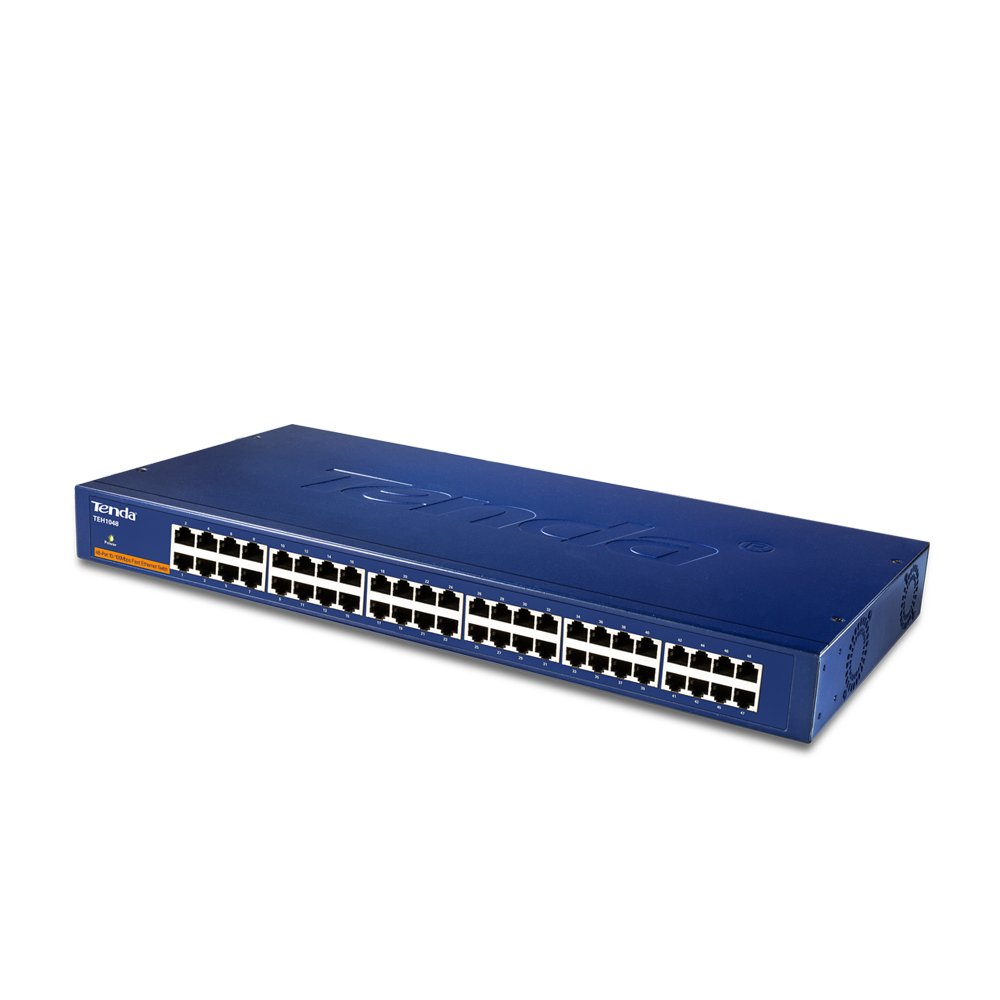
Iwaju view of the Tenda TEH1048 48-Port 10/100Mbps Ethernet Switch. This image displays the front panel of the Tenda TEH1048 switch, highlighting its 48 Ethernet ports, the power indicator LED, and the Tenda logo. The ports are clearly labeled for easy identification.
4. Ṣiṣẹ Yipada
The Tenda TEH1048 is an unmanaged switch, meaning it operates automatically without requiring user configuration. Once powered on and connected to network devices, it begins forwarding data.
4.1 Plug and Play Operation
The switch is designed for immediate use. Simply connect your devices, and the switch will automatically detect their speed (10Mbps or 100Mbps) and duplex mode (half or full) using NWAY Auto-Negotiation. It will then establish the optimal connection.
4.2 LED Atọka
- LED agbara: Itanna nigbati awọn yipada ni agbara lori.
- Awọn LED ọna asopọ/Ofin (fun ibudo):
- Alawọ ewe ri to: Indicates a successful network link.
- Alawọ ewe ti n paju: Indicates data transmission or reception activity on the port.
- Paa: No link detected or device is not connected.
5. Itọju
To ensure optimal performance and longevity of your Tenda TEH1048 switch, follow these maintenance guidelines:
- Ninu: Máa fọ ìta switch náà déédéé pẹ̀lú aṣọ gbígbẹ tí ó rọ̀. Má ṣe lo ohun èlò ìfọmọ́ omi tàbí aerosol.
- Afẹfẹ: Ensure that the ventilation openings are not blocked. Maintain adequate space around the switch for proper airflow.
- Ayika: Operate the switch within its specified temperature and humidity ranges. Avoid exposing it to direct sunlight, excessive heat, or moisture.
- Iṣakoso USB: Keep network cables organized and free from kinks or excessive bending to prevent signal degradation.
6. Laasigbotitusita
If you encounter issues with your Tenda TEH1048 switch, refer to the following common troubleshooting steps:
- Ko si Agbara:
- Check if the power cord is securely connected to both the switch and the power outlet.
- Daju pe iṣan agbara n ṣiṣẹ nipa pilogi sinu ẹrọ miiran.
- Ensure the Power LED on the switch is illuminated.
- Ko si ọna asopọ lori Ibudo kan:
- Ensure the Ethernet cable is securely connected to both the switch port and the network device.
- Check the integrity of the Ethernet cable; try a different cable if necessary.
- Verify that the connected network device is powered on and functioning correctly.
- Confirm that the Link/Act LED for that port is solid green.
- Slow Network Connection:
- Ensure all connected devices are operating at their expected speeds.
- Check for excessive network traffic or bottlenecks upstream (e.g., router, internet connection).
- Verify that cables are not damaged or too long, which can affect performance.
- Asopọmọra igba diẹ:
- Ṣe àyẹ̀wò gbogbo àwọn ìsopọ̀ okùn fún ìfọ́ tàbí ìbàjẹ́.
- Rii daju pe a gbe iyipada si agbegbe ti o ni afẹfẹ daradara lati ṣe idiwọ igbona.
- Consider restarting the switch and connected devices.
7. Awọn pato
| Ẹya ara ẹrọ | Sipesifikesonu |
|---|---|
| Brand | Tenda |
| Nọmba awoṣe | TEH1048 |
| Awọn ibudo | 48 x 10/100Mbps RJ45 Ports |
| Awọn ajohunše | IEEE 802.3, IEEE 802.3u |
| Iṣakoso sisan | IEEE 802.3x (Full-Duplex), Backpressure (Half-Duplex) |
| Mac adirẹsi Table | 4K entries with Learning and Aging |
| MDI/MDIX laifọwọyi | Atilẹyin |
| Agbara Input | AC 100-240V, 50/60Hz |
| Awọn iwọn Ọja (LxWxH) | 12.3 x 4.4 x 44 cm |
| Iwọn Nkan | 3.4 kg |
| Ohun elo ọran | Irin |
| Iṣagbesori | Agbeko-mountable |
8. atilẹyin ọja Information
Tenda products are covered by a limited warranty. The specific terms and duration of the warranty may vary by region and product type. Please refer to the warranty card included with your product or visit the official Tenda webAaye fun alaye atilẹyin ọja alaye ati awọn ilana iforukọsilẹ.
9. Imọ Support
For technical assistance, product inquiries, or to report issues, please contact Tenda customer support. Support resources, including FAQs, firmware updates, and contact information, are typically available on the official Tenda website. When contacting support, please have your product model number (TEH1048) and serial number ready.
Official Tenda Webojula: www.tenda.com.cn


