1. Ifihan
This manual provides essential information for the safe and effective use of your Nexus Revo Stealth Remote Control Rotating Prostate Massager. Please read these instructions thoroughly before first use and retain for future reference. The Nexus Revo Stealth combines a rotating shaft with a perineum vibrator, offering a versatile experience controlled by a wireless remote.
2. Alaye Aabo
- Omi Resistance: The device is water-resistant and can be cleaned with water, but it is not designed to be submerged in water. Submerging the device may cause damage and void the warranty.
- Lubrication: Lo nikan omi-orisun lubricants with this product. Oil-based or silicone-based lubricants may degrade the silicone material over time.
- Ninu: Clean the device thoroughly before and after each use as described in the 'Cleaning and Care' section.
- Ibi ipamọ: Store the device in a cool, dry place, away from direct sunlight and extreme temperatures. Keep out of reach of children.
- Duro Lilo: If you experience any discomfort, pain, or irritation during use, discontinue use immediately. Consult a healthcare professional if symptoms persist.
- Bibajẹ: Do not use the device if it appears damaged or if the silicone is torn.
3. Package Awọn akoonu
Daju pe gbogbo awọn nkan wa ninu apo rẹ:
- 1 x Nexus Revo Stealth Massager
- 1 x Isakoṣo latọna jijin
- 1 x Magnetic Charging Pad
- 1 x Universal USB Charging Cable

Image: The Nexus Revo Stealth massager and its remote control, displayed alongside the product's retail packaging.
4. Eto
4.1 Gbigba agbara akọkọ
Before first use, fully charge your Nexus Revo Stealth. Refer to the 'Charging' section for detailed instructions. The device requires approximately 3.5 hours for a full charge.
4.2 Iṣakoso latọna jijin
The remote control comes with a CR2 battery included. Ensure the battery is correctly inserted. The remote is designed for immediate use once the device is charged.
5. Awọn ilana Iṣiṣẹ
The Nexus Revo Stealth offers dual stimulation with a rotating shaft and a perineum vibrator, controlled wirelessly by the remote.
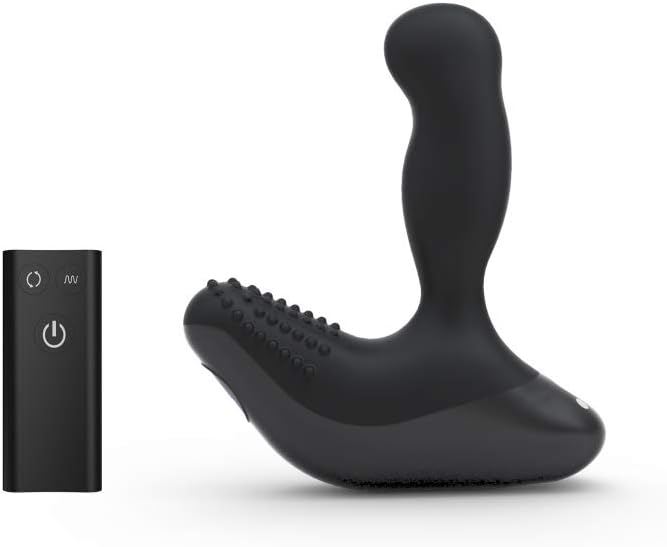
Image: The Nexus Revo Stealth massager and its remote control, illustrating the two main components of the system.
5.1 Agbara Tan / Pa
- To turn on the massager, press and hold the power button on the device or the remote control until the indicator light illuminates.
- To turn off, press and hold the power button again until the light extinguishes.
5.2 Rotation Control
The rotating shaft features 2 speeds. Use the rotation button on the remote control to cycle through the available speeds.
5.3 Vibration Control
The perineum vibrator offers 6 levels of intensity. Use the vibration button on the remote control to select your preferred setting.
5.4 Awọn ọna Apapo
The Nexus Revo Stealth provides a total of 12 unique combinations by mixing the rotation speeds and vibration levels. Experiment with different settings to find your desired experience.
5.5 Remote Control Range
The remote control operates effectively up to 8 meters (approximately 26 feet) from the device, allowing for discreet and convenient control.
Video: An official product video demonstrating the features and operation of the Nexus Revo Stealth massager, including remote control functionality, rotation, and vibration settings. This video provides a visual guide to using the device.
6. Gbigba agbara
The Nexus Revo Stealth is fully rechargeable using the included magnetic charging pad and universal USB cable.
- Connect the USB cable to the magnetic charging pad.
- Attach the magnetic charging pad to the designated charging port on the massager. Ensure a secure connection.
- Plug the USB cable into a compatible power source, such as a PC, Mac, or a USB wall adapter (not included).
- Gbigba agbara ni kikun gba to wakati 3.5 o si pese to wakati 10 ti lilo.

Image: The Nexus Revo Stealth massager shown connected to its magnetic USB charging cable, illustrating the charging method.
7. Ninu ati Itọju
Proper cleaning and care will extend the lifespan of your Nexus Revo Stealth.
- Ṣaaju ati Lẹhin Lilo kọọkan: Clean the massager thoroughly with warm water and a mild, toy-safe soap.
- Rinsin: Rinse the device completely under running water to remove all soap residue.
- Gbigbe: Fi aṣọ tí kò ní ìfọ́ rẹ́ gbẹ tàbí kí o jẹ́ kí afẹ́fẹ́ gbẹ pátápátá kí o tó tọ́jú rẹ̀.
- Maṣe Fi silẹ: As the device is water-resistant, not waterproof, do not submerge it in water.
- Awọn lubricants: Always use water-based lubricants to protect the silicone material.
8. Laasigbotitusita
If you encounter issues with your Nexus Revo Stealth, refer to the following common solutions:
- Ẹrọ Ko Tii: Ensure the device is fully charged. Connect it to the charger for at least 30 minutes before attempting to power on again.
- Iṣakoso Latọna jijin Ko Dahun: Check the battery in the remote control. Replace if necessary. Ensure you are within the 8-meter operating range.
- Weak Performance: A weak rotation or vibration may indicate a low battery. Recharge the device fully.
- Awọn ọran gbigba agbara: Ensure the magnetic charging pad is securely connected to both the device and the USB power source. Try a different USB port or wall adapter.
Ti awọn iṣoro ba tẹsiwaju lẹhin igbiyanju awọn igbesẹ wọnyi, jọwọ kan si atilẹyin alabara.
9. Awọn pato
| Ẹya ara ẹrọ | Ẹ̀kúnrẹ́rẹ́ |
|---|---|
| Nọmba awoṣe | REVOS |
| Awọn iwọn (L x W x H) | 18.5 x 18.2 x 5.3 inches |
| Iwọn | 1.28 iwon |
| Ohun elo | Silikoni, Ṣiṣu |
| Àwọ̀ | Dudu |
| Batiri Iru | Rechargeable (device), 1 CR2 (remote) |
| Akoko gbigba agbara | Isunmọ. wakati meji 3.5 |
| Play Time | Titi di wakati 10 |
| Latọna jijin | Ti o to awọn mita 8 |
10. Atilẹyin ọja ati Support
10.1 Olupese ká atilẹyin ọja
The Nexus Revo Stealth is protected by a one-year manufacturer's warranty from the date of purchase. This warranty covers defects in materials and workmanship under normal use. It does not cover damage caused by misuse, accidents, unauthorized modifications, or failure to follow the instructions in this manual.
10.2 Onibara Support
For warranty claims, technical assistance, or any questions regarding your Nexus Revo Stealth, please contact Nexus customer support through their official website or the retailer where the product was purchased. Please have your proof of purchase and model number (REVOS) ready when contacting support.


