1. Ifihan
This manual provides instructions for the safe and effective use of your Westcott E-14216 00 Manual Pencil Sharpener. This device is designed to sharpen pencils with a diameter ranging from 7mm to 12mm. It features a durable construction and includes a tension clamp for secure table fixture, ensuring stability during operation.

Figure 1: Westcott E-14216 00 Manual Pencil Sharpener, showing the main unit with a pencil inserted.
2. Eto
- Ṣii silẹ: Carefully remove the pencil sharpener from its packaging. Inspect for any damage.
- Table Fixture (Optional): For enhanced stability, the sharpener can be secured to a table or desk using the integrated tension clamp.
- Locate the tension clamp on the sharpener's base.
- Fa clamp lever outwards to open the clamp.
- Position the sharpener on the edge of a table.
- Titari clamp lever inwards to secure the sharpener firmly to the table surface. Ensure it is stable before use.
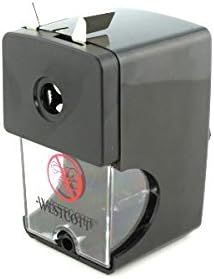
olusin 2: Apa view of the sharpener, illustrating the table tension clamp siseto.
3. Awọn ilana Iṣiṣẹ
Follow these steps to sharpen your pencils:
- Yan Iwọn Ikọwe: The sharpener accommodates pencils with diameters from 7mm to 12mm. Ensure your pencil fits comfortably into the sharpening aperture.
- Fi ikọwe sii: Gently insert the pencil into the sharpening hole on the front of the unit. Push the pencil firmly until it engages with the internal sharpening mechanism.
- Pipọn: While holding the pencil steady, turn the crank handle clockwise. Continue turning until you feel less resistance and the pencil is sharpened to your desired point. The sharpener is designed to stop cutting when the pencil reaches an optimal point, preventing over-sharpening.
- Yọ Ikọwe kuro: Pull the pencil straight out from the sharpening hole.

Figure 3: The pencil sharpener positioned on a desk, demonstrating typical usage with various pencils.
4. Itọju
Regular maintenance ensures optimal performance and longevity of your sharpener.
- Emptying Shavings Tray: The transparent shavings tray should be emptied regularly to prevent clogging.
- Gently pull the transparent tray located at the bottom front of the sharpener to remove it.
- Discard the pencil shavings into a waste bin.
- Slide the tray back into its position until it clicks securely.
- Ninu: Wipe the exterior of the sharpener with a soft, dry cloth. Do not use abrasive cleaners or immerse the unit in water.

olusin 4: Iwaju view of the sharpener, highlighting the transparent shavings collection tray.
5. Laasigbotitusita
| Isoro | Owun to le Fa | Ojutu |
|---|---|---|
| Pẹ́ńsù kì í pọ́n tàbí kí ó pọ́n dáadáa. |
|
|
| Okùn ìdarí pẹ́ńsù máa ń já nígbà gbogbo. |
|
|
| Sharpener slides on table during use. | Tabili clamp not properly secured. | Ensure the tension clamp is fully engaged and tightened to the table surface. |
6. Awọn pato
- Awoṣe: E-14216 00
- Brand: Westcott
- Ibamu Iwọn Ikọwe: 7mm to 12mm
- Àwọ̀: Dudu
- Orisun Agbara: Afowoyi
- Ohun elo: Durable plastic (Note: 'Papel' in source data appears to be an error; product is typically plastic)
- Ìwọ̀n Nkan: 3.17 iwon (nipa 90 giramu)
- Awọn iwọn ọja: 4.61 x 4.37 x 2.56 inches (iwọn 11.7 x 11.1 x 6.5 cm)
- Olupese: Acme United
7. Atilẹyin ọja ati Support
Fun alaye atilẹyin ọja tabi atilẹyin imọ-ẹrọ, jọwọ tọka si osise olupese naa. webojú òpó wẹ́ẹ̀bù tàbí kí o kàn sí ẹ̀ka iṣẹ́ oníbàárà wọn. Pa ìwé ẹ̀rí ìrajà rẹ mọ́ fún gbogbo ẹ̀tọ́ àtìlẹ́yìn.
Olupese: Acme United
Brand Webojula: Visit the Westcott Store on Amazon


