1. Ifihan
The Coby Car Dash Cam (Model DCHD101-V2) is designed to provide reliable video recording of your driving experience. Equipped with a 1080P Full HD camera, 4x digital zoom, and a 140° wide-angle lens, it captures clear footage. Key features include LED night vision, automatic motion detection, and G-sensor collision detection for enhanced security. The device features a 2.7-inch LCD screen for on-spot playback and supports MicroSD cards up to 32GB.
This manual provides detailed instructions for the proper installation, operation, and maintenance of your Coby Car Dash Cam to ensure optimal performance and longevity.
2. Ohun ti o wa ninu Apoti
- Coby Car Dash Cam Unit
- Afamora Oke
- Ṣaja ọkọ ayọkẹlẹ (Okun Alagbara)
- Okun USB
- Afowoyi Olumulo (iwe-ipamọ yii)
3. Ọja Ipariview
Familiarize yourself with the components and controls of your Coby Car Dash Cam.
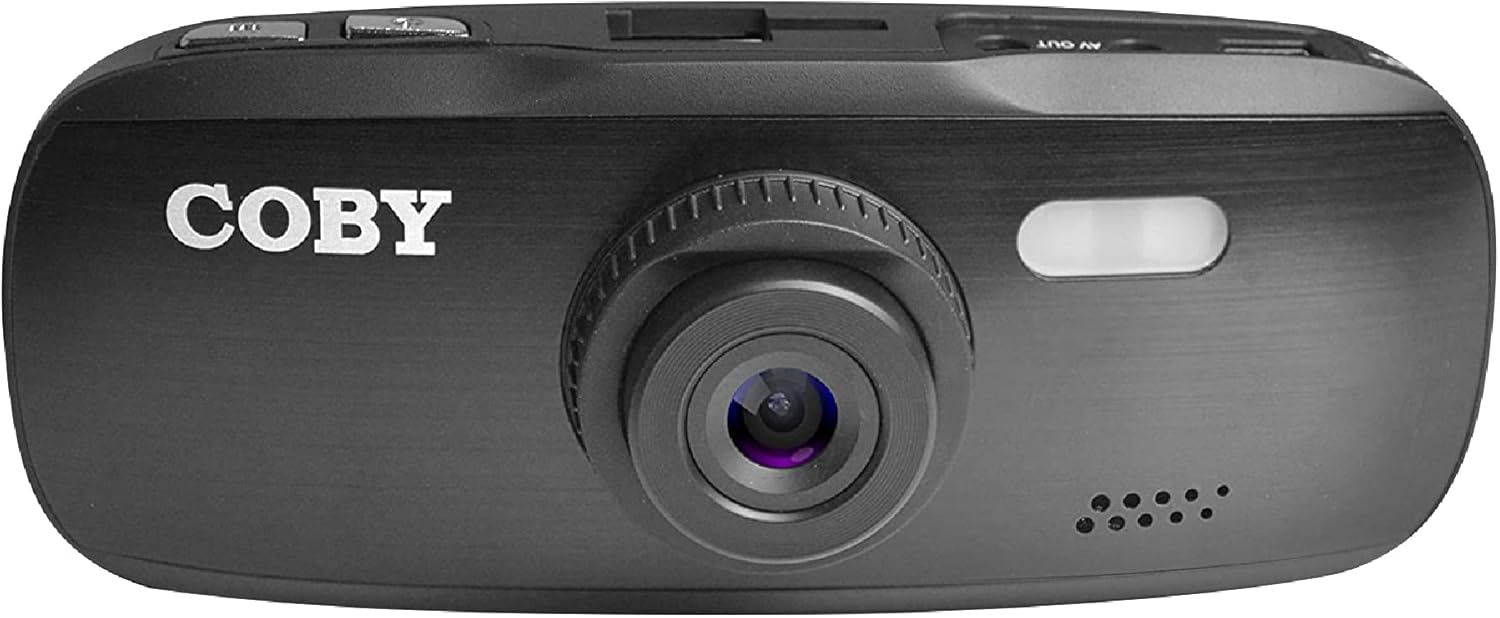
olusin 3.1: Iwaju View of the Dash Cam. This image displays the front of the Coby dash cam, highlighting the main camera lens and the Coby brand logo.

olusin 3.2: Ẹyìn View with LCD Screen and Controls. The back of the dash cam is shown, featuring the 2.7-inch LCD screen displaying a scenic road, flanked by control buttons on both sides.

olusin 3.3: Apa View with Ports and Slots. This image illustrates the side of the dash cam, detailing the MicroSD card slot, AV Out port, and Micro USB port for connectivity.
3.1. Irinše ati idari
- Lẹnsi kamẹra: Main lens for video recording.
- Iboju LCD: 2.7-inch display for live view, šišẹsẹhin, ati lilọ kiri akojọ aṣayan.
- Bọtini agbara: Yipada ẹrọ si tan/pa.
- Bọtini Akojọ: Ó ń wọlé sí àwọn ètò ètò.
- Bọtini Ipo: Switches between video recording, still photo, and playback modes.
- Bọtini REC: Bẹrẹ/duro gbigbasilẹ fidio duro.
- Awọn bọtini oke/isalẹ: Navigate menu options and adjust settings.
- Iho kaadi MicroSD: Insert your MicroSD card (up to 32GB, Class 10 recommended).
- Ibudo USB Micro: For power supply and data transfer to a computer.
- AV Out Port: Fun asopọ si ifihan ita.
- Agbọrọsọ/gbohungbohun: Fun gbigbasilẹ ohun ati ṣiṣiṣẹsẹhin.
4. Eto
4.1. Installing the Suction Mount
- Clean the windshield area where you intend to mount the dash cam. Ensure it is free of dust and grease for optimal suction.
- Attach the suction mount to the dash cam by sliding it into the top mount slot until it clicks securely.
- Press the suction cup firmly against the cleaned windshield and push down the lever on the mount to secure it.
- Ṣatunṣe igun kamẹra dash lati rii daju pe o mọ view ti opopona wa niwaju, yago fun idiwo lati ẹhinview mirror or other vehicle components.

Figure 4.1: Dash Cam Mounted in a Vehicle. This image shows the dash cam securely mounted on the windshield, providing a clear view of the road from the driver's seat.
4.2. Fifi kaadi MicroSD sii
- Wa iho kaadi MicroSD ni ẹgbẹ kamẹra dashboard naa.
- Insert a Class 10 or higher MicroSD card (up to 32GB) into the slot with the gold contacts facing the back of the camera until it clicks into place.
- Lati yọọ kuro, tẹ kaadi naa rọra titi yoo fi jade.
- Akiyesi: It is recommended to format the MicroSD card within the dash cam before first use and periodically thereafter to ensure stable recording.
4.3. Asopọ agbara
- Connect the provided car charger to the Micro USB port on the dash cam.
- So ìkángun kejì ti ẹ̀rọ amúlétutù ọkọ̀ náà mọ́ ibi tí agbára 12V ti ọkọ̀ rẹ wà (ìhò tí ó ń tàn sígá).
- The dash cam is designed to automatically power on and begin recording when the vehicle's ignition is turned on, and power is supplied. It will also automatically power off shortly after the ignition is turned off.
5. Awọn ilana Iṣiṣẹ
5.1. Ipilẹ Gbigbasilẹ
- Once powered on, the dash cam will automatically start recording in a continuous loop.
- The recording indicator (usually a red dot or flashing icon) will appear on the screen.
- To manually stop recording, press the REC button. Press it again to resume recording.
- Gbigbasilẹ Loop: The dash cam records video in segments (e.g., 1, 3, or 5 minutes). When the MicroSD card is full, the oldest unlocked files yoo wa ni kọ nipa titun gbigbasilẹ.
5.2. G-Sensor (Emergency Recording)
- The built-in G-sensor detects sudden movements, such as hard braking, impacts, or sharp turns.
- When triggered, the current video segment will be automatically locked and saved to prevent it from being overwritten by loop recording.
- These locked files are typically stored in a separate folder on the MicroSD card (e.g., "EVENT" or "EMERGENCY").
5.3. išipopada erin
- When enabled in the settings, the dash cam can automatically start recording when motion is detected in front of the lens, even when the vehicle is parked.
- This feature is useful for monitoring your vehicle while it is stationary.
- Akiyesi: Continuous use of motion detection while parked may drain your vehicle's battery if not connected to a constant power source or a dedicated hardwire kit.
5.4. Menu Settings and Playback
- Wiwọle Akojọ: While not recording, press the Akojọ bọtini lati tẹ awọn eto akojọ.
- Akojọ Lilọ kiri: Lo awọn Up ati Isalẹ arrow buttons to scroll through options.
- Yiyan Awọn aṣayan: Tẹ awọn REC button (often functions as OK/Confirm) to select an option or enter a sub-menu.
- Ijade Akojọ: Tẹ awọn Akojọ bọtini lẹẹkansi lati jade kuro ni akojọ aṣayan.
- Awọn ọna Yipada: Tẹ awọn MODE button to switch between Video Recording, Still Photo, and Playback modes.
- Sisisẹsẹhin: Nínú ipò ìṣiṣẹ́padà, lo Up ati Isalẹ awọn bọtini lati yan a file, lẹhinna tẹ REC lati mu ṣiṣẹ.
- Ọjọ/Aago Stamp: Ensure the date and time are correctly set in the menu for accurate recording timestamps.
6. Itọju
- Ninu awọn lẹnsi ati iboju: Use a soft, lint-free cloth to gently wipe the camera lens and LCD screen. Avoid abrasive materials or chemical cleaners that could damage the surfaces.
- Iṣakoso kaadi MicroSD:
- Format the MicroSD card regularly (e.g., once a month) using the dash cam's format function. This helps maintain card performance and prevents data corruption.
- Replace the MicroSD card periodically (e.g., every 6-12 months, depending on usage) as continuous overwriting can degrade its lifespan.
- Awọn akiyesi iwọn otutu: Avoid exposing the dash cam to extreme temperatures for prolonged periods. High temperatures can affect battery life and device performance.
7. Laasigbotitusita
| Isoro | Owun to le Fa | Ojutu |
|---|---|---|
| Kamẹra Dash ko ni agbara lori. | No power supply; low internal battery; faulty power cable. |
|
| Dash cam turns off unexpectedly or overheats. | Poor power connection; faulty MicroSD card; extreme ambient temperature. |
|
| "Card Error" or "Please Insert Card" message. | MicroSD card not inserted correctly; card corrupted; incompatible card. |
|
| Cannot access menu settings or buttons unresponsive. | Device is recording; temporary software glitch. |
|
| Suction mount does not stick. | Dirty windshield; cold temperature; worn suction cup. |
|
8. Awọn pato
| Ẹya ara ẹrọ | Ẹ̀kúnrẹ́rẹ́ |
|---|---|
| Orukọ awoṣe | DCHD101 |
| Nọmba Awoṣe Nkan | DCHD101-V2 |
| Ipinnu Yaworan fidio | 1080p Full HD (30 FPS), 720p (60 FPS) |
| Kẹ́mẹ́rà Megapiksẹli | 5.0 Megapiksẹli |
| Igun lẹnsi | 140 Ìyí Wide Angle |
| Digital Sisun | 4x |
| Ifihan Iru | 2.7" HD Wide Screen LCD |
| Atilẹyin ipamọ | Up to 32GB MicroSDHC card (not included) |
| Pataki Awọn ẹya ara ẹrọ | G-Sensor, Loop Recording, LED Night Vision, Automatic Motion Detection |
| Iṣagbesori Iru | Afamora Oke |
| Asopọmọra Technology | Auxiliary (Micro USB, AV Out) |
| Iwọn Nkan | 3.2 iwon |
| Ọja Mefa | 4.3 x 1.3 x 1.8 inches |
| Olupese | Summit Electronics, LLC |
9. Atilẹyin ọja ati Support
9.1. atilẹyin ọja Information
This Coby Car Dash Cam (Model DCHD101-V2) comes with a 30-day manufacturer's warranty Láti ọjọ́ tí a rà á. Àtìlẹ́yìn yìí bo àwọn àbùkù nínú àwọn ohun èlò àti iṣẹ́ ọwọ́ lábẹ́ lílò déédéé. Kò bo ìbàjẹ́ tí ó wáyé nípasẹ̀ ìlòkulò, jàmbá, àtúnṣe tí a kò fún ní àṣẹ, tàbí àwọn okùnfà láti òde.
Jọwọ ṣe idaduro ẹri rira rẹ fun awọn iṣeduro atilẹyin ọja.
9.2. Onibara Support
For technical assistance, troubleshooting, or warranty inquiries, please contact Coby customer support. You may find contact information on the official Coby webaaye tabi nipasẹ alagbata ti o ti ra ọja naa.
You can also visit the official Coby store on Amazon for more information and product updates: Coby Amazon Store.


