1. Ifihan
Thank you for choosing the Philips Daily HD7462/20 Filter Coffee Maker. This manual provides essential information for the safe and efficient use, maintenance, and troubleshooting of your appliance. Please read these instructions carefully before first use and keep them for future reference.
This coffee maker is designed to brew delicious filter coffee with features like Aroma Swirl for optimal taste, a generous 1.2-liter capacity, and a convenient drip-stop system.
2. Alaye Aabo pataki
- Ka gbogbo awọn itọnisọna ṣaaju ṣiṣe ẹrọ.
- Maṣe fi ohun elo, okun, tabi pulọọgi sinu omi tabi omi miiran.
- Ohun elo yii kii ṣe ipinnu fun lilo nipasẹ awọn eniyan (pẹlu awọn ọmọde) pẹlu idinku ti ara, imọlara tabi awọn agbara ọpọlọ, tabi aini iriri ati imọ, ayafi ti wọn ba ti fun wọn ni abojuto tabi itọnisọna nipa lilo ohun elo nipasẹ eniyan ti o ni iduro fun aabo wọn.
- Awọn ọmọde yẹ ki o wa ni abojuto lati rii daju pe wọn ko ṣere pẹlu ohun elo naa.
- Yọọ kuro lati inu iṣan nigbati ko si ni lilo ati ṣaaju ṣiṣe mimọ. Gba laaye lati tutu ṣaaju fifi sii tabi mu awọn ẹya kuro, ati ṣaaju ki o to nu ohun elo naa.
- Ma ṣe ṣiṣẹ ohun elo eyikeyi pẹlu okun ti o bajẹ tabi pulọọgi tabi lẹhin aiṣe ohun elo, tabi ti bajẹ ni eyikeyi ọna.
- The heating plate remains hot after brewing. Avoid contact with hot surfaces.
- Always ensure the carafe lid is properly closed during brewing to prevent hot water or steam from escaping.
- Use only the original carafe provided with the appliance.
3. Ọja Ipariview
Familiarize yourself with the components of your Philips Daily HD7462/20 Filter Coffee Maker.

Figure 1: Philips Daily HD7462/20 Filter Coffee Maker, front view with coffee brewing.
- Omi ifiomipamo: For filling with fresh water. Features a clear level indicator.
- Ideri: Covers the water reservoir and filter holder.
- Dimu Ajọ: Removable basket for holding the coffee filter and ground coffee.
- Aroma Swirl Nozzle: Distributes coffee evenly in the carafe for optimal aroma.
- Gilasi Carafe: With a capacity of 1.2 liters (15 cups).
- Awo alapapo: Ntọju kọfi brewed gbona.
- Agbara Yi pada: On/Off button with an indicator light.
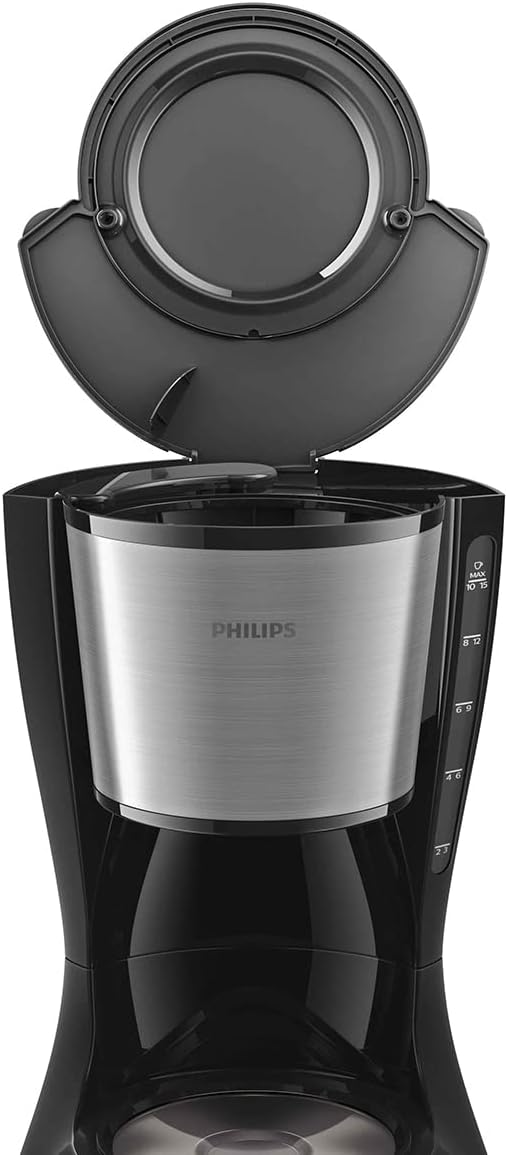
olusin 2: Top view of the coffee maker with the lid open, revealing the water reservoir and filter basket area.
4. Eto
4.1 Ṣiṣii silẹ
Carefully remove all packaging materials from the coffee maker. Ensure all parts are present and undamaged. Dispose of packaging responsibly.
4.2 First Lo Cleaning
Before brewing coffee for the first time, clean the appliance to remove any manufacturing residues:
- Fi omi tutu tutu kun ibi ipamọ omi naa titi de ipele ti o ga julọ.
- Place an empty paper filter (size 1x4 or similar) into the filter holder.
- Place the empty glass carafe with its lid on the heating plate.
- Press the power switch to start a brewing cycle with only water.
- Once the cycle is complete, discard the water and rinse the carafe and filter holder.
4.3 Ibi
Place the coffee maker on a stable, flat, heat-resistant surface, away from water sources and direct heat. Ensure there is adequate space around the appliance for ventilation.
5. Awọn ilana Iṣiṣẹ
5.1 Pipọnti kofi
- Kun Ibi ipamọ omi: Open the lid and fill the water reservoir with fresh, cold water. Use the water level indicator on the side of the appliance to measure the desired number of cups (up to 1.2 liters or 15 cups).
- Add Coffee Filter: Place a paper filter (e.g., size 1x4) into the filter holder.
- Ṣafikun Kofi Ilẹ: Add the desired amount of ground coffee into the filter. A general guideline is one level scoop (approximately 7g) per cup, but adjust to your taste.
- Ideri pipade: Pa ideri naa ni aabo.
- Ibi Carafe: Rii daju pe carafe gilasi pẹlu ideri ti wa ni deede ti a gbe sori awo alapapo.
- Bẹrẹ Pipọnti: Plug the appliance into a power outlet. Press the power switch. The indicator light will illuminate, and the brewing process will begin.
- Drip-Stop Function: The drip-stop system allows you to temporarily remove the carafe during brewing to pour a cup of coffee. The flow of coffee will stop automatically. Return the carafe to the heating plate within 20 seconds to prevent overflow.
- Aroma Swirl: During brewing, the Aroma Swirl nozzle inside the carafe will circulate the coffee, ensuring an optimal and consistent aroma throughout the entire pot.
- Tiipa aifọwọyi: For safety and energy saving, the coffee maker will automatically switch off approximately 30 minutes after the brewing cycle is complete. The indicator light will turn off.
5.2 Lẹ́yìn tí a ti ṣe iṣẹ́ mímu
Once brewing is complete, the heating plate will keep the coffee warm until the automatic shut-off activates. To turn off the appliance manually, press the power switch again.
6. Ninu ati Itọju
6.1 Daily Cleaning
- Yọọ alagidi kọfi nigbagbogbo ki o jẹ ki o tutu patapata ṣaaju ṣiṣe mimọ.
- Remove the filter holder and discard the used coffee filter and grounds.
- Wash the glass carafe and filter holder in warm, soapy water. Rinse thoroughly and dry. These parts are generally dishwasher-safe (top rack).
- Mu ese ita ohun elo naa pẹlu asọ, damp asọ. Maṣe lo awọn aṣoju afọmọ abrasive tabi awọn scourers.
- Ma ṣe fi ẹya akọkọ sinu omi tabi omi miiran.
6.2 Nipasẹ
Regular descaling is crucial to maintain optimal performance and extend the lifespan of your coffee maker. The frequency depends on water hardness and usage, but generally every 2-3 months is recommended.
- Prepare a descaling solution according to the manufacturer's instructions (e.g., white vinegar and water, or a commercial descaler).
- Pour the descaling solution into the water reservoir up to the MAX level.
- Gbe awọn sofo carafe lori alapapo awo.
- Start a brewing cycle. After about half of the solution has run through, switch off the appliance and let it soak for 15-20 minutes.
- Switch the appliance back on to complete the brewing cycle.
- After descaling, run at least two full cycles with fresh, cold water to rinse the appliance thoroughly and remove any residual descaler taste.
7. Laasigbotitusita
Ti o ba pade awọn ọran pẹlu oluṣe kọfi rẹ, tọka si awọn iṣoro ati awọn solusan ti o wọpọ wọnyi:
| Isoro | Owun to le Fa | Ojutu |
|---|---|---|
| Kofi ko ni pọnti. | No power; water reservoir empty; appliance not switched on. | Check power connection; fill water reservoir; press the power switch. |
| Coffee is weak or tastes bad. | Insufficient coffee grounds; incorrect grind size; appliance needs descaling. | Add more coffee; use medium grind; descale the appliance. |
| Coffee overflows from the filter holder. | Too much coffee grounds; filter holder clogged; carafe not placed correctly. | Reduce coffee amount; clean filter holder; ensure carafe is fully seated. |
| Omi n jo lati inu ohun elo naa. | Water reservoir overfilled; components not assembled correctly. | Do not exceed MAX fill line; reassemble filter holder and carafe properly. |
Ti iṣoro naa ba wa lẹhin igbiyanju awọn solusan wọnyi, jọwọ kan si atilẹyin alabara.
8. Awọn pato
- Nọmba awoṣe: HD7462/20
- Agbara: 1000 Wattis
- Voltage: 220V
- Agbara: 1.2 Lita (ago 15)
- Ohun elo: Irin
- Àwọ̀: Dudu / fadaka
- Awọn iwọn (L x W x H): 6 x 19 x 14 cm
- Ìwúwo: 2.13 kilo
- Awọn ẹya: Aroma Swirl, Drip-stop system, Automatic shut-off
9. Atilẹyin ọja ati Support
9.1 atilẹyin ọja
This Philips appliance comes with a standard manufacturer's warranty. Please refer to the warranty card included in your product packaging or visit the official Philips website for detailed warranty terms and conditions applicable in your region. Keep your proof of purchase for warranty claims.
Spare parts are generally available for a period of 2 years from the date of purchase.
9.2 Onibara Support
Fun iranlọwọ siwaju sii, iforukọsilẹ ọja, tabi lati wa awọn idahun si awọn ibeere igbagbogbo, jọwọ ṣabẹwo si atilẹyin osise Philips website or contact their customer service helpline. Contact details can typically be found on the Philips webaaye tabi ninu iwe ọja rẹ.
Atilẹyin Ayelujara: www.philips.com/support


