1. Ifihan
This manual provides essential information for the safe and efficient operation of your COTEC SP2000-224 Pure Sine Wave Inverter. This advanced inverter offers high efficiency and power density, featuring selectable output voltage and frequency, all housed within a robust aluminum casing. Please read this manual thoroughly before installation and use to ensure proper function and longevity of the device.
2. Alaye Aabo
Always observe the following safety precautions to prevent injury and damage to the inverter or connected equipment:
- Afẹfẹ: Rí i dájú pé afẹ́fẹ́ tó péye wà ní àyíká inverter. Má ṣe dí àwọn ihò afẹ́fẹ́.
- Ayika: Install the inverter in a dry, cool, and well-ventilated area, away from direct sunlight, heat sources, and flammable materials.
- Ilẹ: Properly ground the inverter chassis to prevent electrical shock.
- Input DC: Connect the inverter only to a 24V DC battery bank. Ensure correct polarity (positive to positive, negative to negative). Reverse polarity will damage the unit.
- Ijade AC: Do not overload the inverter. Ensure the total wattage of connected AC devices does not exceed the inverter's rated output.
- Ṣiṣẹ: Do not attempt to open or service the inverter yourself. Refer all servicing to qualified personnel.
- Ifihan omi: Keep the inverter away from water, rain, or excessive moisture.
3. Awọn ẹya Ọja
The COTEC SP2000-224 Inverter incorporates several advanced features for reliable power conversion:
- Ìjáde ìgbì omi sínì mímọ́ fún àwọn ẹ̀rọ itanna onímọ̀lára.
- Power ON / OFF remote control capability via a dedicated green terminal.
- Full input and output isolation for enhanced safety.
- Temperature and load-controlled cooling fan for efficient heat dissipation.
- User-friendly interface with 3-color LED status indicators.
- Output frequency selectable between 50 Hz and 60 Hz via DIP switch.
- O wu voltage selectable via DIP switch.
- Power saving mode adjustable via a variable resistor.
- Comprehensive input protection: Reverse Polarity (via fuse), Under Voltage, Lori Voltage.
- Comprehensive output protection: Short Circuit, Overload, Over Temperature.
- Certifications: E13, UL, CE, FCC approved.
4. Eto ati fifi sori
Fifi sori ẹrọ to peye ṣe pataki fun iṣẹ ati aabo inverter naa.
4.1 Fifi sori ti ara
Mount the inverter securely in a location that meets the safety requirements mentioned in Section 2. Ensure sufficient space around the unit for airflow.
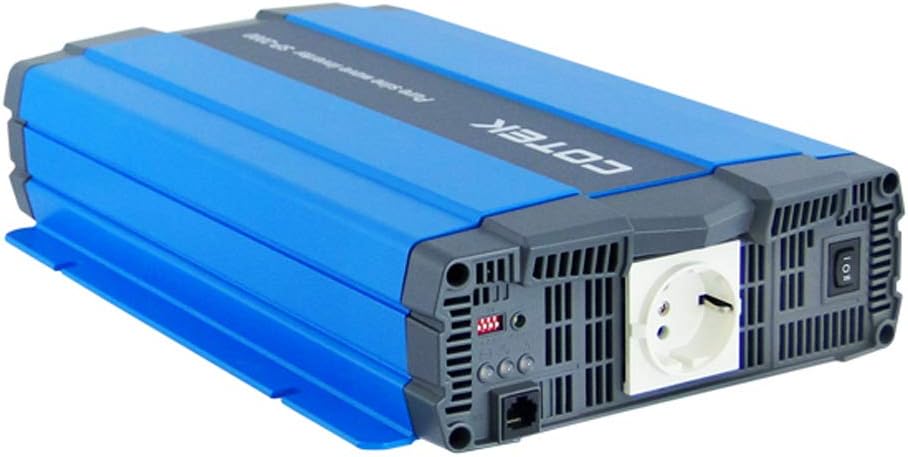
Nọmba 4.1: Igun view of the COTEC SP2000-224 Pure Sine Wave Inverter, showcasing its robust blue and gray casing.
4.2 DC Input Asopọ
Connect the inverter to a 24V DC battery bank using appropriate gauge cables. Ensure the positive (+) terminal of the inverter connects to the positive terminal of the battery, and the negative (-) terminal of the inverter connects to the negative terminal of the battery. Install an appropriate fuse or circuit breaker in the positive DC line close to the battery.

Nọmba 4.2: Ẹyìn view of the inverter, highlighting the DC input terminals (red for positive, black for negative), the chassis ground screw, and the remote control terminal.
4.3 Chassis Ground Connection
Connect the chassis ground terminal (labeled 'CHASSIS GROUND') to a reliable earth ground point. This is a critical safety step.
4.4 AC Output and Controls
The inverter features a standard AC outlet and control switches on its front panel.

Nọmba 4.3: Iwaju view of the inverter, displaying the AC output socket, the main power switch, LED indicators, and DIP switches for configuration.
4.5 DIP Yipada Eto
The inverter features DIP switches for configuring output frequency and voltage. Refer to the specifications table (Section 7) or the product label for specific settings. Ensure the inverter is powered off before adjusting DIP switches.
- Igbohunsafẹfẹ Ijade: Select 50 Hz or 60 Hz based on your regional requirements.
- O wujade Voltage: Yan awọn ti o fẹ AC o wu voltage (e.g., 230VAC for this model).
5. Awọn ilana Iṣiṣẹ
5.1 Titan / Pa a
After all connections are secure and verified, switch the main power button on the inverter to the 'ON' position. The LED indicators will illuminate to show the inverter's status. To power off, switch the button to 'OFF'. A remote control terminal is also available for external ON/OFF control.
5.2 LED Atọka
The 3-color LED indicators provide visual feedback on the inverter's operational status and any potential faults. Consult the product documentation or the specifications table for a detailed explanation of each LED state.
5.3 Ipo Ifipamọ Agbara
The power saving mode can be adjusted via a variable resistor. This feature helps reduce quiescent current draw when no load or a very light load is connected, conserving battery power.
5.4 Nsopọ AC èyà
Plug your AC appliances into the inverter's AC output socket. Ensure the total power consumption does not exceed the inverter's continuous power rating (2000W for this model). For inductive loads (e.g., motors, refrigerators), consider their surge power requirements, which can be significantly higher than their running power.
6. Itọju
Regular maintenance ensures optimal performance and extends the lifespan of your inverter.
- Ninu: Jẹ́ kí inverter náà mọ́ tónítóní kí ó má sì jẹ́ eruku. Lo aṣọ gbígbẹ láti nu ìta rẹ̀. Má ṣe lo àwọn ohun èlò ìfọmọ́ omi.
- Afẹfẹ: Periodically check that the cooling fan and ventilation openings are clear of obstructions.
- Awọn isopọ: Inspect all DC and AC connections regularly to ensure they are tight and free from corrosion. Loose connections can cause overheating and poor performance.
- Itọju Batiri: Follow the manufacturer's recommendations for your battery bank's maintenance.
7. Laasigbotitusita
If the inverter is not functioning correctly, refer to the following common issues and solutions:
- Ko si Agbara Ijade:
- Check DC input connections and battery voltage.
- Verify the inverter's power switch is ON.
- Check for blown DC input fuses (if applicable).
- Itọkasi apọju:
- Dín gbogbo ẹrù tí a so mọ́ inverter kù.
- Disconnect and reconnect the load to reset the inverter.
- Over Temperature Indication:
- Rii daju pe afẹfẹ to peye ni ayika inverter naa.
- Check if the cooling fan is operating.
- Reduce the load if operating in a hot environment.
- Batiri Kekere Voltage Alarm/Shutdown:
- Tun batiri banki gba agbara.
- Check battery connections for looseness or corrosion.
For persistent issues, contact COTEC customer support.
8. Awọn pato
The following table details the technical specifications for the COTEC SP2000 series, with specific values for the SP2000-224 model highlighted where applicable.

Nọmba 8.1: Detailed technical specifications for the COTEC SP-2000 series, including the SP2000-224 model.
| Ẹya ara ẹrọ | Sipesifikesonu |
|---|---|
| Brand | COTEK |
| Orukọ awoṣe | SP2000 (SP2000-224 variant) |
| Ti won won Agbara | 2000W |
| Surge Power (1 Sec) | 4000W |
| DC Input Voltage | 24VDC (Operating Range: 21.0-33.0VDC) |
| AC wu Voltage | 230VAC (selectable) |
| Igbohunsafẹfẹ Ijade | 50/60 Hz (a yan) |
| Iwajade Waveform | Pure Sine Wave (THD<3% at nominal load) |
| Iṣiṣẹ (Max) | 93% |
| Itutu agbaiye | Temperature & load controlled fan |
| Awọn iwọn otutu ti nṣiṣẹ | -20°C si +40°C |
| Ibi ipamọ otutu | -30°C si +70°C |
| Awọn iwọn (W x H x D) | 17.44 x 9.76 x 3.27 inches (443 x 248 x 83 mm) |
| Iwọn Nkan | 1 pounds (approximate, actual unit weight may vary) |
| Package Mefa | 19 x 12 x 6 inches |
| Awọn iwe-ẹri | E13, UL, CE, FCC approved |
8.1 darí Yiya
For detailed physical dimensions and mounting information, refer to the mechanical drawings below.
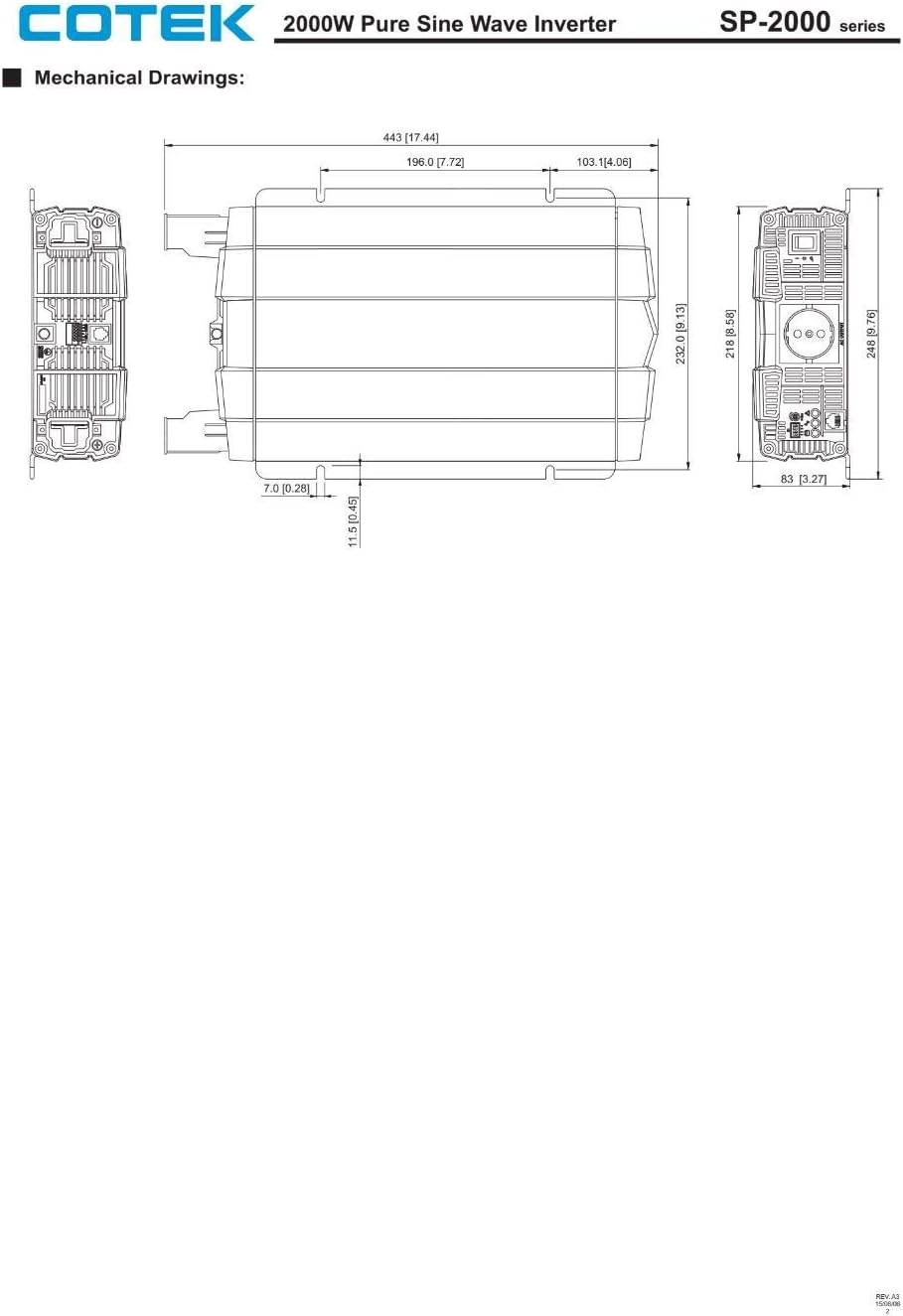
Nọmba 8.2: Mechanical drawings providing precise dimensions for installation planning.
9. Atilẹyin ọja ati Support
COTEC products are designed for reliability and performance. For warranty information, technical support, or service inquiries, please refer to the warranty card included with your product or visit the official COTEC webojula. Tọju iwe-ẹri rira rẹ bi ẹri rira fun awọn iṣeduro atilẹyin ọja.