Ọrọ Iṣaaju
The Electro-Harmonix Super Pulsar is an advanced stereo tap tremolo pedal offering extensive control over modulation waveforms, rhythmic patterns, and signal routing. This manual provides detailed instructions for setup, operation, and maintenance to help you unlock its full potential.
Package Awọn akoonu
- Electro-Harmonix Super Pulsar Stereo Tap Tremolo Pedal
- 9.6VDC-200mA Power Adapter
- Itọsọna olumulo

Image: The Electro-Harmonix Super Pulsar pedal box, indicating the product packaging.
Ọja Pariview
The Super Pulsar features a comprehensive control panel and versatile input/output options.

Image: The Electro-Harmonix Super Pulsar pedal connected with input and output cables, showcasing its front panel controls and jacks.
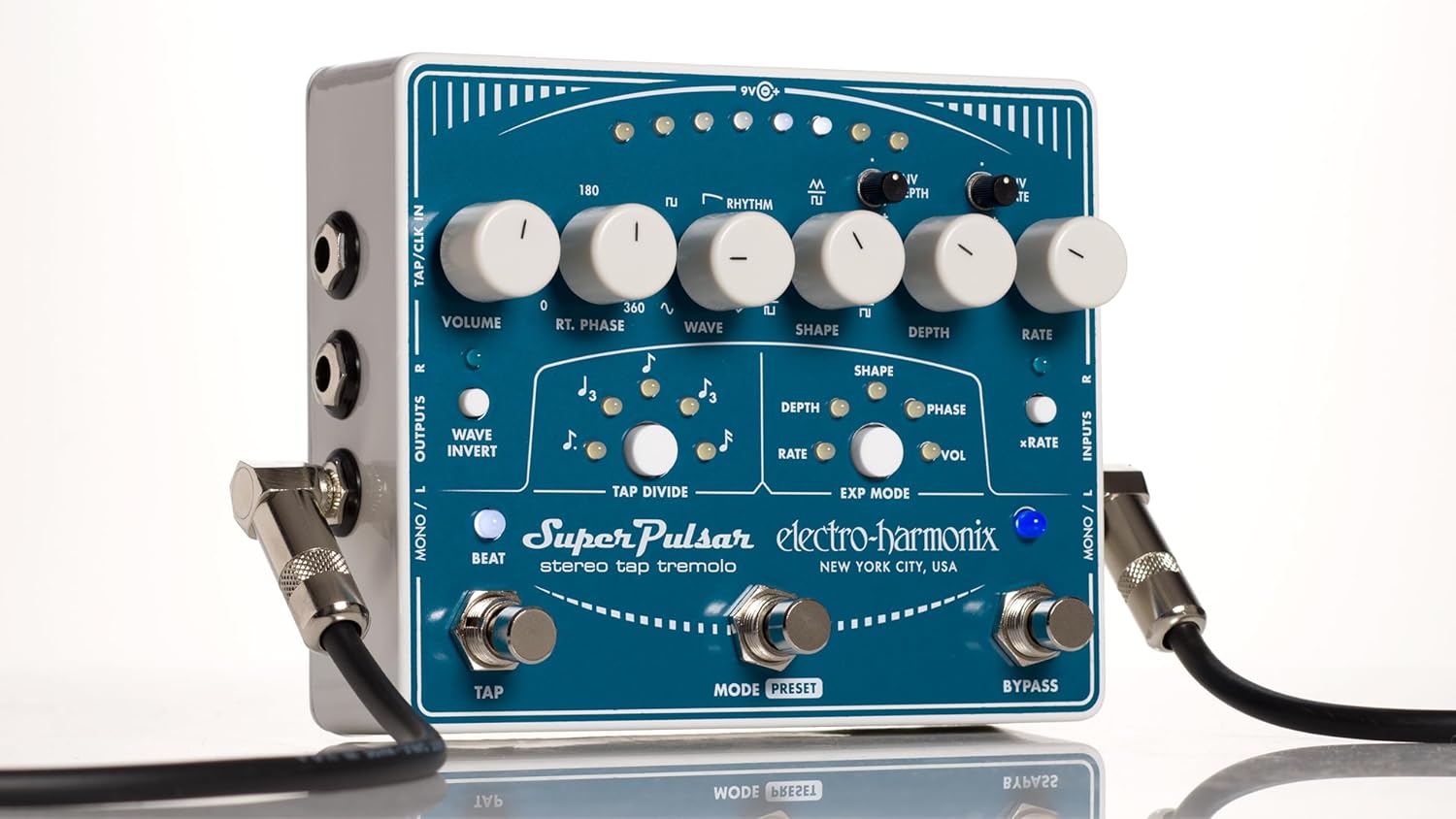
Aworan: A alaye oke-isalẹ view of the Electro-Harmonix Super Pulsar pedal, highlighting all knobs, switches, and LED indicators.
Ṣeto
Asopọ agbara
Connect the included 9.6VDC-200mA power adapter to the 9V jack on the pedal. Ensure the power source matches the pedal's requirements.
Audio Awọn isopọ
- Mono Input/Output: For standard mono operation, connect your instrument to the MONO/L INPUT and your amplifier to the MONO/L OUTPUT.
- Ijade Sitẹrio: For stereo effects, connect your instrument to the MONO/L INPUT and connect two amplifiers or channels to the MONO/L OUTPUT and R OUTPUT.
- Stereo Input/Output: For full stereo processing, connect your stereo source to the MONO/L INPUT and R INPUT, and connect to your stereo amplifier setup via the MONO/L OUTPUT and R OUTPUT.
External Control (Optional)
The pedal supports external tap tempo and clock synchronization via the TAP/CLK IN jack. An expression pedal can be connected to the EXP jack for real-time control over various parameters.
Awọn ilana Iṣiṣẹ
Awọn Iṣakoso Loriview
- KỌRỌ IWỌRỌ: Adjusts the overall output level of the tremolo effect.
- RT. PHASE Knob: Controls the phase relationship between the left and right channels in stereo modes, from 0 to 360 degrees.
- WAVE Knob: Selects the modulation waveform (sine, triangle, pulse) or rhythmic patterns.
- SHAPE Knob: Modifies the shape of the selected waveform.
- Kọ́nì jíjìn: Adjusts the intensity or depth of the tremolo effect.
- KỌRỌ RATE: Sets the speed of the tremolo modulation.
- ENV DEPTH Mini-Knob: Controls the sensitivity of the envelope follower for depth modulation.
- ENV RATE Mini-Knob: Controls the sensitivity of the envelope follower for rate modulation.
- WAVE INVERT Switch: Inverts the tremolo waveform.
- BEAT Switch: Toggles the beat indicator LED.
- TAP DIVIDE Buttons: Select rhythmic subdivisions for tap tempo.
- EXP MODE Switches: Assigns the expression pedal to control SHAPE, DEPTH, RATE, PHASE, or VOL.
- xRATE Switch: Engages a high-speed mode for ring modulation effects.
Footswitch Functions
- TAP Ẹsẹ ẹlẹsẹ: Tap twice or more to set the tremolo rate.
- MODE/PRESET Footswitch: Toggles between modes or cycles through saved presets.
- BYPASSWWICH Footswitch: Engages or bypasses the tremolo effect.
Àwọn Ohun Pàtàkì àti Àwọn Ìgbésẹ̀
Adjustable Modulation Waveforms
The WAVE knob allows selection of classic sine, triangle, and pulse waveforms. Additionally, nine rhythmic patterns can be selected and customized.
Tap Tempo and Tap Divide
Synchronize the tremolo rate with your music using the TAP footswitch. The TAP DIVIDE buttons allow for precise rhythmic subdivisions.
Stereo Phase Adjustment
The RT. PHASE knob enables fine-tuning of the right channel's phase relative to the left, creating dynamic stereo movement.
Envelope Follower Modulation
The ENV DEPTH and ENV RATE controls allow the tremolo's depth and rate to respond dynamically to your playing dynamics.
Tito ipamọ ati ÌRÁNTÍ
Save and recall up to eight customized preset programs for instant access to your favorite tremolo settings.
Iṣakoso efatelese ikosile
Connect an expression pedal to control parameters like Rate, Depth, Shape, Phase, or Volume in real-time for expressive performance.
Ring Modulation (xRATE)
Engage the xRATE switch to push the tremolo into extreme speeds, creating unique ring modulation effects.
Video: Demonstrates the various features and sounds of the Electro-Harmonix Super Pulsar Stereo Tap Tremolo pedal, including waveform adjustments, tap tempo, and expression pedal control.
Reverse Tremolo
By manipulating the WAVE and SHAPE controls, you can achieve a reverse tremolo effect, creating unique swells and backward-sounding textures.
Rhythmic Tremolo
The RHYTHM knob allows you to create complex rhythmic tremolo patterns with up to 16 steps, adding intricate movement to your sound.
Awọn pato
- Ìwọ̀n Nkan: 2.2 iwon
- Awọn iwọn ọja: 5.75"L x 4.75"W x 2.5"H
- Orisun Agbara: Itanna ti o ni okun (9V)
- Ọna kika Ifihan: Analog
- Ni wiwo Hardware: 1/4-inch Audio
- Ara: Stereo Tap Tremolo
- Nọmba awoṣe: SUPERPULSAR
- ASIN: B00SJDUN5M
Itoju
- Ninu: Lo aṣọ rírọrùn tí ó gbẹ láti nu pedal náà. Yẹra fún àwọn ohun ìfọṣọ tàbí àwọn ohun èlò ìfọṣọ.
- Ibi ipamọ: Tọ́jú pedal náà sí ibi tí ó tutù tí ó sì gbẹ, tí kò sí ibi tí oòrùn lè tàn dé àti ibi tí ó gbóná janjan.
- Agbara: Always use the specified power adapter to prevent damage.
Laasigbotitusita
- Ko si Ohun: Check all cable connections, power supply, and ensure the pedal is not in bypass mode. Verify instrument and amplifier volume levels.
- Ohùn tí kò lágbára tàbí tí kò dára: Ensure proper input levels. Check for faulty cables or power supply.
- Tremolo Not Engaging: Verify the BYPASS footswitch is engaged. Check DEPTH and RATE knob settings.
- LEDs Not Lighting: Confirm power supply is connected and functional.
Atilẹyin ọja ati Support
For warranty information and technical support, please visit the official Electro-Harmonix webojula tabi kan si wọn onibara iṣẹ.
Electro-Harmonix Official Webojula