1. Ifihan
This manual provides detailed instructions for the VIZIO SB2920-C6 29-inch 2.0 Channel Sound Bar. This sound bar is designed to enhance your audio experience for television, music, and home theater content. It features two full-range stereo speakers and DTS audio technologies for improved sound quality. The compact and streamlined design allows for versatile placement options.
2. Ohun ti o wa ninu Apoti
Daju pe gbogbo awọn paati wa ṣaaju ki o to tẹsiwaju pẹlu iṣeto.
- VIZIO SB2920-C6 29-inch 2.0 Ikanni Ohun Pẹpẹ
- Isakoṣo latọna jijin
- Awọn batiri 2 x AAA (fun isakoṣo latọna jijin)
- Okun Okun Optical
- Digital Coaxial Cable
- Sitẹrio RCA Cables
- Okun agbara
3. Ọja Ipariview
3.1 Iwaju View

olusin 1: Iwaju view of the VIZIO SB2920-C6 Sound Bar, showcasing awọn oniwe-aso, dudu design.
3.2 Top Panel idari

Figure 2: Close-up of the top panel, showing buttons for Power, Input, Bluetooth Pairing, Volume Down, and Volume Up.
3.3 Ru Panel Awọn isopọ

olusin 3: Full ru view of the sound bar, illustrating all available input and output ports.

Figure 4: Close-up of the rear panel showing AUX (1) and AUX (2) input ports.
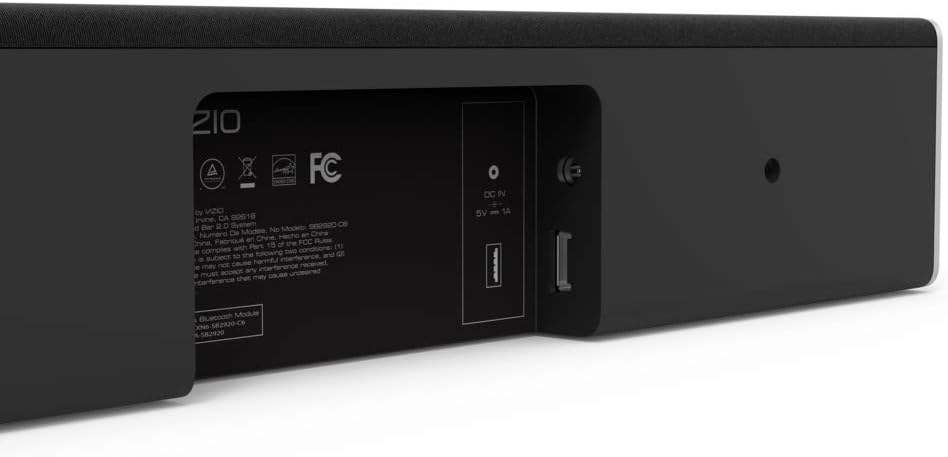
Figure 5: Close-up of the rear panel showing DIGITAL (Coaxial), OPTICAL, and SUB OUT ports.
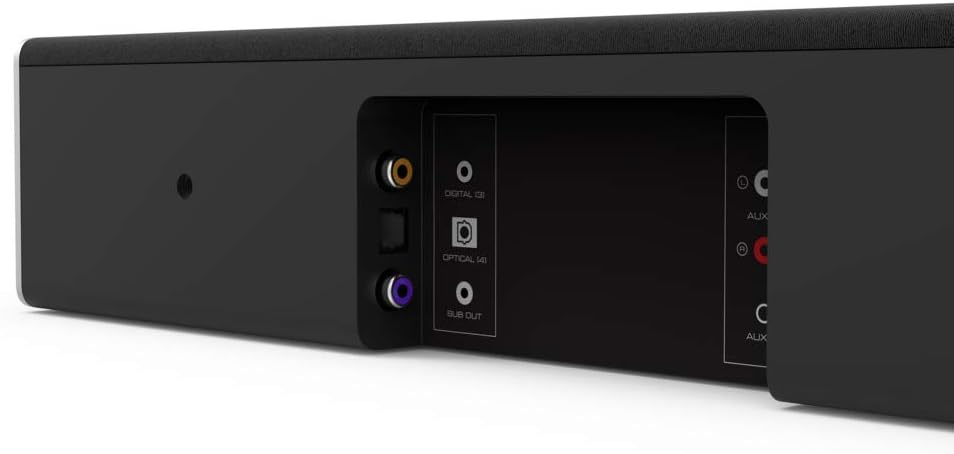
Figure 6: Close-up of the rear panel showing DC IN (power) and USB (Service Only) ports.
3.4 Awọn iwọn

Figure 7: Diagram illustrating the dimensions of the VIZIO SB2920-C6 Sound Bar: 3 inches Depth x 29 inches Width x 3 inches Height.
4. Eto
Follow these steps to set up your VIZIO SB2920-C6 Sound Bar.
4.1 Ibi
- Place the sound bar on a flat surface below your TV or mount it on a wall. Ensure it is centered with your TV for optimal sound distribution.
- Keep the sound bar clear of obstructions that could block the sound.
4.2 Nsopọ si TV rẹ
Yan ọkan ninu awọn ọna asopọ atẹle:
- Optical Cable (Recommended for best audio quality):
Connect one end of the optical cable to the OPTICAL port on the sound bar (Figure 5) and the other end to the Optical Digital Audio Out port on your TV. - Okùn Coaxial oni-nọmba:
Connect one end of the digital coaxial cable to the DIGITAL port on the sound bar (Figure 5) and the other end to the Coaxial Digital Audio Out port on your TV. - RCA Stereo Cables:
Connect the red and white RCA cables to the AUX (1) ports on the sound bar (Figure 4) and the corresponding red and white Audio Out ports on your TV.
4.3 Asopọ agbara
Connect the power cable to the DC IN port on the sound bar (Figure 6) and then plug the other end into a wall outlet.
4.4 Oṣo Video Itọsọna
Video 1: Official VIZIO guide on how to set up your VIZIO Sound Bar, demonstrating connection and initial configuration.
5. Awọn ilana Iṣiṣẹ
5.1 Agbara Tan / Pa
- Tẹ awọn Agbara button on the sound bar (Figure 2) or the remote control to turn the unit on or off.
5.2 Siṣàtúnṣe iwọn
- Lo awọn Iwọn didun soke (+) ati Iwọn didun isalẹ (-) buttons on the sound bar (Figure 2) or the remote control to adjust the sound level.
5.3 Yiyan Orisun Input
- Tẹ awọn Iṣawọle button on the sound bar (Figure 2) or the remote control to cycle through available input sources (Optical, Digital, AUX 1, AUX 2, Bluetooth).
5.4 Sisopọ Bluetooth
- Tẹ mọlẹ Bluetooth button on the sound bar (Figure 2) or the remote control for 3 seconds to enter pairing mode. The LED indicators on the sound bar will flash.
- On your mobile device, search for the VIZIO sound bar in the Bluetooth settings and select it to pair.
5.5 Àwọn Àfikún Ohùn
- The remote control includes buttons for Bass, EQ, ati Treble to customize your audio experience.
- DTS technologies such as DTS Studio Sound, DTS TruVolume, and DTS TruSurround are integrated to optimize sound quality. Refer to the full user manual for detailed adjustments.
6. Itọju
To ensure the longevity and optimal performance of your VIZIO SB2920-C6 Sound Bar, follow these maintenance guidelines:
- Ninu: Use a soft, dry cloth to clean the surface of the sound bar. Avoid using liquid cleaners or abrasive materials, as they may damage the finish.
- Afẹfẹ: Ensure that the sound bar's vents are not blocked to prevent overheating.
- Ibi ipamọ: Ti o ba tọju ọpa ohun fun akoko ti o gbooro sii, ge asopọ kuro ni agbara ki o tọju rẹ si ibi ti o tutu, ti o gbẹ.
7. Laasigbotitusita
Tí o bá ní ìṣòro pẹ̀lú ọ̀pá ohùn rẹ, wo àwọn ìdáhùn tí ó wọ́pọ̀ wọ̀nyí:
| Isoro | Owun to le Solusan |
|---|---|
| No sound from the sound bar |
|
| Ohun ge jade lemọlemọ |
|
| Ẹrọ Bluetooth ko le so pọ |
|
| Didara ohun afetigbọ |
|
8. Awọn pato
| Ẹya ara ẹrọ | Ẹ̀kúnrẹ́rẹ́ |
|---|---|
| Orukọ awoṣe | SB2920-C6 |
| Agbọrọsọ Iru | Pẹpẹ ohun |
| Kakiri Ohun ikanni iṣeto ni | 2.0 |
| Asopọmọra Technology | Bluetooth |
| Imọ-ẹrọ Ibaraẹnisọrọ Alailowaya | Bluetooth |
| Ipo Ijade Ohun | Sitẹrio, Agbegbe |
| Pataki Awọn ẹya ara ẹrọ | Bass Boost, Wireless |
| Awọn ẹrọ ibaramu | Personal Computer, Phones, Smartphone, Tablet, Television |
| Ọna Iṣakoso | Latọna jijin |
| Àwọ̀ | Dudu |
| Awọn iwọn Ọja (D x W x H) | 3" x 29" x 3" |
| Iwọn Nkan | 4.5 iwon |
| Iṣagbesori Iru | Ògiri Ògiri |
| Awọn batiri ti a beere | 2 AAA (pẹlu) |
9. Atilẹyin ọja ati Support
The VIZIO SB2920-C6 Sound Bar typically comes with a 12-month limited warranty. For specific warranty details, registration, and technical support, please refer to the official VIZIO website or contact VIZIO customer service directly. Keep your purchase receipt for warranty claims.
Atilẹyin Ayelujara: Ṣabẹwo www.vizio.com/support
Iṣẹ onibara: Refer to your product packaging or the VIZIO support webAaye fun lọwọlọwọ alaye olubasọrọ.


