Ọrọ Iṣaaju
The Logitech UE Boom is a 360-degree wireless Bluetooth speaker designed for portable audio. It features a durable, go-anywhere shape and is equipped with a water and stain resistant acoustic skin. This speaker allows for wireless music playback, phone calls, and can be paired with another UE Boom for stereo sound.

Aworan: Iwaju view of the Logitech UE Boom Wireless Bluetooth Speaker in Northern Light color.
Key Awọn ẹya ara ẹrọ
- Ohun 360-Iwọn: Delivers immersive audio in all directions.
- Apẹrẹ to gbe: Versatile, cylindrical shape for easy transport.
- Water and Stain Resistant: Features a colorful acoustic skin with plasma coating for durability against water and stains.
- Asopọ Alailowaya: Connects via Bluetooth from up to 50 feet away. Easy pairing via NFC for compatible devices.
- Double Up Feature: Wirelessly connect two UE BOOM speakers in stereo using the UE BOOM app for enhanced sound.
- Igbesi aye batiri gigun: Rechargeable battery provides up to 15 hours of playback.
- Foonu agbọrọsọ: Integrated crystal-clear speakerphone for calls.
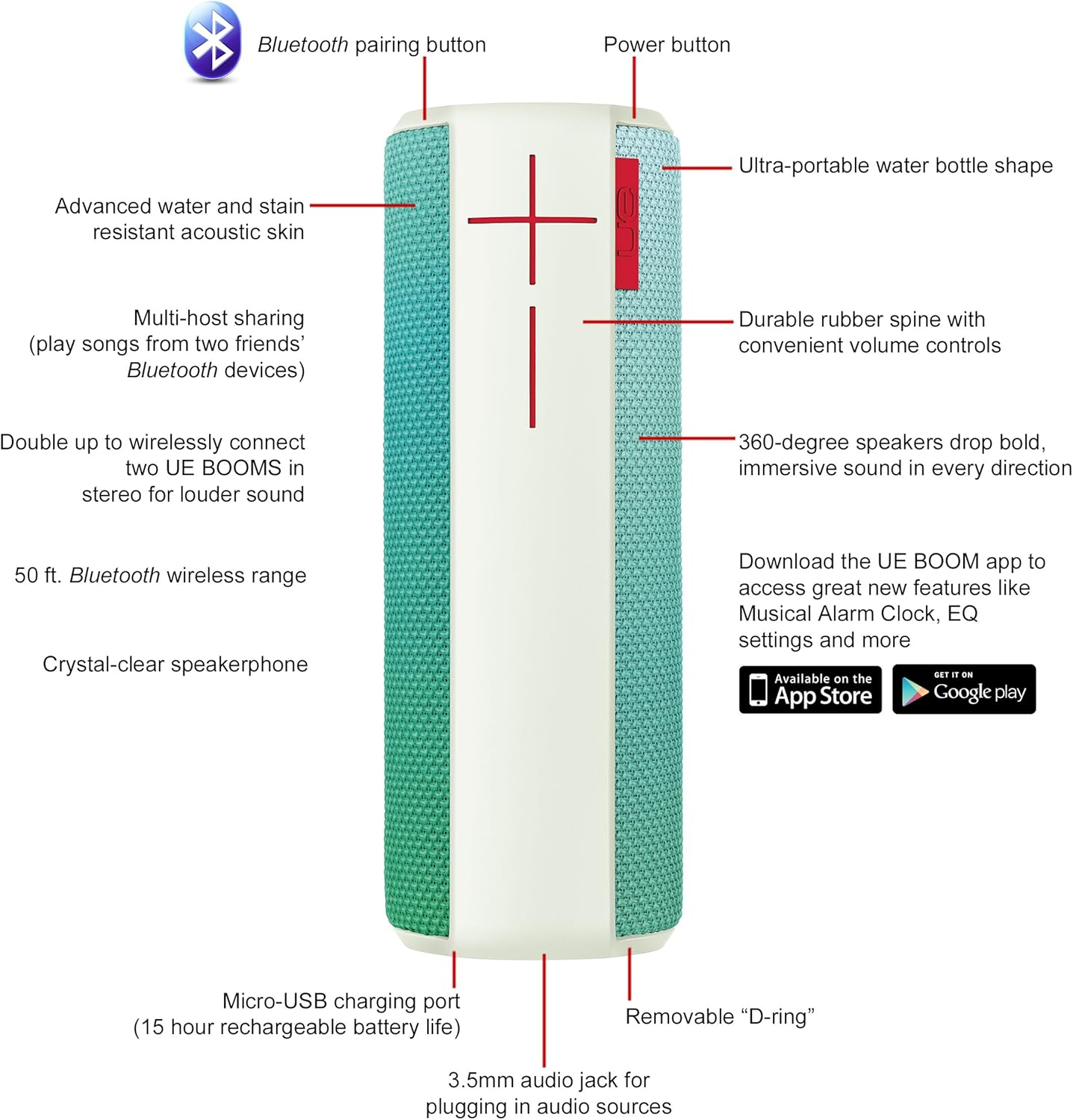
Image: Diagram highlighting key features and controls of the UE Boom speaker, including Bluetooth pairing button, power button, volume controls, micro-USB charging port, and 3.5mm audio jack.
Ṣeto
Gbigba agbara si Agbọrọsọ
Before initial use, fully charge your UE Boom speaker. Connect the provided micro-USB cable to the charging port located at the bottom of the speaker and plug the other end into a USB power source. The speaker's battery provides approximately 15 hours of playback on a full charge.
Asopọ Bluetooth
- Power on your UE Boom speaker by pressing the power button.
- Press and hold the Bluetooth pairing button (usually indicated by a Bluetooth icon) until you hear an audible tone and the LED indicator flashes rapidly.
- On your mobile device (smartphone or tablet), navigate to the Bluetooth settings.
- Select "UE Boom" from the list of available devices to pair.
- Once paired, you will hear a confirmation tone from the speaker.
For NFC-enabled devices, simply tap your device to the NFC area on the speaker for quick pairing.
Awọn ilana Iṣiṣẹ
Awọn iṣakoso ipilẹ
- Bọtini agbara: Located on the top of the speaker to turn it on or off.
- Awọn iṣakoso iwọn didun: Large '+' and '-' buttons on the side of the speaker adjust the volume.
- Bọtini Bluetooth: Ti bẹrẹ ipo sisọpọ Bluetooth.
Using the UE BOOM App
Download the official UE BOOM app from your device's app store (available on App Store and Google Play) to unlock additional features:
- Musical Alarm Clock: Wake up to your favorite music.
- Ṣiṣẹ Latọna jijin: Turn your speaker on/off from your device.
- Eto EQ: Ṣe akanṣe pro ohunfile si ayanfẹ rẹ.
- Ilọpo meji: Connect two UE BOOM speakers for a stereo sound experience.
Iṣẹ-ṣiṣe foonu Agbọrọsọ
When connected to a smartphone, the UE Boom can be used as a speakerphone. Incoming calls will be routed through the speaker, allowing for hands-free communication.
Itoju
The UE Boom speaker features a water and stain resistant acoustic skin. To clean, gently wipe the speaker with a damp cloth. Avoid using harsh chemicals or abrasive cleaners. Ensure all ports are dry before charging or connecting other devices.
Laasigbotitusita
- Ko si Agbara: Ensure the speaker is charged. Connect it to a power source using the micro-USB cable.
- Ko le So pọ nipasẹ Bluetooth:
- Rii daju pe agbọrọsọ wa ni ipo sisopọ (LED didan).
- Ṣayẹwo pe Bluetooth ti ṣiṣẹ lori ẹrọ rẹ.
- Move your device closer to the speaker (within 50 feet).
- Gbiyanju yiyo ati tun so pọ ẹrọ naa.
- Iwọn Kekere tabi Ohun Daru:
- Ṣatunṣe iwọn didun lori mejeeji agbọrọsọ ati ẹrọ ti o sopọ.
- Rii daju pe agbọrọsọ ti gba agbara ni kikun.
- Check for any obstructions around the speaker.
- Ohun elo Ko Sopọ: Ensure the speaker is powered on and connected via Bluetooth to your device. Update the app to the latest version.
Awọn pato ọja
| Orukọ awoṣe | Logitech UE Boom Wireless Bluetooth Speaker |
| Nọmba awoṣe | 980-001023 |
| Brand | Logitech |
| Àwọ̀ | Northern Light |
| Agbọrọsọ Iru | Ita gbangba |
| Asopọmọra Technology | Bluetooth, Alailowaya |
| Alailowaya Ibiti | Titi de 50 ẹsẹ (15.24 mita) |
| Orisun agbara | Agbara Batiri (Batiri Lithium ion 1 to wa) |
| Apapọ batiri Life | Awọn wakati 15 |
| Omi Resistance Ipele | Mabomire |
| Iwọn Nkan | 2.2 iwon |
| Awọn iwọn Ọja (LxWxH) | 2.6 x 2.6 x 7.1 inches |
| Ohun elo | Ṣiṣu |
| UPC | 097855112125 |
Official ọja Video
Fidio: Ipariview of the Logitech UE Boom speaker's features, including 360-degree sound, water resistance, wireless connectivity, and the ability to pair two speakers for louder sound. This video demonstrates the speaker's durability and portability in various environments.
Atilẹyin ọja ati Support
The Logitech UE Boom Wireless Bluetooth Speaker comes with a Limited Warranty. For specific warranty details, please refer to the documentation included with your product or visit the official Logitech webojula.
For technical support or customer service, you may contact Logitech at: 646-454-3200.


