Ọrọ Iṣaaju
Thank you for choosing the Coby Portable CD Player CD191. This device is designed to provide a versatile and enjoyable audio experience, combining classic CD playback with modern features like FM radio and MP3 compatibility. Its compact and shockproof design makes it ideal for both home use and on-the-go listening. Please read this manual thoroughly to understand the proper operation and maintenance of your new CD player.

A iwaju view of the Coby Portable CD Player, showcasing its compact design, LCD display, control buttons, and the included wired earbuds and Micro USB charging cable.
Alaye Aabo
Lati rii daju iṣẹ ailewu ati yago fun ibajẹ, jọwọ ṣe akiyesi awọn iṣọra wọnyi:
- Ma ṣe fi ẹrọ naa han si ojo, ọrinrin, tabi awọn iwọn otutu to gaju.
- Avoid dropping or subjecting the unit to strong impacts, as this may damage internal components.
- Maṣe ṣajọpọ ẹyọ naa. Tọkasi gbogbo iṣẹ si oṣiṣẹ oṣiṣẹ.
- Use only the specified battery type (2 AA batteries) and ensure correct polarity.
- Yẹra fún fífetísílẹ̀ pẹ̀lú ìwọ̀n ohùn gíga jù fún ìgbà pípẹ́ láti dènà ìbàjẹ́ ìgbọ́ran.
- Keep the CD compartment clean and free of dust or debris.
Package Awọn akoonu
Jẹrisi pe gbogbo awọn ohun kan wa ninu package:
- Coby Portable CD Player CD191
- Sitẹrio Earbuds
- Micro USB Cable

The high-fidelity wired stereo earbuds that come with the CD player, providing a personal listening experience.
Ọja Pariview
Irinše ati idari
Familiarize yourself with the main components and controls of your CD player:
- Ifihan LCD: Shows track number, time, mode, and battery status.
- Iyẹwu CD: Where the CD is inserted.
- Bọ́tìnnì Ṣíṣe/Sánu duro: Bẹrẹ tabi da duro sẹhin duro.
- Bọtini Duro: Duro ṣiṣiṣẹsẹhin.
- Fò/Wá àwọn bọ́tìnì (◀◀ / ▶▶): Skips tracks or fast-forwards/rewinds.
- Bọtini Ipo: Switches between CD, FM, and MP3 modes.
- Bọtini Eto: Used for programming track order.
- Iwọn didun +/- Awọn bọtini: Ṣe atunṣe ipele iṣelọpọ ohun.
- Jack agbekọri (3.5mm): Fún sísopọ̀ àwọn agbekọri tàbí àwọn ẹ̀rọ ohùn láti òde.
- Ibudo USB Micro: Fun ipese agbara ita.
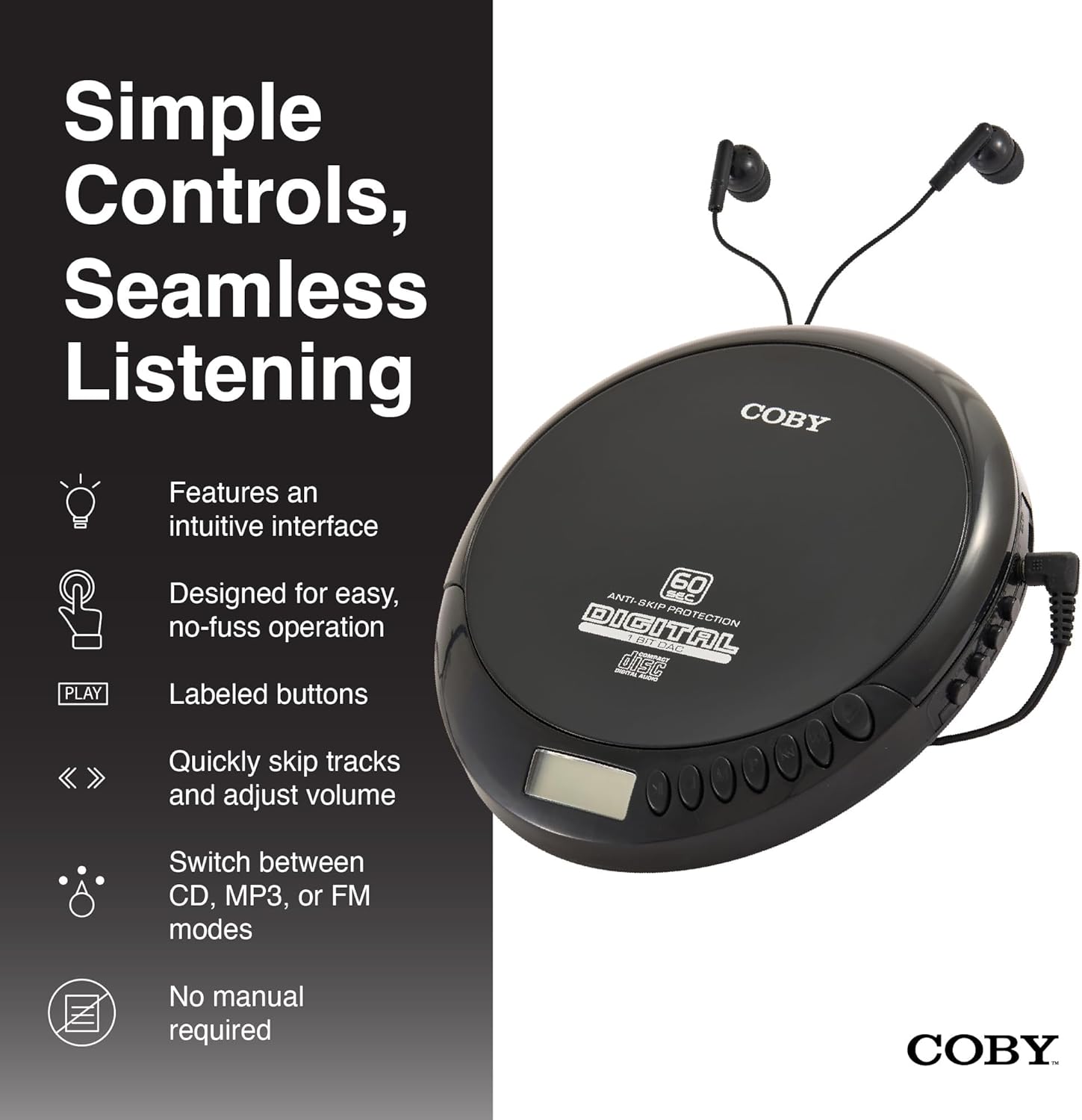
An illustration of the Coby CD Player highlighting its simple controls and intuitive interface.

A alaye view of the player's LCD screen, which displays the current track number, elapsed time, and battery status.

A close-up of the player's intuitive control buttons, including Play/Pause, Stop, Skip/Search, Mode, and Program functions, designed for easy operation.
Ṣeto
Agbara ẹrọ naa
The Coby CD Player can be powered by 2 AA batteries (not included) or via the included Micro USB cable.
- Fifi sori batiri: Open the battery compartment cover on the back of the unit. Insert 2 AA batteries, ensuring correct polarity (+/-). Close the cover securely.
- Agbara agbara USB: Connect the Micro USB cable to the Micro USB port on the CD player and the other end to a USB power source (e.g., USB wall adapter, computer USB port).

An image showing a user enjoying music with the Coby CD player, highlighting its versatility with both battery and USB power options.

The included Micro USB cable, used for powering the CD player when not using batteries.
Nsopọ Awọn agbekọri
Insert the 3.5mm plug of your headphones into the headphone jack on the side of the CD player.
Fifi CD sii
- Press the OPEN button to open the CD compartment lid.
- Carefully place the CD onto the center spindle with the label side facing up.
- Rọra tẹ CD naa si isalẹ titi ti o fi tẹ sinu aaye.
- Pa ideri CD CD duro ṣinṣin titi yoo fi di.
Awọn ilana Iṣiṣẹ
CD Sisisẹsẹhin
- Insert a CD (CD, CD-R, CD-RW, or CD-MP3).
- Tẹ awọn ERE/SINMI button to begin playback. The LCD display will show the track number and elapsed time.
- Lati da ṣiṣiṣẹsẹhin duro, tẹ ERE/SINMI tún tẹ lẹ́ẹ̀kan sí i láti bẹ̀rẹ̀ iṣẹ́ náà.
- Lati da ṣiṣiṣẹsẹhin duro, tẹ awọn DURO bọtini.
The player features 60-second anti-skip protection to ensure continuous audio during movement.
Orin lilọ
- Tẹ ▶▶ lati foju si orin atẹle.
- Tẹ ◀◀ to return to the beginning of the current track. Press it twice quickly to go to the previous track.
- Tẹ mọlẹ ▶▶ to fast-forward through the current track.
- Tẹ mọlẹ ◀◀ to rewind through the current track.
Iṣakoso iwọn didun
Lo awọn Idibo + ati ÌWỌN - buttons to adjust the listening volume to a comfortable level.
FM Radio isẹ
- Tẹ awọn MODE button until 'FM' appears on the LCD display.
- The player will automatically scan and tune to available FM stations.
- Lo awọn ◀◀ ati ▶▶ buttons to manually tune to specific frequencies or to scan for the next/previous strong station.

This image illustrates the built-in FM radio feature of the Coby CD player, allowing users to tune into their favorite radio stations.
Sisisẹsẹhin MP3
The Coby CD Player supports MP3 files burned onto CD-R or CD-RW discs. When an MP3 CD is inserted, the player will automatically detect the format and begin playback.
Connecting to External Audio Systems
You can connect your Coby CD Player to external speakers or a car audio system using a 3.5mm AUX cable (not included).
- Connect one end of the 3.5mm AUX cable to the headphone jack on the CD player.
- Connect the other end to the AUX input of your external speaker or car audio system.
- Ensure the external device is set to its AUX input mode.

The CD player connected to an external speaker, demonstrating its ability to deliver enhanced sound with features like Super Bass and Crystal Clear Sound when connected to compatible audio systems.

The portable CD player integrated into a car's audio system via an AUX connection, allowing for on-the-go music playback through car speakers.
Itoju
Ninu Unit
- Mu ese ita kuro pẹlu asọ ti o gbẹ. Ma ṣe lo abrasive ose tabi epo.
- To clean the CD lens, use a specialized CD lens cleaning disc (not included).
Itọju Batiri ati Ibi ipamọ
- Yọ awọn batiri kuro ti ẹyọ naa ko ba ni lo fun akoko ti o gbooro sii lati ṣe idiwọ jijo.
- Tọju ẹyọ naa ni itura, aye gbigbẹ kuro lati orun taara ati awọn iwọn otutu to gaju.
Laasigbotitusita
| Isoro | Owun to le Fa | Ojutu |
|---|---|---|
| Ẹka ko ni agbara lori. | Batteries are dead or incorrectly inserted. USB cable not connected properly. | Fi àwọn tuntun rọ́pò àwọn bátìrì, kí ó lè rí i dájú pé wọ́n ní ìsopọ̀ tó tọ́. Ṣàyẹ̀wò ìsopọ̀ okùn USB. |
| Disc skipping or distorted sound. | Disc is dirty, scratched, or damaged. Unit is subjected to excessive vibration. | Clean the disc with a soft, lint-free cloth. Try a different disc. Ensure the anti-skip protection is active. Avoid strong impacts. |
| Ko si ohun lati olokun. | Headphones not fully plugged in. Volume is too low. Headphones are faulty. | Ensure headphones are fully inserted into the jack. Increase the volume. Try a different pair of headphones. |
| Gbigba redio FM duro tabi ko dara. | Àmì tí kò lágbára. Ìdádúró. | Adjust the position of the unit. Try moving to a different location. |
| MP3 CD not recognized. | Disc format not supported or disc is corrupted. | Ṣe idaniloju MP3 files are properly encoded and the disc is finalized. Try a different MP3 CD. |
Awọn pato
| Ẹya ara ẹrọ | Ẹ̀kúnrẹ́rẹ́ |
|---|---|
| Ọja Mefa | 5.5 x 1 x 5 inches |
| Iwọn Nkan | 7 iwon |
| Nọmba awoṣe | CD-191-BLK |
| Orisun agbara | 2 AA batteries (not included), Micro USB |
| Asopọmọra Technology | Iranlọwọ, USB |
| Pataki Ẹya | Portable, FM Radio, MP3 Compatible |
| Idaabobo Anti-Rekọja | 60 aaya |
| Awọn ọna kika Disiki ibaramu | CD, CD-R, CD-RW, CD-MP3 |
Official ọja Video
Ifihan fidio ọja osise kanasing the features and benefits of the Coby Portable CD Player with Stereo Earbuds.
Atilẹyin ọja ati Support
Fun alaye atilẹyin ọja ati atilẹyin alabara, jọwọ tọka si awọn iwe aṣẹ ti o wa pẹlu rira rẹ tabi ṣabẹwo si Coby osise website. Contact details for support are typically found on the manufacturer's product page or in the warranty card.
Coby Official Webojula: Ṣabẹwo si Ile itaja Coby lori Amazon


