1. Ifihan
The Pronomic PH15AW is a versatile, battery-powered active speaker system designed for portable sound reinforcement. It features a 15-inch speaker, integrated MP3/SD/USB player, Bluetooth connectivity, and includes wireless microphones for various applications. Its trolley design with an extendable handle and wheels ensures easy transport.
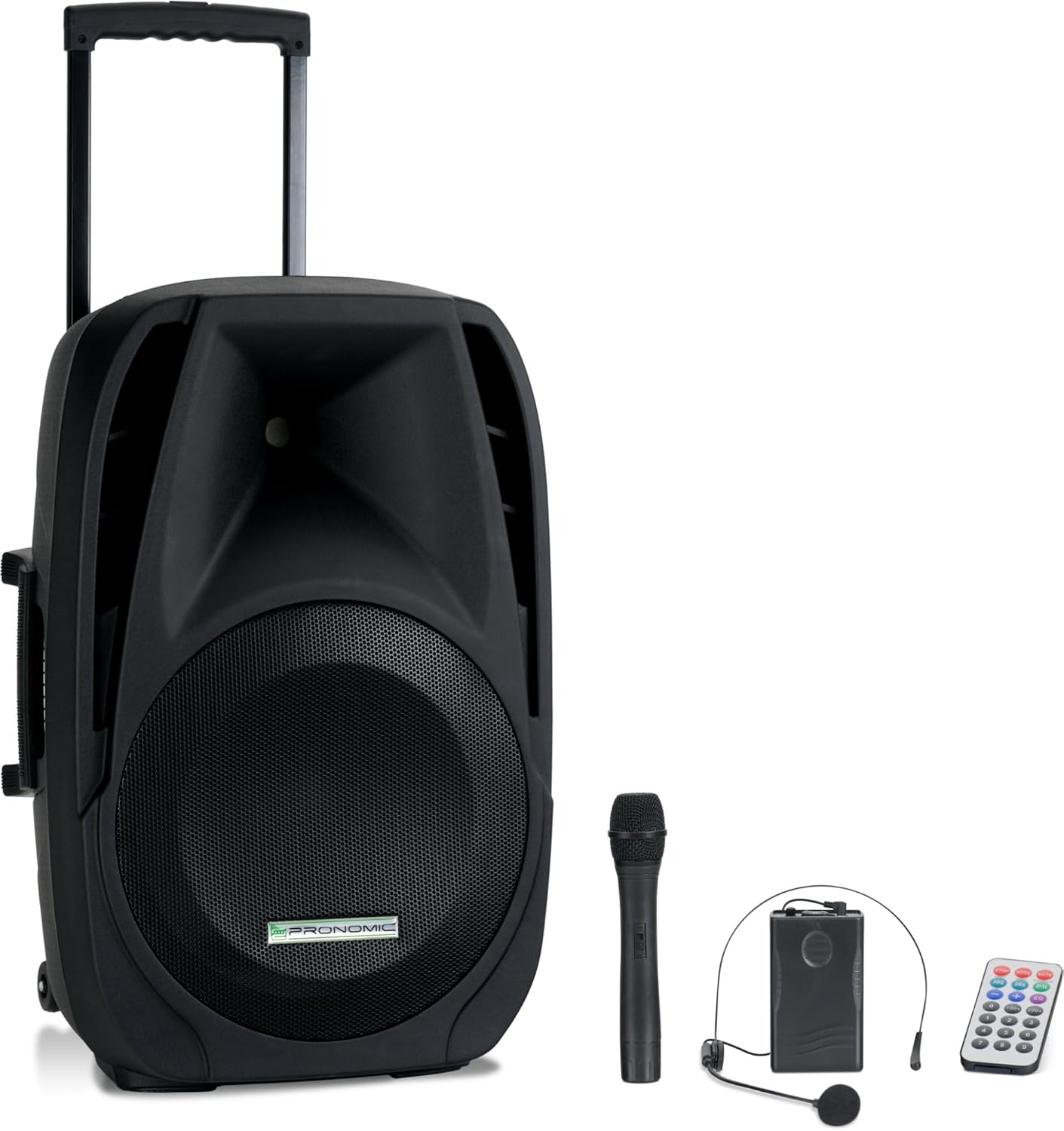
Image 1.1: The Pronomic PH15AW Battery Active Box shown with its included wireless microphone, headset microphone, and remote control.
2. Awọn ilana aabo
- Orisun Agbara: Only use the specified power adapter and voltage (AC 220-230V 50/60Hz or DC 12V).
- Omi ati Ọrinrin: Do not expose the unit to rain, moisture, or any liquids. Avoid placing liquid-filled objects on the speaker.
- Afẹfẹ: Rii daju pe fentilesonu to dara. Ma ṣe dina awọn ṣiṣi atẹgun.
- Ooru: Jeki ẹyọ kuro lati awọn orisun ooru gẹgẹbi awọn imooru, awọn iforukọsilẹ ooru, awọn adiro, tabi awọn ohun elo miiran ti nmu ooru.
- Ninu: Disconnect from power before cleaning. Use a dry, soft cloth.
- Ṣiṣẹ: Maṣe gbiyanju lati ṣiṣẹ ọja yi funrararẹ. Tọkasi gbogbo iṣẹ si oṣiṣẹ oṣiṣẹ ti o peye.
- Aabo Batiri: Do not disassemble, crush, or expose the battery to high temperatures. Dispose of batteries properly.
3. Package Awọn akoonu
Jọwọ ṣayẹwo pe gbogbo awọn nkan wa ninu package:
- Pronomic PH15AW Battery Active Box
- Okun agbara
- Gbohungbohun Amusowo Alailowaya
- Wireless Headset Microphone with Bodypack Transmitter
- Isakoṣo latọna jijin

Image 3.1: The included wireless handheld microphone and headset microphone with bodypack transmitter.
4. Ọja Ipariview
4.1 Iwaju View

Image 4.1: The front view of the PH15AW speaker, highlighting the 15-inch woofer and horn tweeter.
4.2 Ru Panel idari ati awọn isopọ

Aworan 4.2: alaye view of the rear control panel, including inputs, outputs, and various adjustments.

Image 4.3: A closer look at the MP3 player section, EQ controls, and microphone inputs.
- MP3/WMA Player: SD card slot, USB port, Mode button, Play/Pause, Skip buttons, TWS (True Wireless Stereo) function.
- Awọn iṣakoso iwọn didun: Master Volume, Bass, Treble, Echo, Mic Volume.
- Awọn igbewọle:
- MIC/Guitar Input (6.35mm jack)
- MIC Input (6.35mm jack)
- MP3/Smartphone AUX Input (3.5mm jack)
- LINE IN (RCA L/R)
- Awọn abajade: MIX OUT (RCA L/R).
- VHF Wireless Microphones: Volume controls (VOL A, VOL B), RF indicators (RFA, RFB), ON/OFF switch.
- Abala Agbara: DC 12V input, CHARGE indicator, POWER indicator, POWER SWITCH (ON/OFF).
4.3 ti ara Awọn ẹya ara ẹrọ
- Imudani ti o gbooro: For easy pulling.
- Transport Rollers: Two stable wheels for mobility.
- Awọn imudani: Three handles (two side, one top) for lifting.
- 35mm Stand Mount: For mounting on a standard speaker stand.

Aworan 4.4: Apa view illustrating the extendable trolley handle and integrated side handles for carrying.

Image 4.5: Detail of the robust transport rollers for easy movement.
5. Eto
5.1 Ṣiṣii ati Gbe
- Fara yọ agbohunsoke ati gbogbo awọn ẹya ẹrọ kuro ninu apoti.
- Place the speaker on a stable, flat surface or mount it on a compatible 35mm speaker stand.
5.2 Ngba agbara si Batiri inu
- Ensure the speaker's POWER SWITCH is in the OFF position.
- Connect the provided power cable to the AC input on the rear panel and then to a suitable power outlet.
- The CHARGE indicator LED will illuminate, indicating that the battery is charging.
- Allow sufficient time for a full charge before first use (typically several hours). The CHARGE LED will change color or turn off when fully charged.
5.3 Ailokun Gbohungbo Oṣo
- Gbohungbohun amusowo: Open the battery compartment and insert the required batteries (e.g., 9V block battery, not always included). Ensure correct polarity.
- Gbohungbo Agbekọri: Connect the headset microphone to the bodypack transmitter. Open the bodypack transmitter's battery compartment and insert the required batteries (e.g., 9V block battery). Ensure correct polarity.
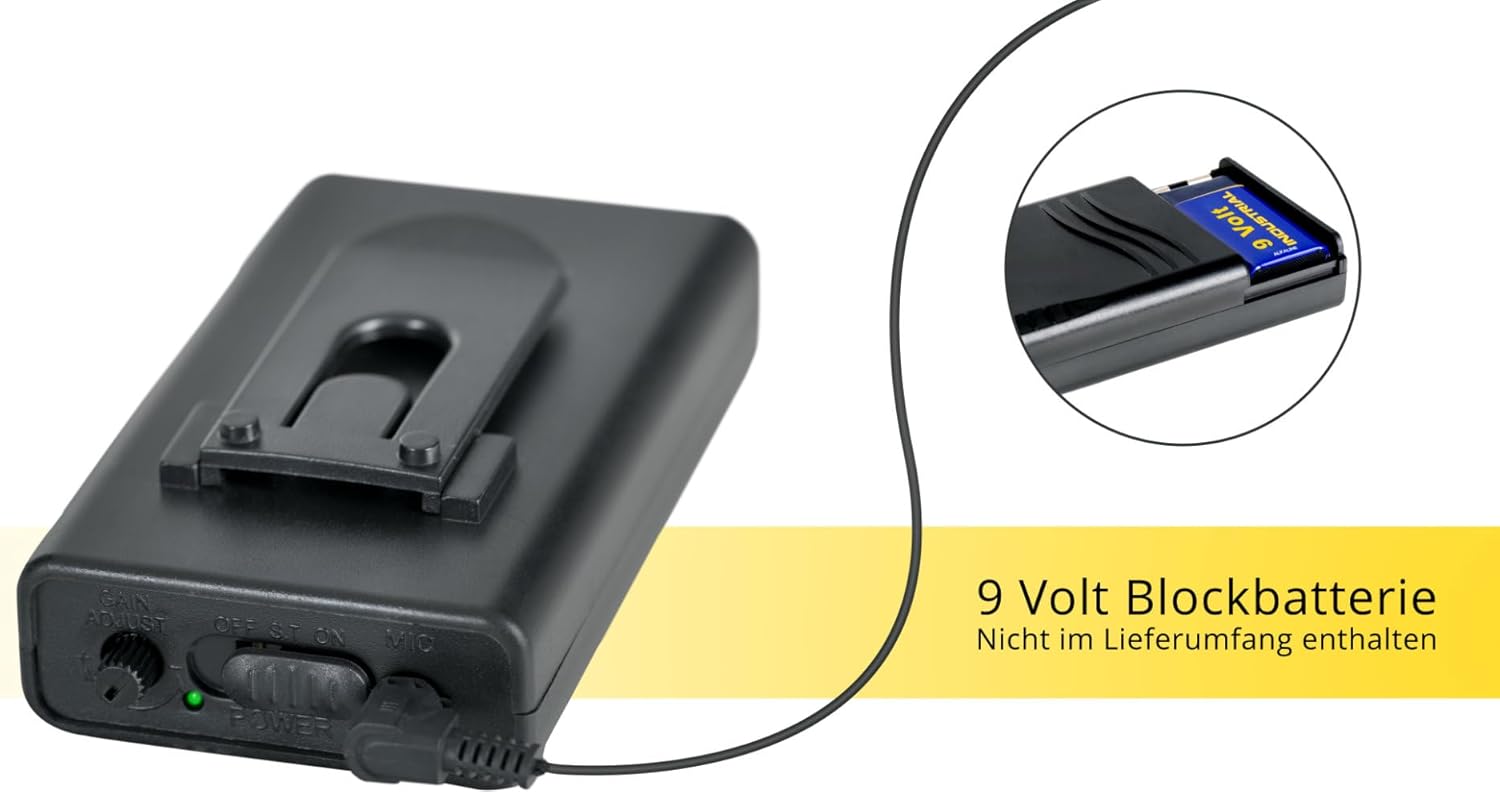
Aworan 5.1: Example of a 9-volt block battery, typically used for the wireless microphones (batteries may not be included).
5.4 Ibẹrẹ Agbara Lori
- After charging, disconnect the power cable if operating on battery.
- Flip the POWER SWITCH on the rear panel to the ON position. The POWER indicator LED will light up.

Image 5.2: The PH15AW's trolley function allows for easy transport, demonstrating its portability.
6. Awọn ilana Iṣiṣẹ
6.1 MP3 Player (USB/SD)
- Insert a USB flash drive into the USB port or an SD card into the SD/MMC slot.
- Tẹ awọn MODE button on the MP3 player section until 'USB' or 'SD' is displayed.
- Use the Play/Pause and Skip buttons to control playback.
6.2 Bluetooth Asopọmọra
- Tẹ awọn MODE button on the MP3 player section until 'Bluetooth' is displayed. The display will show 'BT' and flash, indicating it is ready for pairing.
- Lórí ẹ̀rọ Bluetooth rẹ (fún àpẹẹrẹ, fóònù alágbèéká, tábìlẹ́ẹ̀tì), wá àwọn ẹ̀rọ Bluetooth tó wà.
- Select 'PH15AW' (or similar name) from the list to pair. Once connected, the 'BT' indicator will stop flashing.
- O le mu ohun ṣiṣẹ bayi lati ẹrọ rẹ nipasẹ agbọrọsọ.
6.3 Gbohungbohun Lilo
- Wired Microphones: Connect wired microphones to the 6.35mm MIC/Guitar or MIC inputs.
- Awọn gbohungbohun Alailowaya: Turn on the wireless handheld microphone or the bodypack transmitter for the headset microphone. The corresponding RF indicator (RFA or RFB) on the speaker's rear panel should light up.
- Ṣatunṣe awọn MIC NIPA knob to control the overall microphone level.
- Lo awọn ECHO knob to add an echo effect to the microphone sound.
- Ṣatunṣe VOL A ati VOL B for individual wireless microphone levels.
6.4 Line In/Out Connections
- ILA INU: Connect external audio sources (e.g., CD player, mixer) using RCA cables to the LINE IN (L/R) jacks.
- ADALU OUT: Use the MIX OUT (L/R) jacks to send the mixed audio signal to another active speaker or recording device.
6.5 Tone Control (EQ)
- Lo awọn Bass knob to adjust the low frequencies of the sound.
- Lo awọn TREK. knob to adjust the high frequencies of the sound.
7. Itọju
7.1 Ninu
Mu ese ita ti agbọrọsọ pẹlu asọ ti o gbẹ. Ma ṣe lo awọn afọmọ abrasive, waxes, tabi awọn nkanmimu.
7.2 batiri Itọju
- To prolong battery life, fully charge the battery before first use.
- Recharge the battery regularly, even if the unit is not used frequently.
- Má ṣe tú agbára bátìrì náà jáde pátápátá, nítorí èyí lè dín àkókò rẹ̀ kù.
- If storing the unit for an extended period, charge the battery to approximately 50% and recharge every few months.
7.3 Ibi ipamọ
Tọju ẹyọ naa ni itura, aye gbigbẹ, kuro lati orun taara ati awọn iwọn otutu to gaju.
8. Laasigbotitusita
- Ko si Agbara:
- Ensure the power cable is securely connected and the POWER SWITCH is ON.
- Check if the internal battery is charged. Connect to AC power to charge.
- Ko si Ohun:
- Rí i dájú pé a ti gbé ohùn Master Volume sókè.
- Check input source selection (MODE button for MP3/Bluetooth).
- Ensure all audio cables are correctly connected and not damaged.
- If using microphones, check their power and volume levels.
- Gbohungbohun Ko Ṣiṣẹ:
- For wireless mics, ensure batteries are inserted correctly and charged, and the microphone is switched ON. Check if the RF indicator on the speaker is lit.
- Adjust the MIC VOLUME and individual wireless mic volume knobs (VOL A/B).
- For wired mics, ensure they are securely plugged into the correct input.
- Bluetooth Ko Sopọ:
- Ensure the speaker is in Bluetooth mode ('BT' flashing).
- Make sure Bluetooth is enabled on your device and it is within range.
- Gbiyanju yiyo ati tun so pọ ẹrọ naa.
- Ohun Yiyi:
- Reduce the Master Volume or the volume of the input source.
- Check if any input signals are too strong (clipping).
9. Awọn pato
| Ẹya ara ẹrọ | Sipesifikesonu |
|---|---|
| Awoṣe | PH15AW |
| Agbọrọsọ Iru | Battery Active Trolley Box, 2-way system |
| Iwọn Agbọrọsọ | 15 inch |
| Power Output (RMS/Peak) | 100 Watts (RMS) / 200 Watts (Peak) |
| Iwọn Igbohunsafẹfẹ | 40 Hz - 20 kHz |
| Ifamọ | 97 dB +/-2 dB |
| Iye ti o ga julọ ti SPL | 110 dB |
| Igbesi aye batiri | Titi di wakati 5 |
| Asopọmọra | Bluetooth, USB, SD |
| Awọn igbewọle | 2 x 6.35mm (Mic/Guitar), 1 x 3.5mm AUX, RCA L/R |
| Awọn abajade | RCA L/R (Mix Out) |
| Ibi ti ina elekitiriki ti nwa | AC 220-230V 50/60Hz, 12V/7A Battery |
| Ohun elo | Ṣiṣu |
| Awọn iwọn (H x W x D) | 74 cm x 48.5 cm x 40 cm |
| Iwọn | 19.6 kg |
10. Atilẹyin ọja ati Support
For warranty information and technical support, please refer to the documentation provided at the time of purchase or contact your retailer or the manufacturer directly. Keep your proof of purchase for any warranty claims.


