1. Ifihan
O ṣeun fun riraasing the eKids Li-B17 Millennium Falcon Bluetooth Speaker. This portable wireless speaker allows you to stream audio from your Bluetooth-enabled devices and enjoy hands-free calling. Its unique design, inspired by the iconic Millennium Falcon, includes light effects and plays the Star Wars theme. Please read this manual carefully to ensure proper use and maintenance of your speaker.
2. Alaye Aabo
- Iṣeduro ọjọ ori: Ó yẹ fún àwọn ọmọ ọdún mẹ́ta àti jù bẹ́ẹ̀ lọ.
- Má ṣe fi ẹ̀rọ náà sí ojú ọjọ́ tí ó le koko, oòrùn tààrà, tàbí ọrinrin.
- Má ṣe gbìyànjú láti tú tàbí ṣe àtúnṣe ẹ̀rọ náà. Èyí yóò sọ àtìlẹ́yìn náà di òfo.
- Lo okun gbigba agbara ti a pese nikan tabi iwe-ẹri deede.
- Jeki ẹyọ kuro lati awọn aaye oofa to lagbara.
3. Package Awọn akoonu
Rii daju pe gbogbo awọn nkan wa ninu package:
- eKids Li-B17 Millennium Falcon Bluetooth Speaker
- Okun Ngba agbara USB

Nọmba 1: eKids Li-B17 Millennium Falcon Bluetooth Speaker on its clear stand, showcasing its detailed design and illuminated blue engine lights.
4. Awọn ẹya Ọja
- Bluetooth Wireless Audio: Stream music wirelessly from compatible devices.
- Iṣẹ Ọwọ-Ọwọ: Answer and end calls directly from the speaker.
- Awọn ipa Imọlẹ: Integrated lights illuminate during operation.
- Batiri gbigba agbara: Built-in lithium battery provides up to 6 hours of playback.
- Star Wars Theme: Plays the iconic Star Wars main theme.
- Iṣawọle AUX: Connect non-Bluetooth devices via the auxiliary port.

Nọmba 2: The eKids Li-B17 Millennium Falcon Bluetooth Speaker with text indicating powerful sound performance and illuminated engine lights, alongside a smartphone displaying music playback.
5. Eto
5.1 Gbigba agbara si Agbọrọsọ
- Connect the small end of the included USB charging cable to the USB charging port on the speaker.
- Connect the larger end of the USB charging cable to a powered USB port (e.g., computer, USB wall adapter).
- Ina Atọka gbigba agbara yoo tan imọlẹ. Ni kete ti o ti gba agbara ni kikun, ina le yipada awọ tabi paa.
- Gbigba agbara kikun yoo gba to wakati meje ti akoko ṣiṣiṣẹ.
5.2 Titan / Pa a
Locate the 3-position switch on the side of the speaker (refer to Figure 3).
- Si agbara ON in Bluetooth mode, slide the switch to the Aami Bluetooth ipo.
- Si agbara ON in AUX mode, slide the switch to the AUX ipo.
- Si agbara PAA, slide the switch to the PAA (arin) ipo.
5.3 Sisopọ Bluetooth
- Ensure the speaker is charged and powered ON in Bluetooth mode. The speaker will automatically enter pairing mode if no previously paired device is found.
- Lori ẹrọ Bluetooth ti o ṣiṣẹ (foonuiyara, tabulẹti, ati bẹbẹ lọ), mu Bluetooth ṣiṣẹ ki o wa awọn ẹrọ to wa.
- Yan"eKids Li-B17" (tàbí orúkọ tó jọra) láti inú àkójọ àwọn ẹ̀rọ náà."
- Once paired, the speaker will indicate a successful connection (e.g., a tone or voice prompt).
- To pair a new device or re-enter pairing mode, press and hold the Bluetooth button on the top of the speaker.
5.4 AUX Asopọ
Fun awọn ẹrọ ti ko ni Bluetooth, o le lo titẹ sii AUX:
- Slide the 3-position switch to the AUX ipo.
- So opin kan ti okùn ohùn 3.5mm (ko si ninu rẹ) mọ asopọ agbekọri ẹrọ ohun rẹ.
- Connect the other end of the 3.5mm audio cable to the AUX port on the speaker (refer to Figure 3).
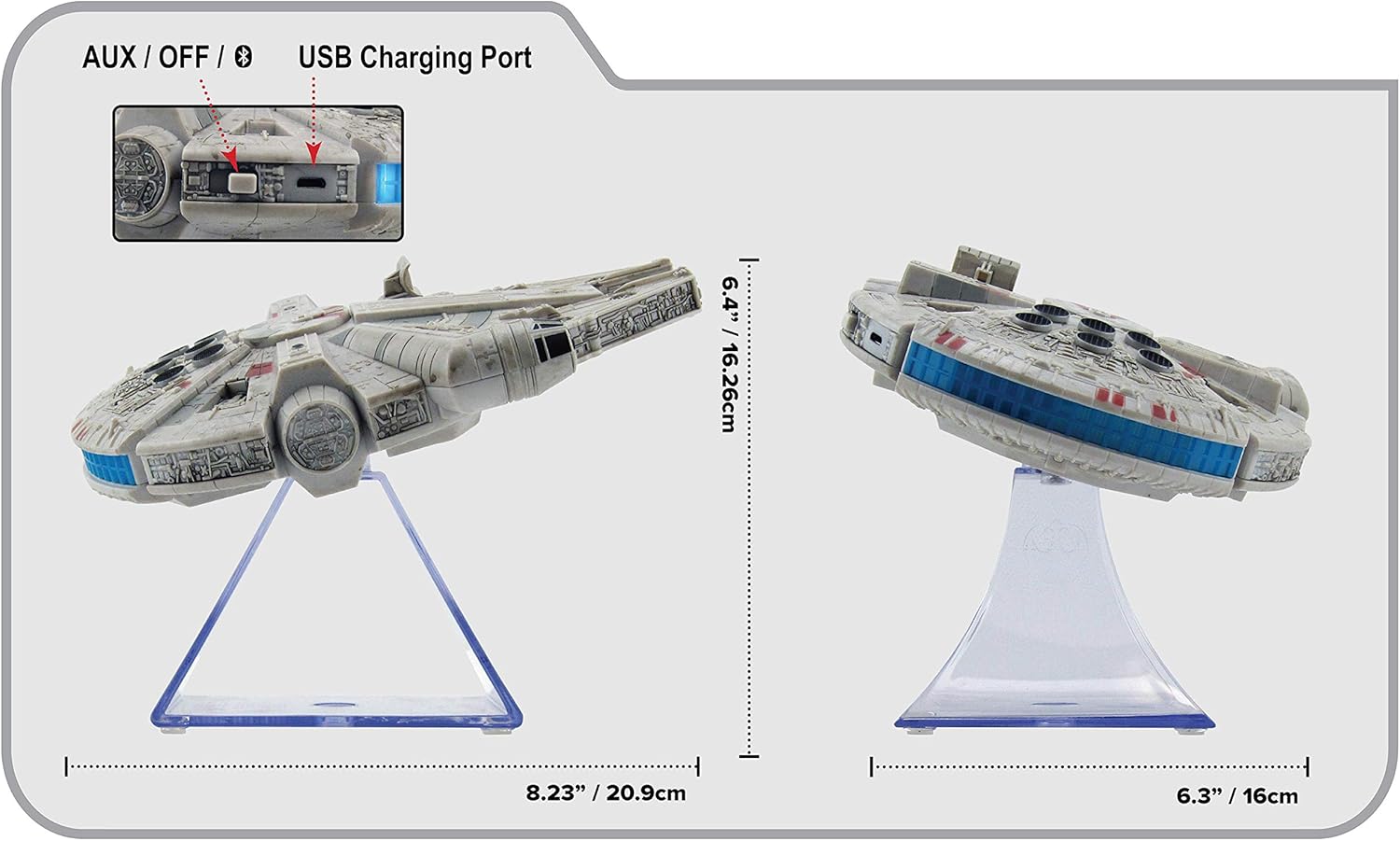
Nọmba 3: Apa view of the eKids Li-B17 Millennium Falcon Bluetooth Speaker, highlighting the AUX/OFF/Bluetooth switch, USB charging port, and product dimensions.

Nọmba 4: Image illustrating the eKids Li-B17 Millennium Falcon Bluetooth Speaker's compatibility with multiple devices including mobile phones, tablets, notebooks, smartwatches, game devices, and PCs.
6. Awọn ilana Iṣiṣẹ
6.1 Ti ndun Audio
- Once connected via Bluetooth or AUX, start playing audio from your source device.
- Adjust the volume using the controls on your connected device. The speaker itself does not have volume controls.
6.2 Ọwọ-Ọfẹ Npe
Nígbà tí a bá sopọ̀ mọ́ fóònù alágbéka nípasẹ̀ Bluetooth:
- Ndahun ipe kan: Press the designated call button on the speaker (often integrated with the Bluetooth button or a separate small button near the main blaster area).
- Pari ipe kan: Press the call button again.
- Npe Ipe: Initiate the call from your smartphone; audio will route through the speaker.
6.3 Light Ipa
The speaker features integrated blue engine lights that illuminate when the speaker is powered on and in use, enhancing the visual experience.
6.4 Star Wars Theme Playback
Press the large button located on the top of the speaker (the top blaster area) to play the Star Wars main theme.
7. Itọju
- Clean the speaker with a soft, dry cloth. Do not use liquid cleaners or abrasive materials.
- Tọju agbohunsoke ni itura, ibi gbigbẹ nigbati o ko ba lo.
- Yẹra fún fífi ohùn sílẹ̀ tàbí kí o fi agbára mú un.
8. Laasigbotitusita
| Isoro | Owun to le Fa | Ojutu |
|---|---|---|
| Agbọrọsọ ko ni tan. | Batiri ti dinku. | Gba agbara si agbọrọsọ nipa lilo okun USB ti a pese. |
| Ko le so pọ nipasẹ Bluetooth. | Agbọrọsọ ko si ni ipo sisopọ tabi Bluetooth ẹrọ ti wa ni pipa. | Ensure speaker is in Bluetooth mode and press the Bluetooth button to enter pairing. Turn Bluetooth on your device and search again. |
| Ko si ohun lati agbọrọsọ. | Volume too low, incorrect input mode, or device not playing. | Increase volume on your device. Ensure speaker is in correct mode (Bluetooth/AUX). Check if your device is playing audio. |
| Didara ohun afetigbọ. | Device too far from speaker, interference, or low battery. | Move device closer to speaker (within 30 feet). Avoid obstacles. Charge the speaker. |
9. Awọn pato
| Ẹya ara ẹrọ | Sipesifikesonu |
|---|---|
| Nọmba awoṣe | Li-B17 |
| Asopọmọra Technology | Bluetooth |
| Alailowaya Ibiti | Titi de 30 ẹsẹ (isunmọ awọn mita 9) |
| Orisun agbara | Lithium-Polymer Battery (rechargeable) |
| Igbesi aye batiri | Titi di wakati 6 |
| Max Agbọrọsọ o wu Power | 25 Wattis |
| Ipo Ijade Ohun | Sitẹrio |
| Ohun elo | Ṣiṣu |
| Iṣagbesori Iru | Tabili |
| Awọn iwọn (L x W x H) | 18.29 x 26.42 x 24.13 cm (7.2 x 10.4 x 9.5 inches) |
| Awọn irinše to wa | Millennium Falcon Bluetooth Speaker, USB Charging Cable |
10. Atilẹyin ọja ati Support
Ọja yi wa pẹlu kan Atilẹyin ọja to lopin. For specific details regarding warranty coverage, duration, and how to obtain service, please refer to the warranty card included with your purchase or contact eKids customer support.
For technical support or further inquiries, please visit the official eKids webojula tabi kan si wọn onibara iṣẹ Eka.


