1. Ifihan
This manual provides comprehensive instructions for the setup, operation, maintenance, and troubleshooting of your Avaya 9508 Digital Deskphone. Designed for small and medium-sized businesses, this deskphone offers reliable and high-quality communication solutions.
The Avaya 9508 Digital Deskphone features an intuitive design and functionality, making it an ideal choice for various user types in mixed digital/IP telephony environments.
2. Eto
Follow these steps to set up your Avaya 9508 Digital Deskphone:
- So foonu pọ: Plug one end of the coiled cord into the handset and the other end into the handset jack on the side of the phone base.
- So okun Nẹtiwọọki pọ: Connect a digital line cable from your wall jack to the port labeled "Digital Line" on the back of the phone.
- Agbára Sopọ̀ (tí ó bá wúlò): If your system requires external power, connect the power adapter to the phone and a power outlet.
- Fi foonu naa si: Place the phone on a stable surface. The integrated stand allows for an angled viewipo ipo.
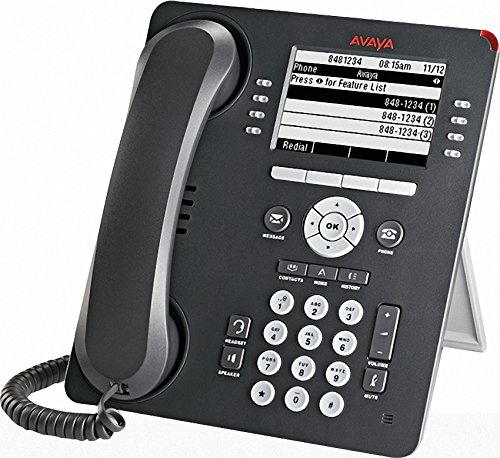
Figure 1: Avaya 9508 Digital Deskphone. This image shows the complete phone unit, including the handset, display screen, and the full keypad with various function buttons.
3. Awọn ilana Iṣiṣẹ
3.1 Ipilẹ Ipe Awọn iṣẹ
- Npe Ipe: Gbe foonu soke tabi tẹ awọn Agbọrọsọ bọtini. Tẹ nọmba ti o fẹ.
- Ndahun ipe kan: Gbe foonu soke tabi tẹ awọn Agbọrọsọ bọtini nigbati foonu ba ndun.
- Pari ipe kan: Rọpo foonu tabi tẹ awọn Phone/Exit bọtini.
3.2 Bọ́ọ́dù àti Ìfihàn
The phone features a clear display and a standard 12-button dial pad. Soft keys below the display provide context-sensitive options.
- Akopọ Lilọ kiri: Lo awọn OK button and surrounding arrow keys to navigate menus and select options on the display.
- Awọn bọtini rirọ: The buttons adjacent to the display (as seen in Figure 1) change function based on the current menu or call state. The OCR shows "Press for Feature List" as a display option, indicating dynamic soft key functionality.
3.3 Awọn bọtini iṣẹ
- Ifiranṣẹ: Access your voicemail messages. A red indicator light next to this button signals new messages.
- Awọn olubasọrọ: Access your stored contact directory.
- Akojọ aṣyn: Access the phone's main menu for settings and features.
- Ipe Wọle: View a list of recent incoming, outgoing, and missed calls. A red indicator light next to this button signals new missed calls.
- Redial: Redial awọn ti o kẹhin nọmba ti a npe ni.
- Agbọrọsọ: Toggle speakerphone mode on or off.
- Pa ẹnu mọ́: Pa gbohungbohun rẹ dakẹ nigba ipe kan.
- Iwọn didun: Adjust the volume for the handset, speaker, or ringer.
- Agbekọri: Activate or deactivate the headset port.
- Dimu: Gbe ipe lọwọ si idaduro.
- Apero: Bẹrẹ ipe apejọ kan.
- Gbigbe: Transfer an active call to another extension or external number.
- Ju silẹ: Disconnect an active call.
4. Itọju
To ensure the longevity and proper functioning of your Avaya 9508 Digital Deskphone, follow these simple maintenance guidelines:
- Ninu: Lo asọ, damp cloth to clean the phone's surface. Avoid abrasive cleaners or solvents. Do not spray liquids directly onto the phone.
- Ayika: Keep the phone away from excessive heat, direct sunlight, and moisture. Ensure proper ventilation.
- Isakoso okun: Avoid tangling or excessive pulling on the handset and network cords to prevent damage.
5. Laasigbotitusita
If you encounter issues with your Avaya 9508 Digital Deskphone, refer to the following common problems and solutions:
- Ko si Ohun orin ipe:
- Check that the network cable is securely connected to both the phone and the wall jack.
- Ensure the phone has power (if using an external adapter).
- Àpapọ̀ òfo tàbí Àìdáhùn:
- Verify power connection.
- Try restarting the phone by disconnecting and reconnecting the power/network cable.
- Cannot Hear or Be Heard:
- Satunṣe iwọn didun nipa lilo awọn Iwọn didun awọn bọtini.
- Rii daju pe Pa ẹnu mọ́ button is not active.
- Ṣayẹwo foonu ati awọn asopọ agbekari.
- Awọn bọtini Ko Dahun:
- Tun foonu bẹrẹ.
- Rii daju pe ko si idoti ti n ṣe idiwọ awọn bọtini.
For persistent issues, contact your system administrator or Avaya support.
6. Awọn pato
| Brand | Avaya |
| Nọmba awoṣe | 9508 |
| Olupese | Avaya |
| Àwọ̀ | Dudu |
| Idahun System Iru | Oni-nọmba |
| Idanimọ olupe | Rara |
| UPC | 712155447561 |
| ASIN | B014FHW9WA |
| Ọjọ Akọkọ Wa | Oṣu Kẹta Ọjọ 6, Ọdun 2016 |
7. Atilẹyin ọja ati Support
For detailed warranty information, please refer to the documentation provided with your purchase or contact your Avaya reseller. Warranty terms and conditions may vary.
For technical support, contact your IT department or the official Avaya support channels. You can typically find support contact information on the Avaya website or through your service provider.


