Ọrọ Iṣaaju
This manual provides instructions for the HAVIT HV-KB366L RGB Backlit Mechanical Gaming Keyboard. This keyboard features blue mechanical switches, full anti-ghosting, and customizable RGB backlighting, designed for reliable performance.
Awọn ilana iṣeto
Nsopọ Keyboard
- Wa ibudo USB ti o wa lori kọnputa rẹ.
- Connect the USB cable from the HAVIT HV-KB366L keyboard to the USB port on your computer.
- Káàbọ́ọ̀dù náà jẹ́ plug-and-play, ó sì yẹ kí ó jẹ́ kí ètò ìṣiṣẹ́ rẹ dá a mọ̀ láìfọwọ́sí.
Ibamu eto
- Compatible with Windows 10 and other Windows operating systems.
- Mac OS supports 6-key rollover only.
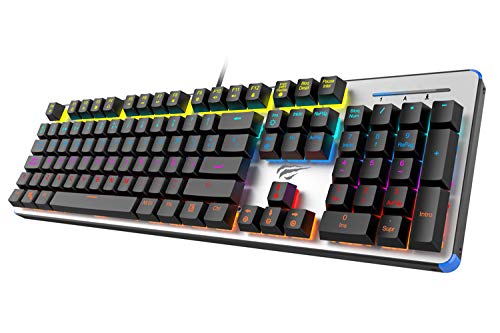
Figure 1: HAVIT HV-KB366L RGB Backlit Mechanical Gaming Keyboard. An overhead view ti keyboard, ifihanasing its full layout with RGB lighting on the keys and a white frame.
Awọn ilana Iṣiṣẹ
Awọn iyipada Key Mekaniki
The keyboard is equipped with blue mechanical switches, providing tactile feedback and an audible click with each keystroke. This design is intended for precise input during typing and gaming.
Anti-Ghosting Feature
The full key anti-ghosting mechanism ensures that all key presses are registered accurately, even when multiple keys are pressed simultaneously. This feature is beneficial for fast-paced gaming.
Atunse Backlight
- To change the backlight color or mode, press the Fn bọtini ni nigbakannaa pẹlu awọn Backlit key. Repeated presses will cycle through available modes and colors.
- Marquee Mode: In 7-color backlit mode (non-breathing), press the Backlit key once to activate marquee mode. Press the Backlit key again to deactivate marquee mode and return to 7-color backlit mode.
- Awọn ipele Imọlẹ: The backlight offers 4 levels of brightness adjustment.
- Breathing Rate: The breathing effect has 10 adjustable levels.
Itoju
Ninu Keyboard
- Ge asopọ keyboard kuro lati kọnputa rẹ ṣaaju ṣiṣe mimọ.
- Lo aṣọ rírọrùn tí ó gbẹ láti nu ojú kọ̀ǹpútà náà.
- Fun eruku ati idoti laarin awọn bọtini, lo afẹfẹ fisinuirindigbindigbin.
- Avoid using harsh chemicals or abrasive materials, as these can damage the finish or keycaps.
Iduroṣinṣin
The keyboard features an aluminum top housing with a sanded finish and a metal base, contributing to its overall durability and stable performance.
Laasigbotitusita
Keyboard Ko Dahun
- Rii daju pe okun USB ti sopọ ni aabo si keyboard mejeeji ati kọnputa naa.
- Gbiyanju lati so keyboard pọ mọ ibudo USB ti o yatọ lori kọnputa rẹ.
- Ṣe idanwo keyboard lori kọnputa miiran lati pinnu boya ọrọ naa wa pẹlu keyboard tabi ibudo USB ti kọnputa naa.
Ìmọ́lẹ̀ ẹ̀yìn kò ṣiṣẹ́ tàbí kò tọ́
- Rí i dájú pé keyboard so pọ̀ dáadáa àti pé ó ń gba agbára.
- Tẹ Fn + Backlit key to cycle through backlight modes and ensure it is not turned off or set to a very low brightness.
- Refer to the "Backlight Adjustment" section for detailed instructions on changing modes and brightness.
Awọn pato
| Brand | OHUN |
| Nọmba awoṣe | HV-KB366L |
| Olupese | OHUN |
| Ọja Mefa | 50.5 x 17.6 x 6 centimeters |
| Iwọn Nkan | 1.33 kg |
| Asopọmọra Technology | Firanṣẹ (USB) |
| Apejuwe Keyboard | Ere Mechanical Keyboard |
| Pataki Ẹya | RGB Backlit, Anti-Ghosting |
| Hardware Platform | Kọǹpútà alágbèéká, PC |
| Eto isesise | Windows 10 (and compatible), Mac OS (6-key rollover) |
| Voltage | 5 Volts |
| Awọn irinše to wa | Okun USB |
Atilẹyin ọja & Atilẹyin
Alaye atilẹyin ọja
Specific warranty details for the HAVIT HV-KB366L keyboard are not provided in the product data. Please refer to the product packaging or contact HAVIT directly for warranty terms and conditions.
Onibara Support
For technical assistance, troubleshooting, or further inquiries, please contact HAVIT customer support through their official webaaye tabi alaye olubasọrọ ti a pese pẹlu rira rẹ.


