1. Ifihan
This manual provides detailed instructions for the installation, operation, and maintenance of your Zmodo ZM-KW1001-O4-1TB HD Camera System. Please read this manual thoroughly before using the product to ensure proper setup and functionality. Keep this manual for future reference.
2. Ọja Ipariview
2.1 Key Awọn ẹya ara ẹrọ
- 720p HD video for clear and sharp images.
- Smartlink wireless configuration for quick setup.
- Motion detection alerts to notify you of activity.
- IP66 rated outdoor cameras for weather resistance.
- Infrared night vision for surveillance in low-light conditions.
- Integrated 1TB hard drive for local video storage.
2.2 System irinše
The Zmodo ZM-KW1001-O4-1TB system typically includes the following components:
- Wireless Network Video Recorder (NVR) with 1TB HDD
- HD Wireless Cameras (quantity may vary, typically 4)
- Awọn Adapters Agbara fun NVR ati Awọn kamẹra
- àjọlò Cable
- Iṣagbesori skru ati ìdákọró
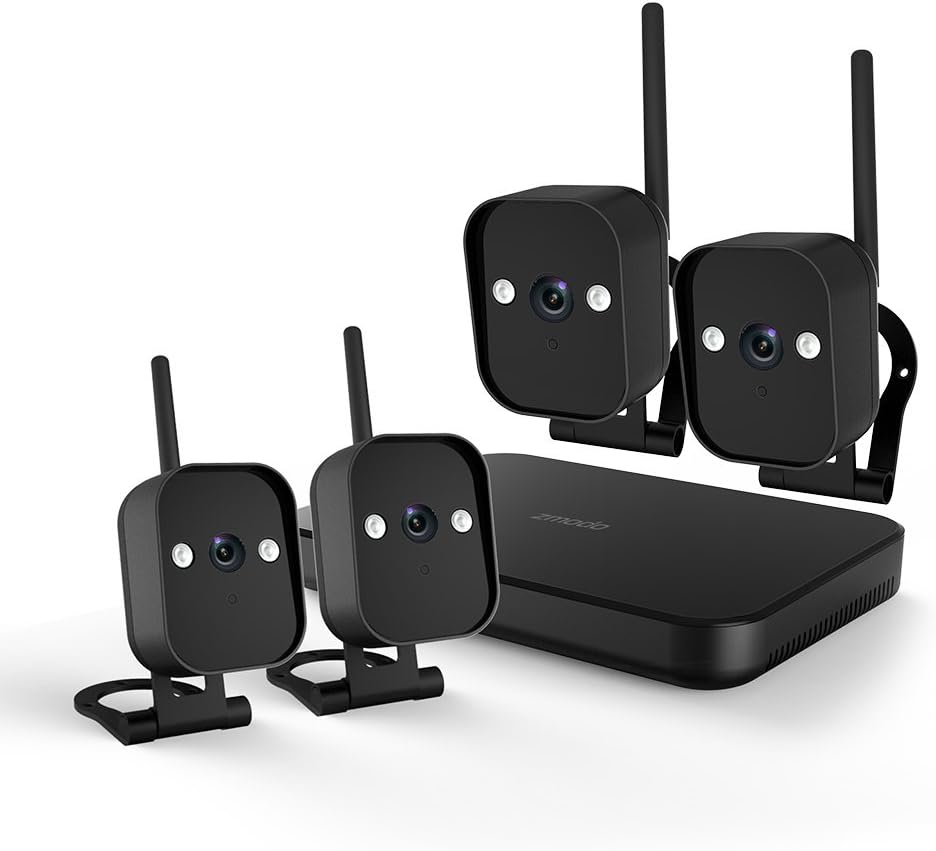
Nọmba 1: Pariview of the Zmodo ZM-KW1001-O4-1TB HD Camera System, showing the NVR unit and four wireless cameras.
3. Awọn ilana iṣeto
3.1 Unboxing ati Ibẹrẹ ayewo
Carefully unpack all components and verify that all items listed in Section 2.2 are present and undamaged. If any items are missing or damaged, contact customer support.
3.2 NVR Asopọ
- So NVR pọ mọ ibudo agbara nipa lilo adapter agbara ti a pese.
- For initial setup and optimal performance, connect the NVR to your router using the supplied Ethernet cable.
- Connect the NVR to a monitor via HDMI or VGA cable (not included) if local viewing jẹ fẹ.

Nọmba 2: The Zmodo Network Video Recorder (NVR) unit, which stores recordings and manages camera connections.
3.3 Camera Installation and Pairing
The cameras are designed for both indoor and outdoor use with an IP66 weather-resistant rating. Ensure cameras are placed within range of the NVR's wireless signal.
- Awọn Kamẹra Agbara Lori: So kámẹ́rà kọ̀ọ̀kan mọ́ ohun tí ó ń darí agbára rẹ̀ kí o sì so mọ́ ibi tí agbára ń gbé jáde.
- Smartlink Pairing: The cameras should automatically attempt to pair with the NVR. Follow the on-screen prompts on the connected monitor or use the Zmodo app for Smartlink setup. If pairing fails, refer to the troubleshooting section.
- Iṣagbesori: Choose suitable locations for your cameras. Use the provided screws and anchors to securely mount the cameras. Ensure a clear line of sight and optimal viewigun igun.

Nọmba 3: A Zmodo wireless camera shown with its wall-mounting bracket, suitable for outdoor installation.

Nọmba 4: A Zmodo wireless camera shown with its stand mount, ideal for indoor placement on flat surfaces.
3.4 Mobile App Configuration
- Download the Zmodo app from the App Store (iOS) or Google Play Store (Android).
- Create a new account or log in to an existing one.
- Follow the in-app instructions to add your Zmodo NVR system. This typically involves scanning a QR code on the NVR or manually entering device details.
- Once added, you should be able to view live feeds from your cameras.
4. Awọn ilana Iṣiṣẹ
4.1 Live View
Access the Zmodo app or the NVR's local interface to view live video streams from your cameras. You can typically select individual cameras or view ọpọ awọn ifunni ni akoko kanna.
4.2 Išipopada erin ati titaniji
The system is equipped with motion detection capabilities. When motion is detected, the system can record footage and send alerts to your mobile device.
- Iṣeto: In the Zmodo app or NVR settings, navigate to the motion detection section. You can customize detection zones, sensitivity levels, and alert schedules.
- Awọn itaniji: Ensure push notifications are enabled for the Zmodo app on your mobile device to receive timely alerts.
4.3 Gbigbasilẹ ati Sisisẹsẹhin
The NVR includes a 1TB hard drive for continuous or motion-activated recording.
- Eto Gbigbasilẹ: Configure recording modes (continuous, scheduled, motion-activated) via the NVR's local interface or the Zmodo app.
- Sisisẹsẹhin: Lati tunview foo ti o ti gbasilẹtage, access the playback feature in the Zmodo app or directly on the NVR. Select the desired date and time to view iṣẹlẹ.
4.4 Night Vision
The cameras feature infrared night vision, allowing them to capture clear video in low-light or complete darkness. The system automatically switches to night vision mode when ambient light levels are insufficient.
5. Itọju
- Kamẹra Ninu: Lokọọkan nu awọn lẹnsi kamẹra pẹlu asọ, damp asọ lati rii daju ko didara aworan. Yago fun abrasive ose.
- Awọn imudojuiwọn famuwia: Check the Zmodo app or website regularly for firmware updates. Keeping your system updated ensures optimal performance and security.
- Išakoso Wakọ lile: Dáìkì líle 1TB náà yóò yí foo àtijọ́ padà láìfọwọ́kọ.tage when full. If you need to preserve specific recordings, back them up to an external device before they are overwritten.
- Ibi ti ina elekitiriki ti nwa: Ensure all power adapters are securely connected and free from damage.
6. Laasigbotitusita
- Ko si Ifunni Fidio:
- Ṣàyẹ̀wò bóyá NVR àti àwọn kámẹ́rà ti ṣiṣẹ́.
- Verify network connectivity for the NVR.
- Ensure cameras are within wireless range of the NVR.
- Re-pair cameras if they have lost connection.
- A ko gba awọn itaniji išipopada:
- Confirm motion detection is enabled in the app settings.
- Ṣayẹwo awọn agbegbe wiwa išipopada ati ifamọ.
- Ensure push notifications are enabled for the Zmodo app on your mobile device.
- Didara Aworan Ko dara:
- Nu lẹnsi kamẹra nu.
- Rii daju pe ko si awọn idena ni aaye kamẹra ti view.
- Check for strong interference if using wireless connection.
- Cameras Not Connecting to Wi-Fi:
- Ensure the NVR's Wi-Fi is enabled and functioning.
- Move cameras closer to the NVR to improve signal strength.
- Reset cameras and attempt Smartlink pairing again.
7. Awọn pato
| Ẹya ara ẹrọ | Sipesifikesonu |
|---|---|
| Nọmba awoṣe | ZM-KW1001-O4-1TB |
| Ipinnu fidio | 720p HD |
| Asopọmọra Technology | Ailokun |
| Nọmba ti awọn ikanni | 4 |
| Agbara ipamọ | 1 TB (Terabyte) |
| Pataki Awọn ẹya ara ẹrọ | Wireless, Motion Detection, Night Vision, IP66 Weatherproof |
| Ibamu System isẹ | Android, iOS |
| Orisun agbara | Wireless (Power Adapters for components) |
| Àwọ̀ | Dudu |
| Package Mefa | 26.8 x 20 x 16 cm |
| Iwọn Nkan | 1.5 kilo |
8. Atilẹyin ọja ati Support
For warranty information and technical support, please refer to the official Zmodo website or contact Zmodo customer service directly. Details regarding warranty periods and service procedures are typically available on the manufacturer's support pages.
Atilẹyin Ayelujara: Visit the Zmodo official webAaye fun FAQs, awọn itọnisọna laasigbotitusita, ati alaye olubasọrọ.
Olubasọrọ Support: If you require further assistance, please have your product model number (ZM-KW1001-O4-1TB) and purchase details ready when contacting support.


