Ọrọ Iṣaaju
This manual provides comprehensive instructions for the Mesqool Projection Alarm Clock with FM Radio. Designed for convenience and reliability, this device features a large LED display, adjustable time projection, dual alarms, FM radio with presets, a sleep timer, and a built-in USB charging port. Please read this manual thoroughly to ensure proper operation and to fully utilize all features.

Figure 1: Mesqool Projection Alarm Clock with a phone connected for charging.
Ṣeto
1. Asopọ agbara
Connect the provided power adapter to the DC input port on the back of the alarm clock and plug it into a standard wall outlet. The clock will power on automatically.
2. Fifi sori ẹrọ afẹyinti batiri (Aṣayan ṣugbọn a ṣeduro rẹ)
For retaining time and alarm settings during power outages, install two 1.5V AAA batteries (not included) into the battery compartment on the back of the unit. Ensure correct polarity (+/-) as indicated inside the compartment.

olusin 2: Ẹyìn view of the alarm clock showing the battery compartment for backup power.
Awọn ilana Iṣiṣẹ
1. Ṣiṣeto Akoko naa
- Tẹ awọn SET Akoko button once. The hour digits will flash.
- Lo awọn WAKATI bọtini lati ṣatunṣe wakati naa.
- Lo awọn MIN bọtini lati ṣatunṣe awọn iṣẹju.
- Tẹ SET Akoko lẹẹkansi lati jẹrisi ati ipo eto akoko jade.
- Lati yipada laarin ọna kika wakati 12 ati wakati 24, tẹ bọtini naa TU+ button during normal time display.
- To adjust for Daylight Saving Time (DST), press the DST bọtini.

Figure 3: The clock supports 24-hour, 12-hour, and DST time formats.
2. Eto Awọn itaniji
The clock supports two independent alarms (Alarm 1 and Alarm 2).
- Tẹ awọn ALARM1 or ALARM2 Bọ́tìnì náà. Àkókò ìkìlọ̀ náà yóò tàn yanranyanran.
- Lo awọn WAKATI ati MIN awọn bọtini lati ṣeto akoko itaniji ti o fẹ.
- Tẹ awọn ALARM1 or ALARM2 button again to select the alarm sound: Buzzer or FM Radio.
- Press the respective alarm button one more time to confirm and activate the alarm. An alarm icon will appear on the display.
- To turn off an active alarm, press the corresponding ALARM PA bọtini.
Iṣatunṣe Iwọn didun Itaniji
The alarm volume can be adjusted from Level 1 to 5. Level 5 provides a loud 106dB sound, suitable for heavy sleepers. Use the volume buttons on the side of the unit to adjust the alarm volume.

Figure 4: Visual representation of adjustable alarm volume levels.
Išẹ lẹẹkọọkan
Nigbati itaniji ba ndun, tẹ tobi OK/SNOOZE/SLEEP button to activate the 9-minute snooze function. The alarm will sound again after 9 minutes.

Figure 5: The large button for activating the snooze function.
3. FM Radio isẹ
The FM radio operates within the 87.5–108 MHz frequency range and can store up to 20 preset stations.
- Tẹ awọn RADIO bọtini lati tan redio FM.
- Lo awọn WAKATI or MIN buttons to tune into the desired radio channel.
- Láti fi ibùdó tí a ti ṣètò tẹ́lẹ̀ pamọ́, tẹ kí o sì di mọ́lẹ̀ MEM/M+ bọtini.
- Tẹ awọn OK/SNOOZE/SLEEP button to confirm storing the channel.
- Lati paa redio, tẹ awọn RADIO PA bọtini.
Aago orun
Nígbà tí rédíò bá wà nílẹ̀, tẹ OK/SNOOZE/SLEEP button repeatedly to set the sleep timer (10-90 minutes). The radio will automatically turn off after the set time.

Figure 6: Step-by-step guide for FM radio operation and setting presets.
4. Ẹ̀yà Ìṣàfihàn
The 180° adjustable projector allows you to display the time onto a wall or ceiling.
- To activate or deactivate the projection, use the ISESE TAN/PA/PA yipada.
- Yi lẹnsi projector pada lati ṣatunṣe igun ifihan.
- Adjust the focus ring on the projector to achieve a clear image.
- The projected image can be flipped 180° for optimal viewing.
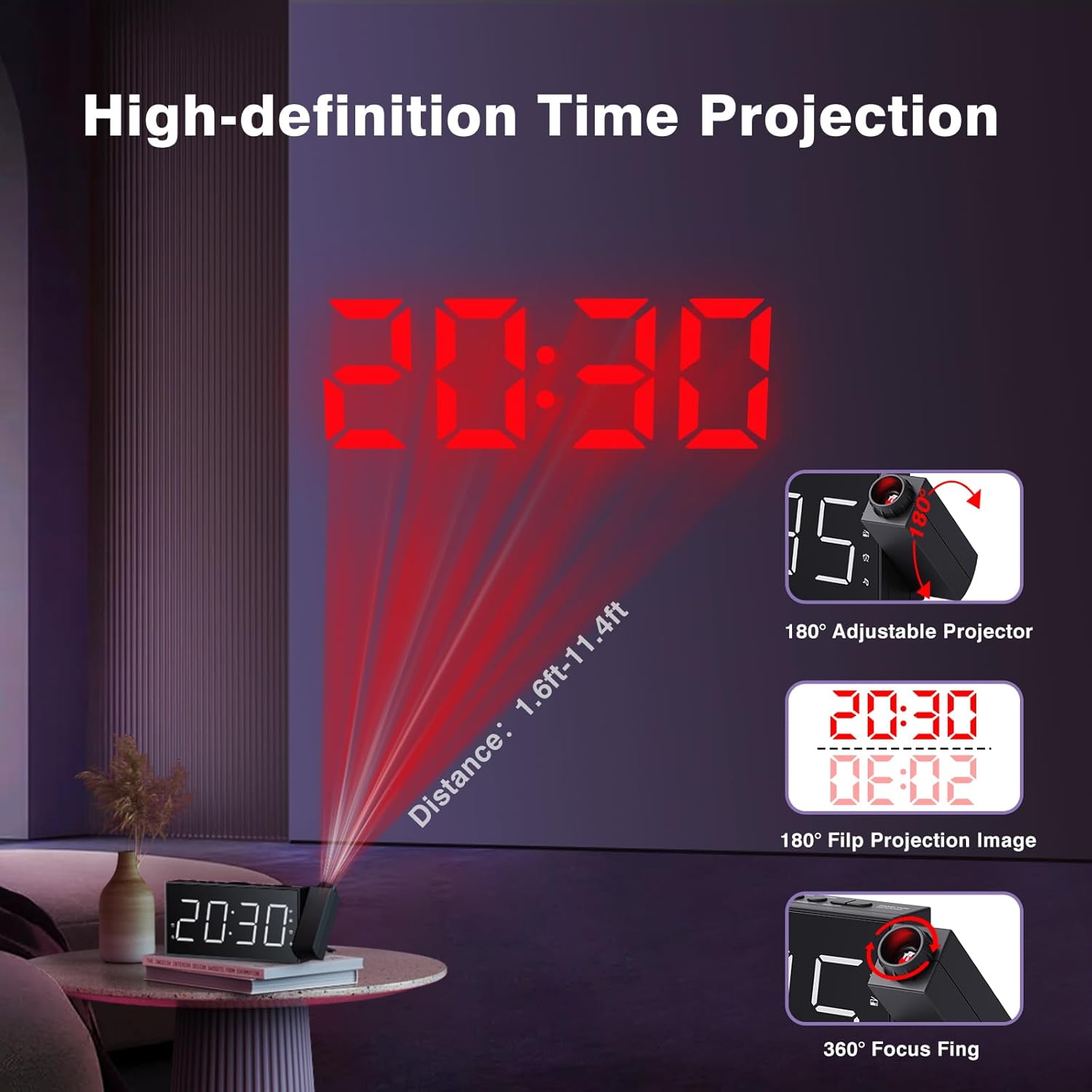
Figure 7: Time projected onto a wall from the alarm clock.

Figure 8: Demonstrating the 180-degree adjustable projection angle.
5. Ifihan Imọlẹ Atunse
The 7-inch LED display offers 5 dimming levels to suit your preference for day or night viewing. Tẹ awọn DIMMER bọtini leralera lati yipo nipasẹ awọn ipele imọlẹ.

Figure 9: The clock display showing different brightness levels from 20% to 100%.
6. USB Ngba agbara Port
A built-in USB charging port is located on the back of the unit, allowing you to charge your mobile devices. Simply connect your device's USB charging cable to the port.

olusin 10: Ẹyìn view of the clock highlighting the USB output and DC input ports.
Itoju
To maintain your Mesqool Projection Alarm Clock, regularly wipe the unit with a soft, dry cloth. Avoid using abrasive cleaners or solvents, as these may damage the surface. Ensure the projector lens is clean for optimal clarity.
Laasigbotitusita
| Isoro | Owun to le Fa | Ojutu |
|---|---|---|
| Ifihan aago ko ṣofo. | Ko si agbara tabi agbara rẹtage. | Check power adapter connection. Ensure battery backup is installed and functional during outages. |
| Itaniji ko dun. | Alarm not set, volume too low, or alarm deactivated. | Verify alarm settings, increase alarm volume, and ensure alarm is activated (icon visible). |
| Àfihàn kò hàn gbangba tàbí kò ṣe kedere. | Focus not adjusted, or projection surface too far/bright. | Adjust the focus ring on the projector. Ensure the projection surface is within optimal distance (1.6ft-11.4ft) and sufficiently dark. |
| FM Radio static or poor reception. | A kò fẹ̀ àmì tàbí eriali tí kò lágbára. | Adjust the position of the clock or extend the antenna for better reception. |
| Gbigba agbara USB ko ṣiṣẹ. | Ìṣòro okùn tàbí ẹ̀rọ náà kò báramu. | Gbiyanju okun USB miiran. Rii daju pe ẹrọ naa baamu pẹlu gbigba agbara USB deede. |
Awọn pato
- Brand: Mesqool
- Awoṣe: FBA_MQL-AC-01
- Iru ifihan: LED oni-nọmba
- Awọn iwọn ọja: 7.99"W x 3.58"H x 1.18"D
- Orisun Agbara: AC Powered (with Battery Backup)
- Batiri Afẹyinti: Awọn batiri 2 x AAA (kii ṣe pẹlu)
- Igbohunsafẹfẹ Redio FM: 87.5-108 MHz (20 preset stations)
- Ilana: 180° adjustable, focusable
- Ṣe afihan Imọlẹ: Awọn ipele 5 adijositabulu
- Iwọn Itaniji: 5 levels adjustable (up to 106dB)
- Ijade USB: For charging mobile devices
- Ohun elo: Acrylonitrile Butadiene Styrene (ABS)
Atilẹyin ọja ati Support
Mesqool provides a one-year warranty for this product, along with a 30-day free return policy. For technical support or warranty claims, please refer to the contact information provided in the original product packaging or visit the official Mesqool webojula.
Itọsọna Olumulo osise (PDF) tun wa fun igbasilẹ: Ṣe igbasilẹ Itọsọna olumulo


