1. Ifihan
The Klipsch Reference Series R-4B 2.1 Channel Sound Bar system is designed to enhance your home audio experience with clear, dynamic sound. This manual provides essential information for setting up, operating, and maintaining your sound bar and wireless subwoofer.

Figure 1: Klipsch R-4B Sound Bar and Wireless Subwoofer
The system includes a sound bar and a wireless subwoofer, offering a simple and effective solution for improved television audio.
2. Package Awọn akoonu
Jẹrisi pe gbogbo awọn ohun kan wa ninu package:
- Klipsch R-4B Sound Bar
- Alailowaya Subwoofer
- Okùn Agbára (fún Pápá Ohun)
- Okùn Agbára (fún Subwoofer)
- Isakoṣo latọna jijin
- Okun Opitika
3. Eto
3.1 Ohun Bar Placement
Place the sound bar directly in front of your television, ensuring it does not obstruct the TV's remote sensor. The sound bar is approximately 40 inches long and 3.5 inches deep, designed to fit comfortably on most TV stands. It can also be wall-mounted using the keyhole slots on the back.

olusin 2: Iwaju View ti Ohun Pẹpẹ
3.2 Gbigbe Subwoofer
The wireless subwoofer can be placed anywhere in the room, ideally near a wall or in a corner to maximize bass response. Ensure it is within approximately 30 feet of the sound bar for optimal wireless connection.
3.3 Awọn isopọ
So ọpa ohun pọ mọ tẹlifisiọnu rẹ nipa lilo ọkan ninu awọn ọna wọnyi:
- Ohun Ojú Díjítà: Connect the included optical cable from your TV's optical output to the DIGITAL input on the sound bar. This is the recommended connection for high-quality digital audio.
- Analog Audio (RCA): Connect an RCA stereo cable (not included) from your TV's analog audio output to the ANALOG inputs on the sound bar.
Plug the power cables for both the sound bar and the subwoofer into standard electrical outlets. The subwoofer will automatically pair wirelessly with the sound bar once both are powered on.
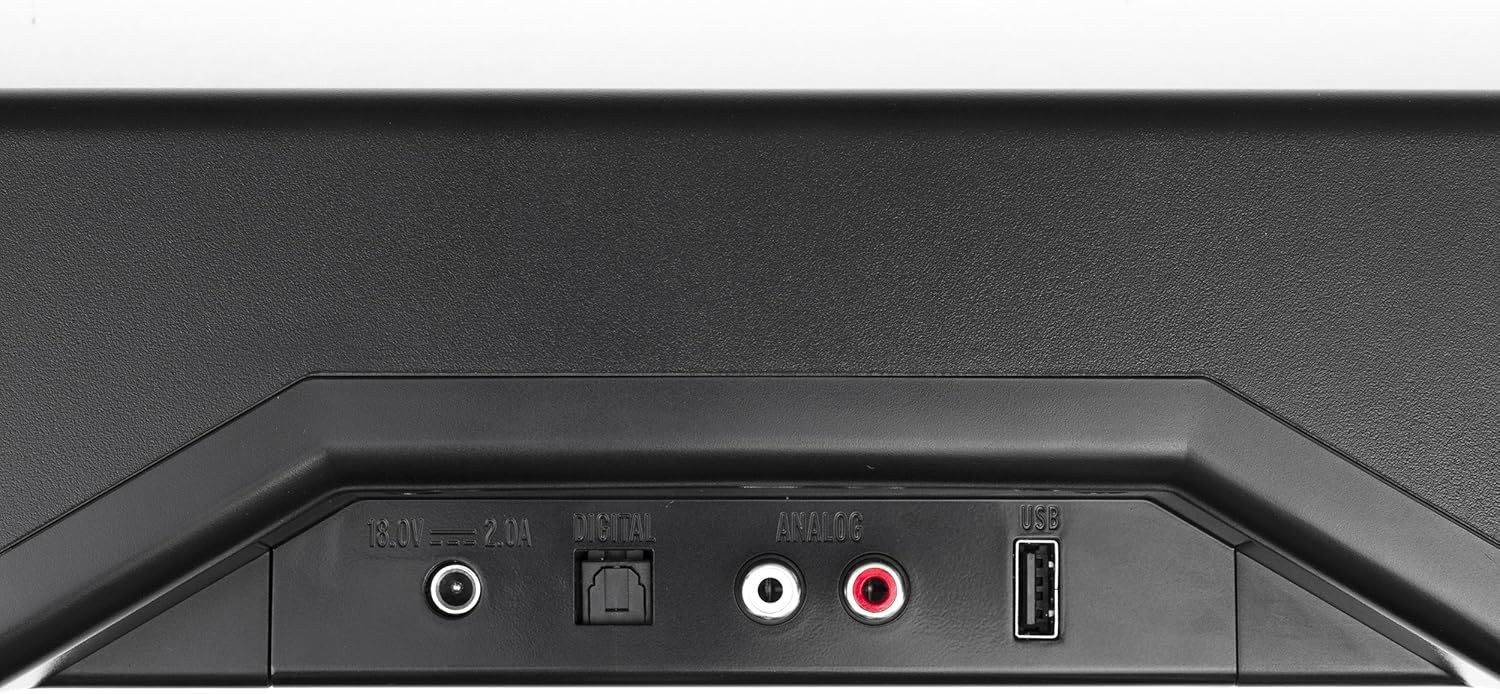
Figure 3: Sound Bar Rear Panel with Digital, Analog, and USB Inputs
The USB port is for service use only and is not intended for audio input from a television.
4. Awọn ilana Iṣiṣẹ
4.1 Iṣakoso latọna jijin
The system is operated using the included remote control. Ensure the remote has a working watch battery installed.

Figure 4: Klipsch R-4B Remote Control
- Agbara: Ó máa ń tan tàbí pa ohun èlò orin.
- Iwọn didun +/-: Adjusts the main system volume.
- SUB +/-: Adjusts the subwoofer volume independently.
- Pa ẹnu mọ́: Mu ohun naa mu tabi mu ohun kuro.
- Aṣayan igbewọle: Buttons for ANALOG, DIGITAL, and BLUETOOTH to select the audio source.
- Imudara ohun: Boosts frequencies where voice comes in, improving dialogue clarity.
- Ipo Alẹ: Adjusts dynamic range for quieter listening environments.
- Agbegbe: Activates or deactivates virtual surround sound.
The sound bar can also be programmed to respond to most TV remote controls for basic functions like volume and mute.
4.2 Sisopọ Bluetooth
To pair a Bluetooth device with the sound bar:
- Press the BLUETOOTH button on the remote control. The LED indicator on the sound bar will begin to flash.
- Mu Bluetooth ṣiṣẹ lori ẹrọ rẹ (foonuiyara, tabulẹti, ati bẹbẹ lọ) ki o wa awọn ẹrọ to wa.
- Select "Klipsch R-4B" from the list.
- Once paired, the LED indicator on the sound bar will glow solid blue.
5. Awọn pato
| Ẹya ara ẹrọ | Apejuwe |
|---|---|
| Agbọrọsọ System | 2-Way Soundbar with Wireless 6.5" Subwoofer |
| Max Acoustic Output | 106 dB |
| Ga Igbohunsafẹfẹ Driver | 2 x .75" Soft dome tweeters mated to 90 x 90 Tractrix horns |
| Aarin | 2 x 2.5" Fiber composite cone woofers |
| Sound Bar Dimensions (H x W x D) | 3.8 x 40 x 3.5 inches |
| Subwoofer Dimensions (H x W x D) | 10.6 x 7.25 x 13.5 inches |
| Iwọn | Sound Bar: 2.09 pounds (approximate) |
| Awọn igbewọle | Digital Optical, Analog RCA, Bluetooth, USB (service only) |
| Nọmba awoṣe | 1062379 |
6. Laasigbotitusita
- Ko si Ohun: Ensure all power cables are securely connected and the sound bar is powered on. Verify the correct input source is selected on the sound bar. Check the optical or RCA cable connection to your TV.
- Subwoofer Ko Sopọ: Ensure both the sound bar and subwoofer are powered on. The subwoofer should automatically pair. If not, refer to the full user manual for manual pairing instructions.
- Didara Ohun Ko dara: Check cable connections. Adjust volume levels on both the sound bar and subwoofer. Experiment with the Voice Enhance and Night Mode settings on the remote control.
- Iṣakoso latọna jijin Ko Ṣiṣẹ: Check the watch battery in the remote control. Ensure there are no obstructions between the remote and the sound bar.
7. Itọju
To ensure the longevity and optimal performance of your Klipsch R-4B Sound Bar system, follow these maintenance guidelines:
- Ninu: Lo asọ ti o rọ, ti o gbẹ lati nu awọn aaye ti igi ohun ati subwoofer. Yago fun lilo awọn olutọpa olomi tabi awọn ohun elo abrasive, nitori wọn le ba ipari jẹ.
- Ibi: Avoid placing the units in direct sunlight, near heat sources, or in areas with high humidity. Ensure adequate ventilation around both components.
- Agbara: Ge awọn okun ina kuro ninu ibudo ogiri ti eto naa ko ba lo fun igba pipẹ.
8. Atilẹyin ọja ati Support
For warranty information, technical support, or service inquiries, please refer to the warranty card included with your product or visit the official Klipsch webojula. Tọju iwe-ẹri rira rẹ bi ẹri rira fun awọn iṣeduro atilẹyin ọja.


