1. Ifihan
The AULA F2010 Unicorn Backlit Mechanical Gaming Keyboard is designed for an enhanced gaming and typing experience. It features a durable construction, multi-color LED illumination, and responsive mechanical switches. This manual provides detailed instructions for setting up, operating, and maintaining your keyboard.
2. Package Awọn akoonu
- AULA F2010 Mechanical ere Keyboard
- Itọsọna olumulo
- Keycap Puller
3. Eto Itọsọna
3.1 System Awọn ibeere
- Operating System: Windows Vista / 7 / 8 / 10 / Mac OS
- USB Port to wa
3.2 Nsopọ Keyboard
- Wa ibudo USB ti o wa lori kọnputa rẹ.
- Plug the USB connector of the AULA F2010 keyboard into the USB port.
- The keyboard will automatically install the necessary drivers. This may take a few moments.
- Once installation is complete, the keyboard's backlighting will illuminate, indicating it is ready for use.
4. Awọn ilana Iṣiṣẹ
4.1 Backlighting Iṣakoso
The AULA F2010 features multi-color LED backlighting with adjustable brightness and various lighting effects.
- Ṣiṣatunṣe Imọlẹ: Tẹ FN + PGUP to increase brightness. Press FN + PGDN lati dinku imọlẹ.
- Iyipada Awọn ọna Imọlẹ: Tẹ FN + INS to cycle through different lighting effects (e.g., strobe, glow, pulse).
- Imọlẹ Iyipada: Lo FN + ILE to enter custom lighting mode. Specific keys can be lit according to user preference.
- Adjusting Effect Speed: Lo FN + Ọfà Òsì or FN + Ọfà Ọ̀tún to adjust the speed of dynamic lighting effects.
4.2 Anti-Ghosting and Key Rollover
The keyboard features 100% Anti-Ghosting with 104 Key Roll-over on USB, ensuring that every key press is registered accurately, even during rapid, simultaneous inputs common in gaming.
4.3 Ipo orun
To conserve energy, the keyboard will enter sleep mode and turn off all LEDs after 10 minutes of inactivity. Press any key to resume the LED backlight and normal operation.
4.4 Multimedia Awọn bọtini ọna abuja
The keyboard includes user-friendly shortcut function keys that can be activated in conjunction with the FN key for quick access to multimedia controls and other functions.
5. Awọn ẹya Ọja
- Apẹrẹ didara: Minimalist styled mechanical gaming keyboard with 6-color backlighting.
- Ikole ti o tọ: Features a brushed aluminum chassis for rugged, lifelong durability.
- Advanced Keycaps: AULA Armor Technology with highly durable Double-shot injection molding keycaps, suitable for all gaming circumstances.
- Atako Ayika: Water resistant, dust-proof, and static-free design.
- Awọn Yipada Mekaniki: Equipped with Blue mechanical switches for a tactile and audible typing experience.

Aworan: Oke-isalẹ view of the AULA F2010 keyboard, showcasing its full layout and vibrant multi-color backlighting.

Aworan: Angled view of the AULA F2010 keyboard, displaying the multi-color LED backlighting across the keys.
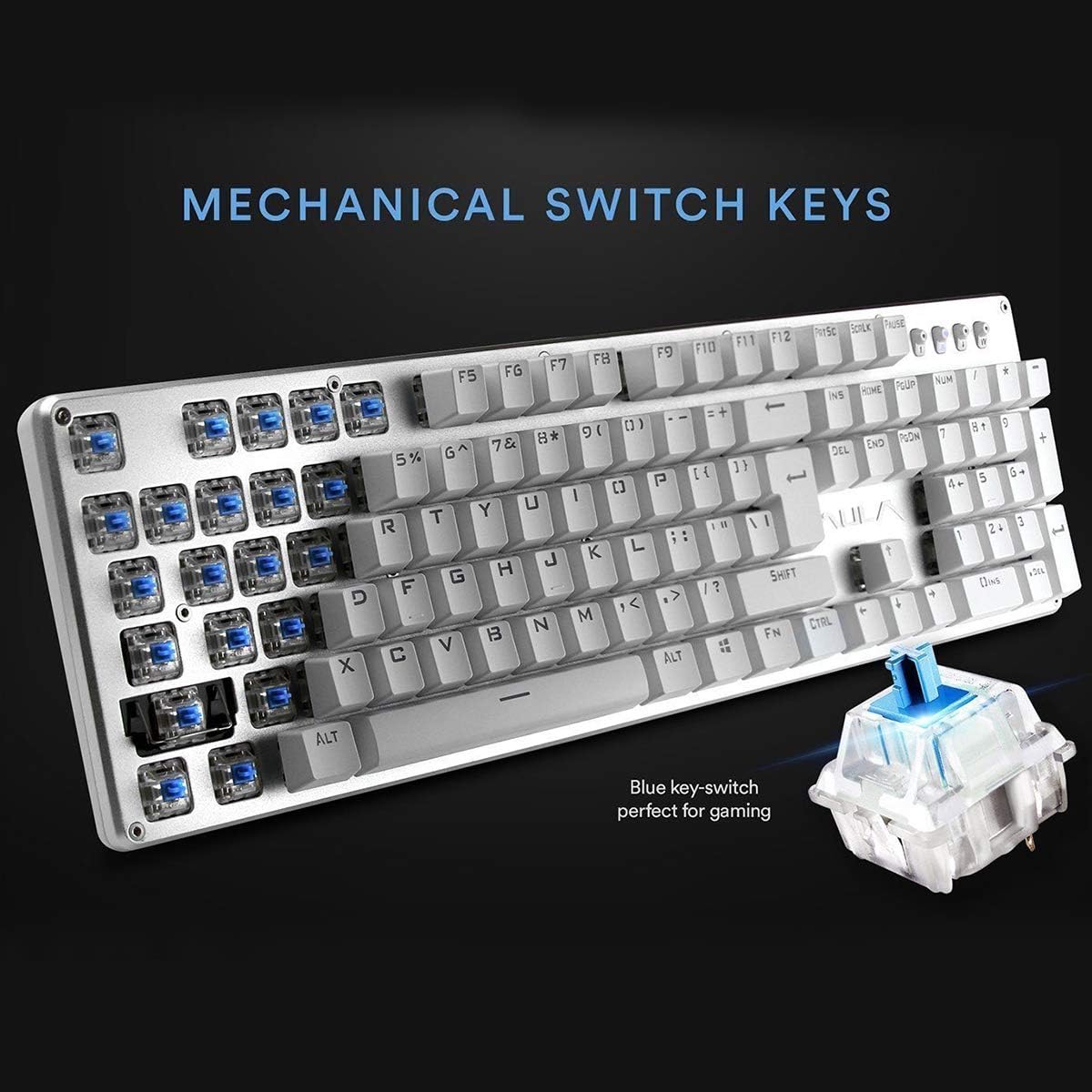
Aworan: A sunmọ-soke view highlighting the mechanical blue switches, which provide tactile feedback and a distinct click sound.
6. Itọju ati Itọju
Ìtọ́jú tó péye máa ń jẹ́ kí páálítà AULA F2010 rẹ pẹ́ títí, ó sì máa ń ṣiṣẹ́ dáadáa.
- Ninu: Regularly clean the keyboard with a soft, dry cloth. For deeper cleaning, use a keycap puller to remove keycaps and clean dust and debris with compressed air or a small brush.
- Idasonu Olomi: Due to its water-resistant design, minor spills may not cause damage. However, it is recommended to immediately unplug the keyboard, dry it thoroughly, and allow it to air dry completely before reconnecting.
- Ibi ipamọ: Tọju keyboard ni itura, aye gbigbẹ kuro lati orun taara ati awọn iwọn otutu to gaju.
7. Laasigbotitusita
Tí o bá ní ìṣòro pẹ̀lú keyboard rẹ, wo àwọn ojútùú tí ó wọ́pọ̀ wọ̀nyí:
- Keyboard Ko Dahun:
- Rí i dájú pé okùn USB náà so mọ́ keyboard àti kọ̀ǹpútà dáadáa.
- Gbiyanju lati so bọtini itẹwe sinu ibudo USB ti o yatọ.
- Tun kọmputa rẹ bẹrẹ.
- Check if the keyboard is in sleep mode (press any key to wake it).
- Imọlẹ ẹhin ko ṣiṣẹ:
- Ensure the brightness is not set to the lowest level (use FN + PGUP to increase).
- Verify that the keyboard is not in sleep mode.
- Keys Not Registering or Doubling:
- Clean around and under the affected keycaps for any debris.
- If the issue persists, it may indicate a switch malfunction. Contact customer support if the product is under warranty.
8. Awọn pato
| Ẹya ara ẹrọ | Ẹ̀kúnrẹ́rẹ́ |
|---|---|
| Brand | AULA |
| Nọmba awoṣe | F2010 |
| Asopọmọra Technology | Firanṣẹ (USB) |
| Nọmba ti Awọn bọtini | 104 |
| Iru Yipada Bọtini | Mechanical (Blue Switch) |
| Imọlẹ afẹyinti | Multi-color LED (RGB) with adjustable brightness and modes |
| Anti-Ghosting | 100% Anti-Ghosting with 104 Key Roll-over |
| Ohun elo | Brushed Aluminum Chassis, Double-shot Injection Molding Keycaps |
| Ibamu System isẹ | Windows Vista / 7 / 8 / 10 / Mac OS |
| Iwọn Nkan | 2.87 lbs (1.3 kg) |
| Awọn iwọn Ọja (L x W x H) | 17.2 x 5.1 x 0.83 inches (43.7 x 13 x 2.1 cm) |
| Pataki Awọn ẹya ara ẹrọ | Water Resistant, Dust-proof, Static-free, Sleep Mode |
9. Atilẹyin ọja ati Support
For warranty information, technical support, or service inquiries, please refer to the warranty card included with your product or visit the official AULA webojula. Tọju iwe-ẹri rira rẹ bi ẹri rira fun awọn iṣeduro atilẹyin ọja.


