1. Ifihan
This manual provides essential information for the safe and efficient operation, installation, and maintenance of your Daitsu ADDH10 Digital Dehumidifier. Please read these instructions thoroughly before using the appliance and retain them for future reference.
The Daitsu ADDH10 is designed to reduce humidity levels in indoor environments, helping to prevent mold, mildew, and other moisture-related issues. It features a digital display and automatic functions for user convenience.
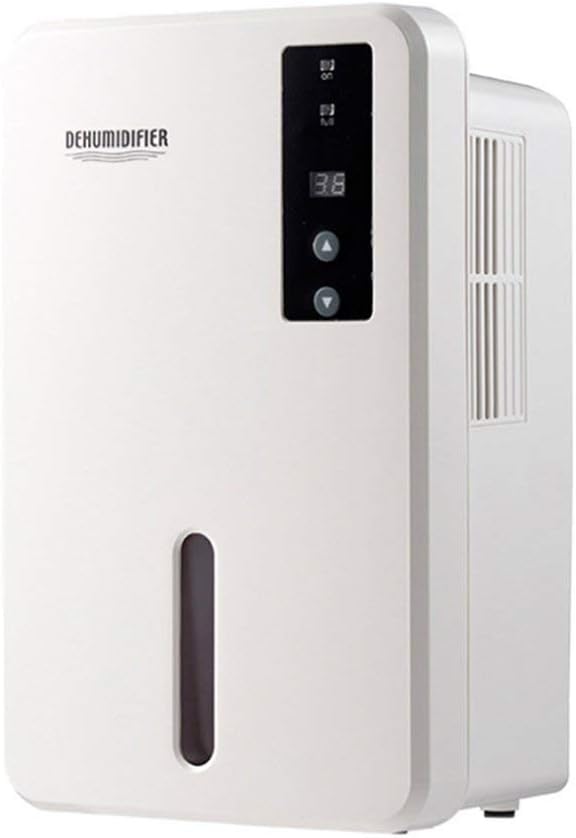
Aworan 1.1: Iwaju view of the Daitsu ADDH10 Digital Dehumidifier, showing the control panel and water tank window.
2. Alaye Aabo
Nigbagbogbo tẹle awọn iṣọra aabo ipilẹ nigba lilo awọn ohun elo itanna lati dinku eewu ina, mọnamọna, ati ipalara.
- Ka gbogbo awọn itọnisọna ṣaaju lilo dehumidifier.
- Rii daju pe ipese agbara ibaamu voltage pato lori awọn Rating aami.
- Ma ṣe ṣiṣẹ ẹrọ mimu kuro pẹlu okun ti o bajẹ tabi plug.
- Jeki ohun elo kuro lati awọn orisun ooru, oorun taara, ati awọn ohun elo ina.
- Do not block the air inlet or outlet. Ensure adequate air circulation around the unit.
- Máa gbé ẹ̀rọ ìtútù sí orí ilẹ̀ tí ó dúró ṣinṣin, tí ó tẹ́jú.
- Unplug the unit before cleaning, maintenance, or when not in use for extended periods.
- Ohun elo yii kii ṣe ipinnu fun lilo nipasẹ awọn eniyan (pẹlu awọn ọmọde) pẹlu idinku ti ara, imọlara tabi awọn agbara ọpọlọ, tabi aini iriri ati imọ, ayafi ti wọn ba ti fun wọn ni abojuto tabi itọnisọna nipa lilo ohun elo nipasẹ eniyan ti o ni iduro fun aabo wọn.

Image 2.1: Illustration of the dehumidifier's double security protection, including automatic shut-off when the water tank is full and over-temperature protection (auto-stop if heat sink exceeds 80°C).
3. Ọja irinše ati Awọn ẹya ara ẹrọ
Mọ ara rẹ pẹlu awọn apakan akọkọ ti ẹrọ imukuro rẹ:
- Ibi iwaju alabujuto: Digital àpapọ ati awọn bọtini fun isẹ.
- Afẹfẹ afẹfẹ: Where humid air is drawn into the unit.
- Oju-afẹfẹ: Ibi ti a ti gbe afẹfẹ gbigbẹ jade.
- Omi omi: Collects condensed water. Features a transparent window to monitor water level.
- Water Tank Handle/Lid: For easy removal and emptying.

Image 3.1: Diagram showing the key components: Air outlet, Control panel, Air inlet, and the 1.5L water tank capacity.
The dehumidifier has a 1.5-liter water tank capacity and features automatic shut-off when the tank is full, indicated by a float sensor. It also includes over-temperature protection.
4. Eto ati fifi sori
4.1 Ṣiṣii silẹ
- Farabalẹ yọ dehumidifier kuro ninu apoti rẹ.
- Yọ gbogbo ohun èlò ìdìpọ̀, àwọn téèpù, àti àwọn fíìmù ààbò kúrò.
- Inspect the unit for any signs of damage. If damaged, do not operate and contact your retailer.
4.2 Ibi
- Gbé ẹ̀rọ ìtútù sí orí ilẹ̀ tó le koko, tó sì tẹ́jú tí ó lè gbé ìwọ̀n rẹ̀ ró nígbà tí ojò omi bá kún.
- Ensure there is at least 20 cm (8 inches) of space around the air inlet and outlet for proper air circulation.
- Avoid placing the unit near walls, furniture, or curtains that could obstruct airflow.
- Do not place the unit in direct sunlight or near heat-generating appliances.
- For optimal performance, operate the dehumidifier in an enclosed area. Close all doors and windows in the room.
4.3 Asopọ agbara
- Ensure your hands are dry before plugging in the unit.
- Pulọọgi okun agbara sinu iṣan itanna ti o ni ilẹ daradara.
5. Awọn ilana Iṣiṣẹ
5.1 Iṣakoso igbimo Loriview
The control panel features a digital display and control buttons:
- Ifihan Digital: Shows current humidity level or settings.
- Bọtini agbara: Yipada ẹyọ naa tan tabi pa.
- Awọn bọtini oke/isalẹ: Adjust desired humidity level or other settings.

Image 5.1: Various angles of the dehumidifier, highlighting the digital control panel with up/down buttons and the transparent water tank.
5.2 Ipilẹ isẹ
- Tan-an: Press the Power button to turn on the dehumidifier. The digital display will light up, showing the current room humidity.
- Ṣètò ọriniinitutu ti a fẹ́: Use the Up and Down buttons to set your desired humidity level. The unit will operate until the room humidity reaches the set level, then cycle on and off to maintain it.
- Paa: Press the Power button again to turn off the dehumidifier.
5.3 Ṣofo Omi Omi
When the water tank is full, the dehumidifier will automatically stop operating, and an indicator light (if available) may illuminate. The unit will not resume operation until the tank is emptied and reinserted correctly.
- Rọra fa jade ni omi ojò lati iwaju ti awọn kuro.
- Farabalẹ gbe ojò naa lọ si ibi iwẹ tabi sisan.
- Remove the tank lid (if applicable) and pour out the collected water.
- Replace the lid securely and slide the empty water tank back into the dehumidifier until it clicks into place.
- The unit will resume operation automatically if the power is on and the desired humidity level has not been reached.

Image 5.2: The transparent water tank, designed for easy removal and emptying.
6. Itọju
Ìtọ́jú déédéé máa ń mú kí iṣẹ́ rẹ̀ dára síi, ó sì máa ń mú kí ẹ̀rọ ìtútù rẹ pẹ́ sí i. Máa yọ ẹ̀rọ náà kúrò kí o tó ṣe ìtọ́jú èyíkéyìí.
6.1 Ninu Omi Omi
- Clean the water tank regularly (e.g., every few weeks) to prevent mold and bacteria growth.
- Remove the water tank as described in Section 5.3.
- Fi ọṣẹ díẹ̀ àti omi gbígbóná fọ ojò náà. Fi omi wẹ̀ ẹ́ dáadáa.
- Gbẹ ojò naa patapata ṣaaju ki o to tun fi sii sinu ẹyọ.
6.2 Ninu Ode
- Mu ese ita ti dehumidifier pẹlu asọ, damp asọ.
- Má ṣe lo àwọn ohun ìfọṣọ, àwọn ohun olómi, tàbí àwọn kẹ́míkà líle, nítorí pé wọ́n lè ba ojú ilẹ̀ jẹ́.
- Rii daju pe ko si omi ti o wọ inu awọn paati inu.
6.3 Ibi ipamọ
- If storing the dehumidifier for an extended period, ensure the water tank is empty and clean.
- Nu ita ti kuro.
- Store the unit in an upright position in a cool, dry place, away from direct sunlight and extreme temperatures.
7. Laasigbotitusita
Ṣaaju ki o to kan si atilẹyin alabara, jọwọ wo itọsọna laasigbotitusita atẹle yii fun awọn ọran ti o wọpọ:
| Isoro | Owun to le Fa | Ojutu |
|---|---|---|
| Dehumidifier ko ni tan. | Ko si ipese agbara. Okun agbara ko ṣafọ sinu aabo. |
Ṣayẹwo boya iṣan agbara n ṣiṣẹ. Rii daju pe okun agbara ti wa ni edidi ṣinṣin sinu ẹyọkan ati iṣan ogiri. |
| Ẹka n ṣiṣẹ ṣugbọn kii ṣe gbigba omi. | Room humidity is already low. Iwọn otutu ti lọ silẹ pupọ. Ti dina ṣiṣan afẹfẹ. |
Check the current humidity level on the display. If it's below your set point, the unit will not collect water. Àwọn ẹ̀rọ ìtútù kò ṣiṣẹ́ dáadáa ní àyíká tí ó tutù gan-an. Rii daju pe ẹnu-ọna afẹfẹ ati ijade ko ni idiwọ. |
| Unit stops operating and indicator light is on. | Omi omi ti kun. Water tank is not properly inserted. |
Sofo ojò omi. Reinsert the water tank correctly until it clicks into place. |
| Ariwo dani nigbati isẹ. | Ẹyọ kii ṣe lori ipele ipele kan. Ti abẹnu paati oro. |
Rii daju pe a gbe ẹyọ naa sori iduro, ipele ipele. Ti ariwo ba wa, da lilo duro ko si kan si atilẹyin alabara. |
8. Awọn pato
| Ẹya ara ẹrọ | Sipesifikesonu |
|---|---|
| Brand | Daitsu |
| Nọmba awoṣe | ADDH10 (Technical Model: bb_S0403263) |
| Àwọ̀ | Funfun |
| Iwọn Nkan | 10 kilo |
| Awọn iwọn Ọja (isunmọ.) | 286mm (Iga) x 180mm (Iwọn) x 134mm (Ijinle) |
| Omi ojò Agbara | 1.5 liters |
| Ipo Iṣiṣẹ | Laifọwọyi |
| Awọn irinše to wa | Dehumidifier |
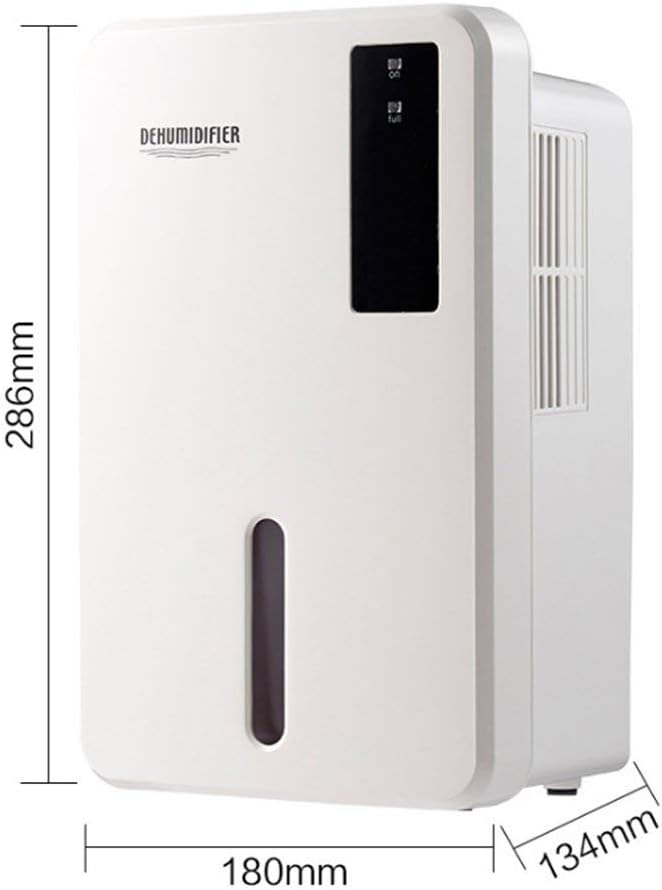
Image 8.1: Diagram illustrating the dimensions of the dehumidifier: 286mm height, 180mm width, and 134mm depth.
9. Atilẹyin ọja ati Support
For warranty information, please refer to the documentation included with your product packaging or visit the official Daitsu webojula. Awọn ofin atilẹyin ọja le yatọ nipasẹ agbegbe ati alagbata.
If you encounter issues not covered in the troubleshooting section or require further assistance, please contact your retailer or the manufacturer's customer support. Have your model number (ADDH10) and purchase details ready when contacting support.


