1. Ifihan
Thank you for choosing the Kaiser MSS-8915 Audio System. This professional 15-inch speaker is designed to deliver powerful and clear audio for various applications, including events, parties, and professional use. This manual provides essential information for safe and efficient operation, setup, maintenance, and troubleshooting.
2. Awọn Ilana Aabo pataki
Please read and understand all safety instructions before operating this device. Keep this manual for future reference.
- Orisun Agbara: So ẹrọ pọ nikan si awọn pàtó kan ipese agbara voltage. Ensure the power cable is not damaged.
- Afẹfẹ: Ma ṣe dina awọn ṣiṣi atẹgun. Rii daju pe sisan afẹfẹ to peye ni ayika ẹyọ naa.
- Omi ati Ọrinrin: Ma ṣe fi ẹrọ naa han si ojo, ọrinrin, tabi ọriniinitutu ti o pọ ju. Ma ṣe gbe awọn nkan ti o kun fun olomi sori ẹrọ naa.
- Ooru: Jeki ẹyọ kuro lati awọn orisun ooru gẹgẹbi awọn imooru, awọn iforukọsilẹ ooru, awọn adiro, tabi awọn ohun elo miiran ti o nmu ooru jade.
- Ninu: Yọ ẹ̀rọ náà kúrò nínú ibi tí agbára ń gbé jáde kí o tó sọ ọ́ di mímọ́. Lo aṣọ gbígbẹ láti fi fọ ọ́.
- Ṣiṣẹ: Maṣe gbiyanju lati ṣiṣẹ ọja yi funrararẹ. Tọkasi gbogbo iṣẹ si oṣiṣẹ oṣiṣẹ ti o peye.
- Ibi: Ensure the unit is placed on a stable surface or securely mounted on a stand to prevent tipping.
- Awọn ọmọde: Pa ẹrọ naa ati awọn ohun elo rẹ mọ kuro ni ọwọ awọn ọmọde.
3. Package Awọn akoonu
Jẹrisi pe gbogbo awọn ohun kan wa ninu package:
- Kaiser MSS-8915 Audio System Unit
- Okun agbara
- Afowoyi Olumulo (iwe-ipamọ yii)
4. Ọja Ipariview
Familiarize yourself with the components and features of your Kaiser MSS-8915 Audio System.
4.1 Iwaju View
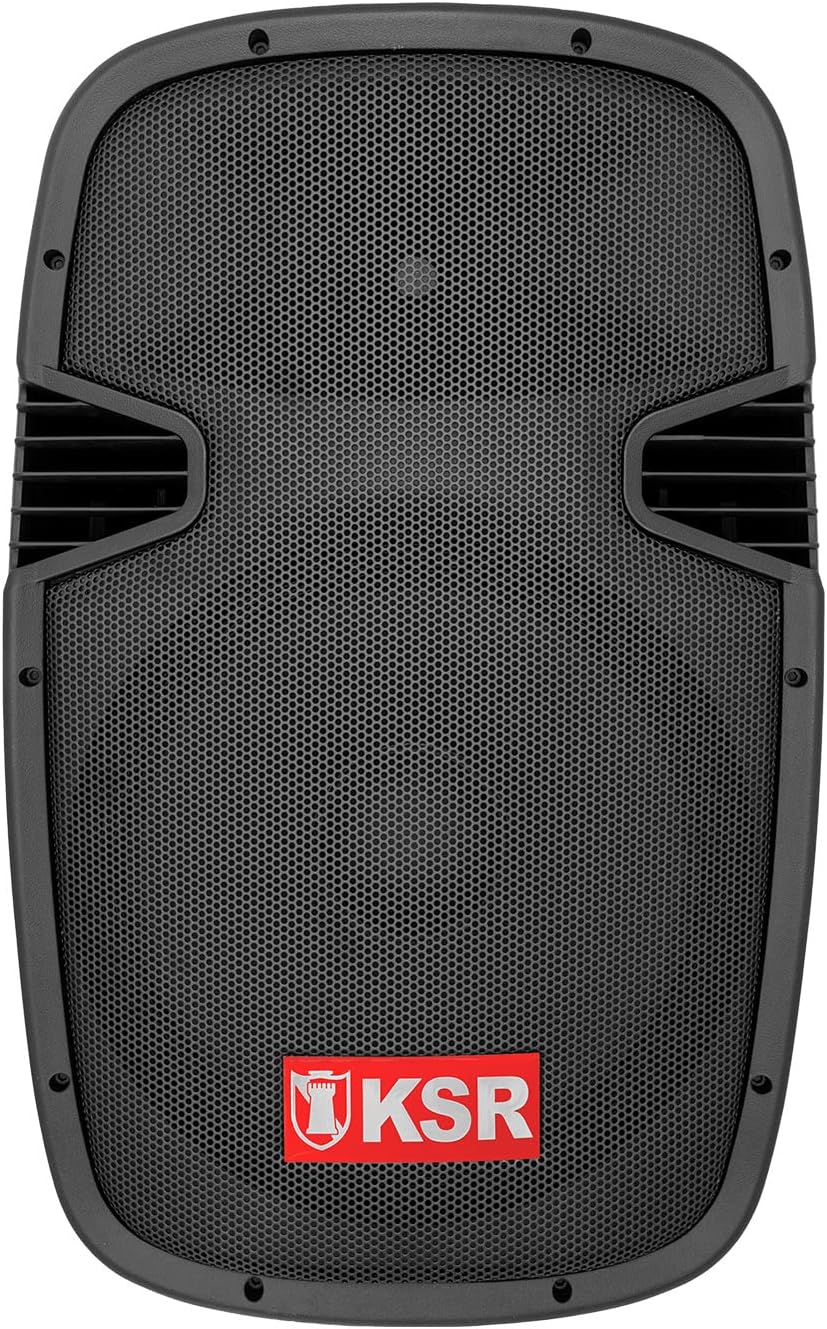
Nọmba 4.1: Iwaju view of the Kaiser MSS-8915 speaker, showing the protective grille and the KSR logo.
4.2 Ru Panel ati awọn isopọ

Nọmba 4.2: Rear panel of the Kaiser MSS-8915, featuring Speakon quick connections for audio input/output and the Kaiser branding plate.
- Speakon Connectors: For secure and reliable audio input and daisy-chaining to other speakers.
- Iṣagbewọle agbara: Asopọ fun okun agbara akọkọ.
- Ibi iwaju alabujuto: (If applicable, for Bluetooth, USB, and SD features).
4.3 Transport and Mounting Features

Nọmba 4.3: Apa view illustrating the integrated side handle for easy transport.

Nọmba 4.4: Isalẹ view of the speaker, highlighting the integrated wheels for convenient mobility.
- Side and Top Handles: Ergonomically designed for comfortable lifting and carrying.
- Awọn kẹkẹ: Integrated at the bottom for effortless transportation.
- Duro Oke: A rear knob and socket allow for secure mounting on a speaker stand.
5. Awọn ilana iṣeto
Follow these steps to set up your Kaiser MSS-8915 Audio System.
5.1 Ibi
- Choose a stable, flat surface for the speaker.
- For optimal sound dispersion, consider placing the speaker on a compatible stand using the rear mounting socket.
- Ensure there is adequate space around the speaker for ventilation.
5.2 Asopọ agbara
- Ensure the speaker's power switch (if present) is in the OFF position.
- Connect the provided power cable to the power input on the rear panel of the speaker.
- Pulọọgi opin miiran ti okun agbara sinu iṣan itanna to dara.
5.3 Awọn isopọ Ohun
The MSS-8915 uses Speakon connectors for audio input and output.
- Connect your audio source (e.g., mixer, amplifier) to the Speakon input connector on the rear panel using a compatible Speakon cable.
- To daisy-chain multiple MSS-8915 speakers, connect a Speakon cable from the output of the first speaker to the input of the next speaker.
6. Awọn ilana Iṣiṣẹ
This section details how to operate your audio system. Note: While the product description mentions a "passive speaker," the product title and specifications indicate integrated Bluetooth, USB, and SD functionality, suggesting an active component. These instructions assume the presence of such active features.
6.1 Titan / Pa a
- After all connections are made, switch the power button to the ON position.
- To power off, switch the power button to the OFF position and then unplug the power cable from the outlet.
6.2 Bluetooth Asopọmọra
- Rii daju pe agbọrọsọ ti wa ni titan.
- Mu Bluetooth ṣiṣẹ lori ẹrọ alagbeka rẹ (foonuiyara, tabulẹti, ati bẹbẹ lọ).
- Wa fun available Bluetooth devices and select "Kaiser MSS-8915" (or similar name).
- Once paired, you can stream audio wirelessly from your device to the speaker.
Sisisẹsẹhin Kaadi USB ati SD 6.3
- Insert a USB flash drive or SD card into the respective port on the speaker's control panel.
- The speaker should automatically detect the media and begin playback.
- Use the control panel buttons (Play/Pause, Next/Previous Track, Volume) to manage playback.
6.4 Iṣakoso iwọn didun
Adjust the master volume using the dedicated volume control knob on the speaker's control panel. Start with a low volume and gradually increase it to your desired level.
7. Itọju
Proper maintenance ensures the longevity and optimal performance of your audio system.
7.1 Ninu
- Always unplug the speaker before cleaning.
- Lo asọ ti o tutu, ti o gbẹ lati nu awọn ita ita.
- Ma ṣe lo abrasive Cleaners, waxes, tabi epo bi wọn ṣe le ba ipari jẹ.
- For the speaker grille, use a soft brush or vacuum cleaner with a brush attachment to remove dust.
7.2 Ibi ipamọ
- Nigbati o ko ba wa ni lilo fun awọn akoko ti o gbooro sii, tọju agbohunsoke si tutu, ibi gbigbẹ, kuro lati orun taara ati awọn iwọn otutu to gaju.
- If possible, use the original packaging or a protective cover to prevent dust accumulation and physical damage.
8. Laasigbotitusita
If you encounter issues with your Kaiser MSS-8915, refer to the following common problems and solutions.
| Isoro | Owun to le Fa | Ojutu |
|---|---|---|
| Ko si agbara | Power cable not connected; Power outlet not working; Speaker power switch off. | Ensure power cable is securely connected. Test the outlet with another device. Turn the speaker power switch ON. |
| Ko si ohun jade | Volume too low; Incorrect audio input connection; Audio source issue; Damaged cable. | Increase volume. Check Speakon cable connections. Verify audio source is playing. Try a different audio cable. |
| Ikuna sisopọ Bluetooth | Agbọrọsọ kii ṣe ni ipo sisopọ; Ẹrọ ti o jinna pupọ; kikọlu. | Ensure speaker is discoverable. Move device closer to speaker. Avoid other wireless devices. |
| Sisisẹsẹhin USB/SD ko ṣiṣẹ | Ti ko ni atilẹyin file format; Corrupted media; Incorrect insertion. | Rii daju files are in a supported format (e.g., MP3). Try a different USB drive/SD card. Reinsert media correctly. |
| Ohun ti o daru | Volume too high; Input signal too strong; Damaged speaker component. | Reduce volume on speaker and audio source. Check input levels. If problem persists, contact support. |
9. Awọn pato
Technical specifications for the Kaiser MSS-8915 Audio System.

Nọmba 9.1: Ẹyìn view of the Kaiser MSS-8915, including key dimensions for reference.
| Orukọ awoṣe | MSS-8915 |
| Agbọrọsọ Iru | Professional Passive Speaker, 2-way, Surround Sound |
| Iwọn Woofer | 15 inches (38.1 cm) |
| Awakọ | Titanium Driver |
| Audio Power (PMPO) | 4000 W PMPO |
| Audio Power (RMS) | 150 W RMS |
| Ipalara | 8 ohm |
| Asopọmọra Technology | Bluetooth, USB, SD (for active system features) |
| Alailowaya Ibaraẹnisọrọ | Bluetooth |
| Ọna Iṣakoso | Tactile (for integrated audio system controls) |
| Orisun agbara | Okun Itanna |
| Awọn iwọn (L x W x H) | 49 x 42 x 76 cm |
| Iwọn | 15 kg |
| Awọn eroja To wa | Okun agbara |
| Iṣagbesori Iru | Floor Oke |
10. Atilẹyin ọja ati Support
Kaiser products are manufactured to high-quality standards. For warranty information and technical support, please refer to the warranty card included with your product or visit the official Kaiser webojula.
- Akoko atilẹyin ọja: Please consult your purchase documentation or the manufacturer's webaaye fun awọn ofin atilẹyin ọja kan pato.
- Oluranlowo lati tun nkan se: For assistance with setup, troubleshooting, or product inquiries, contact Kaiser customer service.
- Awọn orisun Ayelujara: Ṣabẹwo si Kaiser Brand Store on Amazon fun afikun ọja alaye ati support.


