Ọrọ Iṣaaju
The Motorola T260 Talkabout 2-Way Radio is designed for reliable communication in various outdoor and indoor environments. With a range of up to 25 miles under optimal conditions, it allows users to stay connected with family and friends. This lightweight and durable radio includes essential features such as NOAA weather channels and alerts, and iVOX/VOX hands-free communication.

Image: Motorola T260 Talkabout Two-Way Radios banner highlighting the 'Go Further' capability.
Ohun ti o wa ninu Apoti
Your Motorola T260 package includes the following items:
- 2 Redio
- 2 Awọn agekuru igbanu
- 2 NiMH Battery Packs
- 1 "Y" Cable Charging Adapter with dual-micro-USB connectors
- 1 Itọsọna olumulo
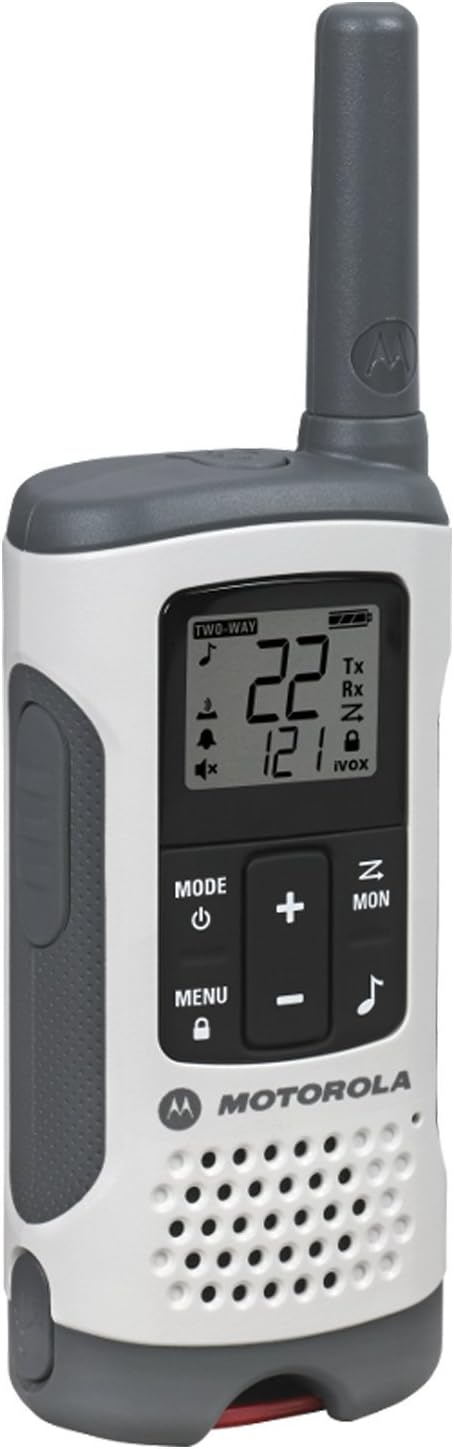
Image: A single Motorola T260 Talkabout 2-Way Radio, showcasing apẹrẹ ati ifihan rẹ.
Awọn ilana iṣeto
1. Fifi sori batiri ati gbigba agbara
The T260 radios can be powered using the included NiMH rechargeable battery packs or 3 AA alkaline batteries (not included for AA). For initial use, install the NiMH battery packs and charge the radios.
- Rí i dájú pé redio náà ti pa.
- Ṣii ideri iyẹwu batiri ni ẹhin redio naa.
- Insert the NiMH battery pack, ensuring correct polarity.
- Pa ideri batiri naa ni aabo.
- Connect the "Y" cable charging adapter to a power source and then to the micro-USB ports on both radios.
- Charge the radios for approximately 10 hours for a full charge. The battery indicator on the display will show charging status.
2. Sisopọ Agekuru Beliti
To attach the belt clip, align the clip with the slots on the back of the radio and slide it down until it clicks into place.
Awọn ilana Iṣiṣẹ
1. Agbara lori / Paa
Tẹ mọlẹ Agbara/Akojọ aṣyn button until the display lights up to turn the radio on. Repeat to turn off.
2. Yíyan Kóòdù Ìkànnì àti Ìpamọ́
The T260 offers 22 channels and 121 privacy codes, totaling 2,662 combinations for clear communication.
- Tẹ awọn Akojọ aṣyn bọtini titi nọmba ikanni seju.
- Lo awọn Up or Isalẹ awọn bọtini lati yan ikanni ti o fẹ.
- Tẹ Akojọ aṣyn again until the privacy code flashes.
- Lo awọn Up or Isalẹ awọn bọtini lati yan koodu ikọkọ ti o fẹ.
- Tẹ Akojọ aṣyn tabi awọn PTT bọtini lati jẹrisi aṣayan rẹ.
3. Titari-si-Sọrọ (PTT)
Lati tan kaakiri, tẹ mọlẹ PTT button and speak clearly into the microphone. Release the PTT bọtini lati gbọ.
4. Range Considerations
The maximum communication range is up to 25 miles under ideal, unobstructed conditions. Actual range will vary based on terrain, weather, electromagnetic interference, and obstructions.
5. NOAA Weather Channels and Alerts
Stay informed about real-time weather conditions by accessing one of 11 NOAA weather channels or initiating weather alerts. NOAA radio service availability may vary by area.
6. iVOX/VOX Hands-Free Communication
The iVOX/VOX feature allows for hands-free operation. When activated, the radio transmits automatically when it detects your voice, eliminating the need to press the PTT button.
7. Scanning Feature
Use the scanning feature to quickly find active channels. This helps identify channels currently in use for communication.
8. Low Batiri Alert
The radio will provide an audible alert and/or a visual indicator on the display when the battery level is low, reminding you to recharge or replace batteries.


Images: Icons representing various outdoor activities like hiking, driving, camping, and biking, where the T260 radios can be utilized.
Fidio: Ifihan fidio ọja osise kanasing the Motorola T260 Talkabout Radio, highlighting its features and ease of use in various scenarios.
Itoju
To ensure optimal performance and longevity of your Motorola T260 radios, follow these maintenance guidelines:
- Ninu: Lo asọ, damp cloth to clean the exterior of the radio. Do not use abrasive cleaners or solvents.
- Itọju Batiri: Fully charge NiMH battery packs before long periods of storage. Store batteries in a cool, dry place.
- Ibi ipamọ: Store radios in a dry, dust-free environment when not in use.
- Ifihan omi: While durable, the T260 is not water resistant. Avoid submerging the radio in water.
Laasigbotitusita
If you encounter issues with your Motorola T260 radio, refer to the following common troubleshooting tips:
- Ko si Agbara: Ensure batteries are correctly installed and fully charged. Check if the radio is turned on.
- Ibiti ko dara/aimi: Verify both radios are on the same channel and privacy code. Move to an area with fewer obstructions.
- Ko le Gbe/Gba: Check if the PTT button is being pressed correctly. Ensure the radio is not in scan mode or iVOX/VOX mode if manual transmission is desired.
- Itaniji Batiri Kekere: Recharge or replace the batteries promptly.
Awọn pato
| Ẹya ara ẹrọ | Ẹ̀kúnrẹ́rẹ́ |
|---|---|
| Nọmba awoṣe | T260 |
| Ọja Mefa | 1.24 x 2.13 x 6.42 inches |
| Iwọn Nkan | 6.4 iwon |
| Nọmba ti awọn ikanni | 22 |
| Awọn koodu asiri | 121 |
| Iwọn Igbohunsafẹfẹ | FRS/GMRS 462 - 467 MHz |
| Ti o pọju Ọrọ sisọ | 25 Miles (optimal conditions) |
| Orisun agbara | 2 NiMH Battery Packs (included) or 3 AA batteries (not included) |
| Voltage | 4.5 Volts (DC) |
| Pataki Awọn ẹya ara ẹrọ | Lightweight, NOAA Weather Channels/Alerts, iVOX/VOX Hands-Free |
| Omi Resistance Ipele | Ko Omi Resistant |
| Àwọ̀ | Funfun |
Atilẹyin ọja ati Support
Specific warranty details and customer support contact information are typically provided in the user guide included with your product. Please refer to the physical user guide for the most accurate and up-to-date information regarding warranty coverage and technical support.


