Ọrọ Iṣaaju
The Motorola Solutions T260TP Talkabout Radio is designed for reliable communication, keeping you connected with family and friends whether outdoors or in various environments. This lightweight and durable radio features essential functions such as NOAA weather channels and alerts, and iVOX/VOX hands-free communication, enhancing safety and convenience.
Package Awọn akoonu
Daju pe gbogbo awọn nkan wa ninu apo rẹ:
- 3 x Motorola Solutions T260TP Radios
- 3 x Awọn agekuru igbanu
- 3 x NiMH Battery Packs
- 1 x "Y" Cable Charging Adapter with dual micro-USB connectors
- 1 x Okun gbigba agbara
- 1 x Itọsọna olumulo (iwe yii)
Redio kọjaview
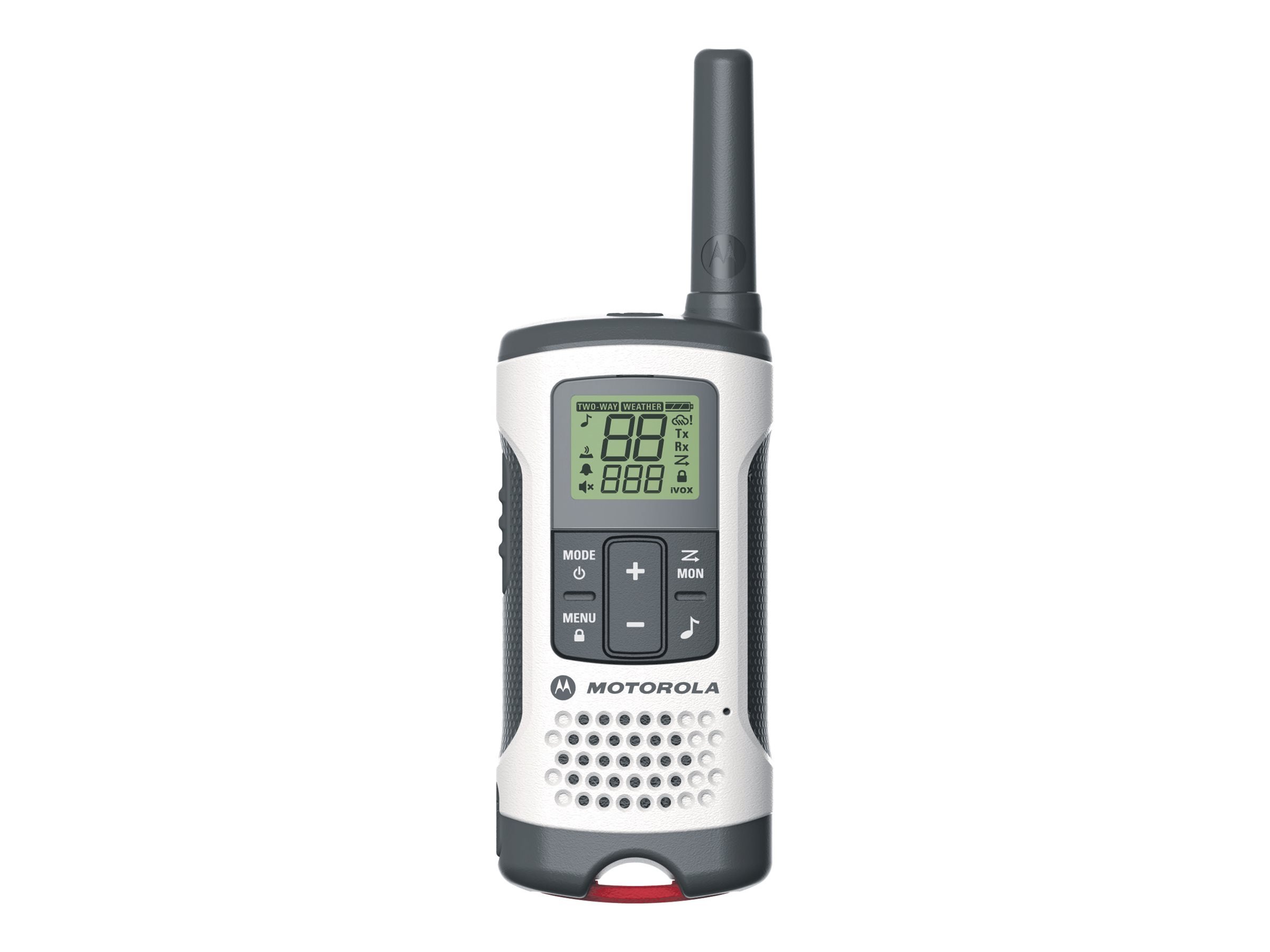
Figure 1: Motorola T260TP Radio Front View
This image displays the front of the Motorola T260TP radio. Key features visible include the antenna at the top, a clear LCD display showing channel numbers, battery level, and various icons such as "TWO-WAY WEATHER", "Tx" (transmit), "Rx" (receive), "iVOX", and a keypad lock indicator. Below the display are control buttons: "MODE" (with power icon), "+" and "-" for navigation/volume, and "MON" (monitor) with a musical note icon. The "MENU" button (with a lock icon) is also visible. The lower part of the radio features a speaker grille and the Motorola logo.
Ṣeto
1. Fifi sori batiri
The T260TP radio can operate using either the supplied rechargeable NiMH battery pack or three AA alkaline batteries. To install batteries:
- Rii daju pe redio wa ni pipa.
- Wa ideri iyẹwu batiri ni ẹhin redio naa.
- Tẹ mọlẹ lori latch naa ki o si yọ ideri naa kuro.
- Insert the NiMH battery pack, aligning the contacts. Alternatively, insert three AA batteries, observing the polarity markings (+/-).
- Rọpo ideri iyẹwu batiri, ni idaniloju pe o tẹ ni aabo sinu aaye.
2. Ngba agbara Pack Batiri
The NiMH battery packs can be recharged using the provided "Y" cable charging adapter and micro-USB charging cable. Alkaline batteries are not rechargeable.
- Connect the micro-USB end of the charging cable to the micro-USB port on the radio.
- Connect the other end of the charging cable to the "Y" cable adapter.
- Plug the "Y" cable adapter into a standard wall outlet.
- The battery indicator on the radio display will show charging status. A full charge typically takes approximately 8-10 hours for depleted NiMH packs.
- For optimal battery life, fully charge new battery packs before first use.
Ṣiṣẹ Redio rẹ
Titan / Paa
- Lati tan-an: Tẹ mọlẹ MODE button (with power icon) until the radio powers on.
- Lati paa: Tẹ mọlẹ MODE button until the radio powers off.
Siṣàtúnṣe iwọn didun
- Tẹ awọn + bọtini lati mu iwọn didun.
- Tẹ awọn - bọtini lati dinku iwọn didun.
Aṣayan ikanni
Your radio has 22 channels. To select a channel:
- Pẹlu redio ti wa ni titan, tẹ awọn Akojọ bọ́tìnì kan náà. Nọ́mbà ikanni náà yóò tàn yanranyanran.
- Lo awọn + or - awọn bọtini lati yan ikanni ti o fẹ.
- Tẹ awọn Akojọ button again to confirm, or wait for 5 seconds for the selection to be automatically saved.
Privacy Codes (Sub-codes)
Privacy codes help reduce interference from other users. Your radio has 121 privacy codes (38 CTCSS codes and 83 DCS codes). To set a privacy code:
- Yan ikanni kan.
- Tẹ awọn Akojọ bọ́tìnì náà lẹ́ẹ̀mejì. Nọ́mbà kódù ìpamọ́ náà yóò tàn yanranyanran.
- Lo awọn + or - buttons to select a code (0-121). Code 0 means no privacy code.
- Tẹ awọn Akojọ button again to confirm, or wait for 5 seconds.
Note: Both radios must be on the same channel and privacy code to communicate.
Gbigbe ati Gbigba
- To transmit: Press and hold the Push-to-Talk (PTT) button (located on the side of the radio). Speak clearly into the microphone. Release the PTT button to receive.
- To receive: Ensure the PTT button is not pressed. The radio will automatically receive signals on the selected channel and privacy code.
iVOX/VOX (Hands-Free Operation)
VOX (Voice Operated Transmission) allows you to transmit by speaking into the microphone without pressing the PTT button. iVOX is similar but for use with a headset.
- Tẹ awọn Akojọ bọtini titi ti VOX/iVOX aami seju.
- Lo awọn + or - buttons to select the sensitivity level (1-3, with 3 being most sensitive) or turn it off (0).
- Tẹ awọn Akojọ bọtini lati jẹrisi.
NOAA Weather Channels and Alerts
Your radio can tune into NOAA weather channels to receive continuous weather broadcasts and alerts.
- Tẹ awọn Akojọ button until the weather channel icon flashes.
- Lo awọn + or - buttons to select a weather channel.
- To activate weather alerts, press the Akojọ button again when the weather channel is selected, and choose "ON" for alerts.
- Tẹ awọn Akojọ bọtini lati jẹrisi.
Titiipa oriṣi bọtini
To prevent accidental changes to your radio settings:
- To lock: Press and hold the Akojọ button (with lock icon) until the lock icon appears on the display.
- To unlock: Press and hold the Akojọ button until the lock icon disappears.
Atẹle Išė
The monitor function allows you to listen for weak signals on the current channel by temporarily disabling the privacy code. This is useful for checking for activity on a channel before transmitting.
- Lati muu ṣiṣẹ: Tẹ mọlẹ MON bọtini.
- Láti pa á: Tú u sílẹ̀ MON bọtini.
Itoju
- Ninu: Nu redio nu pẹlu asọ, damp asọ. Ma ṣe lo abrasive ose tabi epo.
- Itọju Batiri:
- Store NiMH battery packs fully charged in a cool, dry place when not in use for extended periods.
- Remove alkaline batteries if the radio will not be used for a long time to prevent leakage.
- Omi Resistance: Redio yii ni KO water resistant. Avoid exposing it to rain, splashes, or submersion.
Laasigbotitusita
| Isoro | Owun to le Solusan |
|---|---|
| Ko si agbara | Check battery installation and charge level. Replace or recharge batteries. |
| Iwọ̀n tí kò dára tàbí tí kò dúró ṣinṣin | Ensure radios are within range. Check for obstructions (buildings, dense foliage). Change channels or privacy codes. Ensure batteries are fully charged. |
| Ko le tan kaakiri tabi gba | Verify both radios are on the same channel and privacy code. Check if keypad lock is active. Ensure PTT button is fully pressed when transmitting. |
| Radio beeps continuously | Low battery warning. Recharge or replace batteries. |
Awọn pato
- Awoṣe: T260TP
- Awọn iwọn: 1.24"D x 2.13"W x 6.42"H
- Ìwúwo: 6.4 ounces (per radio, without batteries)
- Awọn ikanni: 22 FRS/GMRS Channels
- Iwọn Igbohunsafẹfẹ: FRS/GMRS 462 - 467 MHz
- Awọn koodu Asiri: 121 (38 CTCSS, 83 DCS)
- Orisun Agbara: NiMH rechargeable battery pack (included) or 3 x AA alkaline batteries (not included)
- Talking Range (Maximum): Up to 25 Miles (under optimal conditions)
- Ipele Resistance Omi: Ko Omi Resistant
Alaye Aabo
Please read and understand the following safety precautions before using your radio:
- Do not operate the radio in an explosive atmosphere (e.g., near flammable gas, dust particles, metallic powders).
- Do not replace or charge batteries in an explosive atmosphere.
- Turn off your radio before entering any area with potential explosive atmospheres.
- Maṣe lo awọn batiri ti o bajẹ.
- Sọ awọn batiri sọnu daradara ni ibamu si awọn ilana agbegbe.
- Keep the radio away from medical devices (e.g., pacemakers) to avoid interference.
- Ma ṣe tu tabi yi redio pada.
- Use only Motorola Solutions approved accessories.
Atilẹyin ọja ati Support
For warranty information and technical support, please refer to the official Motorola Solutions website or contact their customer service. A detailed user guide in PDF format is also available for download from the manufacturer's support page.
Itọsọna olumulo osise (PDF): Ṣe igbasilẹ Itọsọna olumulo


