1. Ọja Ipariview
The Kit Magnetic Bluetooth Keyboard Case transforms your 9-10 inch tablet into a portable laptop, offering both protection and enhanced typing capabilities. Its sleek design features a leather-effect finish and an integrated stand for versatile use. The detachable Bluetooth keyboard ensures quick and easy pairing with a wide range of devices.
Awọn ẹya pataki:
- Asopọmọra Bluetooth: Seamlessly connect the wireless keyboard to your tablet.
- Ibamu gbooro: Designed for 9-10 inch iOS, Android, and Windows tablets, including various iPad and Samsung Galaxy Tab models.
- Igbesi aye batiri gigun: The rechargeable battery provides approximately 65 hours of continuous typing.
- Iduro Ijọpọ: Folds into a stable stand for comfortable viewing ati awọn igun titẹ.
- Apẹrẹ oofa: Securely holds the tablet and keyboard in place.

Image: The Kit Magnetic Bluetooth Keyboard Case with a tablet securely placed, illustrating its use as a portable workstation.
2. Bibẹrẹ
2.1 Package Awọn akoonu
- Kit Magnetic Bluetooth Keyboard Case
- Okun Ngba agbara USB
- Itọsọna olumulo
2.2 Ngba agbara si Keyboard
Before first use, fully charge the keyboard. Connect the provided USB charging cable to the keyboard's charging port and plug the other end into a USB power source (e.g., computer USB port, USB wall adapter). The charging indicator light will illuminate during charging and turn off when fully charged.
2.3 Inserting Your Tablet
- Open the keyboard case flat.
- Carefully slide your 9-10 inch tablet into the designated slot or frame within the case. Ensure it is securely seated and aligned with any cutouts for buttons or ports.
- The magnetic design will help hold the tablet in place.
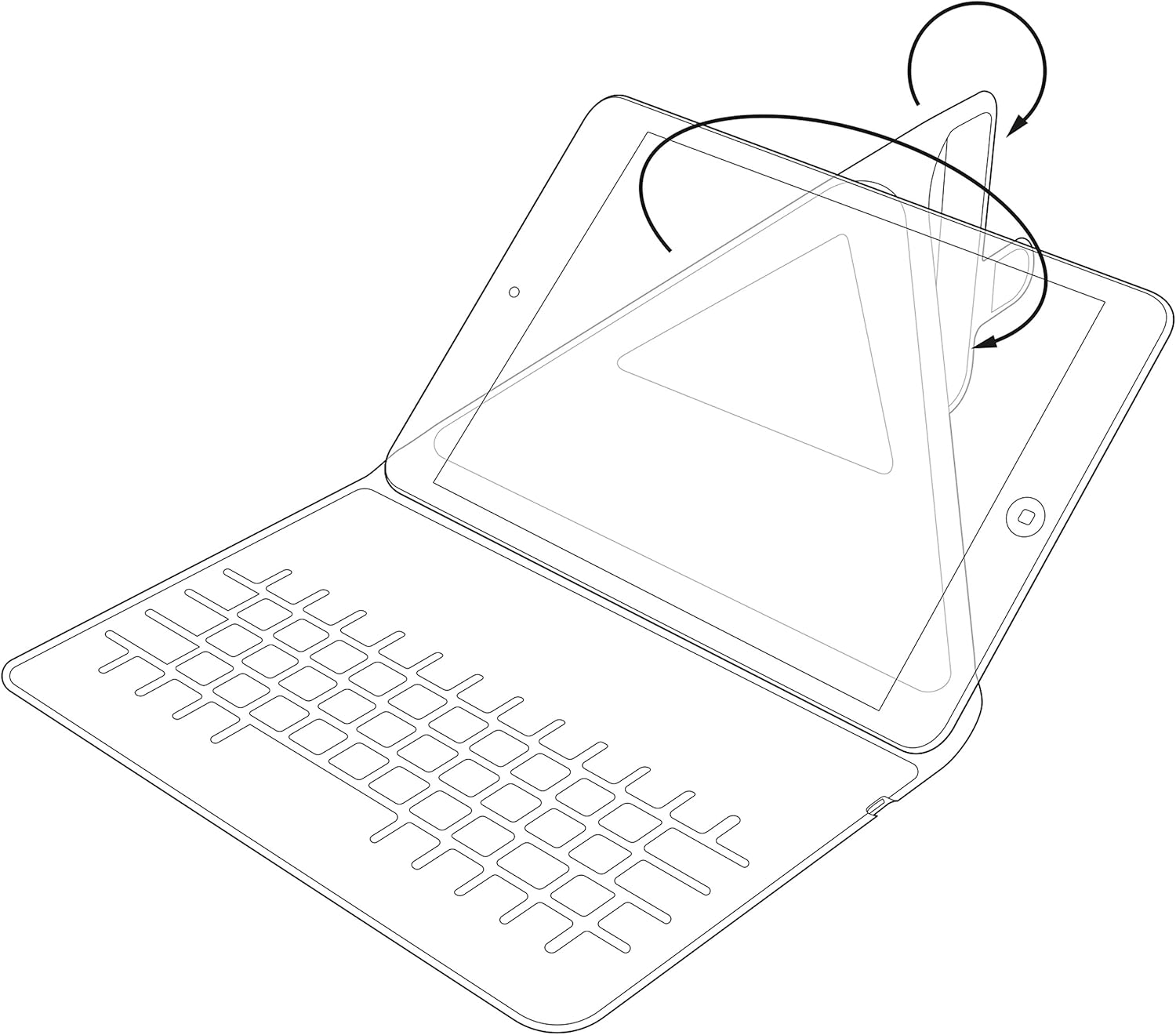
Image: Diagram showing the process of inserting a tablet into the case's holding mechanism.
2.4 Pairing the Bluetooth Keyboard
- Turn on the keyboard by sliding the power switch to the 'ON' position. The power indicator light will briefly illuminate.
- Press the 'Connect' or 'Pair' button on the keyboard (refer to the keyboard layout for exact button location). The Bluetooth indicator light will start blinking, indicating it is in pairing mode.
- On your tablet, go to 'Settings' > 'Bluetooth'. Ensure Bluetooth is enabled.
- Your tablet will search for available Bluetooth devices. Select 'Kit Keyboard' or a similar name from the list of found devices.
- If prompted, enter the pairing code displayed on your tablet screen using the keyboard, then press 'Enter'.
- Once paired, the Bluetooth indicator light on the keyboard will stop blinking and remain solid or turn off, and your tablet will show the keyboard as 'Connected'.
3. Awọn ilana Iṣiṣẹ
3.1 Keyboard Awọn iṣẹ
The keyboard features a standard QWERTY layout with additional function keys (Fn) for quick access to multimedia controls, volume, and other tablet-specific functions. Refer to the key labels for their specific actions. For example, you may find keys for Home, Search, Volume Up/Down, Play/Pause, etc.

Aworan: Alaye view of the keyboard layout, highlighting various function keys and standard alphanumeric keys.
3.2 Using the Integrated Stand
The case is designed to fold into a stable stand, allowing you to position your tablet at an optimal viewing angle for typing, watching videos, or making video calls. Simply fold the back cover of the case to create a triangular support structure.

Image: Diagram demonstrating the folding mechanism of the case to create a stable viewing stand for the tablet.
4. Itọju ati Itọju
- Ninu: Lo asọ, damp cloth to wipe the exterior of the case. For the keyboard, use a dry, lint-free cloth. Avoid harsh chemicals or abrasive cleaners.
- Ibi ipamọ: Tí o kò bá lò ó fún ìgbà pípẹ́, tọ́jú àpótí kíákíá náà sí ibi tí ó tutù tí ó sì gbẹ.
- Itọju Batiri: Láti mú kí batiri pẹ́ sí i, má ṣe jẹ́ kí keyboard máa jáde dáadáa nígbà gbogbo. Gba agbára rẹ̀ déédéé, kódà bí kò bá tilẹ̀ ti bàjẹ́ pátápátá.
- Yago fun Olomi: Keep the keyboard case away from water and other liquids to prevent damage to electronic components.
5. Laasigbotitusita
5.1 Kííbọọ̀dù Kò Sopọ̀/Sísopọ̀
- Ensure the keyboard is turned ON and fully charged.
- Make sure Bluetooth is enabled on your tablet.
- Place the keyboard and tablet within close proximity (within 10 meters).
- Delete any previous pairings of the keyboard from your tablet's Bluetooth settings and attempt to pair again.
- Restart both the keyboard (turn off and on) and your tablet.
5.2 Àwọn kọ́kọ́rọ́ tí kò dáhùn
- Ṣayẹwo ipele batiri ti keyboard ki o gba agbara ti o ba jẹ dandan.
- Ensure the keyboard is properly connected via Bluetooth. Re-pair if needed.
- Nu eyikeyi idoti kuro ni ayika awọn bọtini.
5.3 Awọn ọran gbigba agbara
- Verify that the charging cable is securely connected to both the keyboard and the power source.
- Gbiyanju ibudo USB ti o yatọ tabi ohun ti nmu badọgba agbara.
- Rí i dájú pé okùn gbigba agbara náà kò bàjẹ́.
6. Awọn alaye ọja
| Brand | Kit |
| Nọmba awoṣe | KBMAG10BK |
| Ọja Mefa | 1.6 x 20 x 24.5 cm |
| Iwọn Nkan | 356 g |
| Àwọ̀ | Dudu |
| Ohun elo | Alawọ |
| Asopọmọra Technology | Bluetooth |
| Batiri Iru | Litiumu polima |
| Akoonu Agbara Batiri | Awọn wakati 1 Watt |
| Awọn ẹrọ ibaramu | 9-10 inch iOS, Android, Windows Tablets (e.g., iPad, Samsung Galaxy Tab) |
7. Atilẹyin ọja ati Support
This Kit Magnetic Bluetooth Keyboard Case comes with a full one-year warranty from the date of purchase. For any technical assistance, troubleshooting, or warranty claims, please contact Kit's experienced and friendly UK-based customer service team. Refer to your purchase documentation for specific contact details.


