1. Ifihan
This manual provides detailed instructions for the proper use, setup, and maintenance of your SimpTronic True Wireless Earbuds. Please read this manual thoroughly before using the product to ensure optimal performance and longevity.
2. Ọja Ipariview
2.1 Package Awọn akoonu
- SimpTronic True Wireless Earbuds (Left and Right)
- Ngba agbara Case
- Okun Ngba agbara USB
- Itọsọna olumulo
2.2 Key Awọn ẹya ara ẹrọ
- Sitẹrio Alailowaya otitọ (TWS): Enjoy a completely cable-free audio experience.
- Bluetooth 5.0: Provides stable connectivity and efficient power consumption.
- HD Stereo Sound with Deep Bass: Customized 8mm speaker drivers deliver clear audio.
- Mabomire (IPX6): Resistant to strong jets of water, suitable for sports and outdoor activities.
- Noise Cancelling Microphone: Enhances call clarity.
- Akoko Idaraya: Titi di awọn wakati 30 ti akoko ere lapapọ pẹlu ọran gbigba agbara.
- Iṣakoso Bọtini Kan: Manage music, calls, and voice assistant with a single button on each earbud.
- Ibiti Alailowaya Mita 15: Strong signal for reliable connection.
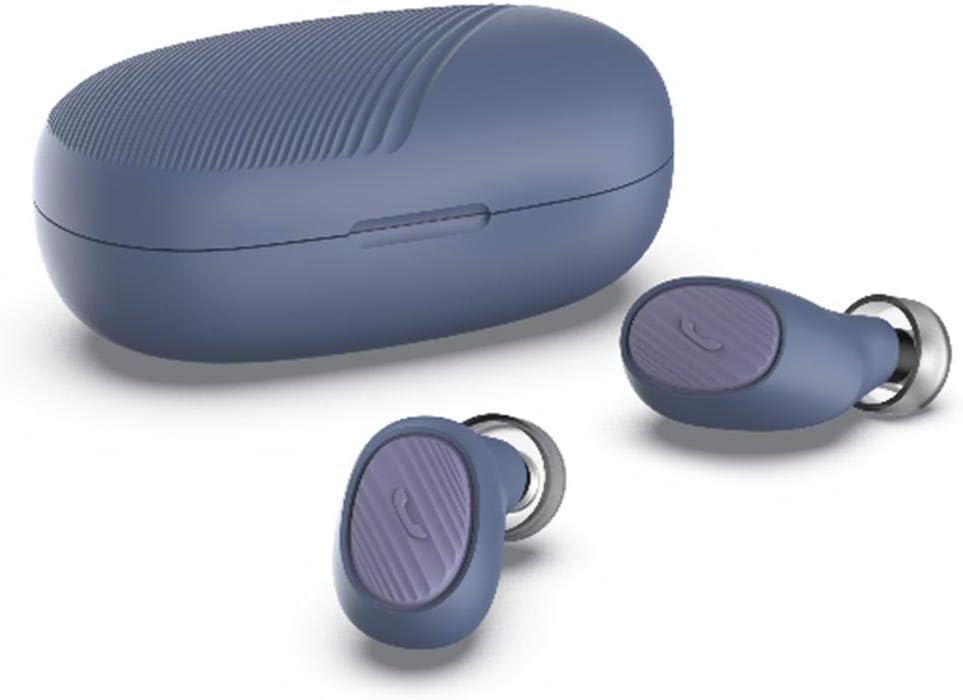
Image: SimpTronic True Wireless Earbuds and their charging case.
3. Eto
3.1 Ngba agbara si Earbuds ati Ọran
- Gbigba agbara si ọran naa: Connect the provided USB charging cable to the charging port on the case and a USB power source. The indicator light on the case will show charging status.
- Ngba agbara si Earbuds: Place the earbuds into their respective slots in the charging case. Ensure the charging contacts align. The earbuds will automatically begin charging. The indicator lights on the earbuds will show charging status and turn off when fully charged.
3.2 Sisopọ pẹlu ẹrọ kan
- Agbara Tan: Take both earbuds out of the charging case. They will automatically power on and enter pairing mode. You may hear a voice prompt indicating pairing mode.
- Mu Bluetooth ṣiṣẹ: Lori foonuiyara rẹ tabi ẹrọ Bluetooth miiran ti o ṣiṣẹ, lọ si awọn eto Bluetooth ki o mu Bluetooth ṣiṣẹ.
- Yan Ẹrọ: Look for "SimpTronic Earbuds" (or similar name) in the list of available devices and select it to connect.
- Ìmúdájú: Once connected, you will hear a voice prompt confirming the successful pairing. The earbud indicator lights may change or turn off.
Akiyesi: Awọn agbekọri naa yoo tun sopọ laifọwọyi si ẹrọ ti o so pọ to kẹhin nigbati o ba jade ninu ọran naa, ti o ba mu Bluetooth ṣiṣẹ lori ẹrọ naa.

Image: Illustration showing an earbud with a strong signal icon (V5.0+EDR) connecting to a smartphone, indicating a 15-meter wireless range.
4. Awọn ilana Iṣiṣẹ
4.1 One-Button Control Functions
Each earbud features a multi-function button for easy control of various functions:
- Mu ṣiṣẹ/Danu Orin duro: Single press the button on either earbud.
- Idahun/Ipe Ipari: Single press the button on either earbud during an incoming call or active call.
- Kọ Ipe: Press and hold the button on either earbud for 2 seconds during an incoming call.
- Orin to nbọ: Double press the button on the right earbud.
- Orin ti tẹlẹ: Double press the button on the left earbud.
- Iwọn didun Up: Triple press the button on the right earbud.
- Iwọn didun isalẹ: Triple press the button on the left earbud.
- Mu Oluranlọwọ Ohun ṣiṣẹ (Siri/Oluranlọwọ Google): Press and hold the button on either earbud for 2 seconds (when not on a call).

Image: Visual guide to the one-button control functions on the earbud, including volume, track navigation, call management, and voice assistant activation.
5. Itọju
5.1 Ninu
- Rọra nu awọn afikọti ati apoti gbigba agbara pẹlu asọ, gbẹ, asọ ti ko ni lint.
- Ma ṣe lo awọn kẹmika ti o lewu, awọn nkan mimu mimọ, tabi awọn ohun ọṣẹ ti o lagbara.
- Clean the charging contacts on both the earbuds and the case regularly to ensure proper charging.
5.2 Ibi ipamọ
- Nigbati o ko ba si ni lilo, tọju awọn afikọti sinu apoti gbigba agbara wọn lati daabobo wọn ki o jẹ ki wọn gba agbara.
- Tọju ẹrọ naa ni itura, aye gbigbẹ, kuro lati awọn iwọn otutu ti o ga julọ ati oorun taara.

Image: The earbuds and charging case are shown on a wet surface, highlighting their IPX6 waterproof rating, indicating resistance to water splashes and sweat.
6. Laasigbotitusita
If you encounter any issues with your SimpTronic True Wireless Earbuds, please refer to the following common solutions:
- Ko si Ohun:
- Rii daju pe awọn agbekọri ti gba agbara.
- Check that the earbuds are properly paired with your device.
- Ṣatunṣe iwọn didun lori ẹrọ rẹ mejeeji ati awọn agbekọri.
- Try restarting your device and reconnecting the earbuds.
- Agbohun-eti Ko Sopọ:
- Make sure both earbuds are out of the charging case and powered on.
- Pa Bluetooth si awọn ẹrọ miiran nitosi lati yago fun kikọlu.
- Gbagbe ẹrọ naa lati inu atokọ Bluetooth ti foonu rẹ ki o gbiyanju lati so pọ lẹẹkansii.
- Rii daju pe awọn agbekọri ti gba agbara to.
- Awọn ọran gbigba agbara:
- Rii daju pe okun gbigba agbara ti sopọ ni aabo si ọran mejeeji ati orisun agbara.
- Rii daju pe awọn olubasọrọ gbigba agbara lori awọn agbekọri ati inu ọran naa jẹ mimọ ati laisi idoti.
- Gbìyànjú láti lo okùn gbigba agbara USB mìíràn tàbí adapta agbara.
- Asopọmọra Laarin:
- Ensure you are within the 15-meter wireless range of your device.
- Yago fun awọn idena ti ara laarin awọn agbekọri ati ẹrọ rẹ.
- Din kikọlu kuro lati awọn ẹrọ alailowaya miiran.
7. Awọn pato
| Awoṣe | TWS Mini Headset (B01GC4NC6G) |
| Ẹya Bluetooth | 5.0 + EDR |
| Alailowaya Ibiti | Titi de awọn mita 15 (49 ẹsẹ) |
| Awọn Awakọ Agbọrọsọ | 8mm customized drivers |
| Mabomire Rating | IPX6 |
| Total Playtime | Titi di wakati 30 (pẹlu ọran gbigba agbara) |
| Iwuwo Earbud | Approximately 0.13 oz (3.8g) per earbud |
| Package Mefa | 8.5 x 6.5 x 1.1 inches |
| Ìwọ̀n Nǹkan (Àpapọ̀) | 1.6 iwon |

Aworan: Alaye view of an 8mm speaker driver, emphasizing the HD stereo sound capability.

Image: An earbud balanced on a fingertip, illustrating its lightweight design at 0.13 ounces (3.8 grams).
8. Atilẹyin ọja ati Support
SimpTronic is committed to providing high-quality products. Your purchase is backed by a 100% Satisfaction Guarantee.
For any product-related inquiries, technical support, or warranty claims, please contact the seller directly through your purchase platform. Provide your order number and a detailed description of the issue for prompt assistance.


