Ọrọ Iṣaaju
This manual provides detailed instructions for the proper use and maintenance of your Mini503 BH503 Neckband Wireless Bluetooth Headset. Please read this manual carefully before using the device to ensure optimal performance and longevity.
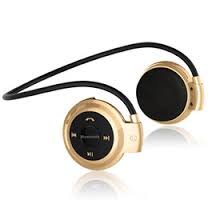
Image: Mini503 BH503 Neckband Wireless Bluetooth Headset. This image shows the headset in a golden color, featuring a neckband design with earbud-style speakers and control buttons on the neckband.
Awọn ẹya ara ẹrọ
- Asopọ Alailowaya: Bluetooth V2.1 + EDR Class II for stable connection.
- Ohun Profiles: Supports Headset, Handsfree, A2DP, and AVRCP profiles for versatile use.
- Gbohungbohun ti a ṣepọ: Fun ipe ti ko ni ọwọ.
- Sisisẹsẹhin orin: Stereo sound for music enjoyment.
- Micro SD Kaadi Iho: Allows direct music playback from a memory card.
- Apẹrẹ ọrun ọrun: Comfortable and secure fit for sports and active use.
- Igbesi aye batiri gigun: Titi di wakati 7 ti ṣiṣiṣẹsẹhin orin.
Awọn pato
| Ẹya Bluetooth | V2.1 + EDR Kilasi II |
| Igbohunsafẹfẹ | 2400.0-2483.5MHz |
| Ni atilẹyin Profiles | Agbekọri, Aimudani, A2DP, AVRCP |
| Chipset | CSR |
| Ibiti isẹ | 10 mita |
| Aago Ọrọ | Awọn wakati 2-3 |
| Orin Akoko Orin | Titi di awọn wakati 7 |
| Akoko imurasilẹ | Titi di awọn wakati 250 |
| Atako | 8Ω |
| Ifamọ | 80dB |
| Igbohunsafẹfẹ Idahun Range | 20-20000Hz |
| Batiri Iru | Batiri gbigba agbara Li-polima |
| Agbara Batiri | 250mA |
| Gbigba agbara Port | USB |
Ṣeto
Ngba agbara si Agbekọri
Before first use, ensure the headset is fully charged. Connect the provided USB Charging Cable to the headset's USB port and plug the other end into a compatible USB power source (e.g., computer USB port, USB wall adapter). The indicator light will typically show red during charging and turn off or change color when fully charged.
Pipọpọ pẹlu Ẹrọ Bluetooth kan
- Ensure Headset is Off: Verify that the headset is powered off before starting the pairing process.
- Tẹ Ipo Sisopọ: Press and hold the Multi-Function Button (MFB) for approximately 7 seconds. The blue LED will flash twice briefly, then the indicator light will flash red and blue alternately. This indicates the headset is in pairing mode.
- Mu Bluetooth ṣiṣẹ lori Ẹrọ rẹ: On your mobile phone or other Bluetooth-enabled device, go to the Bluetooth settings and activate the Bluetooth function.
- Wa fun Awọn ẹrọ: Your device will scan for available Bluetooth devices. Locate and select "mini 503" from the list.
- Enter Passkey (if prompted): If your device prompts for a passkey, enter "0000". For Bluetooth mobile phones with version V2.1 or above, a passkey may not be required.
- Ìsopọ̀pọ̀ Parí: Once successfully paired, the headset's indicator light may change or stop flashing, and your device will confirm the connection.
Awọn ilana Iṣiṣẹ
Titan / Paa
- Lati Fi agbara: Press and hold the MFB until the indicator light turns on (usually blue).
- Lati Paarẹ: Press and hold the MFB until the indicator light turns off (usually red flash).
Sisisẹsẹhin Orin
- After successful pairing, open your music player on your connected device.
- Use the headset's controls (MFB, Volume +/- if available) to play/pause music, skip tracks, and adjust volume. (Specific button functions are not detailed in the product description, refer to device for general Bluetooth headset controls).
- Sisisẹsẹhin Kaadi Micro SD: Fi kaadi Micro SD sii pẹlu ohun files into the designated slot. The headset should automatically switch to Micro SD card playback mode. Use headset controls to manage playback.
Imu ipe
- Ndahun ipe kan: Tẹ MFB ni ẹẹkan lati dahun ipe ti nwọle.
- Pari ipe kan: Press the MFB once to end an active call.
- Kiko Ipe kan: Press and hold the MFB for a few seconds to reject an incoming call.
- Titunse: Double-press the MFB to redial the last number.
Itoju
- Ninu: Wipe the headset with a soft, dry cloth. Do not use abrasive cleaners or solvents.
- Ibi ipamọ: Tọju agbekari naa ni itura, aye gbigbẹ kuro lati orun taara ati awọn iwọn otutu to gaju.
- Ifihan omi: This headset is not waterproof. Avoid exposure to water, moisture, or rain.
- Itọju Batiri: Láti mú kí batiri pẹ́ sí i, má ṣe jẹ́ kí batiri náà máa jáde dáadáa nígbà gbogbo. Gba agbára lórí agbekọri náà déédéé, kódà bí a kò bá lò ó fún ìgbà pípẹ́.
Laasigbotitusita
- Agbekọri ko tii: Rii daju pe batiri ti gba agbara. Sopọ si orisun agbara ati gbiyanju lẹẹkansi.
- Ko le so pọ pẹlu ẹrọ:
- Ensure the headset is in pairing mode (red and blue lights flashing alternately).
- Make sure Bluetooth is enabled on your device and it is within 10 meters of the headset.
- Turn off and on both the headset and your Bluetooth device, then try pairing again.
- Clear previous Bluetooth connections on your device if you have too many stored.
- Ko si ohun tabi didara ohun ti ko dara:
- Ṣayẹwo awọn ipele iwọn didun lori mejeeji agbekari ati ẹrọ ti o sopọ.
- Ensure the headset is properly paired and connected.
- Sunmọ ẹrọ ti o sopọ lati yago fun kikọlu.
- If playing from Micro SD card, ensure the card is inserted correctly and the audio files wa ni ọna kika ibaramu.
- Headset disconnects frequently:
- Ensure the headset and your device are within the 10-meter operating range.
- Avoid obstacles between the headset and your device that might interfere with the Bluetooth signal.
- Check for other devices causing wireless interference.
Atilẹyin ọja ati Support
This product is covered by a standard manufacturer's warranty. For specific warranty terms and conditions, please refer to the documentation provided at the time of purchase or contact your retailer. For technical support or further assistance, please contact the vendor or retailer from whom you purchased the product.


