1. Ifihan
This manual provides essential information for the safe and effective use of the Renishaw OMP60 Machine Tool Probe Kit. The OMP60 is a compact 3D touch-trigger probe designed for workpiece set-up and inspection on a wide range of medium and large machining centers. It utilizes optical signal transmission for reliable communication. Proper understanding and adherence to these instructions will ensure optimal performance and longevity of your Renishaw OMP60 probe.
2. Ọja Ipariview
The Renishaw OMP60 probe is engineered to enhance manufacturing efficiency by reducing set-up times, minimizing scrap, and lowering fixture costs. Its robust design and optical signal transmission system ensure high accuracy and reliability in demanding industrial environments. The probe is compatible with both legacy and new generation Renishaw optical receivers, facilitating seamless integration into existing machine setups.
Awọn ẹya pataki pẹlu:
- Compact 3D touch-trigger design.
- Optical signal transmission for reliable data transfer.
- Suitable for workpiece set-up and inspection.
- Broad compatibility with Renishaw optical receivers.
3. Alaye Aabo
Always observe standard safety precautions when working with machine tools and precision equipment. Failure to do so may result in injury or damage to the equipment.
- Ensure the machine tool is powered off and locked out before installing or removing the probe.
- Handle the probe with care to prevent damage to its precision components.
- Only use approved accessories and replacement parts from Renishaw.
- Refer to your machine tool's operating manual for specific safety guidelines related to probe usage.
- Sọ awọn batiri sọnu ni ibamu si awọn ilana agbegbe.
4. Package Awọn akoonu
Upon opening your Renishaw OMP60 Machine Tool Probe Kit, verify that all components are present and undamaged. The standard kit typically includes the following items:

Image: The Renishaw OMP60 probe kit as received in its original cardboard packaging, showing the probe unit, a quick-start guide, two AA batteries, and a small toolkit.

Image: The individual components of the Renishaw OMP60 probe kit laid out, including the OMP60 probe, a quick-start guide, two Duracell AA alkaline batteries, and a small plastic bag containing a toolkit (likely styli or adjustment tools).
- Renishaw OMP60 Probe Unit
- Quick-start Guide (A-1038-8501)
- AA Alkaline Batteries (typically 2)
- OMP60 Toolkit (RMP/OMP60 TOOLKIT A-4038-0208-02)
5. Eto
Follow these general steps for setting up your Renishaw OMP60 probe. For detailed, model-specific instructions, refer to the included Quick-start Guide and the comprehensive Renishaw OMP60 installation manual.
- Ṣiṣii ati Ṣiṣayẹwo: Carefully remove all components from the packaging. Inspect the probe and accessories for any signs of damage.
- Fifi sori batiri: Access the battery compartment, typically located at the bottom of the probe. Insert the provided AA batteries, ensuring correct polarity. Securely close the compartment.
- Stylus Attachment: Select the appropriate stylus for your application. Carefully thread the stylus onto the probe's mounting point. Ensure it is securely fastened but do not overtighten.
- Gbigbe Iwadii naa: Mount the OMP60 probe into the machine tool spindle or tool holder. Ensure it is seated correctly and securely clamped.
- Optical Receiver Setup: Ensure your Renishaw optical receiver (e.g., OMI-2, OMI-2T) is correctly installed and aligned with the probe's optical transmission window. Refer to the receiver's manual for installation and alignment procedures.
- Machine Control Integration: Configure your machine tool's CNC control system to recognize and communicate with the OMP60 probe. This typically involves setting up probe cycles and offset registers.
- Iṣatunṣe akọkọ: Perform an initial calibration of the probe using a known reference artifact (e.g., a calibration sphere). This establishes the probe's trigger points and ensures measurement accuracy.
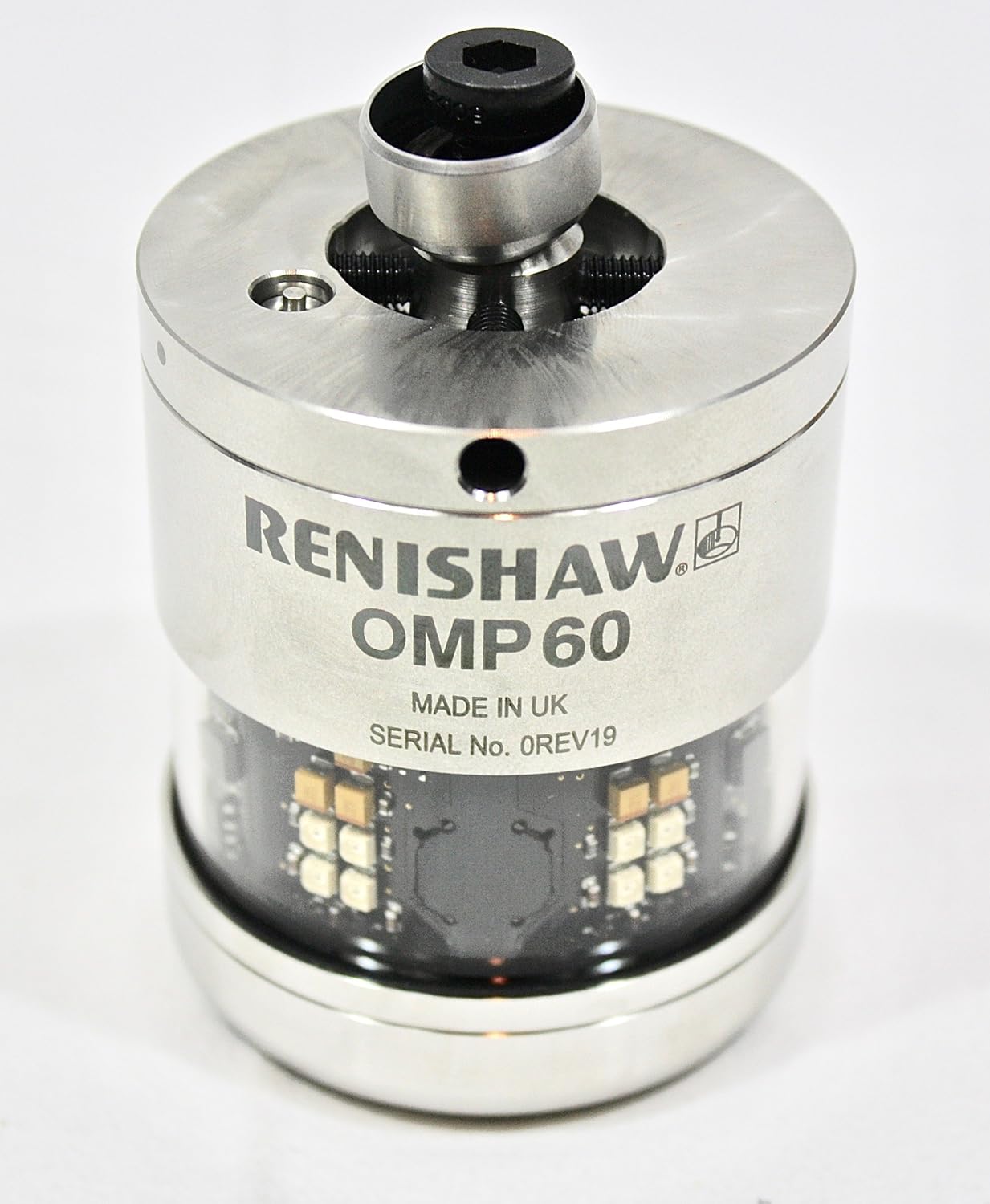
Aworan: A alaye view of the Renishaw OMP60 probe unit, highlighting the branding, model number, and 'MADE IN UK' inscription. This view shows the main body and the transparent section revealing internal electronics.

Aworan: A oke-isalẹ view of the Renishaw OMP60 probe, showing the central stylus mounting point with a hexagonal socket and surrounding adjustment mechanisms.
6. Awọn ilana Iṣiṣẹ
The Renishaw OMP60 probe is designed for automated workpiece measurement and inspection cycles within a machine tool environment. Operation is typically controlled via the machine's CNC system.
- Aṣayan Eto: Select the appropriate probing cycle program on your machine tool's CNC control. These programs are designed for specific measurement tasks, such as workpiece alignment, feature measurement, or tool setting.
- Igbaradi Iṣẹ-iṣẹ: Rii daju pe workpiece wa ni aabo clamped and positioned on the machine table.
- Cycle Execution: Initiate the probing cycle from the CNC control. The machine will automatically move the probe to the designated measurement points.
- Itumọ data: The measurement data collected by the OMP60 probe is transmitted to the CNC control, where it can be used to update work offsets, perform in-process inspection, or generate reports.
Fun eto alaye siwaju siiamples and specific operational sequences, consult the Renishaw OMP60 user manual and your machine tool's programming guide.

Aworan: A sunmọ-soke view of the Renishaw OMP60 probe, indicating the 'TRIGGER FORCE' adjustment screw with directional arrows for increasing tabi paṣẹasing the trigger force. This adjustment allows fine-tuning of the probe's sensitivity.
7. Itọju
Regular maintenance ensures the continued accuracy and reliability of your Renishaw OMP60 probe.
- Ninu: Periodically clean the probe's exterior, especially the optical transmission window, using a soft, lint-free cloth. Avoid abrasive cleaners or solvents.
- Stylus Inspection: Regularly inspect the stylus for wear, damage, or contamination. Replace damaged styli immediately to maintain measurement accuracy.
- Rirọpo Batiri: Replace batteries when the low battery indicator is displayed or when performance degrades. Always use high-quality alkaline batteries.
- Ibi ipamọ: When not in use, store the probe in a clean, dry environment, preferably in its original packaging or a protective case.

Image: A bottom view of the Renishaw OMP60 probe, showing the battery compartment cover with three securing screws and a central access point.
8. Laasigbotitusita
This section addresses common issues you might encounter with the OMP60 probe. For more complex problems, contact Renishaw technical support.
| Isoro | Owun to le Fa | Ojutu |
|---|---|---|
| Probe not activating | Awọn batiri kekere tabi ti o ku Incorrect optical receiver alignment Obstruction of optical path Machine control error | Rọpo awọn batiri Re-align optical receiver Clean optical window and ensure clear path Check CNC program and machine status |
| Awọn wiwọn ti ko pe | Damaged or worn stylus A ko ṣe iwọn iwadi naa Contamination on stylus or workpiece Incorrect trigger force setting | Replace stylus Perform probe calibration Clean stylus and workpiece Adjust trigger force (refer to Section 6 image) |
| Intermittent signal loss | Awọn batiri ti ko lagbara kikọlu ayika Partial obstruction of optical path | Rọpo awọn batiri Minimize sources of optical interference Ensure clear line of sight between probe and receiver |
9. Awọn pato
The Renishaw OMP60 is a precision instrument. Key specifications include:
- Irú Ìwádìí: 3D Touch-Trigger Probe
- Gbigbe: Opitika
- Orisun Agbara: Awọn batiri AA
- Awọn iwọn idii: Isunmọ 10 x 8 x 5 inches (254 x 203 x 127 mm)
- Olupese: Renishaw
- Ilu isenbale: United Kingdom (as indicated on the probe)
For detailed technical specifications, including trigger force ranges, measurement repeatability, and environmental operating conditions, please refer to the official Renishaw OMP60 product data sheet or the full user manual available from Renishaw.
10. Atilẹyin ọja ati Support
The Renishaw OMP60 Machine Tool Probe Kit typically comes with a manufacturer's warranty. Specific warranty terms and conditions are usually provided with the product documentation or can be obtained directly from Renishaw or your authorized distributor. It is recommended to register your product upon purchase to facilitate any warranty claims.
For technical assistance, service, or to inquire about replacement parts, please contact Renishaw customer support or your local Renishaw representative. Contact information can be found on the official Renishaw webAaye (www.renishaw.com).


