1. Ifihan
This manual provides essential information for the safe installation, operation, and maintenance of your Ducasa Ducaverre White 1200W Glass Radiant Panel Heater. Please read these instructions carefully before use and retain them for future reference.
1.1 Abo Alaye
- Aabo Itanna: Always ensure the heater is connected to a properly grounded electrical outlet. Do not operate with a damaged cord or plug.
- Ibi: Maintain a safe distance from flammable materials (curtains, furniture) as indicated in the installation section. Do not cover the heater.
- Ifihan omi: Do not install the heater near water sources (bathrooms, laundry rooms) unless specifically rated for such environments. Avoid direct water spray.
- Children and Vulnerable Individuals: Ohun elo yii le ṣee lo nipasẹ awọn ọmọde ti o jẹ ọdun 8 ati ju bẹẹ lọ ati awọn eniyan ti o dinku ti ara, ifarako tabi awọn agbara ọpọlọ tabi aini iriri ati imọ ti wọn ba ti fun wọn ni abojuto tabi itọnisọna nipa lilo ohun elo ni ọna ailewu ati loye awọn eewu ti o kan. . Awọn ọmọde ko gbọdọ ṣere pẹlu ohun elo naa. Ninu ati itọju olumulo ko le ṣe nipasẹ awọn ọmọde laisi abojuto.
- Itọju: Ge asopọ lati agbara ṣaaju ṣiṣe mimọ tabi ṣiṣe itọju eyikeyi.
1.2 Package Awọn akoonu
Rii daju pe gbogbo awọn paati wa ninu apoti:
- Ducasa Ducaverre 1200W Glass Radiant Panel Heater
- Wall Mounting Bracket(s)
- Iṣagbesori skru ati Wall Plugs
- Afowoyi Olumulo (iwe-ipamọ yii)
2. Eto ati fifi sori
Proper installation is crucial for the safe and efficient operation of your heater. If you are unsure about any step, consult a qualified electrician.
2.1 odi iṣagbesori
The Ducasa Ducaverre heater is designed for wall mounting. Choose a suitable location away from direct drafts, windows, and areas where it might be accidentally covered. Ensure there is sufficient clearance around the heater as specified in the diagram below.
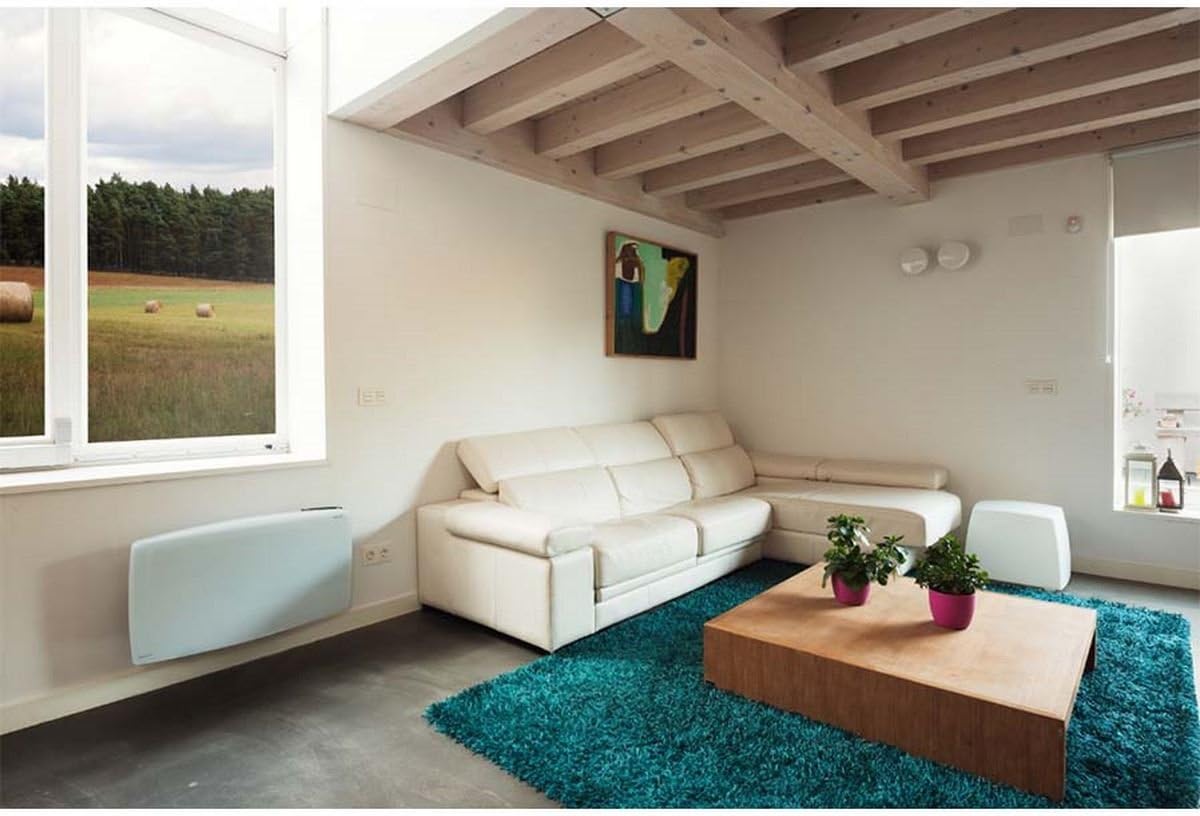
Aworan 1: Ducasa Ducaverre 1200W Glass Radiant Panel Heater mounted on a wall in a modern living room setting. The heater is white and rectangular, positioned low on the wall, illustrating a typical installation scenario.
- Siṣamisi: Hold the mounting bracket against the wall at the desired height. Use a pencil to mark the drilling points.
- Liluho: Lu awọn ihò ni awọn aaye ti o samisi nipa lilo ohun elo ti o yẹ fun iru odi rẹ. Fi awọn pilogi ogiri sii.
- So akọmọ: Secure the mounting bracket to the wall using the provided screws. Ensure it is level and firmly attached.
- Òkè gbigbona: Carefully lift the heater and hook it onto the mounting bracket. Ensure it clicks securely into place. Some models may require additional screws to fix the heater to the bracket from below.
2.2 Itanna Asopọ
Once mounted, connect the heater to a standard electrical outlet. Ensure the outlet is easily accessible and rated for the heater's power consumption (1200W). Do not use extension cords or multi-plugs unless absolutely necessary and only if they are rated for the heater's power.
3. Awọn ilana Iṣiṣẹ
Your Ducasa Ducaverre heater features an intuitive control panel for setting temperature and operating modes.

Aworan 2: A sunmọ-soke view of the black control panel located on the top right side of the white Ducasa Ducaverre heater. The panel features a digital display and several buttons labeled 'OK', '+', '-', 'MODE', and 'PROG', indicating user interface for settings and programming.
3.1 Iṣakoso igbimo Loriview
- Ifihan Digital: Shows current temperature, set temperature, and operating mode.
- Bọtini MODE: Cycles through operating modes (Comfort, Eco, Frost Protection, Program).
- Àwọn bọ́tìnì '+' / '-': Adjust temperature settings or navigate menu options.
- Bọtini O dara: Jẹrisi awọn aṣayan.
- Bọtini PROG: Accesses programming functions.
3.2 Ṣeto Aago ati Ọjọ
Before using programmed modes, set the current time and day:
- Tẹ mọlẹ MODE button until the time setting appears.
- Lo '+' or '-' lati ṣatunṣe wakati, lẹhinna tẹ OK.
- Repeat for minutes and day of the week.
3.3 Awọn ọna ṣiṣe
- Ipo itunu (C): Maintains your desired set temperature. Use '+' or '-' lati ṣatunṣe iwọn otutu.
- Eco Mode (E): Maintains a temperature typically 3-4°C lower than the Comfort setting, saving energy.
- Frost Protection Mode (F): Maintains a minimum temperature (e.g., 7°C) to prevent freezing.
- Program Mode (P): Follows a pre-set weekly heating schedule.
3.4 Programming a Weekly Schedule
To set a custom heating schedule:
- Tẹ awọn PROG button. The display will show the current day and a time segment.
- Lo MODE to select the desired operating mode (Comfort, Eco, Frost Protection) for that specific hour.
- Lo '+' to advance to the next hour or '-' lati pada.
- Repeat for all 24 hours of the day.
- Tẹ PROG again to move to the next day.
- Once all days are programmed, press OK lati fipamọ ati jade.
4. Itọju
Ṣiṣe mimọ nigbagbogbo ṣe idaniloju iṣẹ ṣiṣe ti o dara julọ ati fa igbesi aye ẹrọ igbona rẹ pọ si.
4.1 Ninu
- Ge Agbara: Always unplug the heater from the electrical outlet before cleaning.
- Òde: Wipe the glass panel and exterior surfaces with a soft, damp asọ. Ma ṣe lo awọn afọmọ abrasive, awọn nkanmimu, tabi awọn kẹmika lile, nitori iwọnyi le ba ipari jẹ.
- Eruku: Use a soft brush or vacuum cleaner with a brush attachment to remove dust from air inlets and outlets.
- Gbigbe: Rí i dájú pé ẹ̀rọ ìgbóná náà gbẹ pátápátá kí o tó fi í sínú rẹ̀ padà.
4.2 Ibi ipamọ
If storing the heater for an extended period, ensure it is clean and dry. Store it in its original packaging or a protective cover in a cool, dry place, away from direct sunlight and extreme temperatures.
5. Laasigbotitusita
Ti o ba pade awọn ọran pẹlu igbona rẹ, tọka si awọn iṣoro ti o wọpọ ati awọn ojutu wọnyi:
- Alagbona ko tan:
- Ṣayẹwo boya okun agbara ti wa ni edidi ni aabo sinu iṣan iṣẹ kan.
- Daju pe ẹrọ fifọ Circuit ko ti kọlu.
- Ensure the heater is not in standby mode.
- Heater is on but not heating:
- Check the set temperature; it might be lower than the ambient room temperature.
- Ensure the heater is not in Frost Protection mode if you expect higher heat output.
- Verify that no objects are obstructing the air vents.
- Awọn ariwo ti ko wọpọ:
- Minor expansion/contraction noises are normal during heating and cooling cycles.
- If noises are loud or persistent, disconnect power and contact support.
- Awọn koodu aṣiṣe: If an error code appears on the display, note the code and consult the manufacturer's support or a qualified technician.
If the problem persists after attempting these solutions, disconnect the heater from the power supply and contact customer support.
6. Awọn pato
- Awoṣe: Ducasa Ducaverre 1200W
- Iru: Glass Radiant Panel Heater
- Ijade agbara: 1200W
- Voltage: 230V ~ 50Hz (Standard European)
- Ohun elo: Gilasi iwaju nronu
- Fifi sori: Odi-agesin
- Awọn iwọn: Refer to product packaging or manufacturer's webaaye fun awọn wiwọn gangan.
- ASIN: B01HZMXDAY

Aworan 3: A full, slightly angled view of the Ducasa Ducaverre 1200W Glass Radiant Panel Heater. The heater is white with a sleek glass surface, and the 'ducasa' brand name is visible on the top right, along with the small digital control panel.
7. Atilẹyin ọja ati Support
Your Ducasa Ducaverre heater is covered by a manufacturer's warranty. Please refer to the warranty card included with your purchase or visit the official Ducasa webAaye fun alaye ofin ati ipo.
For technical assistance, spare parts, or warranty claims, please contact Ducasa customer support through their official channels. Have your product model and ASIN (B01HZMXDAY) ready when contacting support.


