1. Ifihan
The AIMS Power 3600 Watt Modified Sine Power Inverter converts 12 Volt DC battery power to 120 Volt AC household power. This unit is ETL Listed and conforms to UL 458 Standards, as well as CSA Standard C22.2 No. 107.1-01 in Canada. It is designed for various applications including mobile power, backup systems, or off-grid power solutions in homes, RVs, cabins, boats, and vehicles.
Key features include 3600W continuous power and 7200W surge capability, dual GFCI outlets, and an AC direct connect terminal block for full wattage delivery. The inverter incorporates soft start technology and comprehensive protections against overload, over temperature, high/low voltage, and short circuits. Integrated volt and amp meters allow for performance monitoring, complemented by LED indicators for power and fault conditions.
2. Awọn Ilana Aabo pataki
IKILỌ: Ikuna lati tẹle awọn ilana wọnyi le ja si ipalara nla tabi ibajẹ ohun-ini.
- Afẹfẹ: Ensure the inverter is installed in a well-ventilated area to prevent overheating. Do not block ventilation openings.
- Ọrinrin: Do not expose the inverter to rain, snow, spray, or bilge water. Do not install in a wet environment.
- Awọn ohun elo ina: Do not install the inverter in compartments containing flammable materials or where flammable fumes may accumulate.
- Awọn isopọ batiri: Always connect the inverter to a 12V DC battery system. Ensure correct polarity (red to positive, black to negative) to avoid damage. Use appropriate gauge cables for connections.
- Ilẹ: A gbọdọ fi ẹ̀rọ inverter naa si ilẹ daradara. So ebute ilẹ naa pọ mọ ilẹ ilẹ ti o yẹ.
- Oṣiṣẹ ti o peye: Installation and servicing should be performed by qualified personnel familiar with electrical systems and safety procedures.
- Awọn ọmọde: Keep the inverter and all associated wiring out of reach of children.
3. Package Awọn akoonu
Your AIMS Power 3600 Watt Modified Sine Power Inverter package includes the following items:
- AIMS Power 3600 Watt Modified Sine Power Inverter
- Ilana itọnisọna
- DC Battery Terminal Covers (Red and Black)
4. Ọja Awọn ẹya ara ẹrọ ati irinše
The AIMS Power 3600 Watt Modified Sine Power Inverter is engineered for robust performance and user convenience. Below are its primary features and components:
- Ijade agbara: 3600W maximum continuous power, 7200W surge capability, with soft start technology.
- Awọn iṣan AC: Meji 20 Amp GFCI (Ground Fault Circuit Interrupter) outlets for enhanced safety.
- Àkọsílẹ̀ Ibùdó AC: Direct connect AC terminal block capable of delivering the full 3600 watts to a single source.
- Input DC: Rugged DC terminals for secure battery connections.
- Awọn ẹya Idaabobo: Overload, over temperature, high voltage, iwọn kekeretage, short circuit, internally fused, low and high voltage alarm, cooling fan, and isolated ground neutral.
- Abojuto: Integrated Volt and Amp meters to monitor inverter performance. LED indicators for power and fault conditions.
- Yipada Igbohunsafẹfẹ: A switch to select between 50Hz and 60Hz output, if needed.
- Ibudo jijin: Dedicated port for an optional remote switch (adapter cable included).
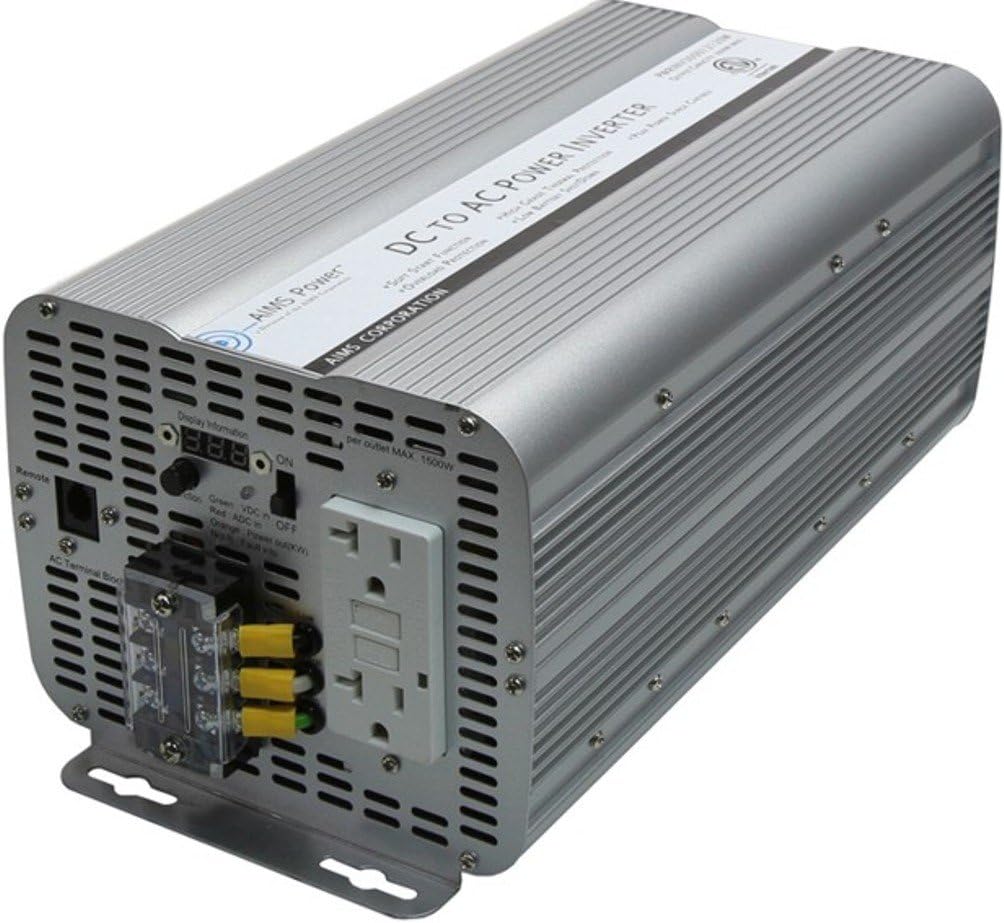
Nọmba 4.1: Lapapọ view of the AIMS Power 3600 Watt Modified Sine Power Inverter.
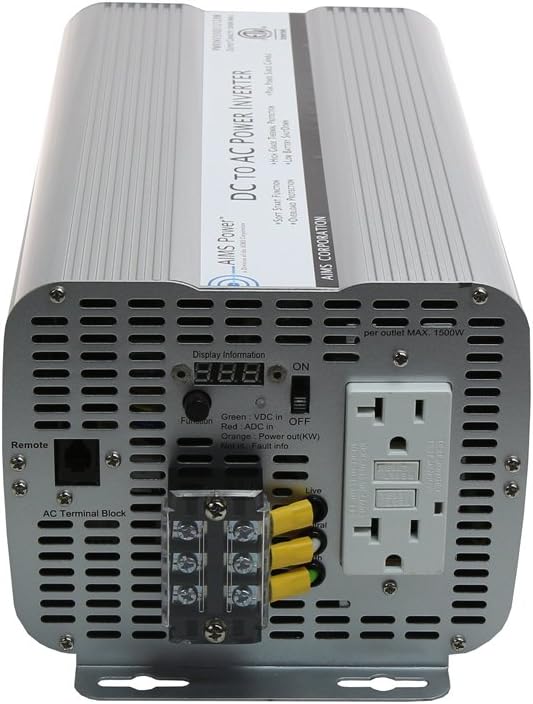
Figure 4.2: Front panel showing AC outlets, terminal block, and controls.

Figure 4.3: Rear panel displaying the DC input terminals and cooling fans.

Nọmba 4.4: Alaye view of the dual GFCI outlets and the AC direct connect terminal block.

Nọmba 4.5: Alaye view of the DC input terminals with protective covers.
Fidio 4.1: Ipariview of the AIMS Power 3600 Watt Modified Sine Inverter, highlighting its features and connection points.
5. Eto ati fifi sori
Proper installation is crucial for the safe and efficient operation of your inverter. Follow these steps carefully:
5.1 Yiyan ipo kan
- Fi ẹrọ inverter naa si agbegbe gbigbẹ, ti o ni afẹfẹ daradara, kuro ni oorun taara, awọn orisun ooru, ati ọrinrin.
- Ensure adequate clearance around the inverter for proper airflow to the cooling fans.
- Mount the inverter securely on a stable, non-flammable surface.
5.2 DC Input Connection (Battery)
- Rí i dájú pé ẹ̀rọ ìyípadà agbára ẹ̀rọ ìyípadà náà wà ní ipò PÁ.
- Connect the supplied DC battery terminal covers to the appropriate terminals on the inverter: red to positive (+), black to negative (-).
- Connect the other end of the DC cables to your 12V DC battery bank, ensuring correct polarity. Use heavy-gauge cables suitable for the inverter's wattage.
- Tighten all connections securely to prevent loose connections, which can cause overheating and damage.
5.3 AC o wu Asopọ
- Awọn ile-iṣẹ GFCI: For standard AC appliances, plug them directly into the dual 20A GFCI outlets on the front panel.
- Àkọsílẹ̀ Ibùdó AC: For applications requiring the full 3600W or a hardwired connection, use the AC direct connect terminal block. Consult a qualified electrician for proper wiring to this block. Ensure all wiring adheres to local electrical codes.
5.4 Remote Switch Connection (Optional)
If using an optional remote switch, connect its cable to the dedicated remote port on the inverter's front panel. An adapter cable is included for this purpose.
6. Awọn ilana Iṣiṣẹ
Once the inverter is properly installed and connected, follow these steps for operation:
6.1 Titan / Pa a
- Ensure all AC loads are disconnected or turned off before powering on the inverter.
- Flip the main power switch on the inverter to the "ON" position. The green LED indicator should illuminate, and the volt/amp meters will display readings.
- If using a remote switch, ensure the inverter's main switch is ON, then use the remote switch to control the inverter's power.
- To power off, first disconnect or turn off all AC loads, then flip the inverter's main power switch to "OFF."
6.2 Àbójútó Iṣẹ́ Àgbékalẹ̀
- The integrated volt and amp meters provide real-time feedback on your system's performance. Monitor these displays to ensure stable operation and prevent overloading.
- LED indicators will show green for normal operation and red for fault conditions (e.g., overload, over temperature).
6.3 Igbohunsafẹfẹ Aṣayan
A switch is provided on the unit to change the output frequency between 50Hz and 60Hz. Adjust this setting according to the requirements of your connected appliances.
7. Itọju
Regular maintenance ensures the longevity and optimal performance of your AIMS Power Inverter:
- Ninu: Máa fọ ìta inverter náà lẹ́ẹ̀kọ̀ọ̀kan pẹ̀lú aṣọ gbígbẹ. Rí i dájú pé àwọn ihò afẹ́fẹ́ kò ní eruku àti ìdọ̀tí. Má ṣe lo àwọn ohun èlò ìfọmọ́ omi.
- Awọn ayẹwo Asopọmọra: Máa ṣe àyẹ̀wò gbogbo àwọn ìsopọ̀ DC àti AC déédéé láti mọ̀ bóyá wọ́n ní agbára púpọ̀. Àwọn ìsopọ̀ tí kò ní agbára lè fa pípadánù agbára, ìgbóná jù, àti ewu iná tó lè ṣẹlẹ̀.
- Ilera Batiri: Monitor your battery bank's health and charge level. A healthy battery system is essential for inverter performance.
- Ibi ipamọ: If storing the inverter for an extended period, ensure it is disconnected from all power sources and stored in a cool, dry place.
8. Laasigbotitusita
Ti o ba pade awọn ọran pẹlu oluyipada rẹ, tọka si awọn iṣoro ti o wọpọ ati awọn ojutu wọnyi:
| Isoro | Owun to le Fa | Ojutu |
|---|---|---|
| Ko si AC Output / Inverter Ko Tan | Loose DC connections, low battery voltage, blown fuse, inverter switch off. | Check DC cable connections and battery voltage. Ensure inverter switch is ON. Replace internal fuses if necessary (consult manual or qualified technician). |
| Overload Alarm / Red Fault LED | Connected load exceeds inverter's continuous or surge rating. | Reduce the total load connected to the inverter. Disconnect some appliances and restart the inverter. |
| Itaniji iwọn otutu ju | Inadequate ventilation, blocked cooling fans, high ambient temperature. | Ensure inverter is in a well-ventilated area. Clear any obstructions from cooling fans. Allow inverter to cool down before restarting. |
| Kekere Voltage Itaniji | Batiri voltage kere ju. | Recharge or replace the battery bank. Ensure battery cables are of adequate gauge and length. |
| GFCI Tripping | Ground fault detected in connected appliance or wiring. | Disconnect all appliances from the GFCI outlets. Reset the GFCI. Reconnect appliances one by one to identify the faulty device. |
9. Awọn pato
| Sipesifikesonu | Iye |
|---|---|
| Orukọ awoṣe | PWRINV360012120W |
| Agbara Tesiwaju | 3600 watt |
| Agbara agbara | 7200 watt |
| DC Input Voltage | 12 Volts |
| AC wu Voltage | 120 folti AC |
| Iwajade Waveform | Títúnṣe Sine igbi |
| Awọn iwe-ẹri | ETL Certified to UL 458, CSA Standard C22.2 No. 107.1-01 |
| AC iletslets | Dual GFCI Outlets (20 Amp kọọkan) |
| Additional AC Output | AC ebute Block |
| Iwọn Nkan | 9.04 iwon |
| Ọja Mefa | 14.5 x 6.62 x 5.6 inches |
| Niyanju Lilo | Home, Office, RV, Cabin |
| Orisun agbara | Agbara Batiri |
10. Atilẹyin ọja ati Support
AIMS Power stands behind its products. This inverter comes with a 2-odun atilẹyin ọja. All technical support, warranty claims, and sales inquiries are handled directly from our support center in Nevada, USA. For assistance, please refer to the contact information provided in your product packaging or visit the official AIMS Power webojula.