Ọrọ Iṣaaju
This manual provides essential information for the safe and efficient operation of your 1byone Bluetooth Record Player. Please read it thoroughly before use and retain it for future reference.
Awọn ẹya pataki:
- Selectable 33, 45, and 78 RPM speed settings, including a 45-RPM adapter.
- Bluetooth connectivity for wireless music playback from smartphones, tablets, and other devices through the turntable's built-in speakers.
- Dynamic, balanced tone arm with soft damping control for gentle record playback.
- RCA output for connecting to external speakers and a headphone jack for private listening.
- Line-in port for connecting external audio sources like MP3 players.
- Portable briefcase-style design with a wooden cabinet and PU leather wrapping for easy storage and transport.
Alaye Aabo
Awọn Itọsọna Aabo pataki:
- This appliance is not intended for use by dependents and children. All use by dependents should be supervised by a responsible, capable adult.
- This product must be used only for the purpose for which it has been developed, and in the manner described in these instructions for use. Any improper use can be dangerous.
- Ma ṣe fi ẹrọ naa han si ojo tabi ọrinrin.
- Ma ṣe dina eyikeyi awọn ṣiṣi atẹgun.
- Dabobo okun agbara lati rin lori tabi pinched.
- Yọọ kuro lakoko iji manamana tabi nigbati a ko lo fun igba pipẹ.
Package Awọn akoonu
Jọwọ ṣayẹwo pe gbogbo awọn nkan ti a ṣe akojọ rẹ si isalẹ wa ninu package rẹ:
- 1byone Bluetooth Record Player
- Adapter RPM 45
- Adapter agbara
- Afowoyi Olumulo (iwe-ipamọ yii)
Ọja Pariview
Familiarize yourself with the components of your record player.

Figure 1: The 1byone Bluetooth Record Player in its open position, showcasing the platter, tone arm, and built-in speakers. A vinyl record is placed on the platter, ready for playback.
Iwaju View (Closed):

Figure 2: The record player in its closed, portable briefcase form, showing the front latches, handle, and speaker grilles.
Ẹyìn View (Closed):

Figure 3: The rear of the record player, displaying the hinges and a product information label with model and power specifications.
Side Panel Controls and Ports:

olusin 4: A alaye view of the right side panel, featuring the power/volume knob, DC input, headphone jack, RCA output (L/R), and Line-in port.

Figure 5: Visual representation of the connectivity options: headphone jack for private listening, RCA output for external speakers, and 3.5mm line-in for connecting other audio devices.
Awọn eroja inu:
- Platter: The rotating surface where records are placed.
- Apá ohùn: Holds the cartridge and stylus, which reads the grooves of the record.
- Àmì (Abẹ́rẹ́): The tip of the cartridge that makes contact with the record. (Protected by a cap).
- Yipada Yiyan Iyara: Allows selection of 33, 45, or 78 RPM playback speeds.
- Yipada TITAN/PA Iduro Aifọwọyi: Controls whether the platter stops automatically at the end of a record.
- Dimu ohun ti nmu badọgba RPM 45: A dedicated slot for storing the 45 RPM adapter.
- Awọn Agbọrọsọ ti A ṣe sinu: Located on the front panel for direct audio output.
Ṣeto
- Unpack the Turntable: Fi ìṣọ́ra yọ ohun èlò orin àti gbogbo àwọn ohun èlò míì kúrò nínú àpótí náà.
- Place the Turntable: Position the unit on a stable, level surface away from direct sunlight, heat sources, or excessive dust.
- So agbara: Insert the DC plug of the power adapter into the DC IN port on the side of the turntable. Plug the other end of the adapter into a suitable wall outlet.
- Remove Stylus Protector: Before playing a record, gently remove the clear plastic protective cap from the stylus (needle).
- Apá Ohùn Ìtújáde: Unlock the tone arm clip to release the tone arm.
Awọn ilana Iṣiṣẹ
1. Playing Vinyl Records:
- Agbara Tan: Rotate the ON/OFF/VOLUME knob clockwise until it clicks to turn on the unit. Adjust the volume to a low level.
- Yan Iyara: Set the speed selector switch (33/45/78 RPM) to match the record you are playing. For 45 RPM records, place the included 45 RPM adapter onto the center spindle.
- Àkọsílẹ̀ Ibi: Fi pẹ̀lẹ́pẹ̀lẹ́ gbé àwo fínílì kan sí orí àwo tí a fi ń tàn án.
- Iṣẹ Duro Aifọwọyi: The AUTO STOP ON/OFF switch controls whether the record stops automatically when finished.
- Ti o ba ṣeto si ON, the record will stop automatically when it reaches the end. (Note: For some records, it may stop prematurely or not stop at all).
- Ti o ba ṣeto si PAA, the record will continue to spin even after the music has ended.
- Bẹrẹ Sisisẹsẹhin: Gently lift the tone arm using the cueing lever. Position the tone arm over the desired track on the record. Slowly lower the tone arm onto the record using the cueing lever. The music will begin to play.
- Ṣatunṣe Iwọn didun: Rotate the ON/OFF/VOLUME knob to adjust the sound level.
- End Playback: When the record finishes (or you wish to stop), lift the tone arm using the cueing lever and return it to the tone arm rest. Secure it with the tone arm clip. Rotate the ON/OFF/VOLUME knob counter-clockwise until it clicks to turn off the unit.
2. Sisisẹsẹhin Bluetooth:
You can stream music wirelessly from your Bluetooth-enabled devices to the record player's built-in speakers.
- Agbara Tan: Turn on the record player using the ON/OFF/VOLUME knob.
- Mu Bluetooth ṣiṣẹ: The unit will automatically enter Bluetooth pairing mode. An indicator light may flash to show it's ready to pair.
- Ohun elo Pàpọ: On your smartphone, tablet, or other Bluetooth device, enable Bluetooth and search for "1byone Turntable" (or similar name). Select it to pair.
- Mu Orin: Once paired, you can play music from your device, and it will sound through the record player's speakers. Adjust volume using both your device and the turntable's volume knob.
3. Using the Line-In Port:
Connect external audio devices via the 3.5mm Line-in port.
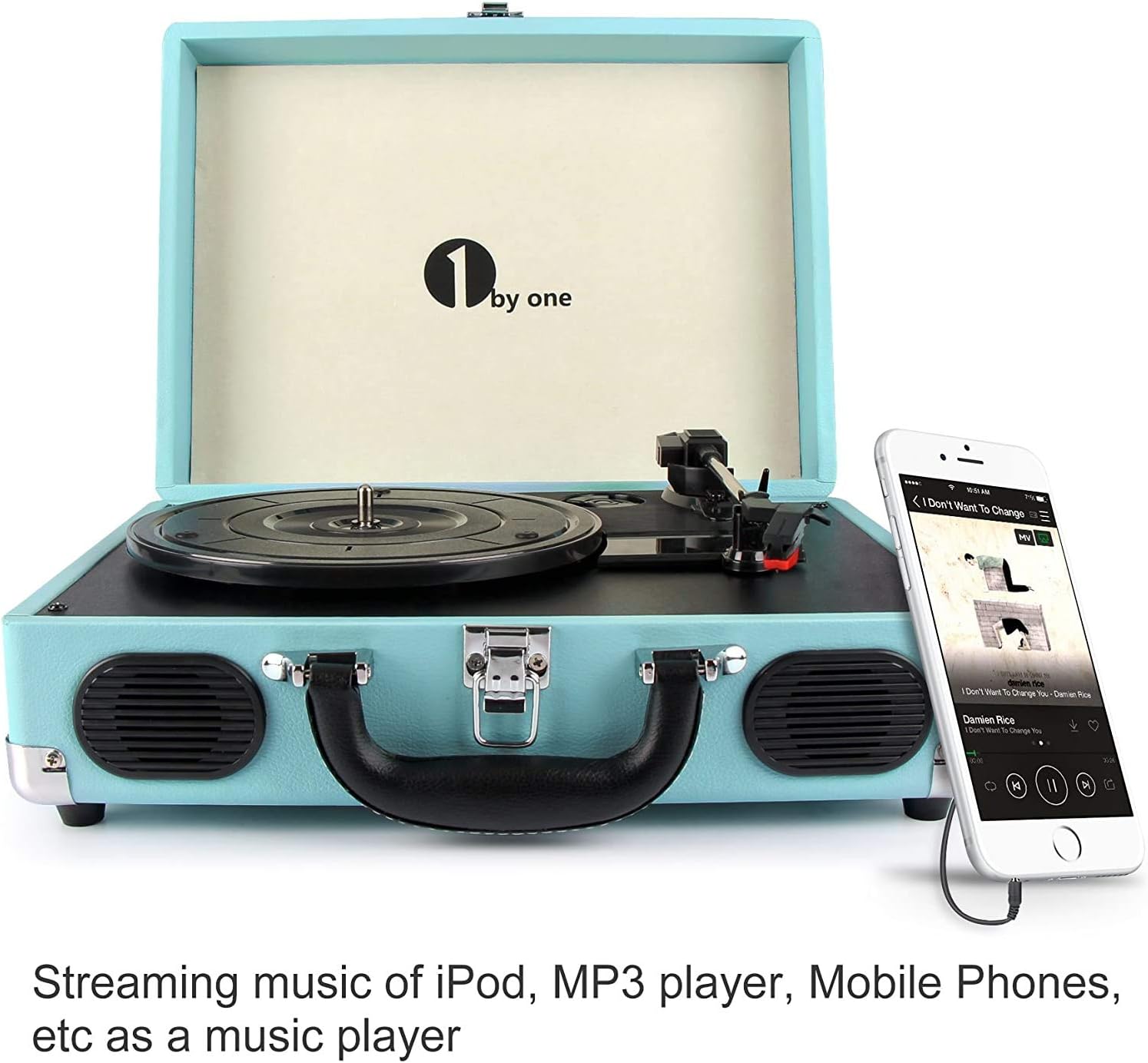
Figure 6: The record player demonstrating a smartphone connected to its 3.5mm Line-in port, allowing external audio playback through the turntable's speakers.
- Okun So pọ: Use a 3.5mm audio cable (not included) to connect your external audio device (e.g., MP3 player, phone) to the LINE IN port on the side of the record player.
- Agbara Tan: Turn on the record player and your external audio device.
- Mu Orin: Start playback on your external device. The audio will be routed through the record player's speakers. Adjust volume using both devices.
4. Using RCA Output:
Connect the record player to an external amplifier or powered speakers for enhanced sound.
- Connect RCA Cables: Use RCA cables (not included) to connect the L (left) and R (right) RCA OUT ports on the record player to the corresponding audio input ports on your amplifier tabi agbara agbohunsoke.
- Agbara Tan: Turn on the record player and your external audio system.
- Mu Orin: Play a record on the turntable. The audio will be output through your connected external system. Adjust volume on your external system.
5. Using Headphone Jack:
For private listening, connect headphones to the dedicated jack.
- So Agbekọri pọ: Plug your headphones (not included) into the HEADPHONE jack on the side of the record player.
- Mu Orin: Play a record or stream via Bluetooth/Line-in. The sound will be directed to your headphones, and the built-in speakers will be muted.
- Ṣatunṣe Iwọn didun: Adjust the volume using the ON/OFF/VOLUME knob.
Itoju
- Ninu Ẹka naa: Wipe the exterior of the record player with a soft, dry cloth. Do not use abrasive cleaners or solvents.
- Ninu Stylus naa: Use a soft brush (not included) to gently clean the stylus, brushing from back to front. Avoid touching the stylus with your fingers.
- Awọn igbasilẹ mimọ: Keep your vinyl records clean to ensure optimal sound quality and prolong stylus life. Use a record cleaning brush and solution (not included) as recommended by record care professionals.
- Iyipada Stylus: The stylus has a limited lifespan. If sound quality deteriorates, the stylus may need replacement. Contact 1byone customer support for replacement options.
- Ibi ipamọ: When not in use, ensure the tone arm is secured with its clip and the stylus cap is in place. Close the lid to protect the platter and tone arm from dust. Store the unit in a cool, dry place.
Laasigbotitusita
| Isoro | Owun to le Fa | Ojutu |
|---|---|---|
| Ko si agbara | Ohun ti nmu badọgba agbara ko ti sopọ tabi iṣan ko ṣiṣẹ. | Ensure the power adapter is securely plugged into the unit and a working wall outlet. Check if the ON/OFF/VOLUME knob is turned on. |
| Ko si ohun lati ọdọ awọn agbohunsoke | Volume too low; headphones connected; RCA output connected to external system. | Increase volume. Disconnect headphones. If using RCA output, ensure external system is powered on and correctly configured. |
| Àwọn ìforíkọsílẹ̀ | Dirty or scratched record; stylus worn or dirty; turntable not level. | Clean the record. Clean or replace the stylus. Place the turntable on a stable, level surface. |
| Record plays too fast/slow | Eto iyara ti ko tọ. | Adjust the speed selector switch to match the record's RPM (33, 45, or 78). |
| Auto stop not working correctly | Record type; AUTO STOP switch setting. | Some records may not trigger the auto-stop function reliably. Try setting the AUTO STOP switch to OFF if it stops prematurely. |
| Awọn oran sisopọ Bluetooth | Device not in pairing mode; device too far; interference. | Ensure the turntable is in Bluetooth mode. Move your device closer. Turn off other Bluetooth devices to reduce interference. |
Awọn pato
| Orukọ awoṣe | Apoti Turntable |
| Nọmba Awoṣe Nkan | OEU00-0750 |
| Brand | 1nipasẹ |
| Ọja Mefa | 13.8 x 10 x 5.1 inches |
| Iwọn Nkan | 5.7 iwon |
| Iyara Yiyipo ti o pọju | 78 RPM |
| Ohun elo | Ṣiṣu |
| Àwọ̀ | Turquoise |
| Awọn ẹrọ ibaramu | Headphone, MP3 Player, Speaker, Tablet |
Note: While the primary material is listed as Plastic, the product features a wooden cabinet with PU leather wrapping for its exterior finish.
Atilẹyin ọja ati Support
Alaye Atilẹyin ọja:
1byone stands by its products. This turntable comes with a 12-month guarantee. If any issues arise, a replacement will be provided. Customer satisfaction is a priority.
Atilẹyin Onibara:
For technical assistance, warranty claims, or general inquiries, please contact 1byone customer support. Refer to the official 1byone webaaye tabi apoti ọja fun alaye olubasọrọ lọwọlọwọ julọ.


