Ọrọ Iṣaaju
This manual provides essential information for the proper setup, operation, and maintenance of your TELECO MIO-868-A04 remote control.
The TELECO MIO-868-A04 is a high-quality remote control designed for gate automation systems, operating at a frequency of 868 MHz. It features a robust design and simple operation, making it an ideal solution for controlling compatible gate receivers.
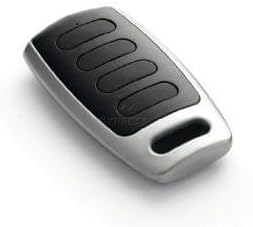
Image: The TELECO MIO-868-A04 remote control, featuring a black and silver casing with four black buttons.
Key Awọn ẹya ara ẹrọ
- Gate remote control with a frequency of 868 MHz.
- Programming type: Recording directly into the receiver unit.
- Nlo batiri CR2032.
- Compact dimensions: 0.6 x 0.4 x 0.1 cm.
- Equipped with 4 control buttons.
- Maximum operating range of 10 metres.
Eto ati siseto
Fifi sori batiri
The remote control comes with a CR2032 battery pre-installed. If replacement is needed, follow these steps:
- Wa yara batiri ni ẹhin isakoṣo latọna jijin.
- Carefully open the compartment using a small screwdriver or coin.
- Yọ batiri CR2032 atijọ kuro.
- Insert the new CR2032 battery with the positive (+) side facing up.
- Pa yara batiri naa ni aabo.
Siseto Iṣakoso latọna jijin
The TELECO MIO-868-A04 remote control is programmed by 'recording' it directly into your gate receiver unit. The exact procedure may vary depending on your specific gate receiver model. Please refer to your gate receiver's instruction manual for detailed programming steps. Generally, the process involves:
- Accessing the programming mode on your gate receiver (often by pressing a 'Learn' or 'Prog' button).
- Pressing a button on the new TELECO remote control when the receiver is in programming mode.
- Confirming successful programming (e.g., an LED indicator on the receiver changes or flashes).
Important: Ensure your gate receiver is compatible with 868 MHz frequency remotes.
Awọn ilana Iṣiṣẹ
Once programmed, the TELECO MIO-868-A04 remote control is ready for use.
- Opening/Closing Gate: Press the assigned button on the remote control to activate your gate. The remote has 4 buttons, allowing for multiple functions if supported by your receiver (e.g., full open, pedestrian open, stop).
- Ibiti: The maximum effective operating range is approximately 10 metres. Ensure there are no significant obstructions between the remote and the receiver.
- Imọlẹ Atọka: A small LED indicator on the remote may illuminate when a button is pressed, indicating battery function and signal transmission.
Itoju
Ninu
Clean the remote control with a soft, dry cloth. Do not use abrasive cleaners or solvents, as these can damage the casing and internal components.
Batiri Rirọpo
Replace the CR2032 battery when the remote's range decreases significantly or the indicator light fails to illuminate consistently upon button press. Refer to the 'Battery Installation' section for instructions.
Ibi ipamọ
Store the remote control in a dry place, away from extreme temperatures and direct sunlight. Avoid dropping the remote or exposing it to water.
Laasigbotitusita
| Isoro | Owun to le Fa | Ojutu |
|---|---|---|
| Latọna jijin ko ṣiṣẹ | Dead battery; Not programmed; Out of range; Receiver issue. | Replace battery; Re-program remote (see Setup); Move closer to receiver; Check receiver power/status. |
| Ibiti o ṣiṣẹ kukuru | Low battery; Interference; Obstructions. | Replace battery; Check for sources of interference (e.g., other wireless devices); Clear line of sight to receiver. |
| LED on remote not lighting up | Dead battery; Faulty remote. | Replace battery; If problem persists, contact support. |
Imọ ni pato
| Orukọ awoṣe | MIO-868-A04 |
| Brand | Teleco |
| Igbohunsafẹfẹ | 868 MHz |
| Nọmba ti Awọn bọtini | 4 |
| Batiri Iru | CR2032 |
| Ọja Mefa | 0.6 x 0.4 x 0.1 cm |
| Iwọn | 50 g |
| Ibiti o pọju | 10 Mita |
| Àwọ̀ | Dudu ati fadaka |
Atilẹyin ọja ati Support
For specific warranty information, please refer to the documentation provided at the time of purchase or contact your retailer. Standard return policies typically allow for returns within 30 days of purchase, subject to retailer terms and conditions.
For technical support or further assistance with programming, it is recommended to contact the manufacturer, Teleco, or your authorized dealer. Ensure you have your model number (MIO-868-A04) ready when seeking support.


