1. Ifihan
This manual provides essential instructions for the safe and efficient operation of your beFree Sound BFS-6445 Projection Party Light Dome Subwoofer Bluetooth Portable Speaker. Please read this manual thoroughly before using the product and retain it for future reference.
The beFree Sound BFS-6445 is a versatile portable speaker system featuring a 10-inch subwoofer, Bluetooth connectivity, USB/SD input, FM radio, and a unique projection light dome. It includes a wireless microphone and a remote control for enhanced functionality.
2. Ọja Ipariview
2.1 Key Awọn ẹya ara ẹrọ
- Ìjáde Agbára Pẹ́kí 800 Watts
- 10-inch Subwoofer for deep bass
- 7" x 4.5" LED Light Projection Dome
- Asopọ Alailowaya Bluetooth
- USB and SD Card Input for media playback
- FM Redio Tuner
- Microphone and Guitar Inputs with priority switch
- Bass, Treble, Echo, Mic Volume, and Guitar Volume Controls
- Built-in Side Handles, Rolling Handle, and Wheels for portability
- Includes Wireless Microphone and Remote Control
2.2 Agbọrọsọ irinše ati idari
Refer to the image below for a visual guide to the speaker's main components and control panel.

Nọmba 1: Iwaju view of the beFree Sound BFS-6445 speaker, showing the projection light dome, control panel, 10-inch subwoofer grille, and included wireless microphone and remote control. The inset images highlight the light dome's color variations (green, blue, red), USB/SD card slots, Bluetooth logo, and FM radio icon.
The control panel, located on the top front of the speaker, provides access to various functions including volume, input selection, equalization, and light dome control.
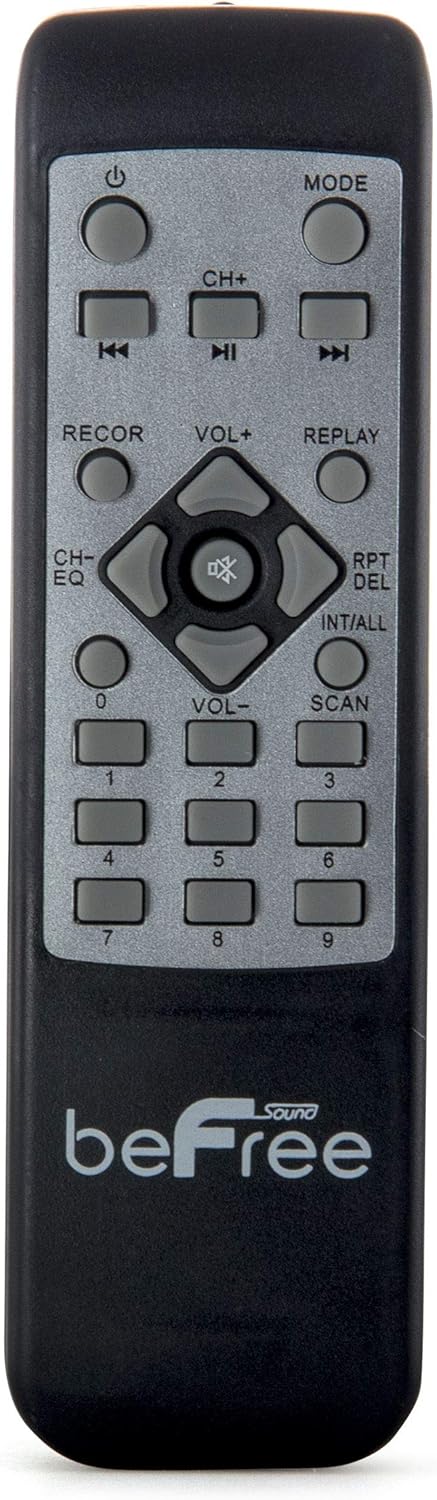
Nọmba 2: Sun mo tipetipe view of the beFree Sound BFS-6445 remote control. It features buttons for power, mode selection, track navigation, volume adjustment, EQ, record, replay, scan, and numerical input.
The remote control allows for convenient operation of the speaker from a distance.
3. Eto
3.1 Ṣiṣii ati Gbe
- Fara yọ agbohunsoke ati gbogbo awọn ẹya ẹrọ kuro ninu apoti.
- Gbe agbọrọsọ sori ibi iduro, dada alapin. Rii daju pe fentilesonu to peye ni ayika ẹyọ naa.
- The speaker is equipped with rolling wheels and an extendable handle for easy transport.
3.2 Asopọ agbara
- Connect the provided AC power cord to the speaker's AC input port (AC 100-240V, 50/60Hz).
- So opin keji okun ina naa sinu ibudo ogiri ti o yẹ.
- The speaker can operate on AC power.
3.3 Battery Installation (Remote Control & Wireless Microphone)
- Isakoṣo latọna jijin: Open the battery compartment on the back of the remote control. Insert 2 x AAA batteries, ensuring correct polarity (+/-). Close the compartment.
- Gbohungbohun Alailowaya: Open the battery compartment on the microphone. Insert 2 x AA batteries, ensuring correct polarity (+/-). Close the compartment.
4. Awọn ilana Iṣiṣẹ
4.1 Agbara Tan / Pa
Tẹ awọn AGBARA bọ́tìnì lórí pánẹ́lì ìṣàkóso tàbí ìṣàkóso latọna jijin láti tan tàbí pa agbọ́hùnsọ̀.
4.2 Aṣayan Ipo igbewọle
Tẹ awọn MODE button on the control panel or remote control to cycle through available input modes: Bluetooth, USB, SD, FM Radio, and AUX (if an external device is connected via audio input).
4.3 Sisopọ Bluetooth
- Tan agbọrọsọ naa ki o yan Bluetooth mode using the MODE button. The display will indicate Bluetooth mode, and a pairing tone may sound.
- Mu Bluetooth ṣiṣẹ lori ẹrọ alagbeka rẹ (foonuiyara, tabulẹti, ati bẹbẹ lọ).
- Wa fun available Bluetooth devices. The speaker will appear as "beFree Sound BFS-6445" or similar.
- Select the speaker from the list to pair. Once paired, a confirmation tone will sound.
- O le mu ohun ṣiṣẹ bayi lati ẹrọ rẹ nipasẹ agbọrọsọ.
4.4 USB / SD Kaadi Sisisẹsẹhin
- Fi kọnputa filasi USB tabi kaadi SD sinu iho oniwun lori nronu iṣakoso.
- The speaker will automatically switch to USB or SD mode and begin playing compatible audio files. Tí kò bá rí bẹ́ẹ̀, tẹ MODE bọtini lati yan titẹ sii to tọ.
- Lo awọn ERE/SINMI, TẸLẸJẸ, ati ITELE buttons on the control panel or remote to control playback.
4.5 FM Radio isẹ
- Yan Redio FM ipo nipa lilo bọtini MODE.
- Tẹ mọlẹ SCAN button (often the PLAY/PAUSE button) to automatically scan and save available FM stations.
- Lo awọn TẸLẸJẸ ati ITELE awọn bọtini lati lọ kiri nipasẹ awọn ibudo ti a fipamọ.
4.6 Gbohungbo ati gita awọn igbewọle
- So gbohungbohun onirin pọ mọ MIC igbewọle jaki.
- So a guitar si awọn GITOR input jaki.
- Ṣatunṣe awọn MIC NIPA ati GOMI NIPA knobs on the control panel to set desired levels.
- Lo awọn MIC PRIORITY SWITCH to enable or disable microphone priority. When enabled, the music volume will automatically lower when the microphone is in use.
- Ṣatunṣe awọn ECHO knob for microphone echo effects.
4.7 Light Projection Dome
The speaker features an integrated LED light projection dome. Use the LIGHT POWER SWITCH on the control panel to turn the light dome on or off. The dome projects various colored patterns to enhance the ambiance.
4.8 Audio tolesese
Lo awọn Bass ati TREK. knobs on the control panel to adjust the low and high frequencies of the audio output.
Akọkọ Iwọn didun knob controls the overall output level of the speaker.
4.9 Using as Main or Passive Speaker
This speaker supports dual audio input/output, allowing it to be used in conjunction with another unit. Connect the audio output of one speaker to the audio input of another using an AV cable to amplify sound or create a stereo setup.
5. Itọju
5.1 Ninu
- Yọọ agbohunsoke nigbagbogbo kuro ni iṣan agbara ṣaaju ṣiṣe mimọ.
- Lo aṣọ rírọrùn tí ó gbẹ láti nu àwọn ojú ìta ti agbọ́hùnsọ náà.
- Ma ṣe lo abrasive Cleaners, waxes, tabi epo bi wọn ṣe le ba ipari jẹ.
- Jẹ́ kí àwọn ohun èlò ìgbóhùnsáfẹ́fẹ́ má ṣe ní eruku àti ìdọ̀tí.
5.2 Ibi ipamọ
When not in use for extended periods, store the speaker in a cool, dry place, away from direct sunlight and extreme temperatures. If possible, use the original packaging for protection.
6. Laasigbotitusita
| Isoro | Owun to le Fa | Ojutu |
|---|---|---|
| Ko si agbara | Power cord not connected; outlet not active; power switch off. | Ensure power cord is securely connected. Check wall outlet with another device. Turn the speaker's power switch on. |
| Ko si ohun | Volume too low; incorrect input mode; device not paired (Bluetooth); media error (USB/SD). | Increase master volume. Select the correct input mode. Re-pair Bluetooth device. Check USB/SD card for compatible files and proper insertion. |
| Bluetooth ko sopọ | Speaker not in Bluetooth mode; device too far; interference; speaker already paired to another device. | Rí i dájú pé agbọ́hùnsọ náà wà ní ipò Bluetooth. Gbé ẹ̀rọ náà sún mọ́ agbọ́hùnsọ. Pa àwọn ẹ̀rọ Bluetooth mìíràn. Gé ẹ̀rọ tó wà tẹ́lẹ̀ kúrò. |
| Gbohungbohun ko ṣiṣẹ | Microphone not powered; volume too low; incorrect input. | Check microphone batteries (if wireless) or connection (if wired). Increase MIC VOLUME. Ensure MIC PRIORITY switch is set correctly. |
| Light dome not working | Light power switch off. | Ensure the LIGHT POWER SWITCH is in the ON position. |
7. Awọn pato
- Irú Agbọrọsọ: Subwoofer
- Iwọn Agbọrọsọ: 10 inches
- Agbara Ijade ti o pọju Agbọrọsọ: 800 Wattis
- Imọ-ẹrọ Asopọmọra: Bluetooth, USB
- Awọn ẹya pataki: Portable, Projection Light Dome, FM Radio, USB/SD Input, Microphone/Guitar Input
- Ọna Iṣakoso: Latọna jijin, Awọn idari lori ẹyọkan
- Orisun Agbara: AC 100-240V, 50/60Hz
- Awọn iwọn Ọja (D x W x H): 13.5" x 12.5" x 29.75"
- Ìwọ̀n Nkan: 30.3 iwon
- Awọn batiri Iṣakoso Latọna jijin: 2 x AAA (pẹlu)
- Wireless Microphone Batteries: 2 x AA (to wa)
- Nọmba awoṣe: BFS-6445
- UPC: 602573151884
8. Atilẹyin ọja ati Support
beFree Sound products are designed for reliability and performance. For warranty information, technical support, or service inquiries, please refer to the warranty card included with your purchase or contact beFree Sound customer service directly.
Jọwọ ṣe idaduro ẹri rira rẹ fun awọn iṣeduro atilẹyin ọja.


