Ìwé Ìtọ́ni fún Ìpèsè Agbára Keithley 2303-PJ
Model: 2303-PJ
1. Ọja Ipariview
The Keithley 2303-PJ is a specialized power supply designed for testing portable, battery-operated devices. It offers advanced capabilities to simulate a battery's performance across a wide range of conditions, including output resistance and voltage response. This instrument is crucial for accurately testing device charge control circuitry and overall battery simulation.
Awọn ẹya pataki pẹlu:
- Ultra-fast response to transient load currents
- Variable output resistance
- 100nA DC current sensitivity
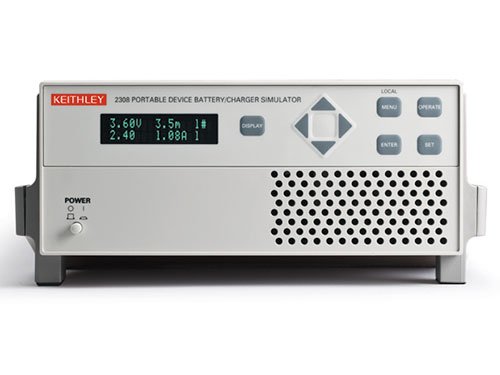
Figure 1: Front panel of the Keithley 2303-PJ Power Supply. The display shows voltage and current readings (e.g., 3.60V, 1.08A). Controls include a navigation pad, 'DISPLAY', 'MENU', 'OPERATE', 'ENTER', 'SET' buttons, and a 'POWER' button with indicator lights.
2. Eto
- Ṣiṣii ati Ṣiṣayẹwo: Carefully remove the instrument from its packaging. Inspect for any signs of damage during transit. Report any damage to the shipping carrier and Keithley immediately.
- Asopọ agbara: Connect the supplied AC power cord to the instrument's rear panel power inlet and then to a grounded AC power outlet. Ensure the power source matches the instrument's voltage ibeere.
- Agbara Ibẹrẹ Tan: Tẹ awọn AGBARA button located on the front panel. The display should illuminate, indicating the unit is operational.
- Connecting to Device Under Test (DUT): Use appropriate test leads to connect the output terminals of the 2303-PJ to the device you intend to test. Observe correct polarity.
- Afẹfẹ: Ensure adequate ventilation around the instrument. Do not block the ventilation grilles on the sides or rear of the unit.
3. Awọn ilana Iṣiṣẹ
3.1 Iwaju Panel idari
- Ifihan: Shows output voltage, current, and other operational parameters.
- Awọn bọtini lilọ kiri (Soke, Isalẹ, Osi, ọtun): Used to navigate through menus and adjust parameter values.
- Tẹ Bọtini: Confirms selections or entered values.
- Ṣeto Bọtini: Tẹ ipo eto paramita wọle.
- Bọtini MENU: Accesses the main menu for configuration and advanced settings.
- OPERATE Button: Toggles the output on or off.
- Bọ́tìnì ÌFIHÀN: Cycles through different display modes or views.
3.2 Ipilẹ isẹ
- Eto Voltage ati lọwọlọwọ:
- Tẹ awọn SET bọtini.
- Use the navigation buttons to select the voltage or current parameter you wish to adjust.
- Use the navigation buttons (typically Up/Down) to change the value.
- Tẹ WOLE lati jẹrisi eto.
- Enabling Output:
- Once parameters are set, press the SISE button to enable the power output. The output indicator should illuminate.
- To disable the output, press SISE lẹẹkansi.
- Awọn kika Abojuto:
The display continuously shows the actual output voltage and current. Use the Afihan button to cycle through different measurement views ti o ba wa.
4. Itọju
- Ninu: Keep the instrument clean by wiping the exterior with a soft, damp cloth. Do not use abrasive cleaners or solvents. Ensure the unit is powered off and disconnected from the AC supply before cleaning.
- Afẹfẹ: Periodically check that the ventilation grilles are free from dust and debris to ensure proper airflow and prevent overheating.
- Ibi ipamọ: When not in use for extended periods, store the instrument in a clean, dry environment within its specified operating temperature and humidity ranges.
- Iṣatunṣe: For optimal performance and accuracy, periodic calibration by qualified personnel is recommended. Refer to the Keithley service manual or contact Keithley support for calibration procedures and intervals.
5. Laasigbotitusita
| Isoro | Owun to le Fa | Ojutu |
|---|---|---|
| Ohun elo ko ni agbara lori. | No AC power; faulty power cord; internal fuse blown. | Check AC power connection and outlet. Try a different power cord. If fuse is suspected, contact qualified service personnel. |
| Ko si voltage/lọwọlọwọ. | Output disabled; incorrect settings; overload protection active; faulty connections. | Tẹ SISE to enable output. Verify voltage/current settings. Check for short circuits or overloads on the DUT. Ensure test leads are securely connected. |
| Àwọn ìwé kíkà tí kò dúró ṣinṣin tàbí tí kò péye. | Poor connections; external interference; instrument needs calibration. | Check all connections for looseness or corrosion. Ensure the instrument is away from strong electromagnetic fields. Consider professional calibration. |
| Gbigbona pupọ. | Blocked ventilation; excessive ambient temperature; continuous operation at maximum load. | Ensure ventilation grilles are clear. Operate in a cooler environment. Reduce load or allow for cool-down periods. |
For issues not listed here or if troubleshooting steps do not resolve the problem, please contact Keithley technical support.
6. Awọn pato
| Paramita | Iye |
|---|---|
| Olupese | Keithley |
| Nọmba apakan | 2303-PJ |
| Nọmba Awoṣe Nkan | 2303-PJ |
| Iwọn Nkan | 5.44 kg |
| Package Mefa | 48.26 x 33.02 x 22.86 cm |
| Nkan Package opoiye | 1 |
| Ti beere awọn batiri? | Rara |
| Ọjọ Akọkọ Wa | Oṣu kọkanla ọjọ 4, ọdun 2016 |
7. Atilẹyin ọja ati Support
Warranty information for the Keithley 2303-PJ Power Supply is typically provided with the product at the time of purchase or can be found on the official Keithley webojula. Jọwọ ṣe idaduro ẹri rira rẹ fun awọn iṣeduro atilẹyin ọja.
For technical support, service, or calibration inquiries, please contact Keithley customer service directly. Refer to the contact information provided in your product documentation or on the official Keithley webAaye (www.tek.com/keithley).


