Ọrọ Iṣaaju
This manual provides essential instructions for the installation, operation, and maintenance of your Yale YMG40 Digital Door Lock. Please read this manual thoroughly before installation and use to ensure proper function and security.
Package Awọn akoonu
Daju pe gbogbo awọn paati wa ṣaaju ki o to bẹrẹ fifi sori:
- Yale YMG40 Digital Door Lock (Front and Back Body)
- Mortise Titiipa Apejọ
- Àwọn Kọ́kọ́rọ́ Mẹ́kínẹ́ẹ̀kì Mẹ́ta
- Installation Hardware (screws, strike plate, etc.)
- Afowoyi Olumulo (iwe-ipamọ yii)
Key Awọn ẹya ara ẹrọ
- Imudani Titari-Fa: Designed for convenient operation; push to enter, pull to exit.
- Awọn ọna Wiwọle lọpọlọpọ: Biometric fingerprint recognition, PIN code entry, and mechanical key override.
- Optional Connectivity: Compatible with Z-Wave and Bluetooth modules for smart home integration (modules sold separately).
- Itọsọna ohun: Provides audio prompts for setup and operation.
- Safe Handle Mechanism: Enhances security by preventing unauthorized entry.
- Titiipa Aifọwọyi: Configurable to automatically lock the door after closing.
- Wiwọle pajawiri: Low battery warning and external power terminal for emergency situations.
Eto ati fifi sori
Professional installation is recommended for optimal performance and security. Ensure your door meets the following specifications:
- Sisanra ilekun: 40-75mm (wooden doors).
- Iru ilekun: Suitable for both inswing and outswing doors.
Awọn Igbesẹ Ibẹrẹ:
- Ṣetan ilẹkun: Ensure the door is properly prepped according to the provided template (if applicable) for the mortise lock and lock body.
- Install Mortise Lock: Insert the mortise lock into the door edge and secure it.
- Install Lock Bodies: Mount the front and back lock bodies, ensuring cables are correctly routed and connected.
- Fi awọn batiri sii: Install the required batteries into the back body.
- Eto Ibẹrẹ: Follow the voice guide prompts to set up the master PIN code.
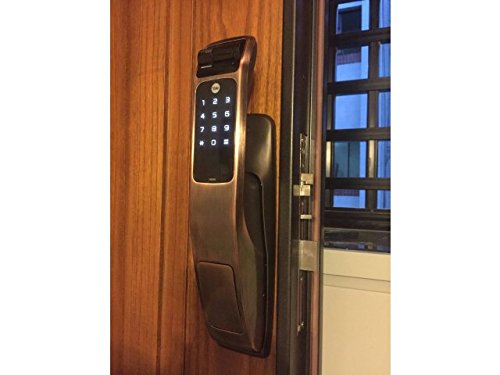
Image: Yale YMG40 Digital Door Lock installed on a wooden door, showing the sleek design and integration.
Awọn ilana Iṣiṣẹ
1. Accessing the Door
a. Fingerprint Access
The lock supports up to 20 different fingerprints. To unlock using a fingerprint:
- Place your registered finger on the fingerprint scanner.
- The lock will verify the fingerprint and unlock.
- Use the push-pull handle to open the door.
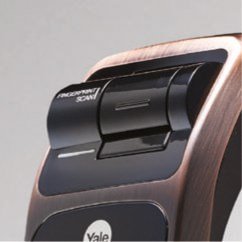
Aworan: A alaye view of the fingerprint scan area on the Yale YMG40 lock.
b. PIN Code Access
The lock supports up to 30 different user codes. To unlock using a PIN code:
- Fọwọ́ kan bọtini itẹwe náà láti mu un ṣiṣẹ́.
- Enter your registered PIN code followed by the '*' or '#' button (refer to specific model instructions for exact key).
- The lock will verify the code and unlock.
- Use the push-pull handle to open the door.

Aworan: Iwaju view of the Yale YMG40 Digital Door Lock, showcasing the illuminated keypad and push-pull handle.
c. Mechanical Key Override
In case of emergency or battery failure, the lock can be opened using the provided mechanical keys.
- Locate the mechanical key slot, typically hidden under a cover on the front body.
- Insert one of the 2 darí awọn bọtini and turn to unlock.
- Use the push-pull handle to open the door.

Aworan: A sunmọ-soke view of the mechanical key override cylinder on the Yale YMG40 lock.
d. Push-Pull Handle Operation
The ergonomic push-pull handle simplifies door opening:
- Lati ita: After successful authentication (fingerprint, PIN, or key), simply Ti the handle down to open the door.
- Lati inu: Nikan Fa the handle down to open the door.
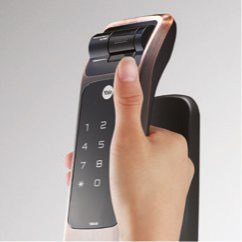
Image: A hand demonstrating the push-pull action of the Yale YMG40 door handle.
2. Titiipa aifọwọyi
The YMG40 can be configured to automatically lock the door after it closes. Refer to the full programming guide for instructions on enabling or disabling this feature.
3. Optional Accessories (Z-Wave & Bluetooth)
The Yale YMG40 is compatible with optional Z-Wave and Bluetooth modules, allowing integration with smart home systems and remote control capabilities. These modules are sold separately. Consult the specific module's instructions for pairing and setup.
A remote control accessory is also available, utilizing wireless floating ID technology with a range of up to 50 meters.
Itoju
- Rirọpo Batiri: The lock will provide a low battery warning. Replace all batteries promptly when this warning appears to ensure continuous operation.
- Ninu: Fi aṣọ rírọrùn tó gbẹ nu ìta ìdènà náà. Yẹra fún àwọn ohun ìfọṣọ tàbí àwọn ohun èlò ìfọṣọ tó lè ba ìparí tàbí àwọn ohun èlò ẹ̀rọ itanna jẹ́.
- Apanirun Itanna ọwọ: Keep the fingerprint sensor clean and free of debris for accurate readings.
- Kọ́kọ́rọ́ Ẹ̀rọ: Store the mechanical keys in a safe, accessible location outside the property for emergency use.
Laasigbotitusita
- Titii Ko Dahun: Check battery levels. If batteries are depleted, use the mechanical key or connect a 9V battery to the emergency power terminal (if available on your model) to provide temporary power.
- A ko mọ ìka ọwọ́: Rii daju pe ika rẹ mọ ati ki o gbẹ. Gbiyanju lati tun-forukọsilẹ itẹka rẹ ti awọn ọran ba tẹsiwaju.
- PIN Code Not Working: Verify the correct PIN is being entered. Ensure the keypad is active before entering the code.
- Ilẹ̀kùn tí kò ní Tíì/Ṣíṣí sílẹ̀ dáadáa: Ṣayẹwo fun eyikeyi idiwo ninu awọn fireemu ẹnu-ọna tabi latch siseto. Rii daju pe titiipa ti wa ni ibamu daradara pẹlu awo idasesile.
- Voice Guide Issues: Ensure the volume is set appropriately.
For persistent issues, consult the full product manual or contact Yale customer support.
Awọn pato
| Ẹya ara ẹrọ | Ẹ̀kúnrẹ́rẹ́ |
|---|---|
| Awoṣe | YMG40 |
| Titiipa Iru | Mortise Lock, Biometric |
| Awọn ọna Wiwọle | Fingerprint, PIN Code, Mechanical Key |
| Agbara Ika ika | Up to 20 different fingerprints |
| User Code Capacity | Up to 30 different user codes |
| Awọn bọtini ẹrọ | 2 Awọn bọtini pẹlu |
| Front Body Dimensions (D x W x H) | 67.6mm x 76mm x 359.1mm |
| Back Body Dimensions (D x W x H) | 65.2mm x 76mm x 359.1mm |
| Sisanra ilekun | 40-75mm (Wooden Doors) |
| Ohun elo | Irin ti ko njepata |
| Connectivity (Optional) | Z-Wave, Bluetooth |
| Iwọn Nkan | 1 kg |
Atilẹyin ati atilẹyin ọja
For technical assistance, warranty information, or service requests, please contact Yale customer support. Refer to your product packaging or the official Yale webAaye fun awọn alaye olubasọrọ kan pato si agbegbe rẹ.
Note: Installation charges may be extra and are typically not covered under product warranty.


